
Plugin directory / Developer / dsh-balance-plugin
dsh-balance-plugin
Verified · install-tested on dsh stevenx65
What it does
(no description)
Works — verified, early-stage project
(no description) It installs cleanly and boots without issues in our testing. It's early-stage but functional.
“Verified” means our automated CI actually ran dsh plugin add in a clean profile and it booted — nothing more. Feature descriptions and version compatibility are the author’s claims. This is not a security audit and not an endorsement of third-party code.
README
dsh-balance-plugin

A DeepSeek Harness (dsh) web plugin: shows DeepSeek API balance and token usage at the bottom of the web sidebar (port 3080), with a Today / All-time toggle, filtered by provider (only deepseek-official, ignoring other vendors).
Features
- 💰 Balance: calls DeepSeek's official
GET /user/balance, reusing dsh's credentials (~/.dsh/.credentials.yaml) — no manual key entry - 📊 Token usage: reads dsh session logs (
session.jsonl.zstd), aggregates by provider- Uncached input / cache read / output / model call count
- 🔄 Today / All-time toggle: today (Beijing time) or full history
- 🎨 Auto-adapts to light/dark theme
Screenshot
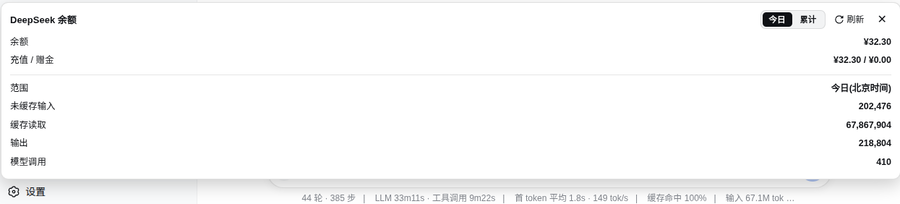
Install (from the plugin market)
dsh plugin --profile web add dsh-balance-plugin
Restart dsh web, then refresh the page — a balance button appears at the bottom of the sidebar.
Architecture
Browser (3080 page)
  client.js ──fetch──▶ /dsh-balance/data?scope=today|all
                              │
node side (index.js, inside the dsh process)
  ├── credentials.resolve("DEEPSEEK_API_KEY")  ← reuses dsh's key
  ├── fetch(https://api.deepseek.com/user/balance)
  └── decompress ~/.dsh/sessions/*/*/session.jsonl.zstd
      filter assistant/message rows + provider=deepseek-official
index.js: node-side cordis plugin, registers HTTP route/dsh-balance/dataclient.js: browser-side plugin, injects intosidebar.footer.action(sidebar bottom button + floating panel)package.json:dsh.bundle+dsh.client.platform: "web"+exports["./client"]cordis.patch.yml: bundle patch registering the node entry
Manual install
mkdir -p ~/.dsh/profiles/web/node_modules/dsh-balance-plugin
cp index.js client.js cordis.patch.yml package.json ~/.dsh/profiles/web/node_modules/dsh-balance-plugin/
Then add to ~/.dsh/profiles/web/cordis.patch.yml:
- insert:
    - id: dsh-balance
      name: dsh-balance-plugin
Restart dsh web and refresh the browser.
Dependencies
- node side: Node built-ins only (
node:fs,node:child_process,node:path); requires thezstdCLI for decompressing session logs - browser side:
@deepseek-ai/dsh-client-ui-primitives(peer dep, ships with dsh 0.1.0-rc.6)
Data source
Session logs at ~/.dsh/sessions/<scope>/<session-id>/session.jsonl.zstd. Each assistant/message row:
{
  "type": "assistant/message",
  "time": 1786635270943,
  "data": {
    "message": { "source": { "kind": "model", "provider": "deepseek-official", "model": "deepseek-v4-pro" } },
    "usage": { "inputTokens": 8702, "outputTokens": 298, "cacheReadTokens": 0 }
  }
}
Pack
npm pack # produces dsh-balance-plugin-0.1.0.tgz
License
MIT
Install
Install the catalog once, then DeepSeek Harness can find and install any plugin from this site automatically:
dsh plugin add dshbase-catalogThen say "install dsh-balance-plugin for me" — your agent finds it in the directory and installs it. Docs: dshbase-catalog · verified packs.
Web profile:
dsh plugin --profile web add dsh-balance-pluginHeadless (CLI) profile:
dsh plugin --profile headless add dsh-balance-pluginPackage
npm: dsh-balance-plugin · version 0.1.0 · tested on dsh 0.1.0-rc.6
Test report
Verified end-to-end: L1 install + L2 load + L3 runtime Q&A on dsh 0.1.0-rc.6.
When to use it
Extend the agent's coding surface — give it a new tool, workflow, or integration so it handles a dev task it couldn't before.
Who it's for
Developers who want dsh to behave like a teammate on real codebases — editing, running, and verifying changes rather than just answering.
For developers — extending it
The tool/command surface is the seam: expose more of the SDK, add smarter context wiring, or tighten the loop between code changes and verification.
Share this badge
Drop this badge into your README — it links back here and updates automatically when our test status changes:

[](https://dshbase.com/plugins/dsh-balance-plugin/)<a href="https://dshbase.com/plugins/dsh-balance-plugin/"><img src="https://dshbase.com/badges/dsh-balance-plugin.svg" alt="dshbase install-tested"></a>