
Plugin directory / UI & Skins / dsh-client-ui-skin-claude
dsh-client-ui-skin-claude
Verified · install-tested on dsh PAKIKNOWLEDGE
What it does
Claude-style skin for DeepSeek Harness (dsh) Web GUI — warm-black canvas, Anthropic clay accent, serif UI
Works — verified, early-stage project
Claude-style skin for DeepSeek Harness (dsh) Web GUI — warm-black canvas, Anthropic clay accent, serif UI It installs cleanly and boots without issues in our testing. It's early-stage but functional.
“Verified” means our automated CI actually ran dsh plugin add in a clean profile and it booted — nothing more. Feature descriptions and version compatibility are the author’s claims. This is not a security audit and not an endorsement of third-party code.
README
dsh-client-ui-skin-claude
 English | 中文
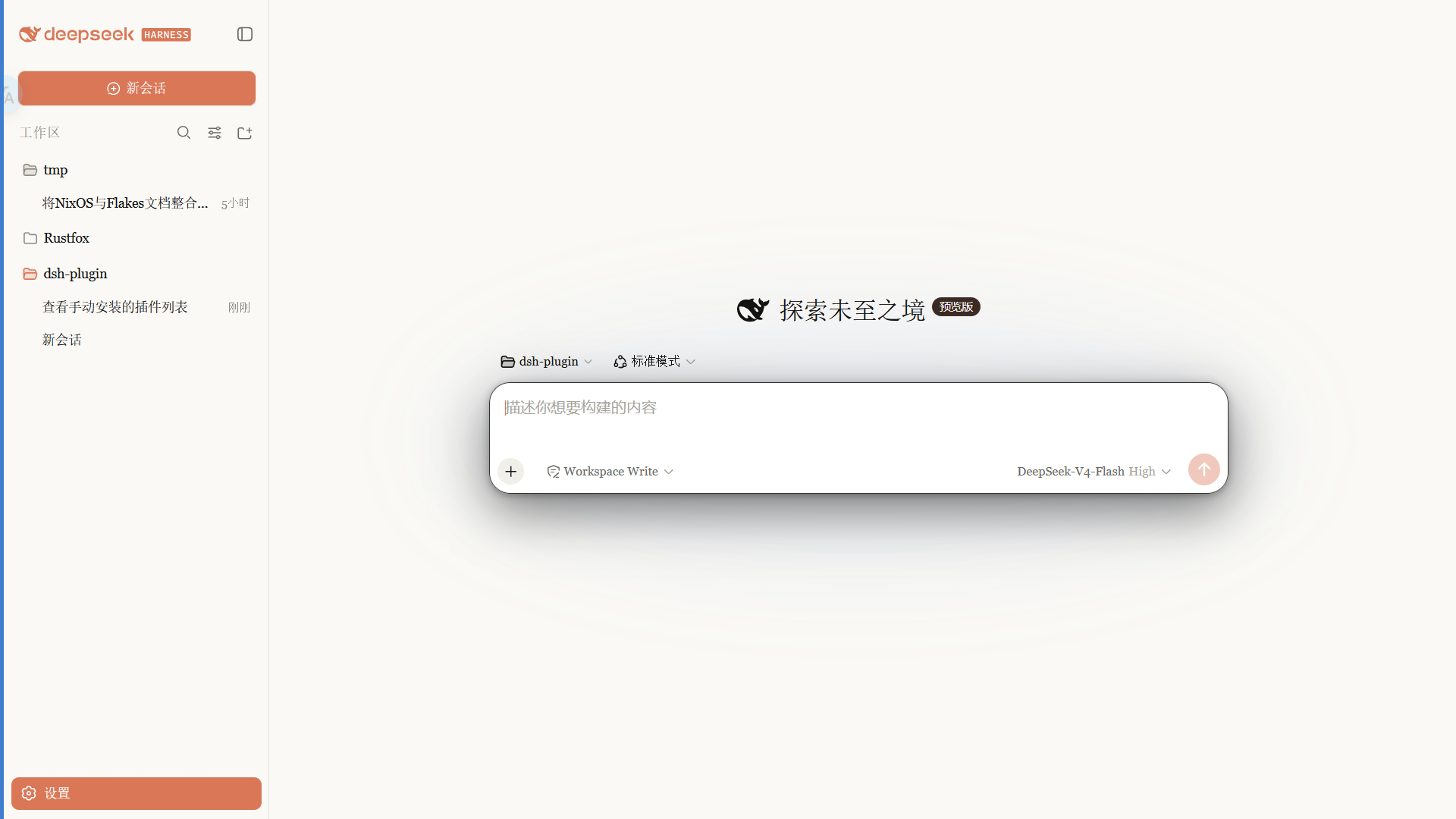
Claude 风格的 DSH Web 界面皮肤:暖黑画布、陶橙点缀,内置 Anthropic 字体切换,跟随原生亮/暗主题。
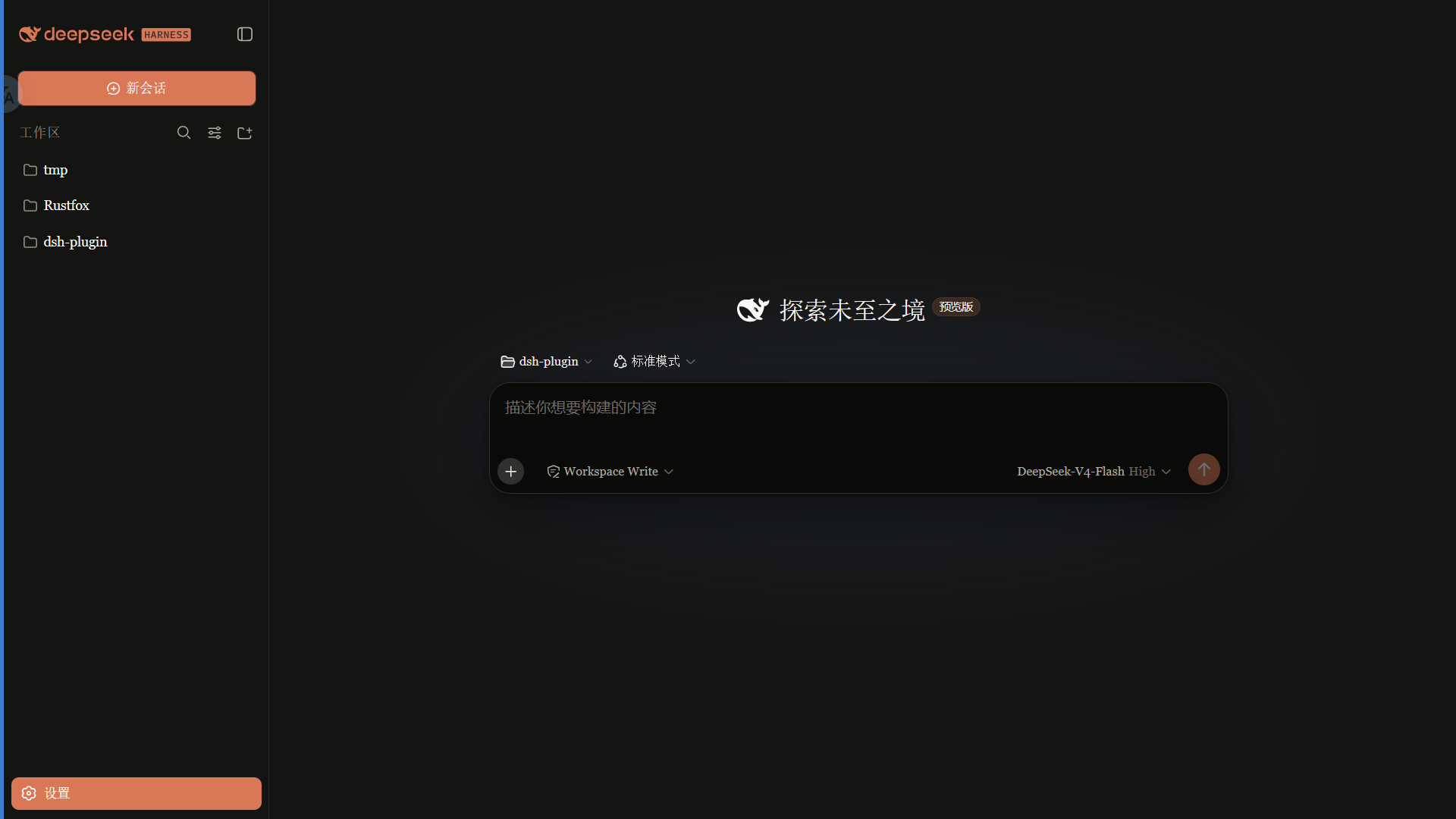 ·
· 
特性
- 暖黑(#141413)画布 + Anthropic 陶橙(#d97757)点缀
- 字体模式:
- Anthropic 原生(默认):UI 用 Anthropic Sans,对话正文用 Anthropic Serif,代码用 Anthropic Mono
- 皮肤衬线:保留原来的衬线 UI 风格
- 系统默认:不覆盖 DSH 字体
- 细滚动条、陶橙选中 / 焦点、胶囊徽章
- 亮 / 暗双主题,跟随系统切换
字体
重要:npm 包不随包分发字体文件。 字体文件放在仓库
fonts/供下载;安装后刷新 / 重启 web 才会生效。
| 字体 | 用途 | 文件 |
|---|---|---|
| Anthropic Sans Web Text | 界面 / UI | fonts/AnthropicSansWebText.ttf |
| Anthropic Serif Web Text | 对话正文 / Markdown | fonts/AnthropicSerifWebText.ttf |
| Anthropic Mono Variable | 代码 / 代码块 | fonts/AnthropicMonoVariable.ttf |
安装:Windows 双击 .ttf → 「安装」;macOS 用「字体册」导入。安装后刷新页面生效。
字体版权归 Anthropic 所有,仅供个人使用,不适用 MIT 许可(详见 LICENSE 字体声明)。
安装
从 npm 安装(推荐,预构建免授权):
dsh plugin --profile web add @pakiknowledge/dsh-client-ui-skin-claude
或从 GitHub 安装:
dsh plugin --profile web add github:PAKIKNOWLEDGE/dsh-client-ui-skin-claude
装完重启 dsh web,刷新页面。
切换字体
打开 设置 → 常规 → 字体风格:
- Anthropic 原生(默认):Sans UI / Serif 正文 / Mono 代码
- 皮肤衬线:Georgia 等衬线 UI
- 系统默认:保持 DSH 默认字体
选择立即生效,并保存在浏览器 localStorage。
如果之前单独安装过
dsh-anthropic-fonts,建议先卸载,避免两套字体变量互相覆盖。
切换皮肤
同一时刻只启用一个皮肤。编辑 ~/.dsh/cordis.patch.yml:
# dsh-skin managed 段之外
- insert:
    - id: ui-skin-claude
      name: '@pakiknowledge/dsh-client-ui-skin-claude'
(并把当前启用皮肤的 disabled: true 加上。)配置 watcher 几秒内热加载,刷新页面生效。
卸载
- 删除
~/.dsh/cordis.patch.yml里的ui-skin-claudeinsert 行 dsh plugin --profile web remove @pakiknowledge/dsh-client-ui-skin-claude- 重启
dsh web
许可
MIT
Install
Install the catalog once, then DeepSeek Harness can find and install any plugin from this site automatically:
dsh plugin add dshbase-catalogThen say "install dsh-client-ui-skin-claude for me" — your agent finds it in the directory and installs it. Docs: dshbase-catalog · verified packs.
This plugin is GitHub source (not published to npm) — install it straight from the repo:
Web profile:
dsh plugin --profile web add github:PAKIKNOWLEDGE/dsh-client-ui-skin-claudeHeadless (CLI) profile:
dsh plugin --profile headless add github:PAKIKNOWLEDGE/dsh-client-ui-skin-claudeTest report
Verified: L1 install + L2 load + L3 runtime from GitHub source on dsh 0.1.0-rc.6.
When to use it
Change how dsh looks or how you interact with it — a theme, a skin, or a new panel that reshapes the workspace.
Who it's for
Users who spend hours in the web UI and want it to look and feel the way they work.
For developers — extending it
Skins, panels, and theme tokens are the extension points — author a new skin, add a panel, or sync tokens with an upstream palette.
Share this badge
Drop this badge into your README — it links back here and updates automatically when our test status changes:

[](https://dshbase.com/plugins/dsh-client-ui-skin-claude/)<a href="https://dshbase.com/plugins/dsh-client-ui-skin-claude/"><img src="https://dshbase.com/badges/dsh-client-ui-skin-claude.svg" alt="dshbase install-tested"></a>