
Plugin directory / Developer / dsh-coding-remote-kit
dsh-coding-remote-kit
Verified · install-tested on dsh lninghaha
What it does
DeepSeek Harness mobile pairing remote: E2EE companion over dual-plane allowlisted RPC
Works — verified, early-stage project
DeepSeek Harness mobile pairing remote: E2EE companion over dual-plane allowlisted RPC It installs cleanly and boots without issues in our testing. It's early-stage but functional.
“Verified” means our automated CI actually ran dsh plugin add in a clean profile and it booted — nothing more. Feature descriptions and version compatibility are the author’s claims. This is not a security audit and not an endorsement of third-party code.
README
dsh-coding-remote-kit
v0.4.1 · DeepSeek Harness 0.1.0-rc.6 · GitHub dsh-coding-remote-kit
Remote phone access for DeepSeek Harness. Pair a phone to the desktop that already runs dsh web, then observe sessions and perform a narrow set of writes — without exposing the full Web API.


English · 中文版 · 日本語 · 한국어 · Português (BR) · Español · Français · Deutsch · Русский
Upgrade / 升级: Follow the versioned steps in
INSTALL.md.0.4.1fixes a0.4.0startup failure on strict Cordis injection guards; keep profile/storage/pairing files and restart one existing DSH Web process only after all selected plugins are updated.[email protected]remains the Hub/Subscription shared npm dependency, not a separate DSH plugin.
Community plugin. Not affiliated with, and not endorsed by, DeepSeek. Product intent is closer to Orca Mobile Companion than to a second copy of the desktop IDE.
Read AGENTS.md before changing this repo: do not restart the production DSH Web process or its local service wrapper yourself. Prepare the tarball; the operator restarts it through the machine's own process manager.
Names
Developed first as GitHub dsh-mobile-remote. The npm name dsh-mobile-remote is a different project (a WeChat remote-control plugin). This plugin publishes as dsh-coding-remote-kit.
| Use this | Notes | |
|---|---|---|
| npm | [email protected] |
dsh plugin --profile web add [email protected] |
| GitHub | lninghaha/dsh-coding-remote-kit |
previous checkout name dsh-mobile-remote |
| Cordis plugin id | mobile-remote |
unchanged |
| Settings HTTP | /api/mobile-remote/* |
unchanged |
| Storage | $DSH_HOME/storages/mobile-remote/ |
unchanged |
Do not dsh plugin add dsh-mobile-remote — that installs the unrelated WeChat plugin.
Status
| Milestone | Status |
|---|---|
| Research (Orca / DSH ecosystem) | done — docs/research/ |
| M1 plugin skeleton + ADR / threat model | done |
| M2 pairing / LAN data plane | done |
| M3 narrow RPC / approvals | done |
| M4 signed HTTPS / native app | not started |
| M5 self-hosted rendezvous Worker | done — docs/05-cloud-relay.md |
Features
- Bilingual UI — Chinese and English for desktop Settings and the phone companion (
?lang=/ in-app switch; defaults fromnavigator.language). - Pair once — desktop shows a QR code or 8-digit PIN; the phone pins the desktop X25519 public key and holds a
deviceToken(server stores SHA-256 only). - Dual plane — management routes stay on loopback
dsh web; the mobile data plane is a dedicated port (default6879) with an RPC allowlist. - E2EE after handshake — tweetnacl secretbox on
/m/ws; unauthenticated sockets never see session content. - Narrow writes — observe sessions, answer approvals/questions, short replies; heavy editing stays on the desktop.
- Private-network first — LAN / Tailscale preferred. Optional Cloudflare Quick Tunnel exposes only the data plane, never port
3080. Optional self-hosted rendezvous Worker: desktop and phone both outbound; business frames stay E2EE. - Standard plugin shape — one Cordis server plugin + classic-script Settings page.
dsh plugin --profile web adda file tarball, never alink:working tree.
Screenshots
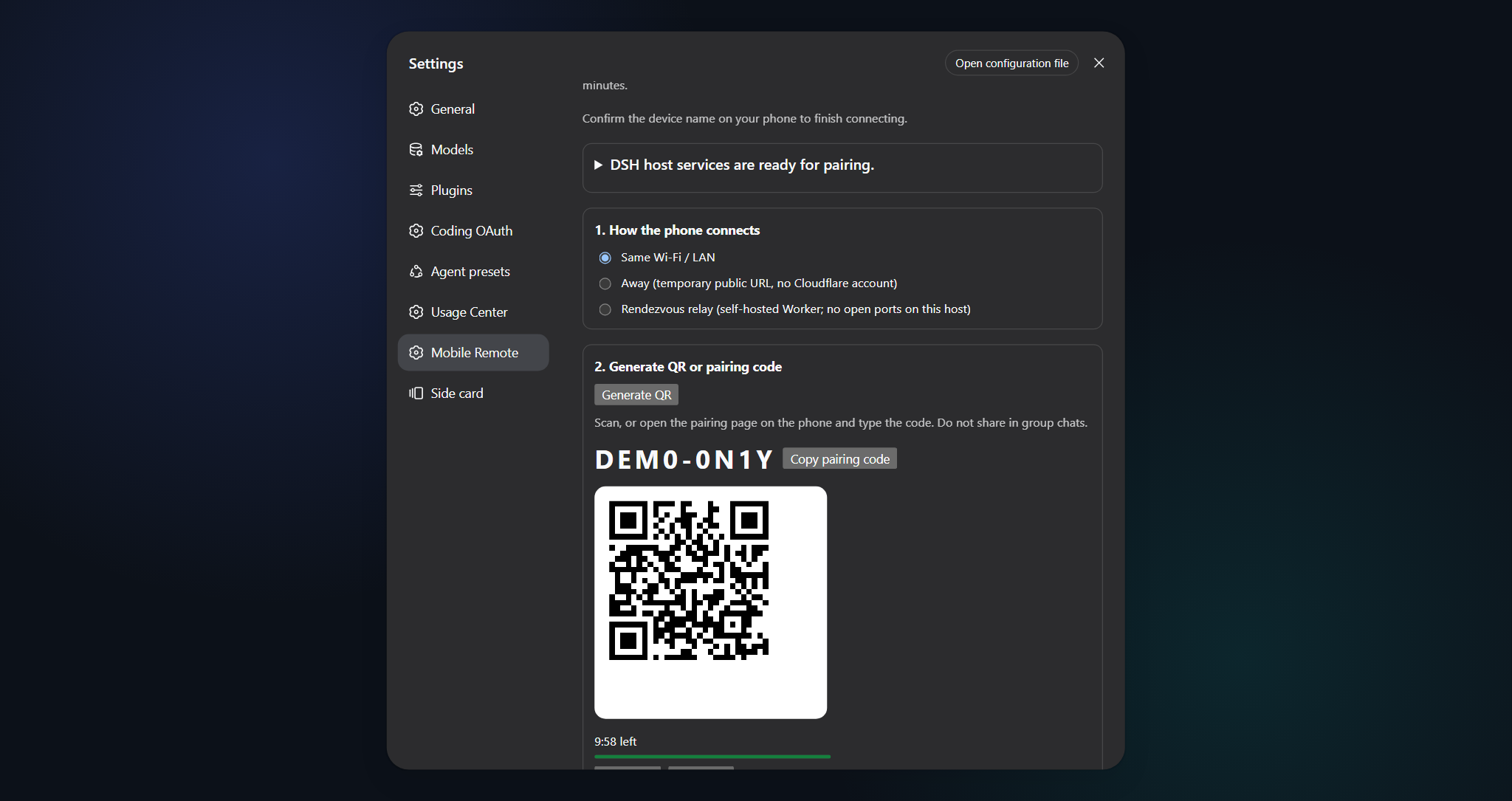
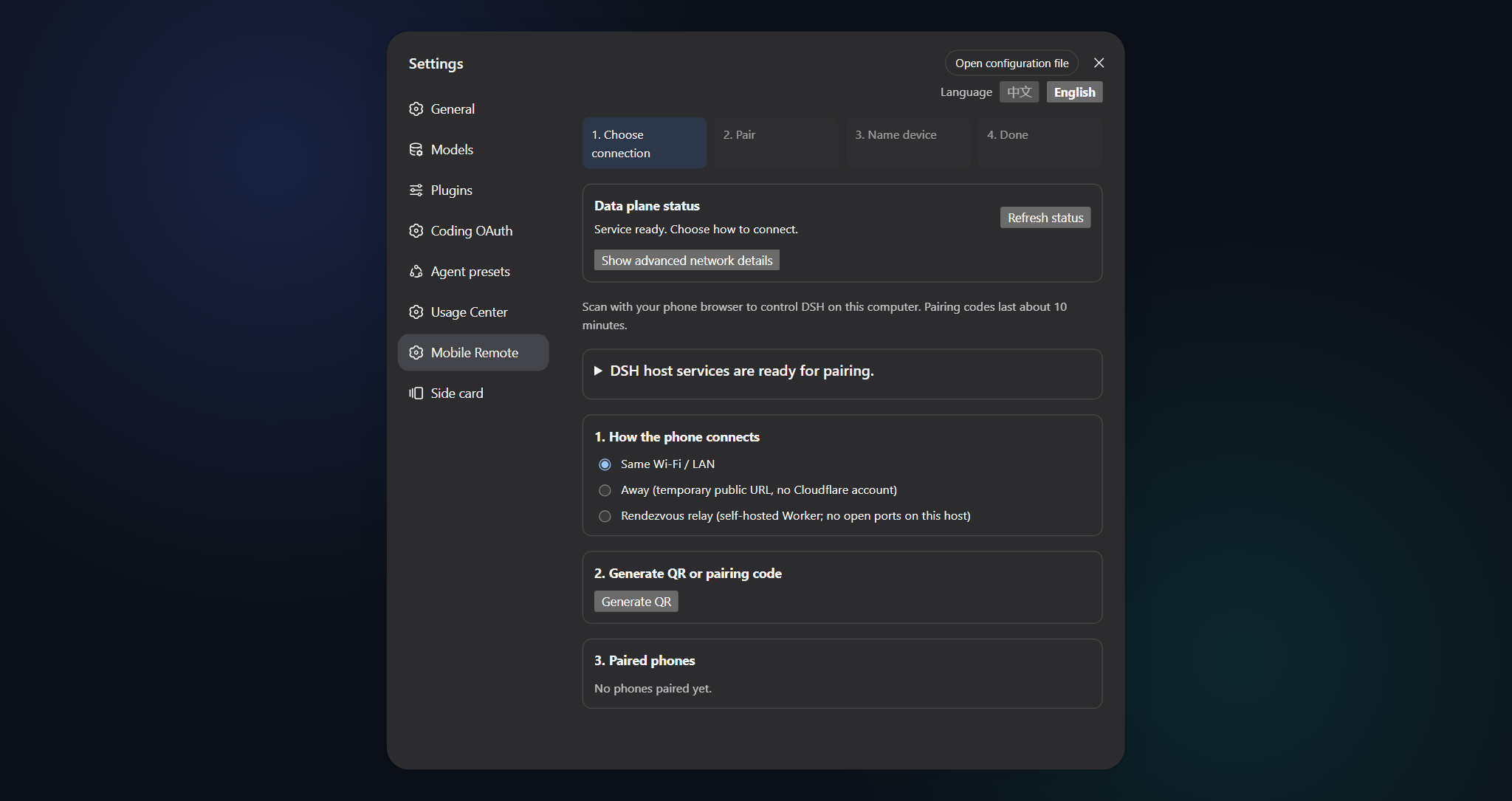
Desktop Settings → Mobile Remote: create a pairing offer (left) · channel status & devices (right)
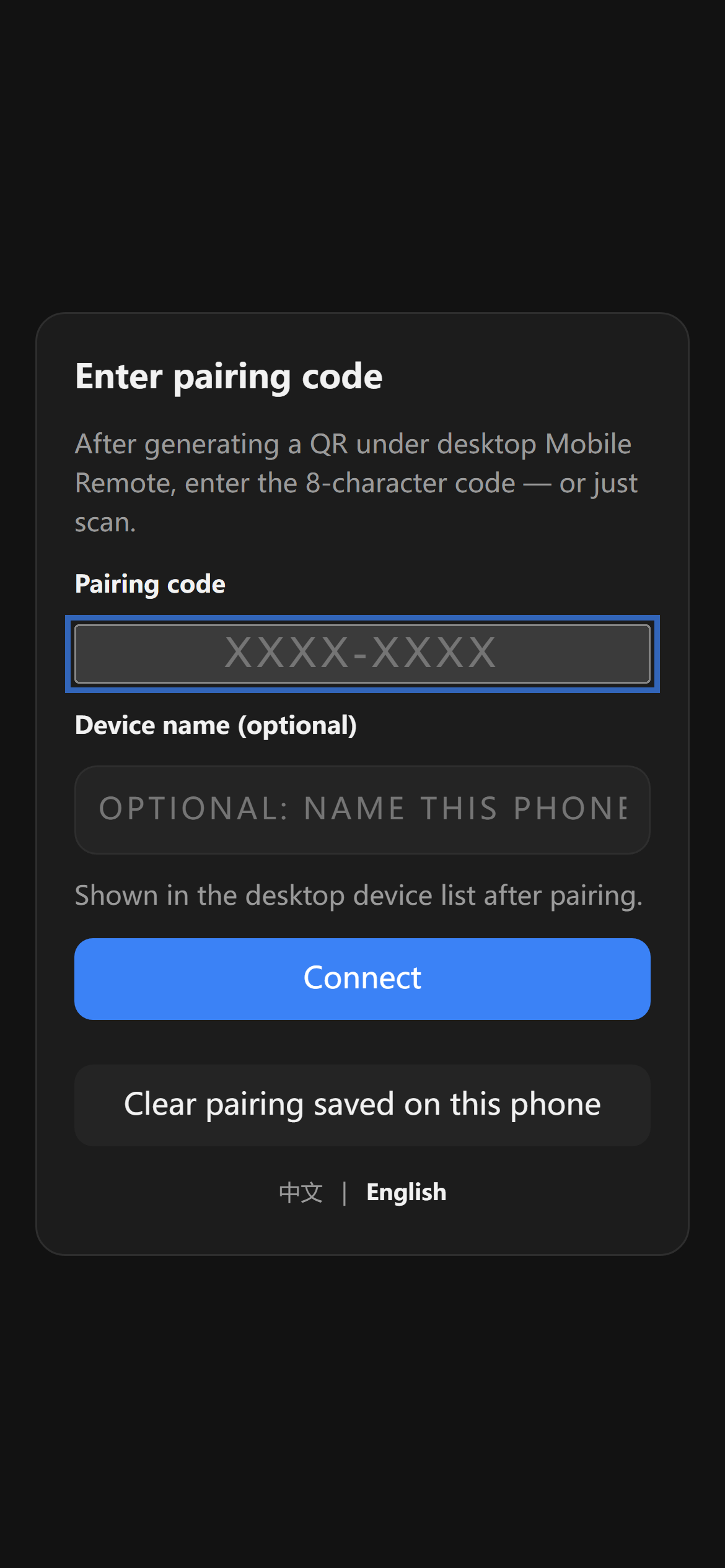
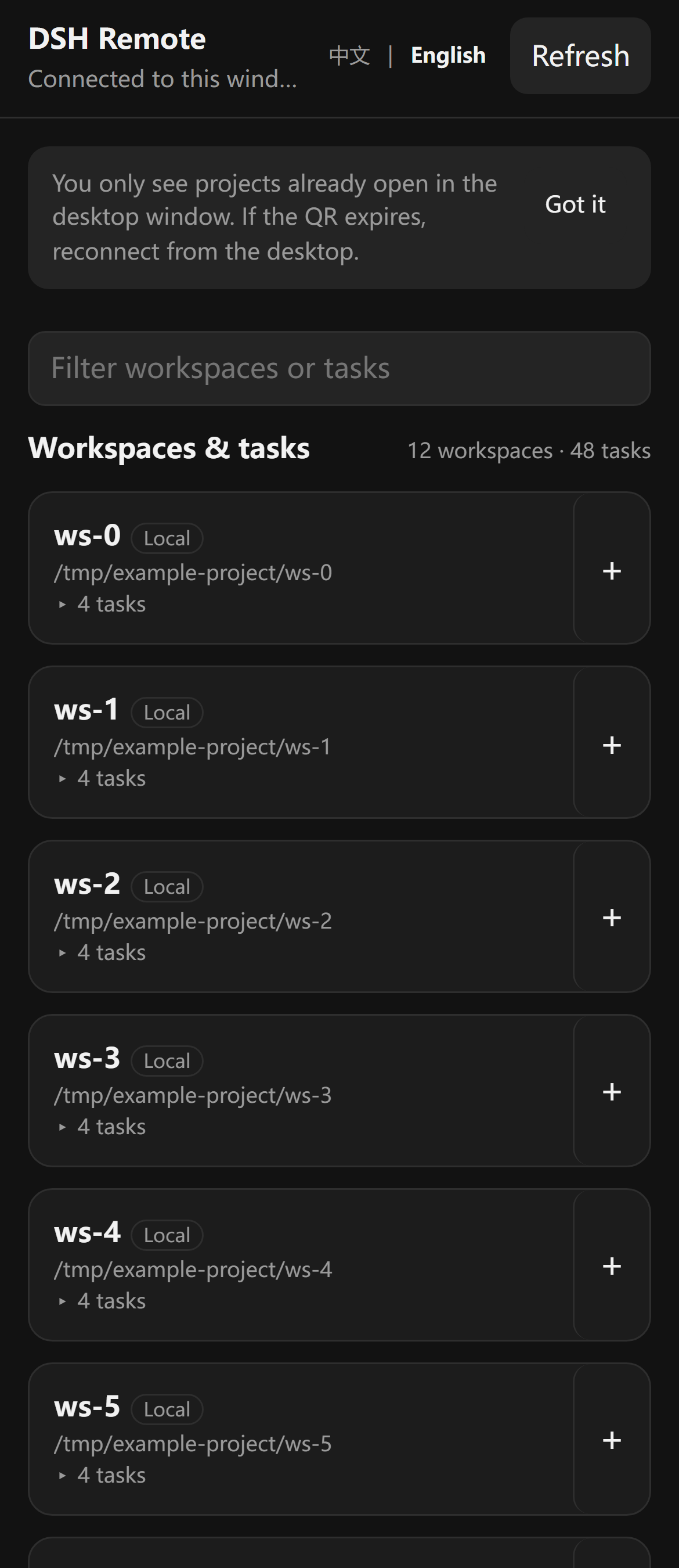
Phone companion: enter PIN / scan (left) · session list after pairing (right)
Problems this plugin solves
| You searched / saw | What was actually broken | What this plugin does |
|---|---|---|
| “Orca-style phone companion for DSH” | Official DSH has no first-class paired mobile app | Semantic companion: pair + E2EE + allowlisted RPC |
dsh-pocket / dsh-web-remote on a phone |
Full dsh web surface on LAN/public |
Dual plane; unknown RPC methods are forbidden |
| Phone on cellular, desktop on LAN | Raw LAN HTTP page can be MITM’d | Prefer Tailscale; optional Quick Tunnel (TLS at the edge, localhost origin) |
Plugin import failed and port 3080 died |
DSH fail-fasts the whole plugin tree | Sandbox gate + packed tarball copied outside the repo; no link: |
Quick start
dsh plugin --profile web add [email protected]
Then the operator restarts the existing dsh web process in their own window. Open Settings → Mobile Remote, create a pairing offer, scan the QR (or type the PIN) on the phone.
From a source checkout (development):
pnpm test:sandbox
pnpm pack
mkdir -p "$HOME/.dsh/packages"
cp dsh-coding-remote-kit-0.4.1.tgz "$HOME/.dsh/packages/"
dsh plugin --profile web add "$HOME/.dsh/packages/dsh-coding-remote-kit-0.4.1.tgz"
Do not dsh plugin add ./ from this working tree. pnpm 11 treats some file: tarball paths as link: source, and a bad entry import takes down the whole GUI.
Table of contents
- Names
- Status
- Features
- Screenshots
- Problems this plugin solves
- Quick start
- Install
- How it works
- Settings page
- Mobile RPC
- Public tunnel
- Security
- Architecture
- Documentation
- Related
- Contributing
- License
Install
Requires DeepSeek Harness 0.1.0-rc.6 (pinned) and Node.js 22.19+. Full steps, pairing, and tunnel notes: INSTALL.md.
Development:
pnpm install && pnpm build && pnpm test   # inside the Docker sandbox, not on a live GUI host
pnpm test:sandbox                         # Dockerfile targets check / isolated-install / verify
Build outputs:
lib/server/index.js— Cordis entry (name/inject/Config/apply)lib/client.js— Settings classic-scriptlib/mobile/— phone page served at/m
How it works
Settings (loopback)          Phone browser
        │                            │
        │  QR / PIN  ────────────────┤
        ▼                            ▼
 /api/mobile-remote/*          GET /m  +  WS /m/ws
   (dsh web, :3080)            (data plane, :6879, E2EE)
Management stays behind the host Web loopback fence. The data plane is a separate node:http + ws server. Pairing may rebind it from 127.0.0.1 to 0.0.0.0 so LAN clients can connect; an active Quick Tunnel advertises its HTTPS origin instead of widening.
Settings page
Open Settings → Mobile Remote:
- status (bind, port, listening, active devices, tunnel, rendezvous)
- LAN / Quick Tunnel / rendezvous channels
- create offer → QR + 8-digit PIN
- device list and revoke
- optional official
cloudflaredinstall (never runs at pluginapply())
Mobile RPC
Allowlisted methods (everything else is forbidden):
status.get · session.list · session.history · session.subscribe · session.unsubscribe · host.subscribe · session.prompt · session.cancel · session.create · respond
Pushes include session events plus approval.requested / question.requested (with rpcId for respond). Wire format: docs/03-protocol.md.
Public tunnel
Default off. When started from Settings, cloudflared Quick Tunnel points only at 127.0.0.1:<data-plane-port>. /m becomes reachable on a https://<random>.trycloudflare.com URL; pairing still needs the fragment token (or PIN) and E2EE. The child process is killed on plugin unload / Stop.
Never tunnel port 3080 / dsh web. A self-hosted rendezvous Worker (desktop and phone both outbound, business frames still E2EE) is optional; see docs/05-cloud-relay.md. It needs a Cloudflare Workers Paid plan and is not a public relay operated by this project.
Security
Invariants (full model: docs/04-threat-model.md):
- Unauthenticated connections handle handshake only.
deviceTokenis stored as SHA-256; keys and registry files are0600.- RPC allowlist, default deny; writes are audited to
deviceId. - Management plane is loopback + Host + CSRF.
- The plugin does not weaken
dsh web/apiand does not take overapi-proxyproviders.
Honest v0 boundary: the first HTTP download of /m on a raw LAN can be MITM’d. Prefer an overlay VPN.
Prohibitions:
- Do not share another person's credentials.
- Do not monitor accounts you are not authorized to access.
- Do not bind the data-plane port on
0.0.0.0to the public Internet (Quick Tunnel is an explicit, user-started exception). - Do not imply DeepSeek official endorsement.
Examples in docs use example.com, 127.0.0.1, and YOUR_TOKEN only.
Architecture
Dual plane, module map, storage, and handshake: docs/02-architecture.md · 中文.
MVP decision (route B): docs/01-mvp-scope.md.
Documentation
| Doc | Purpose |
|---|---|
| INSTALL.md | Install, pair, tunnel |
| CHANGELOG.md | Release history |
| docs/00-project-rules.md | Versioning, publish vs local-only, host DSH boundary |
| docs/01-mvp-scope.md | ADR: MVP scope (Chinese) |
| docs/02-architecture.md | Internal architecture · 中文 |
| docs/03-protocol.md | RPC allowlist and push envelopes (Chinese) |
| docs/04-threat-model.md | Assets, attackers, invariants (Chinese) |
| docs/05-cloud-relay.md | Self-hosted rendezvous Worker (M5) |
| CONTRIBUTING.md | Contribution guide |
| AGENTS.md | Agent/operator rules (no production restart) |
Related
- dsh-coding-subscription-oauth — sibling plugin; documentation layout is modelled on it.
- GitHub:
lninghaha/dsh-coding-remote-kit. - This plugin is independent of the usage-centre plugin
dsh-hub-oauth-gateway. - It does not replace
@deepseek-ai/dsh.
Contributing
Issues and PRs welcome. See CONTRIBUTING.md for the Docker sandbox, commit conventions, and the document layers.
License
MIT.
Install
Install the catalog once, then DeepSeek Harness can find and install any plugin from this site automatically:
dsh plugin add dshbase-catalogThen say "install dsh-coding-remote-kit for me" — your agent finds it in the directory and installs it. Docs: dshbase-catalog · verified packs.
This plugin is GitHub source (not published to npm) — install it straight from the repo:
Web profile:
dsh plugin --profile web add github:lninghaha/dsh-coding-remote-kitHeadless (CLI) profile:
dsh plugin --profile headless add github:lninghaha/dsh-coding-remote-kitTest report
Verified: L1 install + L2 load + L3 runtime from GitHub source on dsh 0.1.0-rc.6.
Share this badge
Drop this badge into your README — it links back here and updates automatically when our test status changes:

[](https://dshbase.com/plugins/dsh-coding-remote-kit/)<a href="https://dshbase.com/plugins/dsh-coding-remote-kit/"><img src="https://dshbase.com/badges/dsh-coding-remote-kit.svg" alt="dshbase install-tested"></a>