
Plugin directory / Developer / dsh-control
dsh-control
Verified · install-tested on dsh 6mt
What it does
本地一个窗口,驱动你所有机器上的 dsh · Drive the dsh instances on your other machines from one local window
Works — verified, early-stage project
本地一个窗口,驱动你所有机器上的 dsh · Drive the dsh instances on your other machines from one local window It installs cleanly and boots without issues in our testing. It's early-stage but functional.
“Verified” means our automated CI actually ran dsh plugin add in a clean profile and it booted — nothing more. Feature descriptions and version compatibility are the author’s claims. This is not a security audit and not an endorsement of third-party code.
README
dsh-control
English | 中文
Every machine already runs dsh. Make this one window the front end for all of them.
Chat with the dsh instances on your other machines, natively from your local sidebar.
Remote sessions stream back token by token; the remote uses its own model credentials,
tools and sandbox. Zero changes on the remote. Zero dependencies. One-line install.
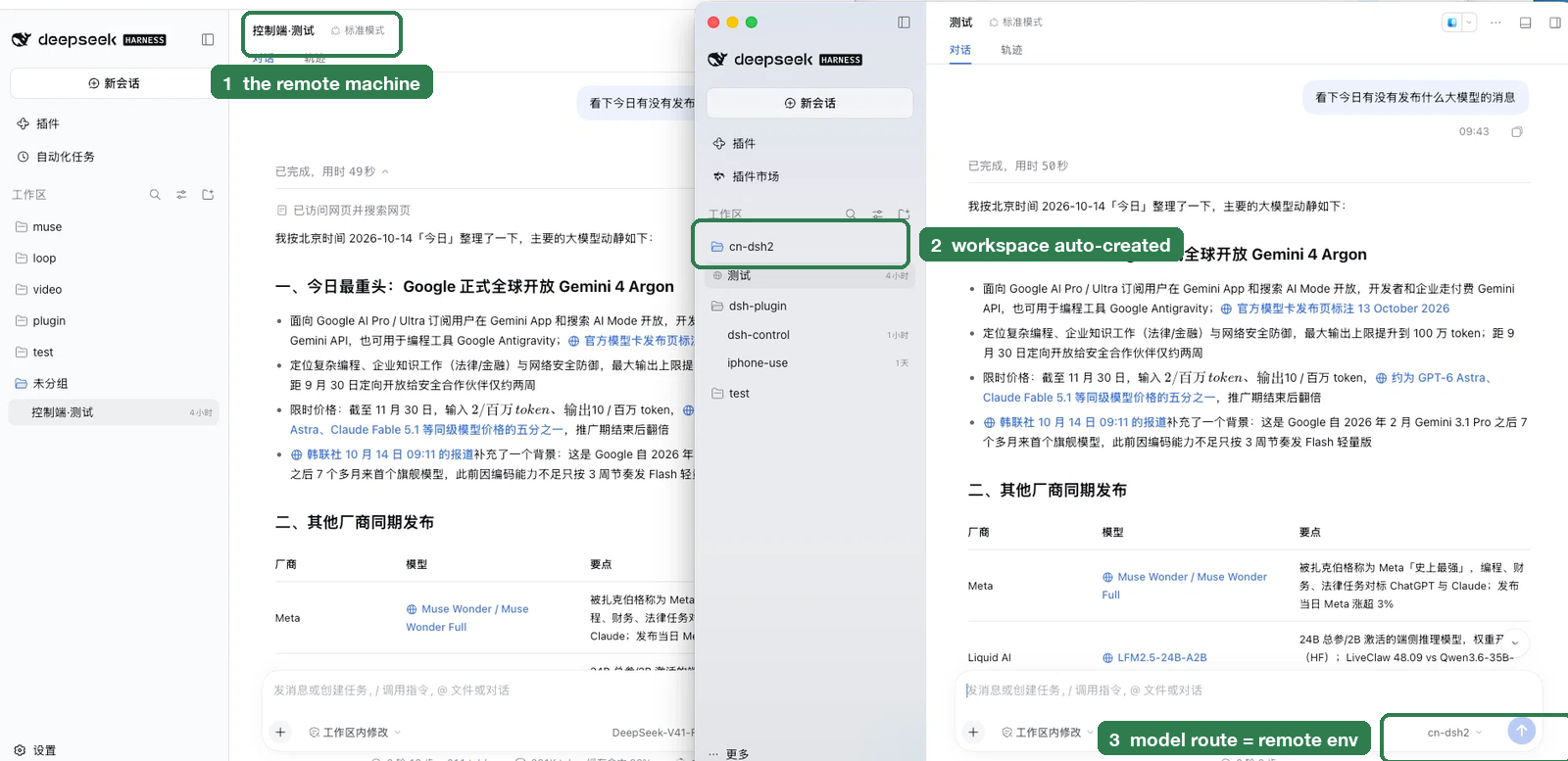
A real two-machine setup. Left: the remote machine's own dsh — the session there was created
for you and auto-named 控制端·<local title> (①). Right: your local dsh — the same question
runs on the remote (③ the model route is the environment name, cn-dsh2) and the answer lands in a
local session inside the workspace the plugin created for that environment (②).
🎬 A 15-second capture (one-click connect → streaming reply) is being recorded.
Install
dsh plugin --profile <profile> add dsh-control
After installing, fully quit and reopen dsh (⌘Q). A「远程 dsh 环境」panel appears
in the right sidebar.
How is this different from dsh-remote / dsh-remote-ssh?
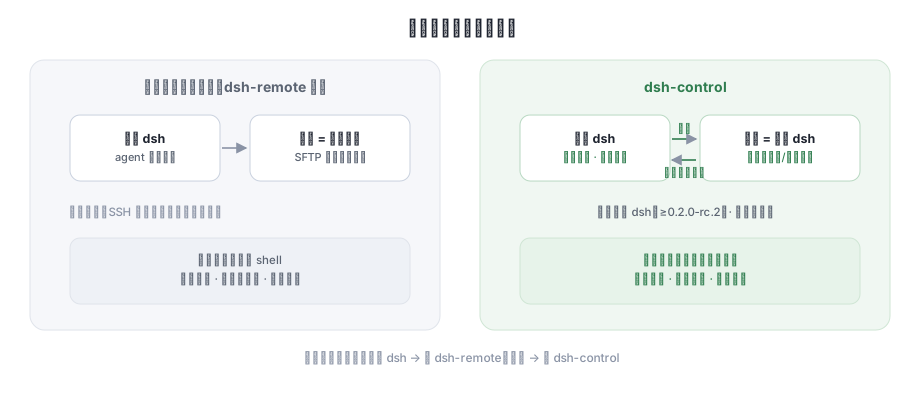
| Remote-workspace plugins (dsh-remote, …) | dsh-control | |
|---|---|---|
| The remote machine is a | file system (SFTP tool set) | dsh that is already running there |
| Sessions live | local session + remote directory | remote sessions, native in your sidebar |
| Credentials & tools | configured locally, SSH config duplicated | the remote's own — nothing copied |
| Remote needs | only SSH | dsh installed (≥0.2.0-rc.2) with its web instance running |
| Changes on the remote | some deploy dsh for you | zero (read-only probing + the remote's own API) |
The two coexist (tested side by side): no dsh on the remote → use dsh-remote;
dsh already there → use dsh-control.
What it does
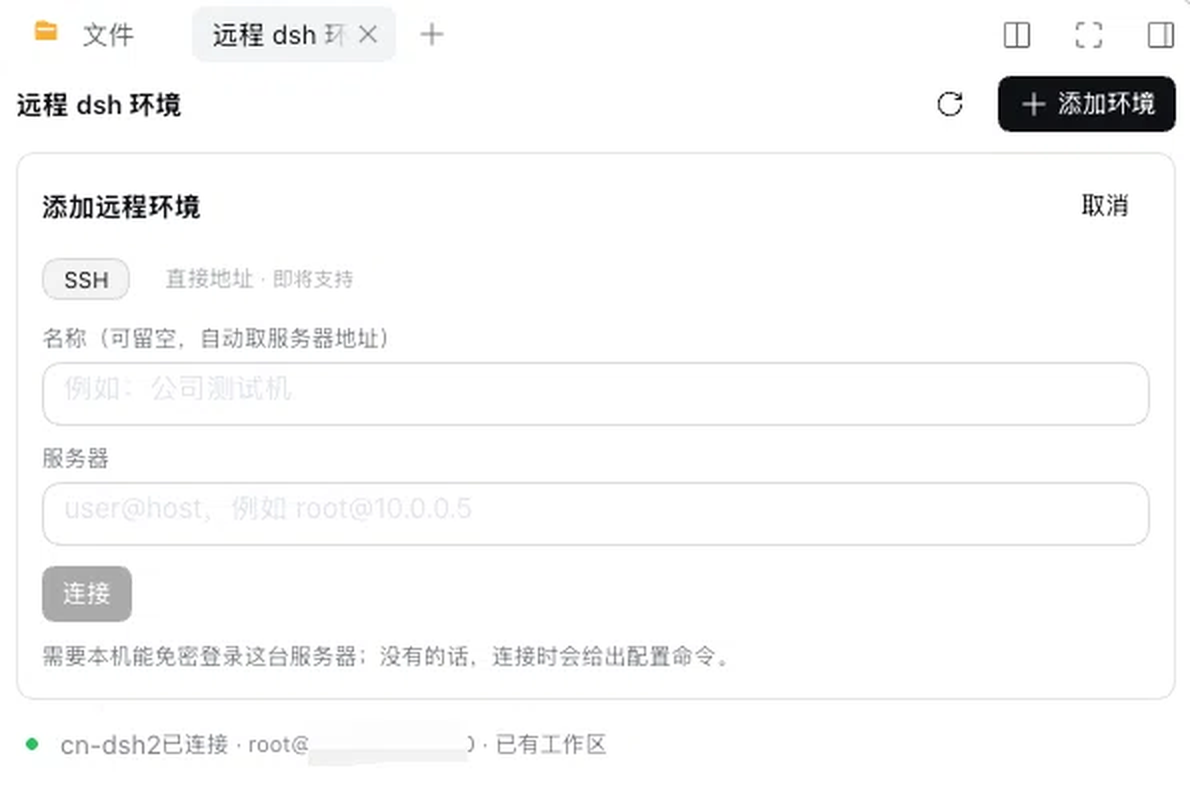
The「远程 dsh 环境」panel: type user@host and connect — the row then reports its state and
whether the environment already has its workspace.
- One-click connect — type
user@host; the plugin probes the remote dsh, fetches
its access token and opens an encrypted channel (~5 s) - Automatic workspace — each environment gets a same-named local workspace; any
session created inside it automatically becomes a remote session - True streaming — remote replies flow in token by token, not dumped at the end
- Paired naming — remote sessions are named
控制端·<local title>, so both sides match - Visible & self-healing — remote sessions are marked in the sidebar; disconnects
are reported honestly and repaired by one click
Security
What it does on your machine: one state file
($DSH_HOME/dsh-control/state.json, mode 0600, holds the remote access tokens) and an
on-demand SSH tunnel process.
What it never does: no installs or writes on the remote, no lifecycle management of
the remote dsh, never reads your other local credentials, tokens never enter logs.
When passwordless SSH is not set up it shows the exact one-line fix — passwords are
never stored. Details in SECURITY.md.
Known limitations
- The remote must already run dsh with its web instance (otherwise use a
remote-workspace plugin) - Connects over SSH (passwordless or configured key; a direct no-SSH mode is on the roadmap)
- Sidebar markers and the streaming feel are verified by eye per release
- Cancelling a remote turn is implemented but marked experimental
Development
node --check lib/*.js
for t in test/*.test.mjs; do node "$t"; done   # 52 checks: unit / contract / structural invariants
scripts/verify-boot-selfheal.sh                # boot self-heal (needs a local dsh runtime)
License
MIT © 6mt
Install
Install the catalog once, then DeepSeek Harness can find and install any plugin from this site automatically:
dsh plugin add dshbase-catalogThen say "install dsh-control for me" — your agent finds it in the directory and installs it. Docs: dshbase-catalog · verified packs.
This plugin is GitHub source (not published to npm) — install it straight from the repo:
Web profile:
dsh plugin --profile web add github:6mt/dsh-controlHeadless (CLI) profile:
dsh plugin --profile headless add github:6mt/dsh-controlTest report
Verified: L1 install + L2 load + L3 runtime from GitHub source on dsh 0.1.0-rc.6.
Share this badge
Drop this badge into your README — it links back here and updates automatically when our test status changes:

[](https://dshbase.com/plugins/dsh-control/)<a href="https://dshbase.com/plugins/dsh-control/"><img src="https://dshbase.com/badges/dsh-control.svg" alt="dshbase install-tested"></a>