
Plugin directory / Developer / dsh-cool-ui
dsh-cool-ui
Verified · install-tested on dsh Lee-mx
What it does
A plugin in the Developer category for DeepSeek Harness.
Works — verified, early-stage project
A plugin in the Developer category for DeepSeek Harness. It installs cleanly and boots without issues in our testing. It's early-stage but functional.
“Verified” means our automated CI actually ran dsh plugin add in a clean profile and it booted — nothing more. Feature descriptions and version compatibility are the author’s claims. This is not a security audit and not an endorsement of third-party code.
README
dsh-cool-ui
An original mecha-command visual layer for a DeepSeek Harness Web profile.
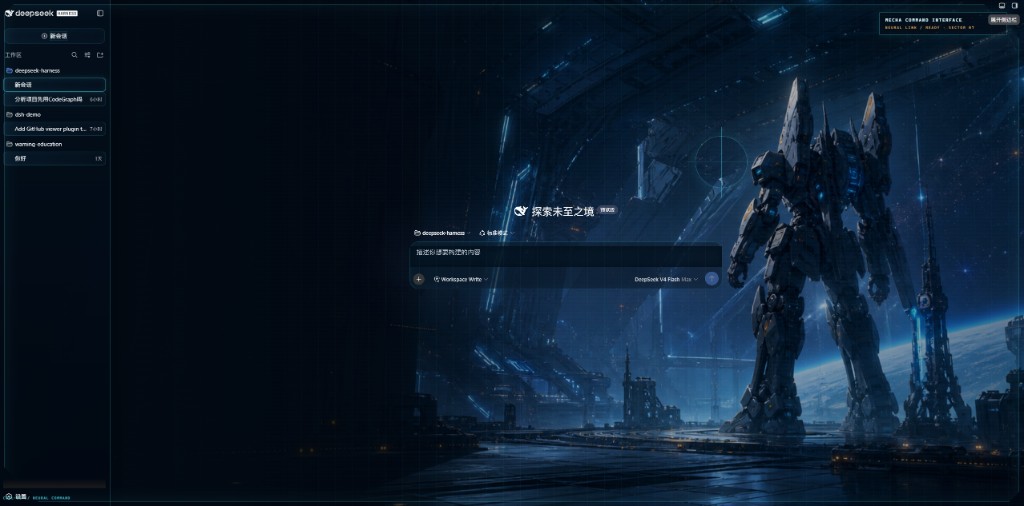
It is a single DSH bundle: the Host half serves the packaged hero artwork, and the browser half adds a non-interactive HUD, background treatment, and responsive framing without changing the Agent, session, or tool behavior.
Local development
cd E:\code\dsh-cool-ui
pnpm install
pnpm build
cd E:\code\deepseek-harness
pnpm dsh plugin --profile web add E:\code\dsh-cool-ui
pnpm dsh web

The bundle uses the public package name @dsh-cool-ui/plugin. Its cordis.patch.yml inserts one row that activates both the Host and browser halves.
Design source
assets/mecha-hangar-hero.png and assets/mecha-settings-command-deck.png are original generated artwork for this project. They are not anime screenshots, franchise assets, characters, logos, or promotional posters.
The visual direction uses common current mecha-key-art traits as abstract reference: dark structural hangars, cyan energy conduits, hard-surface mechanical detail, and sparse amber warnings.
Scope
This starter is a visual layer over the existing DSH Web shell. A full replacement of the sidebar, conversation layout, and routing would be a separate custom Web shell that still consumes the same DSH Host/API runtime.
Install
Install the catalog once, then DeepSeek Harness can find and install any plugin from this site automatically:
dsh plugin add dshbase-catalogThen say "install dsh-cool-ui for me" — your agent finds it in the directory and installs it. Docs: dshbase-catalog · verified packs.
This plugin is GitHub source (not published to npm) — install it straight from the repo:
Web profile:
dsh plugin --profile web add github:Lee-mx/dsh-cool-uiHeadless (CLI) profile:
dsh plugin --profile headless add github:Lee-mx/dsh-cool-uiTest report
Verified: L1 install + L2 load + L3 runtime from GitHub source on dsh 0.1.0-rc.6.
Share this badge
Drop this badge into your README — it links back here and updates automatically when our test status changes:

[](https://dshbase.com/plugins/dsh-cool-ui/)<a href="https://dshbase.com/plugins/dsh-cool-ui/"><img src="https://dshbase.com/badges/dsh-cool-ui.svg" alt="dshbase install-tested"></a>