
Plugin directory / UI & Skins / dsh-cron-panel
dsh-cron-panel
Verified · install-tested on dsh a792883583
What it does
DSH web GUI scheduled-tasks panel: sidebar management of DSH and system (crontab) tasks with natural-language creation and execution logs
Works — verified, early-stage project
DSH web GUI scheduled-tasks panel: sidebar management of DSH and system (crontab) tasks with natural-language creation and execution logs It installs cleanly and boots without issues in our testing. It's early-stage but functional.
“Verified” means our automated CI actually ran dsh plugin add in a clean profile and it booted — nothing more. Feature descriptions and version compatibility are the author’s claims. This is not a security audit and not an endorsement of third-party code.
README
dsh-cron-panel
DSH Web GUI 的定时任务面板:位于侧边栏工作区与设置之间,分区管理 DSH 定时任务与系统定时任务(crontab),支持自然语言创建、全屏详情编辑、执行记录查看。
功能
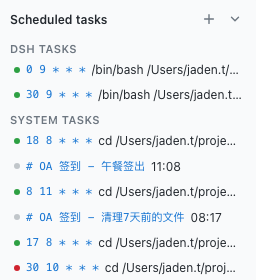
侧边栏面板:工作区下方、设置上方;标题右侧 ➕ 新增、▾ 收起(收起后折叠成一条小标题栏,状态持久化)
分区展示与状态指示:DSH 定时任务(带管理标记)与系统定时任务分开显示,列表项配备执行状态圆点(🟢 成功 / 🔴 失败 / ⚪ 未执行)
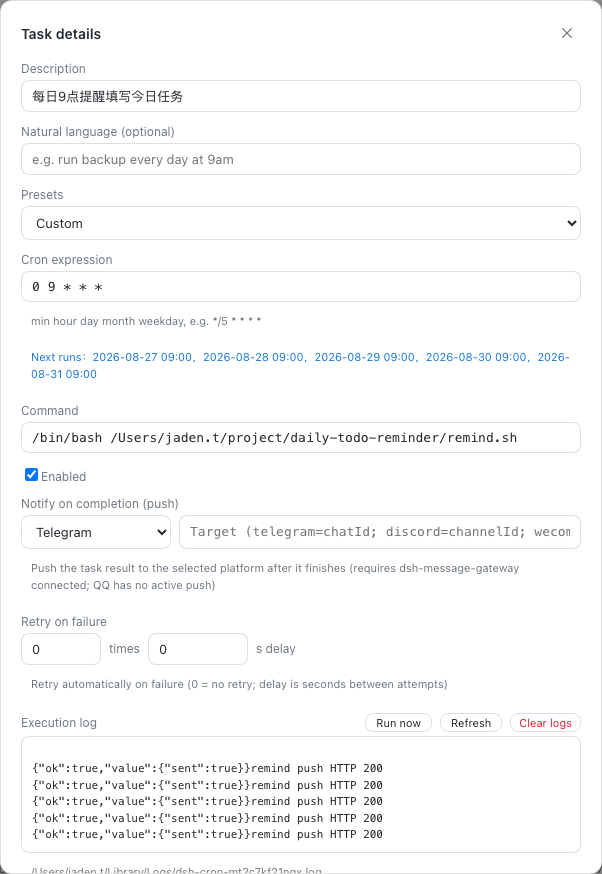
执行记录与一键清空:面板创建的任务自动记录日志,支持实时刷新与一键清空日志文件,避免长期运行日志膨胀
自然语言创建:输入「每天上午 9 点运行备份」「每 30 分钟清理临时文件」「每周一晚上 8 点」即自动解析为 cron 表达式(中英文,17+ 常见模式),也可手动填写
全屏详情:点击任务在对话区全屏覆盖,右上角关闭;支持编辑 / 保存 / 删除 / 启停
下次执行预览:编辑时输入 cron 表达式自动显示「接下来 5 次运行时间」,避免表达式写错
完成后主动通知:编辑任务时可配置「完成后通知」——任务执行结束后,结果自动推送到所选平台(Telegram / Discord / 企业微信智能机器人 / Email),需已安装并连接
dsh-message-gateway(QQ 官方不支持主动推送)。推送走网关的/gateway/push,cron 命令自动追加推送段(含退出码与任务描述),无需额外配置立即运行:任务详情里点「立即运行」直接执行一次命令(不经 cron 调度),实时查看退出码与输出——建完任务先验证再等调度
失败自动重试:可配置失败后自动重试次数与间隔(命令在子 shell 中执行,失败退出码触发重试)
写前自动备份:每次改写 crontab 前自动备份当前内容到
~/.local/share/dsh-cron-backups/(保留最近 20 份),误操作随时可回滚多语言:自动跟随 DSH Web 界面语言(中文 / 英文),西班牙语浏览器自动切换西班牙语,默认简体中文
跨平台与主题适配:
- Windows 环境下自动兼容处理,避免
spawn /usr/bin/crontab ENOENT异常,支持本地定时任务持久化与优雅降级 - 全面优化明暗主题颜色对比度,完美适配浅色模式,防止文字对比度缺失
- Windows 环境下自动兼容处理,避免
明暗主题跟随 DSH Web GUI
界面预览
侧边栏面板(DSH / 系统分区 + 新增 + 收起):
全屏详情(编辑表单 + 执行记录,右上角关闭):
安装
dsh plugin --profile web add dsh-cron-panel
重启 dsh web,侧边栏工作区下方出现「定时任务」面板。
本地开发时可用
dsh plugin --profile web add link:/path/to/dsh-cron-panel以链接方式安装,修改源码后npm run build并刷新页面即可生效。
反馈
使用中遇到问题或有功能建议?欢迎到 GitHub Issues 反馈,帮助我们把插件做得更好。
License
MIT
Install
Install the catalog once, then DeepSeek Harness can find and install any plugin from this site automatically:
dsh plugin add dshbase-catalogThen say "install dsh-cron-panel for me" — your agent finds it in the directory and installs it. Docs: dshbase-catalog · verified packs.
This plugin is GitHub source (not published to npm) — install it straight from the repo:
Web profile:
dsh plugin --profile web add github:a792883583/dsh-cron-panelHeadless (CLI) profile:
dsh plugin --profile headless add github:a792883583/dsh-cron-panelTest report
Verified: L1 install + L2 load + L3 runtime from GitHub source on dsh 0.1.0-rc.6.
Share this badge
Drop this badge into your README — it links back here and updates automatically when our test status changes:

[](https://dshbase.com/plugins/dsh-cron-panel/)<a href="https://dshbase.com/plugins/dsh-cron-panel/"><img src="https://dshbase.com/badges/dsh-cron-panel.svg" alt="dshbase install-tested"></a>