
Plugin directory / Developer / dsh-cursor-acp
dsh-cursor-acp
Verified · install-tested on dsh loeanxi
What it does
Delegate standalone tasks to the local Cursor CLI over ACP.
Works — verified, early-stage project
Delegate standalone tasks to the local Cursor CLI over ACP. It installs cleanly and boots without issues in our testing. It's early-stage but functional.
“Verified” means our automated CI actually ran dsh plugin add in a clean profile and it booted — nothing more. Feature descriptions and version compatibility are the author’s claims. This is not a security audit and not an endorsement of third-party code.
README
dsh-cursor-acp
English | 中文
A community plugin for DeepSeek Harness. In a normal chat, the current agent can hand a standalone job to the Cursor CLI already signed in on this machine.
This is not a Cursor row in the model picker, and it is not an official Cursor product.
Before you start
Install the Cursor CLI on the same computer, then sign in:
Windows (PowerShell):
irm 'https://cursor.com/install?win32=true' | iex
agent login
macOS / Linux:
curl https://cursor.com/install -fsS | bash
agent login
You can also set CURSOR_API_KEY instead of agent login.
Mainland China / proxy
agent login and cursor_agent must reach Cursor's servers. A browser proxy does not apply to the terminal. Clash-style system proxy is ignored by Node unless you set it in the same window you will use:
$env:HTTP_PROXY = "http://127.0.0.1:7890"
$env:HTTPS_PROXY = "http://127.0.0.1:7890"
$env:ALL_PROXY = "http://127.0.0.1:7890"
$env:NO_PROXY = "localhost,127.0.0.1"
$env:NODE_USE_ENV_PROXY = "1"
Use the port your proxy app shows (7890 is common). Then run agent login and start DeepSeek Harness in that same window. This plugin forwards HTTP_PROXY / HTTPS_PROXY / ALL_PROXY / NO_PROXY / NODE_USE_ENV_PROXY to the Cursor child. Let node.exe / agent use the proxy; do not force them to DIRECT. If a Clash config sends node.exe DIRECT, Settings and doctor will say the child may skip the proxy.
Install
From npm (preferred):
dsh plugin --profile desktop add dsh-cursor-acp
Web:
dsh plugin --profile web add dsh-cursor-acp
Or from GitHub:
dsh plugin --profile desktop add github:loeanxi/dsh-cursor-acp
dsh plugin --profile web add github:loeanxi/dsh-cursor-acp
Restart DeepSeek Harness after install.
After install
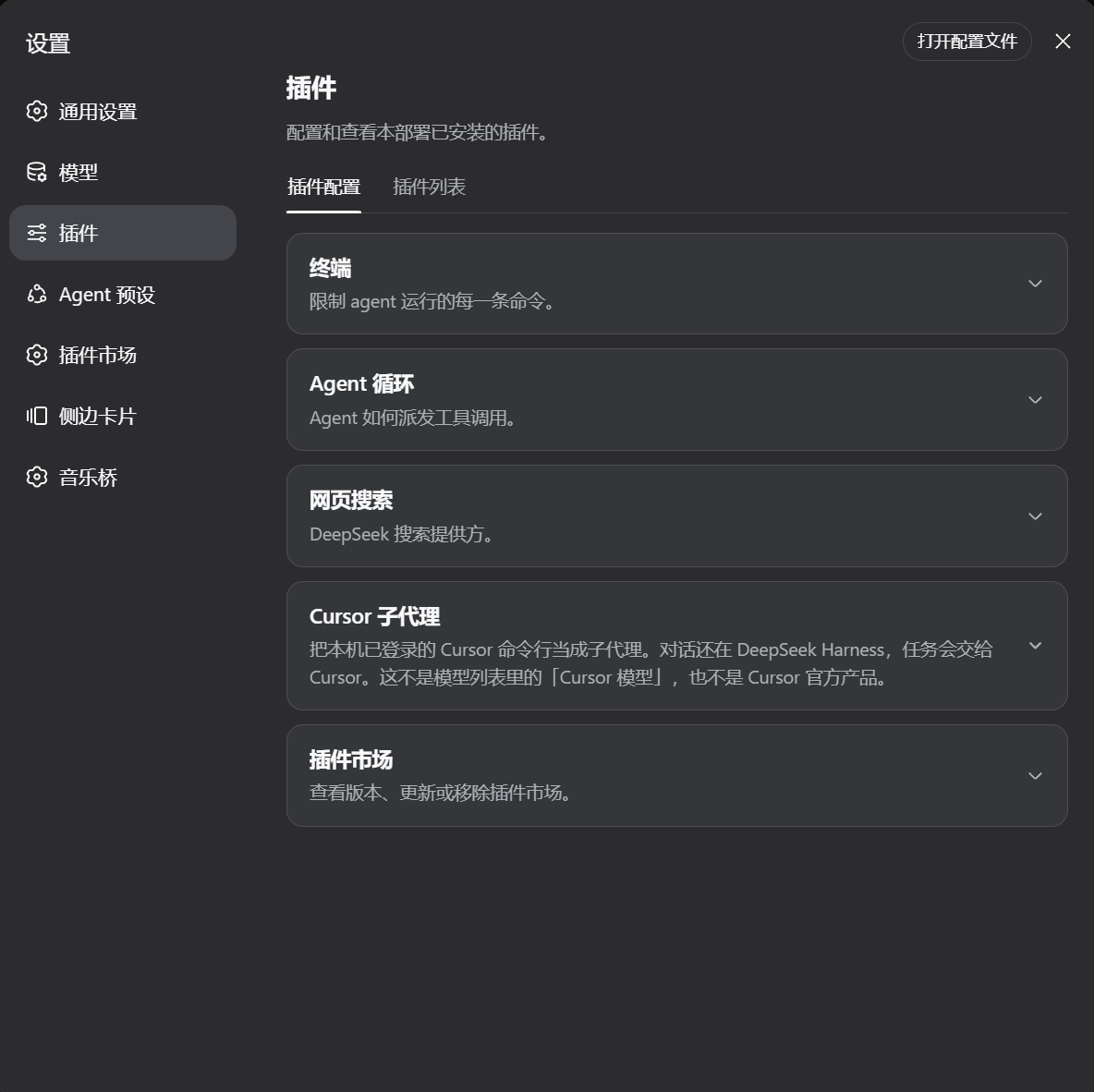
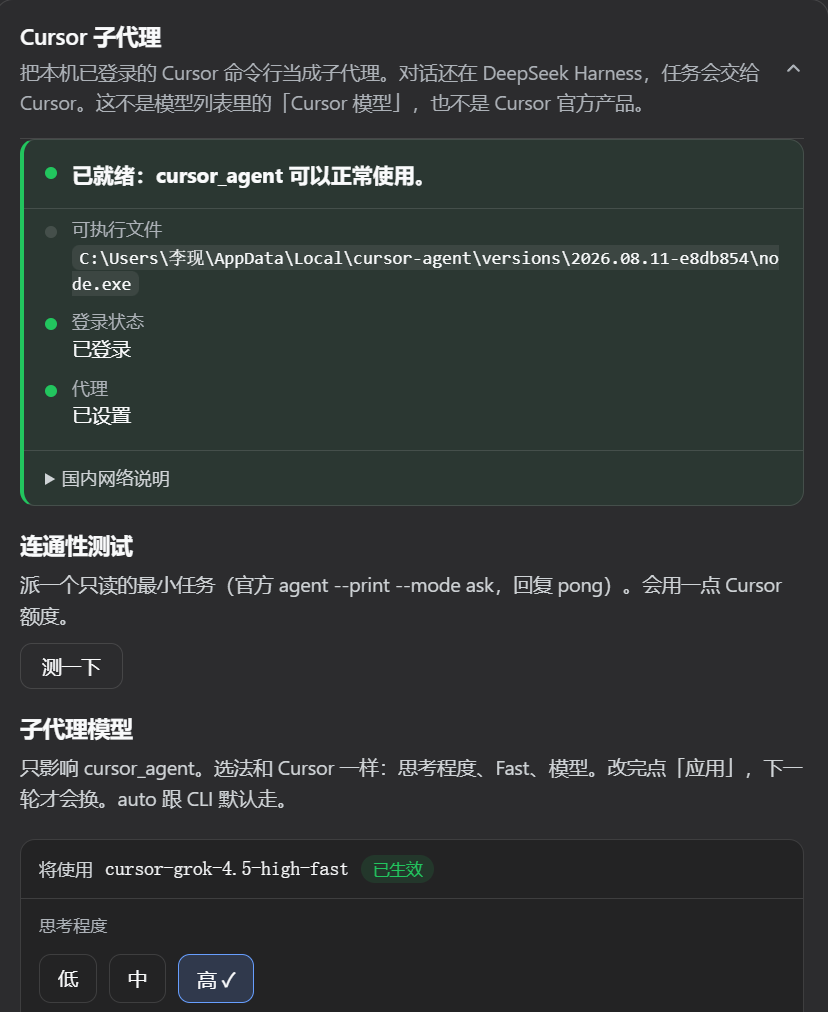
Open Settings → Cursor subagent.
- If it found the CLI, the chat can see the
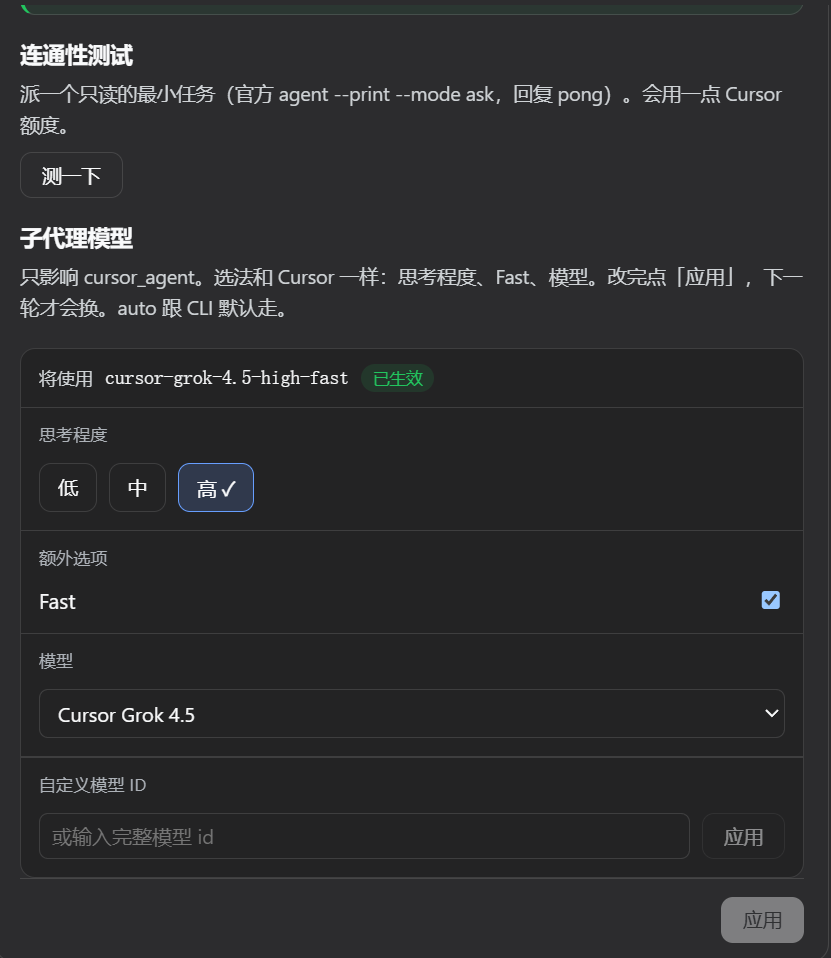
cursor_agenttool. Finding the CLI is not the same as being signed in. The page also checksagent statusand whether this process hasHTTPS_PROXY+NODE_USE_ENV_PROXY=1. It will say if you are not signed in, or if the proxy is missing. It does not show your email. - You can pick the child model (effort, Fast, model), then click Apply. That only affects
cursor_agent, not the model of the current chat. The choice is stored by this plugin, so it works on stock DeepSeek Harness too — it does not need the Host settings allowlist. If an official settings row for this plugin is grey, ignore it and use Settings → Cursor subagent. - Test sends one official read-only
agent --print --mode askjob (replypong). It uses a little Cursor quota. It does not start a full ACP session.
How to use it
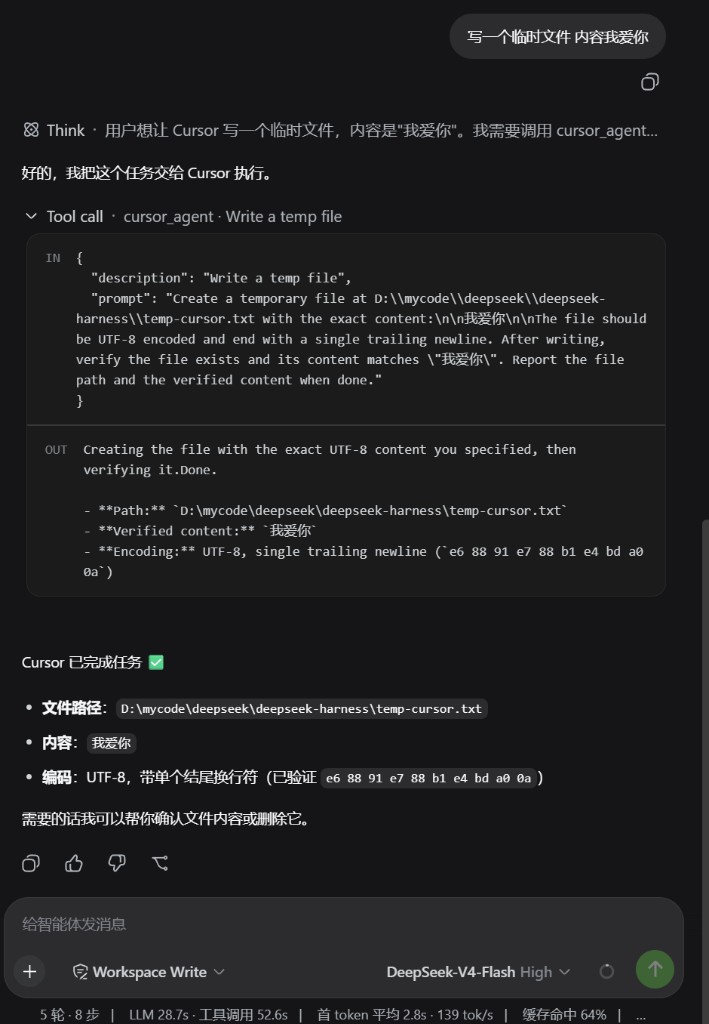
Ask in chat, for example: “Have Cursor implement this feature” or “Have Cursor review this file.” Give enough detail in that message. The agent should call cursor_agent on its own.
The job runs in the current workspace folder and uses your Cursor subscription. The parent chat only sees the final result.
If it cannot find the CLI
dsh plugin --profile desktop exec dsh-cursor-acp doctor
On web, use --profile web. This prints the CLI path, login/proxy hints, and whether this dsh can load @deepseek-ai/dsh-subagent-acp / dsh-tool-subagent. It does not read Cursor credentials. If those official packages are missing, Settings says so and cursor_agent is not registered.
License
MIT
Install
Install the catalog once, then DeepSeek Harness can find and install any plugin from this site automatically:
dsh plugin add dshbase-catalogThen say "install dsh-cursor-acp for me" — your agent finds it in the directory and installs it. Docs: dshbase-catalog · verified packs.
This plugin is GitHub source (not published to npm) — install it straight from the repo:
Web profile:
dsh plugin --profile web add github:loeanxi/dsh-cursor-acpHeadless (CLI) profile:
dsh plugin --profile headless add github:loeanxi/dsh-cursor-acpTest report
Verified: L1 install + L2 load + L3 runtime from GitHub source on dsh 0.1.0-rc.6.
Share this badge
Drop this badge into your README — it links back here and updates automatically when our test status changes:

[](https://dshbase.com/plugins/dsh-cursor-acp/)<a href="https://dshbase.com/plugins/dsh-cursor-acp/"><img src="https://dshbase.com/badges/dsh-cursor-acp.svg" alt="dshbase install-tested"></a>