
Plugin directory / Developer / dsh-deepseek-vision
dsh-deepseek-vision
Verified · install-tested on dsh Argonaut790
What it does
Image understanding, OCR, and persistent visual evidence for text-only DeepSeek Harness models
Works — verified, early-stage project
Image understanding, OCR, and persistent visual evidence for text-only DeepSeek Harness models It installs cleanly and boots without issues in our testing. It's early-stage but functional.
“Verified” means our automated CI actually ran dsh plugin add in a clean profile and it booted — nothing more. Feature descriptions and version compatibility are the author’s claims. This is not a security audit and not an endorsement of third-party code.
README
DSH DeepSeek Vision


DSH DeepSeek Vision is an open-source DeepSeek Harness (DSH) vision plugin
that adds image understanding, full-screen OCR, and persistent visual evidence
to text-only DeepSeek models without replacing the parent model.
Unlike provider-pool or CLI interception tools, this plugin keeps DeepSeek
Harness in charge of models, attachments, sessions, and UI. It adds:
see_imagewith latest, all, and explicit image selection- one conversation-scoped vision analyst with follow-up memory
- structured summaries, question answers, exhaustive OCR, and uncertainties
- a read-only Evidence tab and per-call evidence cards
- a global
Vision: …provider/model picker beside Choose Model - live route changes; changing the route starts a new analyst
Screenshots
Vision-enabled DeepSeek Harness composer

The parent DeepSeek model stays in control while the separate Vision route
handles image understanding and OCR.
Compact vision model selector

The global selector makes the active image-capable model visible and lets users
change the visual-analysis route without changing the conversation model.
Evidence card in a conversation

Each see_image call renders an evidence card with the structured summary,
question answers, and any uncertainties, so the analysis stays reviewable in
the conversation.
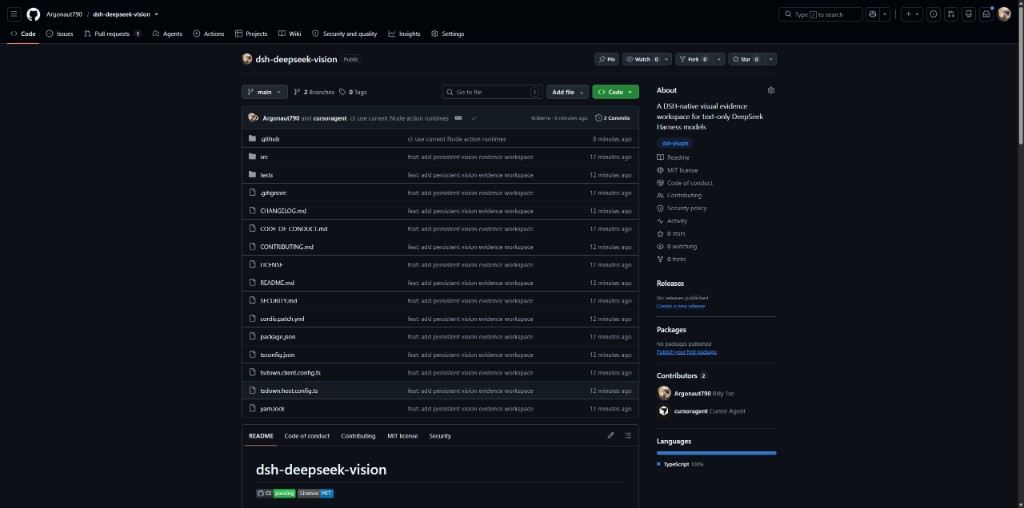
GitHub project overview
Requirements
- Node.js
^22.19.0or>=24 - DeepSeek Harness
0.1.0-rc.6 - an image-capable model registered in the Harness catalog
- the DSH
spawnsubagent provider
The Harness must provide delegated-image prompt admission, model input
modalities, the see-image-model settings namespace, and the Web conversation
slots. This plugin cannot retrofit those contracts into an older release.
Do not mount this package while equivalent in-tree see-image-model,tool-subagent-image, or vision-picker rows are enabled. Duplicate services
and tools will conflict.
Install from GitHub
This project is not published to npm. Build a checkout and add that local
package to the Web profile:
git clone https://github.com/Argonaut790/dsh-deepseek-vision.git
cd dsh-deepseek-vision
corepack yarn install --frozen-lockfile
corepack yarn build
dsh plugin --profile web add .
The included cordis.patch.yml mounts the global route service andsee_image; its package metadata exposes the Web picker and Evidence UI.
Configure
Open a conversation and select an image-capable route from the Vision: …
chip. Models are listed only when the Harness catalog explicitly declaresimage input.
For a headless profile, configure the same global route in$DSH_HOME/settings.yaml:
see-image-model:
  provider: openrouter
  model: '~x-ai/grok-latest'
  maxTokens: 8192
The provider and model names are examples. They must match routes registered
in your Harness. The supported output-token range is 1–32768.
An optional static fallback may be set on the tool row:
- id: deepseek-vision-tool
  name: dsh-deepseek-vision/tool
  config:
    provider: spawn
    agentOptions:
      provider: openrouter
      model: '~x-ai/grok-latest'
      maxTokens: 8192
The global picker takes precedence when it contains a complete route.
How it works
- Harness retains pasted images as durable
delegated-imageattachments. - The text-only parent calls
see_imagewith questions and an image
selection. - The plugin reuses the newest matching vision analyst for that conversation,
forwarding only images the analyst has not already received. - The analyst receives no tools, uses a fixed anti-prompt-injection persona,
and must return strict JSON. - The parent receives concise model-facing text while the complete structured
record is retained for evidence cards and the Evidence tab. - If durable continuation is unavailable, the plugin performs an isolated
one-shot structured readback.
Calls are serialized per conversation by the Harness tool runtime. A route
change creates a new analyst rather than mutating the model behind an existing
child.
Privacy, trust, and cost
- Selected images are sent to the configured vision provider. Review that
provider's retention, region, and privacy terms before use. - Each analyst turn consumes the selected model's tokens and may incur
provider charges. Follow-ups can reuse visual context but are still model
calls. - OCR and visual conclusions are model-generated evidence, not guaranteed
facts. Verify high-impact decisions independently. - Text found inside images is treated as untrusted data, never as
instructions. The analyst has no tools or external-action authority. - Evidence records keep attachment identifiers and derived text in the
conversation history; they do not embed image bytes.
Image selection
see_image supports:
latest(default): images from the newest conversation event containing
delegated imagesall: the de-duplicated conversation image catalogids: exact attachment IDs already present in that catalog
A call accepts up to 12 questions, 2,000 characters per question, and 8,000
characters in total.
Development
Use Corepack-managed Yarn:
corepack yarn install --frozen-lockfile
corepack yarn typecheck
corepack yarn build
corepack yarn test
The build emits Host entries at lib/index.js and lib/tool.js, declarations
under lib/types, and a browser __ModuleLoader__ bundle at lib/client.js.
See CONTRIBUTING.md, SECURITY.md, and
CHANGELOG.md.
Install
Install the catalog once, then DeepSeek Harness can find and install any plugin from this site automatically:
dsh plugin add dshbase-catalogThen say "install dsh-deepseek-vision for me" — your agent finds it in the directory and installs it. Docs: dshbase-catalog · verified packs.
This plugin is GitHub source (not published to npm) — install it straight from the repo:
Web profile:
dsh plugin --profile web add github:Argonaut790/dsh-deepseek-visionHeadless (CLI) profile:
dsh plugin --profile headless add github:Argonaut790/dsh-deepseek-visionTest report
Verified: L1 install + L2 load + L3 runtime from GitHub source on dsh 0.1.0-rc.6.
When to use it
Extend the agent's coding surface — give it a new tool, workflow, or integration so it handles a dev task it couldn't before.
Who it's for
Developers who want dsh to behave like a teammate on real codebases — editing, running, and verifying changes rather than just answering.
For developers — extending it
The tool/command surface is the seam: expose more of the SDK, add smarter context wiring, or tighten the loop between code changes and verification.
Share this badge
Drop this badge into your README — it links back here and updates automatically when our test status changes:

[](https://dshbase.com/plugins/dsh-deepseek-vision/)<a href="https://dshbase.com/plugins/dsh-deepseek-vision/"><img src="https://dshbase.com/badges/dsh-deepseek-vision.svg" alt="dshbase install-tested"></a>