
Plugin directory / Developer / dsh-emacs
dsh-emacs
Unverified vritser
What it does
An Emacs client for DeepSeek Harness
No short evidence report
There is no checkable per-level test record on this page. Stars, the catalog test field, a web-only flag, and whether the plugin needs an external account or service are not shown here as a pass or a failure. The catalog badge stays as published.
“Unverified” means our automated CI has not yet installed this plugin. Feature descriptions and version compatibility are the author’s claims. This is not a security audit and not an endorsement of third-party code.
README
dsh-emacs — an Emacs client for DeepSeek Harness
dsh-emacs brings DeepSeek Harness
(dsh) into Emacs: streaming replies, tool calls, thinking blocks, slash
commands, file/session references, and model selection. It uses Emacs
built-ins (Emacs 27.1+) with no third-party dependencies.
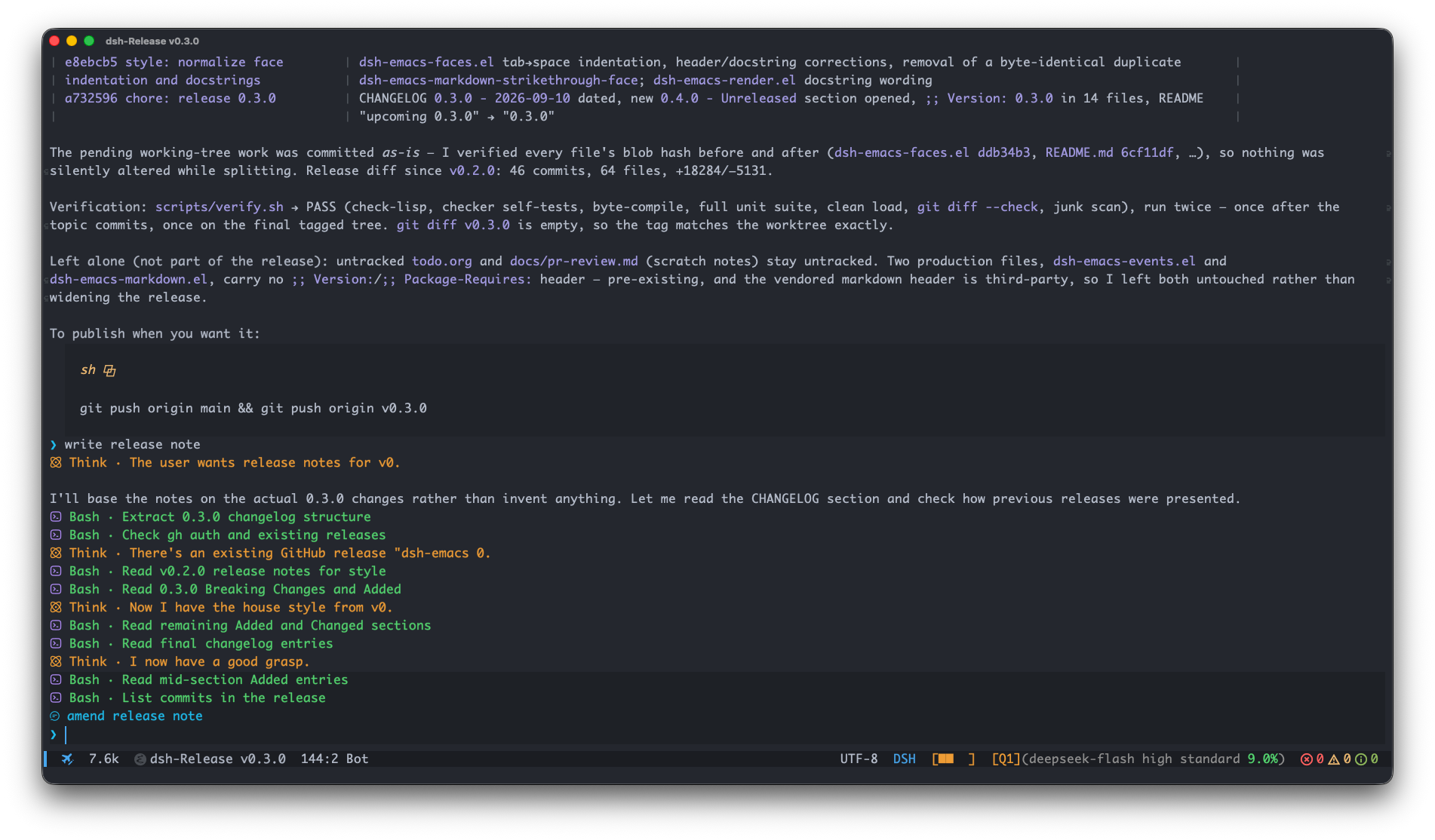
0.5.x targets the dsh 0.1.7 wire protocol (servers 0.1.5 or newer:
the queue surfaces read theinboxsession projection, which 0.1.5, 0.1.6 and
0.1.7 all publish).
Quick start
You need Emacs 27.1+ and a provider/model configured in dsh to send
messages. dsh-emacs can install and start the dsh server for you; provider
credentials and model configuration remain in dsh. For an existing local or
remote server, set its address as described in Server setup
before connecting.
Clone the repository:
git clone https://github.com/vritser/dsh-emacs.git ~/dsh-emacsAdd this to your Emacs configuration and evaluate it, or restart Emacs:
(add-to-list 'load-path (expand-file-name "~/dsh-emacs"))
(require 'dsh-emacs)
Run
M-x dsh-emacsto open the session list. If no local server is
running, dsh-emacs starts one, offering to install the CLI if it is missing.
On a fresh dsh setup, useM-x dsh-emacs-open-webto configure your
provider and model before sending a message.Press
cin the session list to create a session. UseC-c C-min the
chat buffer to choose a model if needed.Type after the
❯prompt and pressC-c C-cto send your first message.
For an optional use-package setup, see
Example configuration.
Using it
Chat buffers show the DeepSeek Harness whale in the mode line when SVG is
supported: blue on dark themes, black on light themes, with DSH as the
terminal fallback. Colors follow theme changes. The icon keeps the
standard Emacs major-mode menu. See Mode-line status.
With Motion Line installed, a running
turn shows the same swinging whale tail as dsh web (18×18 display size,
60 frames, three-second loop), followed by Deep diving · 12s with a gentle text sweep and elapsed
time. Terminals show cycling DSH... text with the caption and clock.
Opening an already-running session restores this indicator after an Emacs
restart, even when its turn started before the loaded history window.
Motion Line is optional and installed separately. Without it, the mode line
shows a static Deep diving caption while running and clears it when the
turn ends or disconnects. This fallback uses no animation timer or elapsed
clock. See Mode-line status for setup.
When nerd-icons-completion is active, DSH chat buffers use the whale icon in
Consult's buffer-switch minibuffer (C-x b).
Session list
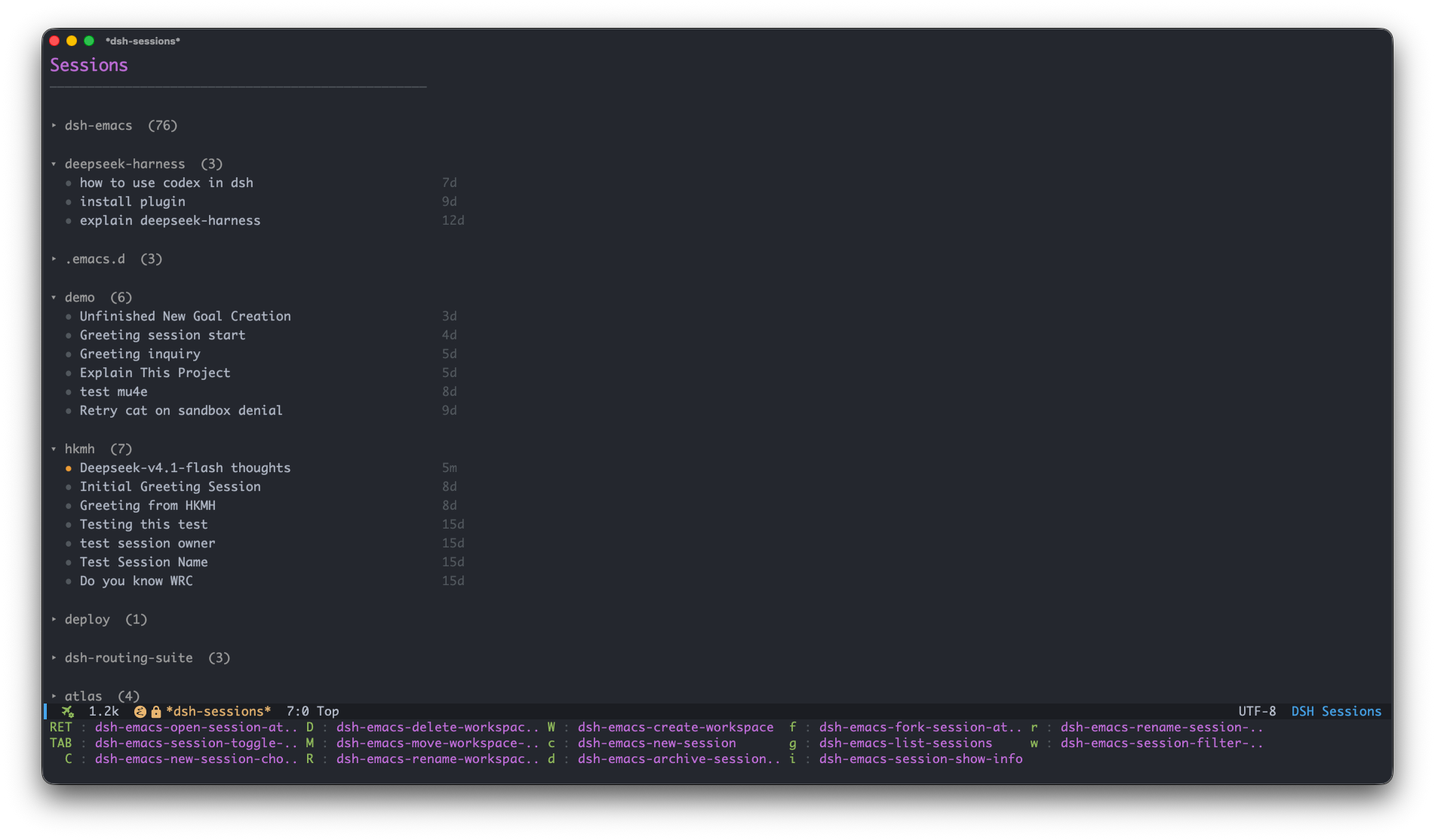
M-x dsh-emacs opens your sessions, grouped by workspace. Press c to
create a session or RET to open one. From a local project file or directory,
the command expands the workspace matching the project root and centers its
header in the selected window when space permits. Near the start of the list,
the view starts at the buffer boundary instead.
It waits for workspace data if needed and does not create a workspace. Your
next command in the list cancels pending automatic navigation, so later data
does not pull you away from manual navigation or folding.
From a chat buffer, it still locates the active session; remote servers and
TRAMP directories keep the usual session navigation.TAB folds a workspace header or
expands a session's subagents beneath it. Only sessions with confirmed children
show an expansion arrow and respond to TAB; unknown or empty catalogs remain
unchanged. Child rows show their mode and activity; use TAB for nested
children and RET to open a child conversation.
Expansion and cursor position survive refreshes. See
Session and workspace controls
for list management and navigation.
Subagent conversations
M-x dsh-emacs-list-subagents (or mouse-1 on the mode-line child count) opens
minibuffer completion for this conversation's direct children. RET opens the
selected chat; C-u before the command opens it in another window. C-g
cancels and M-, returns to the originating chat position through xref.
Inside a child, run the command again to select its children. Your normal
completion frontend and keys apply; no separate browser buffer is created.
The count uses a thin brain-and-circuit SVG, with the brain above three
downward branches, in the existing muted status-text color.
Without SVG support it falls back to Nerd Font source_branch, then Sub.
The total is bold, with a thin gap after the icon (text fallback: Sub 3);
hover for the running count.
Candidates show mode, activity and available duration/token metrics.M-x dsh-emacs-subagent-refresh
refreshes the current conversation's catalog and parent availability.
Continuable children accept text with C-c C-c and stop with C-c C-b;C-u C-c C-c steers. Input closes while the parent is unavailable or the host
connection is lost. One-shot children are read-only and cannot be interrupted
through this surface. C-c C-o pages older child history. Queue editing, model
selection, attachments, slash commands and late question answers are unavailable
inside child chats. M-x dsh-emacs-subagent-stop chooses a running continuable
child to stop after confirmation; M-x dsh-emacs-subagent-describe chooses a
child for detailed inspection. Token totals include cache usage and are session
projections, not billing estimates or the chat mode line's message accumulator.
See subagent integration for protocol and test details.
Inside a chat buffer
| Key | What it does |
|---|---|
C-c C-c |
Send input or interrupt; see below |
C-c C-b |
Interrupt the running turn |
C-c C-q |
Manage the pending queue |
C-c C-j |
Manage background jobs (view output / stop) |
C-c C-p |
Answer a timed question whose window expired (dsh 0.2.0) |
C-c C-g |
Open the goal-action prefix |
C-c C-m |
Switch model / reasoning effort |
C-c C-e |
Switch the running model's reasoning effort |
C-c C-a |
Stage one file for the next message; repeat to add more |
C-c C-v |
Paste the clipboard image into the next message |
C-c C-d |
Discard staged attachments |
s-v |
Paste a clipboard image, else yank text |
C-c C-s / C-c M-s |
Switch session in this workspace / across all |
C-c C-r |
Refresh |
C-c C-o |
Load older messages above the current transcript |
C-c C-w |
Copy (region → code block → message at point → last reply) |
C-c C-y |
Fork into a new conversation through the assistant reply at point |
C-c C-f |
Toggle mode-line stats |
C-c C-! |
Stop the tracked local shell process |
M-p / M-n |
Previous / next input |
C-/ / C-_ / C-x u |
Undo input editing; redo with C-g C-/, or undo-redo on Emacs 28+ (the transcript is never undone) |
TAB |
Complete a slash command or skill |
Background-job status appears in the tool rows. Use C-c C-j to inspect
retained output or stop a job; the mode line has no separate job count.
Branching a conversation: place point in a committed assistant reply
(including its code blocks) and press C-c C-y, or runM-x dsh-emacs-fork-message-at-point. The new conversation includes that
reply and its preceding history, excluding later events, and opens
automatically. Replies still streaming and subagent conversations cannot
be forked this way. In the session list, f forks through the latest
completed turn instead. See fork controls.
Finished turns show a small row after all their content, including
Deliverables, tool cards and error messages:Copy · Fork · Tokens 12.3k · Time 8.2s. Click an action or press RET
on it (TAB moves between buttons). Copy preserves the reply's original
Markdown. Tokens include the turn's reported input, output and cache usage;
hover for the breakdown. Time includes tools and waits. Incomplete history
shows a token lower bound (≥), and unavailable values show —.
Choose the items and their order, or hide the row entirely:
(setq dsh-emacs-reply-footer-items '(copy fork usage duration)) ; default
;; (setq dsh-emacs-reply-footer-items '(copy usage duration))  ; omit Fork
;; (setq dsh-emacs-reply-footer-items nil)                     ; hide the row
Refresh existing chats after changing the option. See
reply footer settings for statistics scope.
Sending during a running turn: by default, C-c C-c queues a non-empty
message for the next turn. C-u C-c C-c steers the running turn instead;C-c C-c with blank input and no staged attachments interrupts it. Configure
this with dsh-emacs-busy-enter-behavior. The C-c C-q queue menu acts on the
highlighted item; x deletes all pending items.
Type @ to choose file, directory or session references: @src/ drills
into a directory and @session-title mentions another session. See
@ references.
Type /, then press TAB to complete a slash command. Automatic
popups depend on your completion front-end and its settings: corfu/company
can provide them with auto completion enabled; stock completion,
vertico and icomplete require TAB. The same list carries the session's
skills (host instruction bundles), with user-only ones marked. The token
completes wherever the host accepts a gesture — at the start of the message
or after a space — so please /rev + TAB becomes please /review ; a
name no command or skill matches is left to path/word completion. See
Slash commands and
Skills.
TAB completes a local file path once the token carries a separator:docs/rp, ./src/, ~/… and /abs/… complete through the stock file-name
completer against the chat buffer's working directory — the session workspace
— with the same directory drill-down as find-file, the path suffix after
the cursor preserved, and the active completion styles (abbreviated
directories work with partial-completion). A /name at the start of the
input is reserved for slash commands even when their catalog is empty; in the
middle of a message a /name only goes to command completion when a command
or skill actually matches it, so see /usr still completes as a path.
Completion reads the machine Emacs runs on, like ! shell lines — with a dsh
server on another host, use an @ reference instead. A path with spaces is
not handled in plain text (the token ends at the space); quote it as an @
reference.
TAB also completes an ordinary word from what is already in the buffer:
the draft above point and, within dsh-emacs-word-completion-limit
characters, the transcript above it — so a term from an earlier message or
tool result completes instead of being retyped. Words are runs of letters,
digits, _ and -, so identifier-like terms such as dsh-emacs-mode
complete whole. Candidates appear nearest-first, and completion inside a
word includes the existing suffix. Slash commands and @ references keep
their own completion even when their catalogs are empty.
The composer shows the current goal and the next pending message above ❯.
Hover over the preview for its full text, or use C-c C-q to manage pending
messages. Goal shortcuts and inline controls are described in
Goal actions.
The mode line shows Retry 1/3 while waiting to retry, Retrying 1/3 once
the request starts, and Compacting during context compaction. Hover, click,
or run M-x dsh-emacs-describe-status for details. See
Execution feedback.
Plan mode shows Plan while active, or Plan → on / Plan → off while a
switch is pending. Use /plan to enter and /plan off to leave; the badge
persists across turns. See Plan mode.
Submitted plans open as readable Markdown in a separate buffer, with
Approve and execute (C-c C-c) and Request changes (C-c C-k).
Requesting changes returns to the chat input for feedback. q only closes
the document window; reopen a pending review with M-x dsh-emacs-plan-review,
or open a previous plan from its titled transcript card. See
Plan review.
Expanded file-edit cards show unchanged lines once as context, with red/green
rows and totals for the changes. See
Tool cards for the display
rules, including the limit for very large replacements.
Answering questions
Agent ask prompts are answered in one minibuffer read. The question text is
the prompt, the options are the completion candidates (each one carries its
description as an annotation), and the question detail shows in the echo area.
- Single choice: pick a candidate,
RETaccepts it. Empty input skips the
question. - Multiple choice: type the options comma-separated —
2,3oralpha,beta—
andRETsubmits them (completing-read-multiple, Emacs' standard
comma-separated input path). An unambiguous prefix works too (alph), and
an ambiguous one is left as your answer text rather than guessed. - Anything that names no option is taken as your answer text, like at any
Emacs completion prompt — there is no separate "type an answer" step, and
a partly-matched answer is never silently trimmed. C-c C-sskips the question (empty input does the same);C-gabandons
the whole group.
Nothing is toggled in place and the reader never reopens: one read per
question, so the menu cannot flicker or reorder.
(setq dsh-emacs-question-help-display 'echo-area) ; default; nil hides the detail
Try M-x dsh-emacs-question-preview locally, without contacting a server.
See Question prompts for details.
Approval reasons
Approval prompts use the host's localized reason when available (dsh 0.2.0),
following the Emacs message locale. To select Chinese explicitly:
(setq dsh-emacs-approval-language "zh") ; nil follows the Emacs locale
Missing translations fall back to English, then the original reason. See
Approval prompts for the lookup order.
Workspaces
Workspaces group sessions by project/directory.
New sessions use the current workspace when created from a workspace header,
its empty New Session row, or an existing chat. Without that context, a
local server can use the Emacs project of the current buffer's directory,
creating its workspace on first use. This detection is controlled bydsh-emacs-new-session-auto-project and does not run for remote servers.
Otherwise the new session uses the current buffer's directory.
Local shell commands
Enter !git status and press C-c C-c to run a command locally in the
session's workspace directory. Output appears in the transcript, including
while a model turn is running. C-c C-! stops the tracked shell process.
Shell output is not sent to the model or saved in server history; refreshing
the transcript removes it. With attachments, a leading ! is caption text
sent to the model. See Shell commands for multiline
scripts, shell selection and process handling.
Skills
dsh skills are host-side instruction bundles (SKILL.md plus resources) for a
session's working directory and preset. dsh-emacs lists them in the /
completion (user-only ones marked) and in M-x dsh-emacs-command, the same
menu that runs slash commands: picking a skill inserts /name at the cursor,
or with C-u, opens the picked skill's SKILL.md. The host expands a /name
gesture found in your prompt, so a skill is invoked like ordinary text
(/review check the parser). See Skills.
Attachments
An image whose type is in dsh-emacs-attach-media-types rides the prompt
inline and reaches the model as an image. Any other file is uploaded to
the host when the prompt is submitted and reaches the model as a file
attachment; the transcript shows it as a display-only [file: name · size]
line. dsh-emacs-attach-max-file-size caps an uploaded file (32 MiB by
default, nil lifts the cap), and an inline image is not governed by it.
C-c C-a (dsh-emacs-attach-file) reads one existing file with Emacs's
standard file-name prompt and appends it to the staged-attachments row above
the input. Repeat the command to add more files. It neither contacts the
server nor asks for a caption. Drag-and-drop keeps its yes/no confirmation
and appends all valid dropped files in their existing order to the same
list; neither action sends immediately. There is no separate multi-select
picker.
Type your message in the chat input, then press C-c C-c to send it with the
whole staged set. Blank input sends the staged file names as the message text.
Files upload when the send starts. Each file's ✕ on the row drops just that
file; C-c C-d discards the whole staged set.
C-c C-v pastes the system clipboard's image into the same staged list.s-v does the same as C-c C-v whenever the clipboard holds an image, and
falls back to ordinary text yank otherwise; C-y always stays a plain text
yank, so a clipboard carrying both an image and text can still paste the text.
Where the pasteboard exposes TIFF rather than PNG (macOS), the image is
converted with the system sips tool before upload, provided PNG is indsh-emacs-attach-media-types. A rejected send restores its caption and
attachments only while both the input and staged attachments are empty; a
failed upload likewise restores them and sends nothing. Emacs 29+ users can
also run M-x yank-media.
Models & presets
Use M-x dsh-emacs-add-provider to select a pi-ai catalog provider or enter
a custom provider name. Minibuffer prompts collect the endpoint, protocol
and model IDs as needed, then the API key through a password reader. Settings
and credentials are saved on the connected dsh server; C-c C-m then selects
a model. Selecting an existing provider updates its endpoint/key while
preserving its model definitions and other settings. See
Adding providers.
Other provider families and account sign-in use M-x dsh-emacs-open-web.
For advanced configuration and agent presets, edit dsh's configuration files.M-x dsh-emacs-edit-config asks for an existing configuration file and opens
it for ordinary editing and C-x C-s saving. It remembers the choice per
server URL for this Emacs session; use C-u M-x dsh-emacs-edit-config to
choose again. Remote files use an explicit TRAMP path. See
Editing dsh configuration.C-c C-e selects the running model's reasoning effort directly; C-c C-m
also offers it as the second step of a model switch.
dsh-emacs-default-preset selects the preset for new sessions; nil uses the
host default. dsh-emacs-default-model is a display fallback for the mode
line and does not select the model used by a session. See
Model picker for details.
Server setup
By default dsh-emacs manages a local server. To use one you run yourself, setdsh-emacs-base-url to its address. Remote addresses, including HTTPS and
URLs with user:pass@ Basic auth, never trigger a local server start. Setdsh-emacs-server-auto-start to nil to disable automatic startup locally.
For a server dsh-emacs starts, launch-token authentication is automatic.
For a server you started yourself, provide the launch token from the URL it
prints (dsh web: …/?token=…). You can set dsh-emacs-server-auth-token to
the token, or paste the whole URL into dsh-emacs-base-url.
If a reverse proxy also requires Basic authentication, include its separate
credentials as http://user:pass@host:port; the dsh launch token is still
required. RPC authentication failures report HTTP 401 instead of asking for
a username and password, and clear the rejected cookie before the next attempt.
When prompted for an external server's token, a successful answer is saved
for reuse. After a server restart, the previous token may be stale and need
replacing. See Server options.
Streaming and appearance
Replies and thinking appear as they arrive. Large Markdown regions finish
styling while Emacs is idle; see
Markdown responsiveness
for tuning options.
Use M-x customize-face or custom-set-faces to change the appearance.
UI styling lists the active faces and explains rendering;
the streaming performance audit records
measurements and remaining limits.
Documentation
- Customization — configuration examples and options
- @ references — file, directory and session mentions
- Slash commands — catalog, completion and execution
- Skills — host skill catalog and
/namegestures - Shell commands — local
!commandexecution - Model picker — models, providers and reasoning effort
- Mode line — status, context usage and pending queue
- UI styling — faces and Markdown rendering
- Development & testing — workflow and verification
- Architecture — module ownership and event flow
- RPC protocol — methods, events and projections
- Fragment extension API — snapshots and card styling
- Changelog
Contributing
Development workflow and commit conventions are in AGENTS.md.
Keep pull requests focused on one topic; for non-trivial work, open an issue
first to align the scope. Run scripts/verify.sh before pushing. It checks
syntax, checker self-tests, byte compilation, the full unit suite, silent
loading, diff whitespace, and generated-file cleanup.
Real-server tests are separate. See E2E testing
for the batch smoke suite and timed-question tests in a running Emacs.
Acknowledgments
The UI mirrors dsh web,
including its tool icons, session list and context meter. Markdown rendering
and folding build on agent-shell;
mode-line stats and compact token formatting follow
pi-mono.
License
GPL-3.0-or-later — GNU General Public License v3 or later.
Install
Install the catalog once, then DeepSeek Harness can find and install any plugin from this site automatically:
dsh plugin add dshbase-catalogThen say "install dsh-emacs for me" — your agent finds it in the directory and installs it. Docs: dshbase-catalog · verified packs.
This plugin is GitHub source (not published to npm) — install it straight from the repo:
Web profile:
dsh plugin --profile web add github:vritser/dsh-emacsHeadless (CLI) profile:
dsh plugin --profile headless add github:vritser/dsh-emacsTest report
No short evidence report
There is no checkable per-level test record on this page. Stars, the catalog test field, a web-only flag, and whether the plugin needs an external account or service are not shown here as a pass or a failure. The catalog badge stays as published.
Share this badge
Drop this badge into your README — it links back here and updates automatically when our test status changes:

[](https://dshbase.com/plugins/dsh-emacs/)<a href="https://dshbase.com/plugins/dsh-emacs/"><img src="https://dshbase.com/badges/dsh-emacs.svg" alt="dshbase listed"></a>