
Plugin directory / Developer / dsh-emoji-wallet
dsh-emoji-wallet
Verified · install-tested on dsh ankesu
What it does
Minimal DeepSeek balance wallet for DSH: one click shows your API balance in the session header. · DSH 余额小钱包:顶栏一点看余额
Works — verified, early-stage project
Minimal DeepSeek balance wallet for DSH: one click shows your API balance in the session header. · DSH 余额小钱包:顶栏一点看余额 It installs cleanly and boots without issues in our testing. It's early-stage but functional.
“Verified” means our automated CI actually ran dsh plugin add in a clean profile and it booted — nothing more. Feature descriptions and version compatibility are the author’s claims. This is not a security audit and not an endorsement of third-party code.
README
dsh-emoji-wallet



A minimal DeepSeek balance wallet for DeepSeek Harness: one click shows your API balance right in the session header.
DSH 余额小钱包:顶栏一个 💰,点一下就知道 DeepSeek API 还剩多少钱。
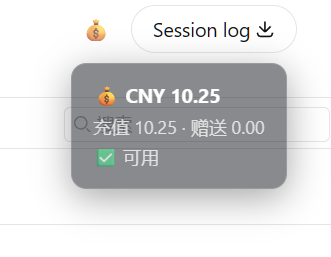
Features / 功能
- 💰 One-click balance — a small wallet button in the session header (right side, next to Session log)
- 🔒 Key never leaves the host — the browser only ever sees the balance numbers; the API key is read from the harness credentials file (
~/.dsh/.credentials.yaml) on the host - 🫧 Semi-transparent bubble — click to open, click again to close (auto-closes after 8s)
- 🎛️ No config needed — reads
DEEPSEEK_API_KEYautomatically
Install / 安装
dsh plugin --profile web add dsh-emoji-wallet
Restart the harness. A 💰 button appears in the session header, right next to
Session log. Click it to see your balance.
How it works / 原理
- Host half:
GET /api/wallet/balancereadsDEEPSEEK_API_KEYfrom~/.dsh/.credentials.yamland querieshttps://api.deepseek.com/user/balance - Client half: a slot component in
conversation.session.header.utilities
(the same container as Session log), positioned before it with flexorder: -1
License
MIT
Install
Install the catalog once, then DeepSeek Harness can find and install any plugin from this site automatically:
dsh plugin add dshbase-catalogThen say "install dsh-emoji-wallet for me" — your agent finds it in the directory and installs it. Docs: dshbase-catalog · verified packs.
This plugin is GitHub source (not published to npm) — install it straight from the repo:
Web profile:
dsh plugin --profile web add github:ankesu/dsh-emoji-walletHeadless (CLI) profile:
dsh plugin --profile headless add github:ankesu/dsh-emoji-walletTest report
Verified: L1 install + L2 load + L3 runtime from GitHub source on dsh 0.1.0-rc.6.
Share this badge
Drop this badge into your README — it links back here and updates automatically when our test status changes:

[](https://dshbase.com/plugins/dsh-emoji-wallet/)<a href="https://dshbase.com/plugins/dsh-emoji-wallet/"><img src="https://dshbase.com/badges/dsh-emoji-wallet.svg" alt="dshbase install-tested"></a>