
Plugin directory / Developer / dsh-enhanced-plugins
dsh-enhanced-plugins
Verified · install-tested on dsh sky-unicorn
What it does
dsh-enhanced-plugins 是一站式 DeepSeek Harness 增强插件包,集成 MCP 管理、插件市场、文件引用、模型能力配置及子智能体开关。
Works — verified, early-stage project
dsh-enhanced-plugins 是一站式 DeepSeek Harness 增强插件包,集成 MCP 管理、插件市场、文件引用、模型能力配置及子智能体开关。 It installs cleanly and boots without issues in our testing. It's early-stage but functional.
“Verified” means our automated CI actually ran dsh plugin add in a clean profile and it booted — nothing more. Feature descriptions and version compatibility are the author’s claims. This is not a security audit and not an endorsement of third-party code.
README
dsh-enhanced-plugins
中文 | English
An enhancement suite for DeepSeek Harness (DSH): six independently installable Cordis bundles plus one Windows companion.
- Does not modify DSH core; every Web feature uses public plugin extension points.
- Installs everything in one pass or keeps only the independently packaged features you select.
- Keeps Host, Web Client, and Windows Companion lifecycles and security boundaries separate.
Features · Quick start · Feature guide · Compatibility and migration · Configuration · Development
Features
The installer only needs the stable “feature ID.” Every feature also has a self-contained selective package.
| Feature | Feature ID | Selective package | Platform and entry point | What it adds |
|---|---|---|---|---|
| Windows Launcher | windows-launcher |
dsh-enhanced-windows-launcher |
Windows Start menu | Tray controls for Web, Headless, profiles, source builds, and diagnostics |
| Desktop alerts and pet | notification |
dsh-enhanced-notification |
Windows; Settings → Desktop Pet | Task sounds, a custom WAV library, and a native animated pet |
| Plugin Community | plugin-market |
dsh-enhanced-plugin-market |
Web; Settings → Plugin Community | Search, safely preflight, install, and uninstall community plugins |
| MCP server manager | mcp-server-manager |
dsh-enhanced-mcp-server-manager |
Web; Settings → Plugins | Manage stdio / Streamable HTTP servers and import local configuration |
| pi-ai model request types | model-input-types |
dsh-enhanced-model-input-types |
Web; Settings → Plugins | Declare whether a model accepts text-only or image requests |
| Edit last message | edit-last-message |
dsh-enhanced-edit-last-message |
Web; latest user message | Change that turn and regenerate in the same session |
| Product subagents | sub-agent |
dsh-enhanced-sub-agent |
Web; Settings → Subagents | Enable or disable Claude Code / Codex tools in real time |
The aggregate package is dsh-enhanced-plugins. With no feature selection, the installer composes all seven entries above; with a selection, it installs only the matching packages or companion.
Quick start
Requirements
- Node.js 22.19.x, or Node.js 24 and later.
- A recent DSH Web profile that runs from source; see the DSH Web UI quickstart.
- This repository is verified against DSH
0.1.1-rc.2, with local ABI baseline commitb150a551b8d465e31e418e1b2eaf5e79bbb7d28e. - Windows Launcher, native sounds, and the desktop pet require Windows 10 or later and Windows PowerShell 5.1. The remaining features are cross-platform.
[!IMPORTANT]
DSH remains a developer preview. If a DSH upgrade causes compatibility issues, check the verified version and commit above first.
[!CAUTION]
Check the DSH/plugin repository layout before copying an install command:
- Sibling-directory install: both repositories share the same parent directory; use the commands below as written.
- Different-directory install: the repositories have different parent directories; add
-DshCheckout "absolute path to the DSH source"to the command.
Install every feature
When both repositories share a parent directory, run this from the root of this repository:
<workspace>/
├── deepseek-harness/
└── dsh-enhanced-plugins/
powershell.exe -NoProfile -ExecutionPolicy Bypass -File .\scripts\migrate-to-enhanced-plugin.ps1
Omitting -Features, or passing -Features all, installs the six Cordis enhancements and Windows Launcher. The launcher is deployed to %LOCALAPPDATA%\DeepSeekHarness\Launcher and creates a Start menu shortcut. Add -CreateLauncherDesktopShortcut if you also want a desktop shortcut.
If the DSH checkout is not a sibling, provide its location explicitly:
powershell.exe -NoProfile -ExecutionPolicy Bypass -File .\scripts\migrate-to-enhanced-plugin.ps1 `
  -DshCheckout "E:\projects\deepseek-harness"
Install selected features
List the stable feature IDs exposed by this version:
powershell.exe -NoProfile -ExecutionPolicy Bypass -File .\scripts\migrate-to-enhanced-plugin.ps1 -ListFeatures
Then pass the final set you want to keep. For example, install desktop alerts, MCP management, and message editing only:
powershell.exe -NoProfile -ExecutionPolicy Bypass -File .\scripts\migrate-to-enhanced-plugin.ps1 `
  -Features notification,mcp-server-manager,edit-last-message
Common combinations can replace the -Features value in that command:
| Goal | Feature set |
|---|---|
| Windows desktop experience | windows-launcher,notification |
| Agent and model enhancements | mcp-server-manager,model-input-types,edit-last-message,sub-agent |
| Plugin discovery and integration management | plugin-market,mcp-server-manager |
-Features is not an additive list. It describes the final enhanced feature set that the target profile and machine should retain. The installer:
- Installs dependencies and builds every selected feature.
- Installs and verifies that every selected bundle or companion loads.
- Only then removes the aggregate package, unselected sibling features, and declared legacy conflicts.
- Detects and cleans up the retired file-reference plugin.
If a prerequisite step fails, the installer does not dismantle the previously working combination. Restart the current Web profile once after a successful install if DSH is already running.
Feature guide
1. Windows Launcher
windows-launcher · Start → DeepSeek Harness Launcher · Windows 10+
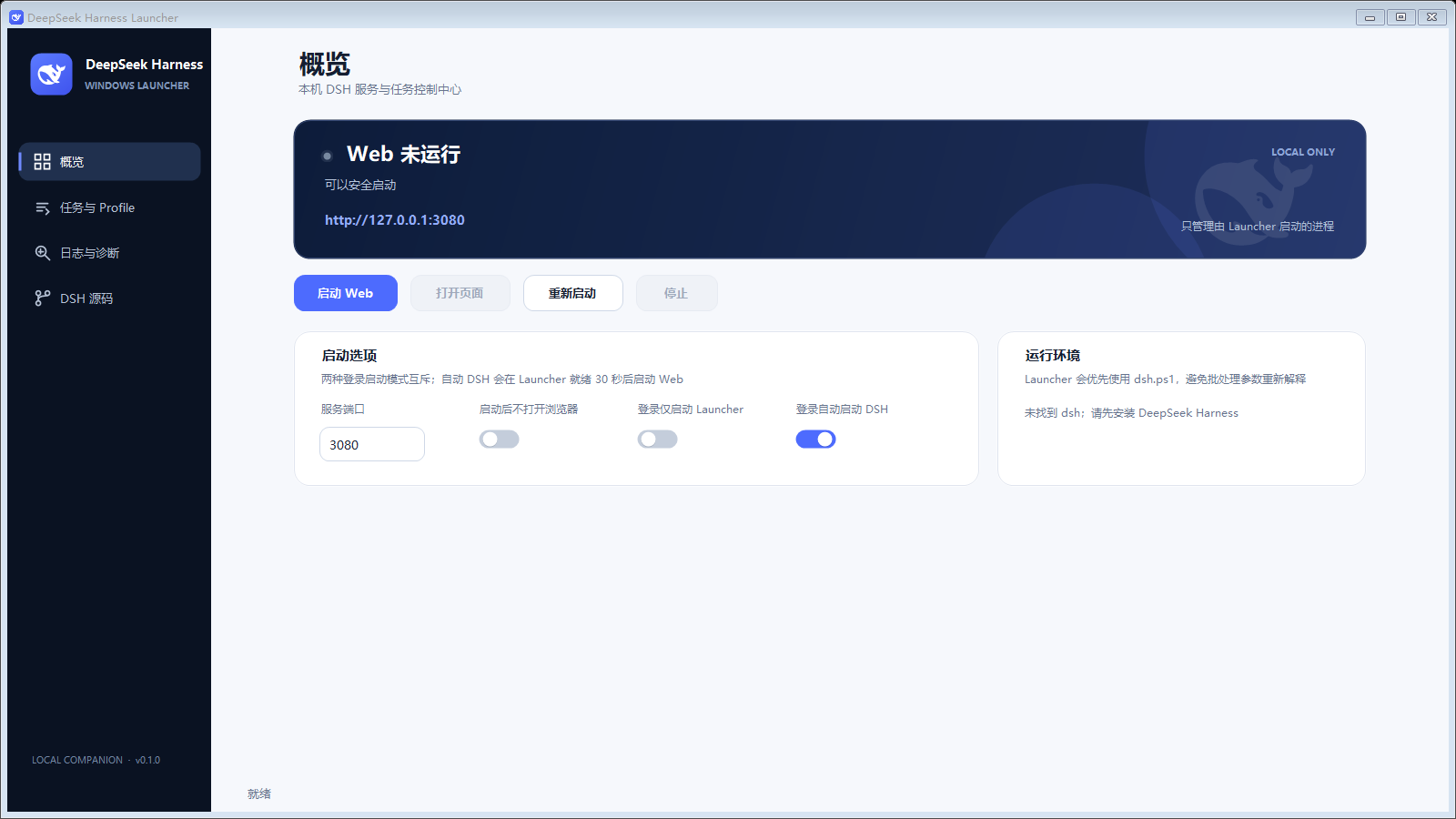
A Windows control center outside the Cordis plugin tree for local DSH users who do not want to keep a terminal open.
- Web control: inspect status, start, open, restart, or stop Web; identify services already bound to the port without taking ownership of them.
- Tasks and profiles: run one-shot Headless tasks and background profiles with unified UTF-8 results and logs.
- Source maintenance: run
git pull --ff-onlyagainst the bound DSH checkout and only runpnpm run buildafter a successful update; explicitly allow build-only operation when Git is unavailable. - Diagnostics: collect command, port, working directory, status, and log information, with a dedicated DSH Source page.
- Desktop behavior: system tray, optional login startup, wide split layouts, compact layouts, per-monitor DPI scaling, and multi-monitor bounds protection.
Process ownership, exit, and background behavior
Launcher only stops DSH process trees that it started. A service already using the configured port is shown as an external Web service: the page can be opened, but Launcher will not take it over, restart it, or terminate it.
The tray exposes two exit paths. “Exit Launcher Only” leaves DSH running; “Exit Launcher” first requests a safe stop of Launcher-owned services. If the service is external or the stop times out, exit is cancelled with a reason.
Tasks and profiles run in no-console child processes. User task content travels through a UTF-8 request file to the PowerShell command engine and is never concatenated into cmd.exe. Hiding the main window stops foreground polling while the tray and background services continue running.
Login startup, deployment, and source binding
Login startup is off by default. You can start Launcher in the tray only, or start Launcher and launch DSH Web in the background after a 30-second initialization delay. The modes are mutually exclusive and can both remain disabled.
Versioned deployment directories keep Start menu and login-startup entries pointed at the current release without depending on profile node_modules. The installer preserves an explicitly configured DSH command. For a local DSH checkout, it generates and verifies a safe direct CLI entry and records that checkout as the only permitted source-build root.
Settings, runtime state, and logs live under %LOCALAPPDATA%\DeepSeekHarness\Launcher. Deselecting windows-launcher stops the tray and removes program files, startup entries, and shortcuts while preserving logs and user settings.
2. Desktop alerts and pet
notification · Settings → Desktop Pet · Sounds and pet require Windows 10+
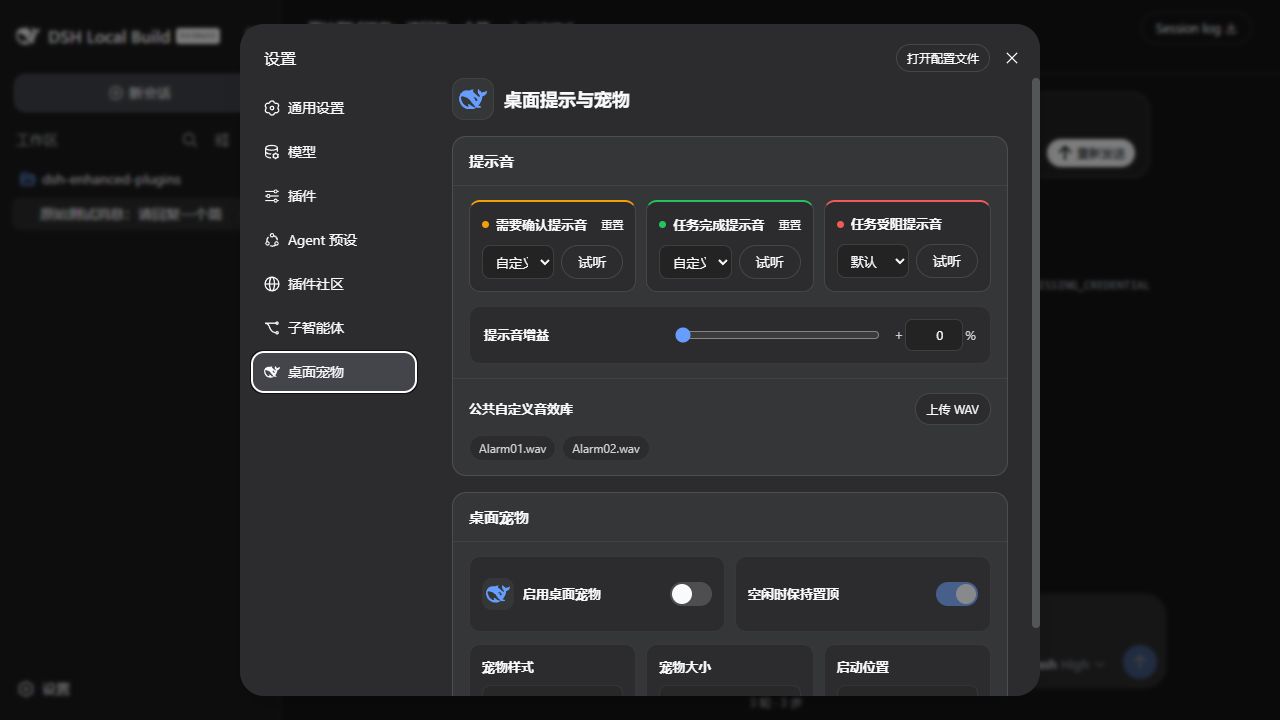
- Confirmation, completion, and blocked events can each be disabled or mapped to two built-in sounds or a custom WAV.
- Changing a sound previews it automatically, with a manual preview button as well. Shared gain ranges from 0–100%; 100% is approximately +6 dB, with soft limiting for near-peak PCM / IEEE Float WAV files.
- Each file is limited to 2 MiB and the shared library to 64 files, all stored in the current DSH profile.
- The pet switches live between the Flat Whale, 3D Whale, and Whale Girl characters.
| Aggregate state | Pet behavior |
|---|---|
| Idle | Sleeping loop; mouse contact or dragging triggers an interaction, with optional non-topmost idle mode |
| Working | Focused swimming or operating a task panel |
| Confirmation | Surprise, head turn, or question-mark cue; highest priority |
| Completed | A short celebration for top-level tasks only |
| Blocked | A short tired or concerned response for top-level tasks only |
The pet can be dragged across monitors and stores normalized per-monitor positions. Resolution, scale, work-area, or display-topology changes remap it into a visible area; changing the startup corner clears the drag record. Windows “Show animations” accessibility preferences reduce every state to a representative still frame when animations are disabled.
Both the resident pet and short-lived sound processes are owned by the DSH subprocess service and exit cooperatively when disabled. A known retired pet ID is migrated to Flat Whale on the next launch; other unknown values continue to fail validation.
3. Plugin Community
plugin-market · Settings → Plugin Community
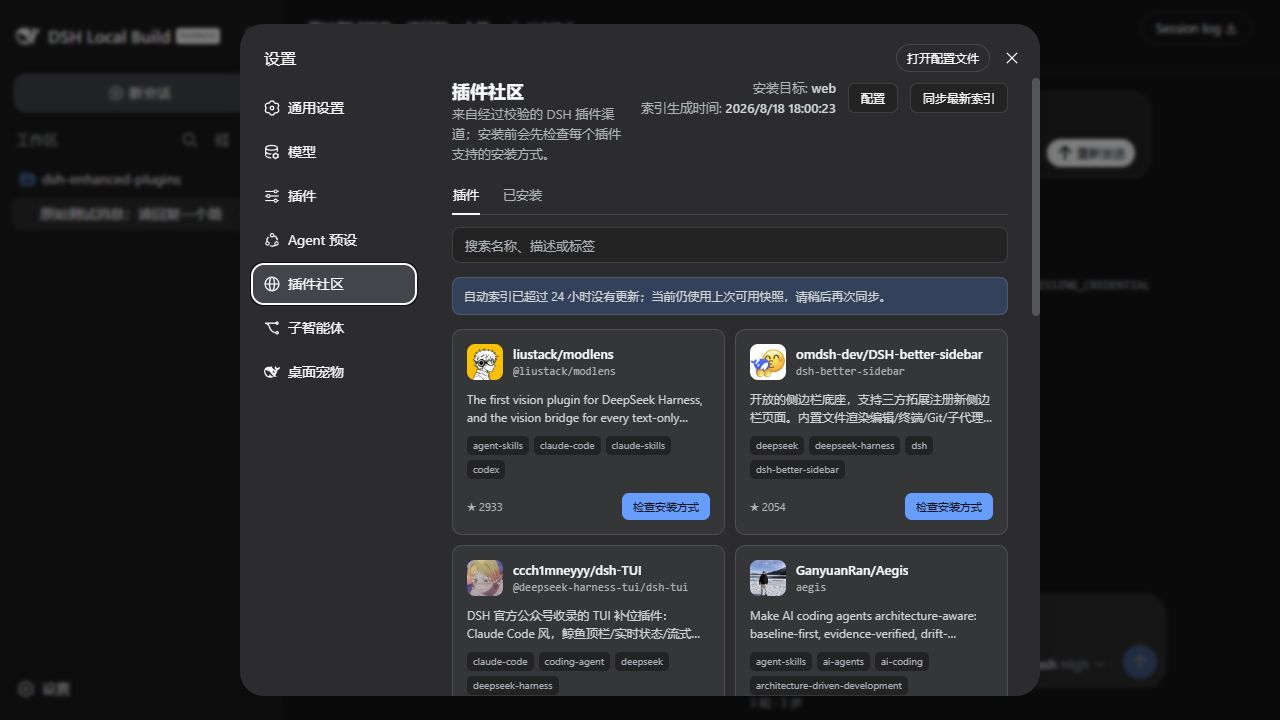
- The first visit uses a bundled snapshot. “Sync latest index” uses ETags to fetch a schema-validated snapshot published by GitHub Actions every six hours, retrying temporary 429/502/503/504 responses.
- Search by repository, package, description, or topic. A live preflight checks repository identity, commit, and distribution shape before installation.
- One-click install is offered only for matching npm bundles with no install lifecycle scripts. Verifiable build-free source bundles can be installed at a pinned commit after confirmation; every other path links to its installation guide.
- Install and uninstall run as cancellable background jobs. The target profile, bundle patch, and composition are verified afterward, with automatic rollback on failure.
- The Installed tab separates market-managed plugins from externally managed ones. Only the former can be removed from this page.
Index publishing, network proxies, and credentials
The .github/workflows/update-plugin-index.yml workflow publishes the market-index branch. It enumerates the complete topic, revalidates only new or changed repositories, and refuses to overwrite the last result after an abnormal shrink or failed build. This project is also a built-in verified channel contribution, so it remains discoverable before the remote mirror catches up and is not duplicated afterward.
Neither the bundled snapshot nor automated index sync requires a GitHub token. The Host recognizes HTTP_PROXY, HTTPS_PROXY, ALL_PROXY, and NO_PROXY, including lowercase variants. If install preflight hits GitHub API limits, Settings can store a read-only, short-lived fine-grained token. It is sent only to the local DSH Host and stored through the credentials service.
The page displays index generation time. An index older than 24 hours receives an explicit warning while the last usable snapshot remains available.
4. MCP server manager
mcp-server-manager · Settings → Plugins → Plugin configuration → MCP Servers
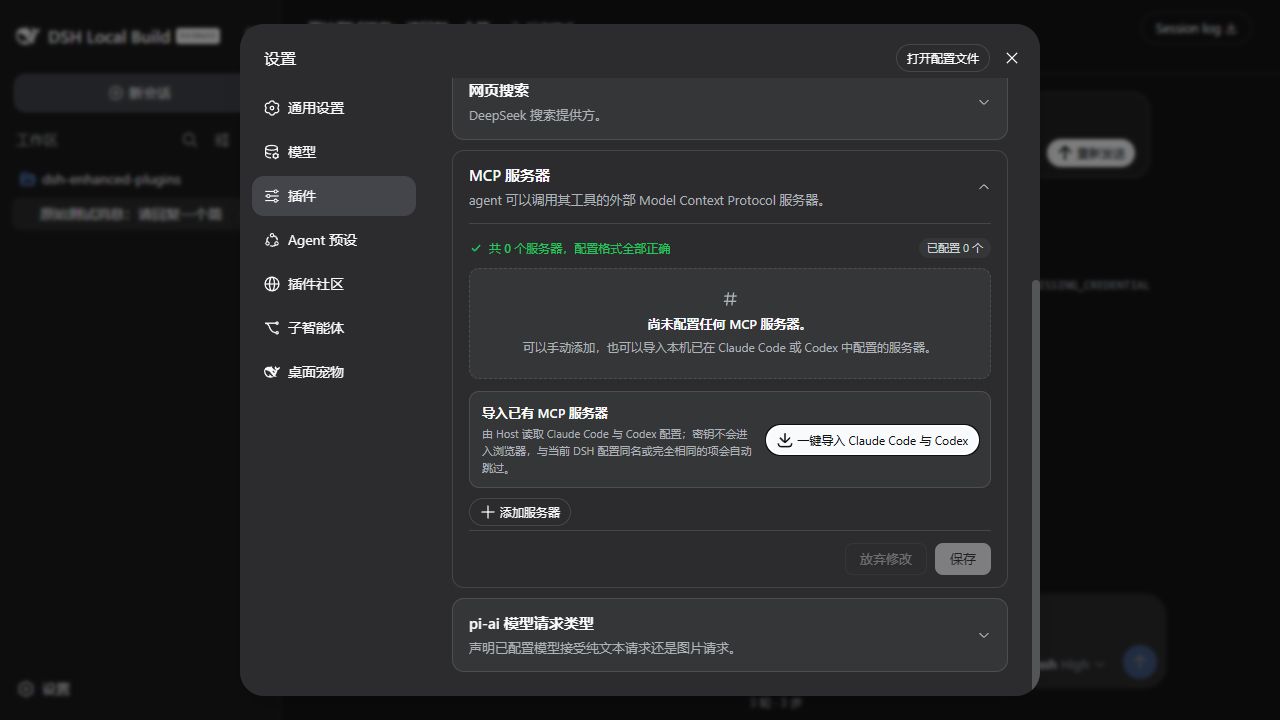
- Add a unique name and choose
stdioor Streamable HTTP. - Configure command, arguments, working directory, and environment for
stdio; configure an HTTP(S) URL and headers for HTTP. - The Host can import local Claude Code and Codex configurations in one pass. Duplicates are skipped and unsafe conversions report a reason.
- Review the format audit at the top of the card and save. The Host starts, updates, or unloads each connection independently.
Environment and header values are masked when existing servers reach the browser. Unchanged secrets are not reconstructed from, or overwritten by, redacted snapshots.
5. pi-ai model request types
model-input-types · Settings → Plugins → Plugin configuration → pi-ai model request types

Add pi-ai model overrides on the DSH Models page or in settings.yaml, then choose Provider default, Text only, or Text and images for each model. Changes save immediately.
The card appears only when the official llm-pi-ai settings namespace is available. It stores a capability declaration and does not probe the endpoint; verify that the provider truly accepts images before declaring Text and images.
6. Edit last message
edit-last-message · Latest editable user-message bubble in the current session
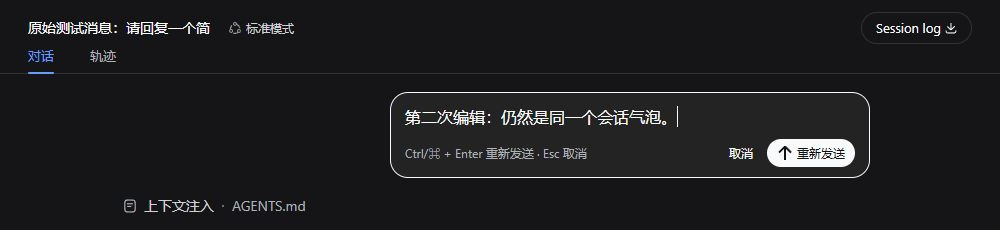
- Wait for the current session to finish, or stop it first.
- Select Edit last message and change the text inline.
- Select Resend or press
Ctrl/⌘ + Enter; pressEscor Cancel to leave edit mode.
Resend stays inside the current session: the plugin replaces model context starting at the edited user message, then generates through the same AgentLoop. The DSH Session log remains an append-only audit record, and side effects from tools that already ran are not rolled back. Messages containing images or other non-text blocks do not expose the editor, preventing silent data loss.
7. Product subagents
sub-agent · Settings → Subagents
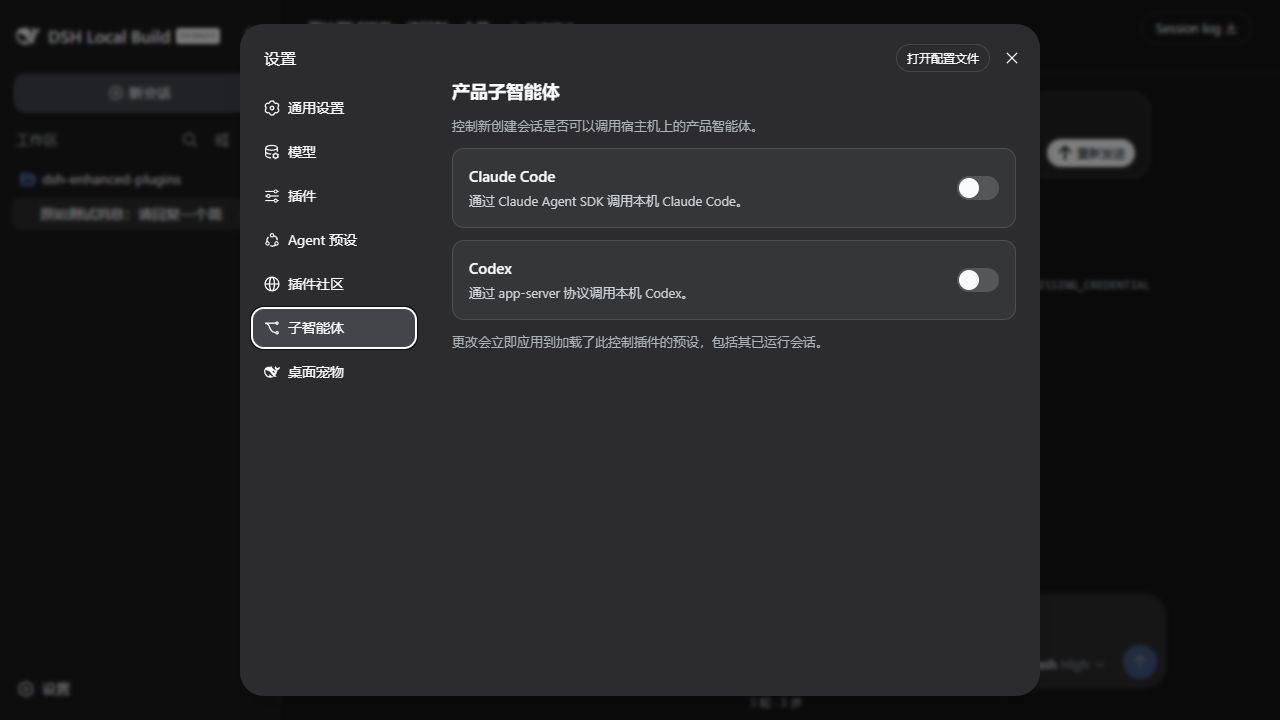
Enabling Claude Code or Codex applies immediately to every Agent preset carrying this controller, including running sessions. Disabling a toggle removes the matching tool in real time. The corresponding product and its official DSH provider must still be installed locally.
Both toggles default to off. Writes use path-addressed operations and settings revisions, so a redacted or stale snapshot cannot overwrite changes from another page or an external editor.
Compatibility and migration
- Verified baseline: DSH
0.1.1-rc.2, commitb150a551b8d465e31e418e1b2eaf5e79bbb7d28e. - Architecture boundary: Web features extend public Services, events, slots, and settings. Windows Launcher is an independent companion and never joins the Cordis plugin tree.
- File reference retired: current DSH provides native
@file references. Type@in the composer, or@"for paths containing spaces. The oldreferenced-filefeature ID and#snapshot syntax are no longer provided. - Automatic cleanup:
-Features referenced-fileis rejected explicitly. A normal installer run removes the historical selective package or the feature carried by an older aggregate install.
Configuration
The default composition lives in cordis.patch.yml. A later profile patch replaces the target Loader row's entire config, so an override must restate every field that row still needs.
Desktop alert defaults
| Field | Default | Purpose |
|---|---|---|
completionSound |
subtle |
Completion sound: off, subtle, prominent, or uploaded custom |
confirmationSound |
prominent |
Attention sound: off, subtle, prominent, or uploaded custom |
blockedSound |
prominent |
Blocked sound: off, subtle, prominent, or uploaded custom |
soundGain |
0 |
Shared 0–100% positive gain; 100 is approximately +6 dB |
petEnabled |
false |
Show the native global desktop pet |
petCharacter |
classic |
classic (Flat Whale), multiview (3D Whale), or whale-girl |
petIdleTopmost |
true |
Keep the idle pet topmost |
petSize |
112 |
80, 112, 144, or 176 device-independent pixels |
petPosition |
bottom-right |
top-left, top-right, bottom-left, or bottom-right |
Six *CustomSoundFile / *CustomSoundName fields are Host-owned selection references for the three events. The shared catalog is stored at desktop-notifications/sound-library.json inside the profile. Upload and choose sounds through Settings instead of editing these fields manually.
Plugin Community Host configuration
| Field | Default | Purpose |
|---|---|---|
profile |
web |
Target profile for install and uninstall |
topic |
dsh-plugin |
Topic required by validated channel entries |
channelUrl |
HTTPS snapshot on market-index |
Publication used by Sync latest index |
pageSize |
12 |
Plugins per page |
operationTimeoutMs |
120000 |
Install and uninstall timeout |
githubTokenEnv |
GITHUB_TOKEN |
Credentials reference name |
cliPath |
empty | Optional absolute DSH executable path |
Bundled assets/plugins-cache.json is a read-only bootstrap snapshot and the incremental-validation seed for the first automated index run. The Host owns cached snapshots, ETags, background tasks, and installation records under DSH home. Plugin Community never parses shell commands out of READMEs and never enables dangerouslyAllowAllBuilds.
To expose product-subagent tools to selected Agent presets only, disable or remove the root subagent-product-toggle-tools row and mount the appropriate entry inside each target preset:
- Aggregate package:
dsh-enhanced-plugins/sub-agent/preset - Selective package:
dsh-enhanced-sub-agent/preset
Do not mount both layouts in the same scope.
Development and verification
This repository uses the following read-only sibling checkout as its DSH API, type, and assembled Web UI baseline:
D:\work\workspace\github\deepseek-harness
Regular verification commands:
npm install
npm run typecheck
npm test
npm run build
npm run pack:dry-run
git diff --check
Browser bundles use CSS Modules and consume only DSH --dsw-alias-* semantic theme tokens, so they follow light, dark, and system appearance automatically. See the DSH plugin development guide and architecture reference for public extension points.
License
Install
Install the catalog once, then DeepSeek Harness can find and install any plugin from this site automatically:
dsh plugin add dshbase-catalogThen say "install dsh-enhanced-plugins for me" — your agent finds it in the directory and installs it. Docs: dshbase-catalog · verified packs.
This plugin is GitHub source (not published to npm) — install it straight from the repo:
Web profile:
dsh plugin --profile web add github:sky-unicorn/dsh-enhanced-pluginsHeadless (CLI) profile:
dsh plugin --profile headless add github:sky-unicorn/dsh-enhanced-pluginsTest report
Verified: L1 install + L2 load + L3 runtime from GitHub source on dsh 0.1.0-rc.6.
Share this badge
Drop this badge into your README — it links back here and updates automatically when our test status changes:

[](https://dshbase.com/plugins/dsh-enhanced-plugins/)<a href="https://dshbase.com/plugins/dsh-enhanced-plugins/"><img src="https://dshbase.com/badges/dsh-enhanced-plugins.svg" alt="dshbase install-tested"></a>