
Plugin directory / Developer / dsh-extension-hub
dsh-extension-hub
Verified · install-tested on dsh Relistencode
What it does
Manage DSH(DeepSeek Harness)) skills and MCP servers: CLI + settings-page UI with zh/en i18n, Claude/Codex import, and update checks.
Works — verified, early-stage project
Manage DSH(DeepSeek Harness)) skills and MCP servers: CLI + settings-page UI with zh/en i18n, Claude/Codex import, and update checks. It installs cleanly and boots without issues in our testing. It's early-stage but functional.
“Verified” means our automated CI actually ran dsh plugin add in a clean profile and it booted — nothing more. Feature descriptions and version compatibility are the author’s claims. This is not a security audit and not an endorsement of third-party code.
README
dsh-extension-hub
New in v0.2.19 — the Add-ons block now carries dsh-pocket: DeepSeek Harness in your pocket — run dsh web on your PC and sync access from your phone by scanning a QR code (LAN + public network, real-time screen mirroring). (click to expand earlier highlights)
New in v0.2.18 — the Add-ons block now carries odai-dsh-plugin (profile-wide Odai governance & responsibility routing) and dsh-cost-meter (session cost & token statistics, budgets, balances and Coding Plan quotas).
New in v0.2.15 — the Add-ons block now carries dsh-vision-toolkit: a more powerful vision toolkit — paste an image directly for image understanding, UI restoration, long-screenshot analysis, and more visual tasks.
New in v0.2.8 — one-command install: the package now ships a bundle layer, so dsh plugin --profile web add dsh-extension-hub wires the plugin row into your profile automatically (no more manual cordis.patch.yml edits in the quick start).
New in v0.2.7 — the Add-ons block now also carries dsh-recall: conversation history recall for DSH — literal/fuzzy/semantic retrieval over every past session, fully local & offline.
New in v0.2.6 — A curated plugin store inside DSH: browse 400+ community-curated plugins (11 categories, bilingual descriptions), install from npm in seconds with anti-squatting checks, search every GitHub dsh-plugin repo — and keep them updated. Plus dsh-myrules — a companion plugin to edit your host-wide global instructions from the settings page. And a new Add-ons block in the Plugin Management tab: install, disable, uninstall and update companion features together with the main plugin.
Manage DeepSeek Harness (DSH) skills and MCP servers from one place.
Skills management · MCP servers · Skill import · Plugin management · Plugin market
A service-oriented extension center for DeepSeek Harness: a zero-dependency persistence core and CLI, plus a durable settings-page UI embedded in DSH Web — create / edit / enable / disable skills and MCP servers, one-click import from Claude Code and OpenAI Codex, and a full plugin manager (official vs third-party, enable / disable / uninstall, check & update, plus a Plugin Market with a curated store and GitHub search).
🌏 中文 · English
Quick Start
Prerequisites: DSH installed and running (dsh web works), Node.js ≥ 22, pnpm ≥ 10.
dsh plugin --profile web add [email protected]
One command: the package ships its own composition patch (bundle layer), so the plugin row is wired into your profile automatically — no manual cordis.patch.yml edits. Restart dsh web, then open Settings → Extension Management.
Install once — use the header's Check Updates button to upgrade later.
Features
| Feature | CLI | Settings UI |
|---|---|---|
| List skills / MCP (enabled state, scope) | ✅ | ✅ |
| Create / edit / delete skills | ✅ | ✅ (form + Markdown body) |
| Enable / disable skills & MCP | ✅ | ✅ |
| Create / edit / delete MCP (stdio / streamable-http) | ✅ | ✅ |
| Import skills & MCP from Claude / Codex and other tools | ✅ | ✅ |
| Project-scope install with folder picker | ✅ (folder cmd) |
✅ (DSH directory picker) |
| Manage plugins (official vs other, enable / disable / uninstall) | — | ✅ |
| Plugin Market: curated store (npm install) + GitHub search | — | ✅ |
| Check & update third-party plugins | — | ✅ |
| dsh-myrules — edit host-wide global instructions (Customize page); search "dsh-myrules" in the plugin manager to disable or uninstall it | — | ✅ |
| Add-on manager: install / disable / uninstall companion features, update together with the main plugin | — | ✅ |
Built-in skills are read-only: the list also shows skills bundled with the
deployment (shipped presets, e.g. the cordis preset's skills) and skills
shipped inside user presets, marked "Built-in/Preset" and not editable /
deletable / toggleable — they belong to the deployment or preset layer. To
override, create a same-name skill in the user or project directory.
Plugin Management Guide
The Extension Management page ships a full plugin manager since v0.2.0,
with four tabs: Skills / MCP Servers / Plugins / Plugin Market.

Managing installed plugins
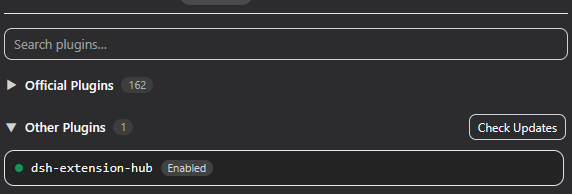
The Plugins tab lists every plugin row in your DSH composition, split into
two collapsible groups:
- Official Plugins — DeepSeek's own
@deepseek-ai/*packages (collapsed by
default). They can be disabled but not uninstalled; thecordis:include
entry is the composition loader itself and is marked Core — it cannot be
disabled or removed. - Other Plugins — third-party and your own plugins (e.g. this one).
Click a plugin to see its details: description, source, repository link, entry
id and module name. From the detail block you can:
- Enable / Disable — written to your profile
cordis.patch.yml; takes
effect after adsh webrestart. Disabling warns you that an unknown plugin
may cause serious problems. - Uninstall (non-official only) — removes the plugin row from the
configuration, with a warning plus a second "Confirm uninstall?" step. If the
plugin was installed via a GitHub clone, its local clone directory is deleted
too.
The Other Plugins group header has Check Updates: it compares npm
packages against the registry and local git clones against their origin HEAD.
Updateable plugins get a green Update Available button next to their status
label — click it to pull the new version (npm tarball or git pull), or use
Update All to update every updateable plugin at once.
Discovering & installing new plugins
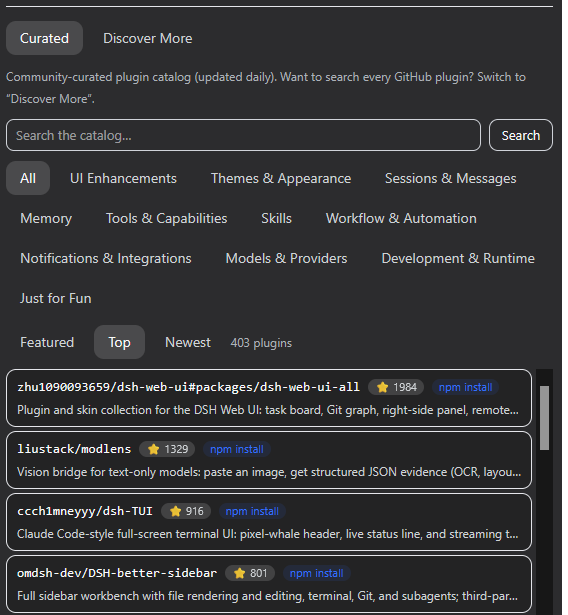
The Plugin Market tab has two sub-views:
- Curated (default) — a community-curated catalog
(awesome-dsh-plugin, refreshed
daily) with 11 categories, bilingual descriptions, star counts and ordering
(Featured / Top / Newest). Entries with an npm mapping install from npm in
seconds (registry tarball, with an anti-squatting check that the package
points back at the listed repository); entries without one fall back to a
GitHub clone. A 24h local cache keeps the view usable offline. - Discover More — searches GitHub for repositories tagged
dsh-plugin(a
free-text query narrows the search). Each result shows stars and an
"Installed" badge when the repo is already present locally.
Click a curated/discovered entry to open its detail page — description, stars,
category (curated), install method and a link to the repository — then hit
Install. Extension Hub:
- Prefers the npm registry when the plugin publishes to npm: downloads the
tarball into the profilenode_moduleswithout pnpm (no symlink/permission
requirements) and registers a bundle row. Packages installed this way are
managed by Extension Hub itself — keep updating them with its Check
Updates; the dependency is declared in the profile manifest, so a laterdsh plugin/ pnpm install keeps it. - Otherwise clones the repository (shallow) into
~/.dsh/extension-hub/plugins/<repo>and verifies it ships a usablepackage.jsonentry. Clone installs support zero-dependency plugins
only: packages with npm runtime dependencies are rejected (there is no
dependency-install step), and packages that rely on a bundle patch
(dsh.bundle.patch) are flagged because a clone cannot apply it. Be aware
that a monorepo root (e.g. the repo ofdsh-myrulesis this very
repository) clones as the root package, not the target plugin — use the npm
or Add-ons install path for those. - Registers the plugin in your profile
cordis.patch.yml(managed insert
block) and self-checks the write.
Mixing install paths (Discussion #2889): Extension Hub installs write a
profile patch row plus a dependency declaration. Do not combine this
with the officialdsh plugin add/list/updatecommands: DSH CLI appends
every dependency declaring adsh.bundle.patchtodsh.profile.bundles,
duplicating the manual row and crashingdsh webon boot withduplicate loader entry id(see
deepseek-harness Discussion #2889).
If you already ran adsh plugincommand, remove the duplicated entries
fromdsh.profile.bundlesbefore restarting.
After a dsh web restart the plugin appears in the Other Plugins group,
where you can disable or uninstall it (GitHub-clone installs also remove the
clone directory) and keep it updated with Check Updates (npm packages
check the registry; local git clones update via git pull).
Installing runs third-party code. Only install repositories you trust, and
check the repository's own README for install instructions — a repo taggeddsh-pluginmay still be a skill, an MCP server, or need a custom setup.
Recent Updates
Recent updates (click to expand)
- 2026-08 — v0.2.19: new add-on dsh-pocket — run dsh web on your PC and sync access from your phone by scanning a QR code (LAN + public network, real-time screen mirroring); install / disable / uninstall from the Add-ons block, updates together with the main plugin.
- 2026-08 — v0.2.18: two new add-ons — odai-dsh-plugin (profile-wide Odai governance & responsibility routing) and dsh-cost-meter (session cost & token statistics, budgets, balances, Coding Plan quotas, 90+ model price catalog); install / disable / uninstall from the Add-ons block, updates together with the main plugin.
- 2026-08 — v0.2.17: npm installs of bundle-patch add-ons now warn against mixing install paths — DSH CLI's bundle reconcile (
dsh plugin add/list/update) appends every dependency declaringdsh.bundle.patchtodsh.profile.bundles, duplicating the manual row and crashingdsh webon boot (duplicate loader entry id, see Discussion #2889); the README now carries the same guidance. - 2026-08 — v0.2.16: add-on installs now warn about missing runtime dependencies — the npm installer checks the downloaded package's dependencies against the profile and appends a reminder to the result message when any are absent (the install still completes; a profile-level
pnpm installfixes loading after restart). - 2026-08 — v0.2.15: new add-on dsh-vision-toolkit — a more powerful vision toolkit (paste an image directly for image understanding, UI restoration, long-screenshot analysis, and more visual tasks); install / disable / uninstall from the Add-ons block, updates together with the main plugin.
- 2026-08 — v0.2.14: fix: add-ons / installed badges now see the bundle layer — a feature or plugin installed via the official
dsh plugin add(bundle) path is detected as installed (its row lives in the bundle's own patch, not the profile patch), so the Add-ons block no longer offers a duplicate install that would crashdsh web;installNpmPluginrefuses packages already registered by a bundle layer; bundle-installed add-ons are uninstalled viadsh plugin remove(guided in the UI) instead of profile-patch deletion. - 2026-08 — v0.2.13: fix (issue #2) —
hostPatchPath()no longer auto-probes the profiles directory (a scan could hit a headless profile before web and make the MCP list read/write the wrong composition); extension management is bound to the web profile, with an explicit profile name still supported. - 2026-08 — v0.2.12: review fixes — MCP discovery now follows Claude/Codex precedence (project
.mcp.json> project.claude.json> user configs; Codex project > global) instead of the reversed order; the MCP list shows home-level rows ($DSH_HOME/cordis.patch.yml, read-only, badge-marked); composition and state writes are atomic (temp+rename, lock retries) so a crash cannot corruptcordis.patch.yml; clone-install rejection messages distinguish a missing package.json from a missing build output (git installs fetch sources, not artifacts); README notes that npm-installed plugins stay managed by Extension Hub across laterdsh plugin/pnpm runs. - 2026-08 — v0.2.11: docs — quick-start install command pinned to the current release (the published tarball had carried the v0.2.8 command).
- 2026-08 — v0.2.10: complete Windows fix for GitHub-clone installs — clone rows now register a
file://URL pointing at the clone's entry file (v0.2.9 pointed at the clone directory, which Node ESM still rejects withERR_UNSUPPORTED_DIR_IMPORTand crasheddsh web); clone installs also refuse packages with npm runtime dependencies (there is no dependency-install step) and warn when a package relies on a bundle patch that a clone cannot apply. To repair a broken row by hand, editcordis.patch.ymland pointnameat the entry file, e.g.name: file:///C:/Users/you/.dsh/extension-hub/plugins/foo/lib/index.js. - 2026-08 — v0.2.9: Windows GitHub-clone install fix (first pass) — clone rows switched from raw drive-letter paths to
file://module names; superseded by v0.2.10 (entry-file URLs). - 2026-08 — v0.2.8: one-command install — the package now ships a bundle patch (
cordis.patch.yml), sodsh plugin --profile web add dsh-extension-hubwires the plugin row into your profile automatically; the quick start no longer requires manualcordis.patch.ymledits. - 2026-08 — v0.2.7: new add-on dsh-recall — conversation history recall for DSH (three-layer literal/fuzzy/semantic retrieval over every past session, fully local & offline); install / disable / uninstall from the Add-ons block, updates together with the main plugin.
- 2026-08 — v0.2.6: new Add-ons block in the Plugin Management tab — install / disable / enable / uninstall companion features (dsh-myrules) without leaving the page; the header Check Updates now checks the main plugin AND installed add-ons together and updates everything at once; collapsible block; feature i18n keys aligned with their ids; "Integrate with Extension Hub" invitation section added to both READMEs.
- 2026-08 — v0.2.5: new companion plugin dsh-myrules (
packages/dsh-myrules) — a Customize (个性化) page in Settings that edits the host-wide global instructions ($DSH_HOME/AGENTS.md, injected into every session, new sessions apply immediately); theme-inverted primary buttons across the plugin manager, slim save button, percentage budget meter; rolling.bakbackup removed. - 2026-08 — v0.2.4: Plugin Market with a Curated store + npm install path — the Plugin Market tab now leads with a Curated view of the community catalog (awesome-dsh-plugin, 11 categories, bilingual descriptions, Featured/Top/Newest ordering, 24h offline cache) beside Discover More (GitHub search); plugins with an npm mapping now install from the npm registry via tarball (no pnpm, anti-squatting repo check) with GitHub clone as fallback; settings tab renamed to Plugin Market; curated view no longer hangs on load (client-side method registration); quoted (
@scope) row ids match in installed detection and uninstall; README overhaul with new screenshots. - 2026-08 — v0.2.3: fix: patch persistence semantics — 0.2.2's flat-row writer was wrong for patch files (a bare top-level
- id:row means "override" and silently no-ops; rows must be wrapped in- insert:). Reverted all patch writes to the managed insert-block region; the profile patch was rebuilt to the correct format. This restores plugin loading after restart. - 2026-08 — v0.2.2: unified flat-row patch persistence (CLI and UI write the same loader-compatible format); MCP list reads merged rows (region and flat formats); scalar quoting fix for
@-prefixed names; uninstall removes discover-installed clone directories. - 2026-08 — v0.2.1: Discover tab pagination ("Load more", 30 per page), plugin detail as a modal popup, truthful "Installed" badges (verified against the config row, not just the clone dir), install write-back verification, horizontal-overflow fixes.
- 2026-08 — v0.2.0: full plugin manager — official vs third-party grouping (vendor-scope based), core protection for the composition loader, enable / disable / uninstall with confirmations, per-plugin check & update (npm registry + local git clones, Update All), and a GitHub-powered Discover tab that clones and installs
dsh-pluginrepositories in one click. - 2026-08 — v0.1.4: package the v0.1.3 changelog into the published artifact (registry-sync release).
- 2026-08 — v0.1.3: strict Typert descriptors (
./typert) fix/api/extensionHub/*404 in layouts where the protocol package loads twice; one-click update downloads the npm tarball directly (no pnpm). - 2026-08 — "Check Updates" button in the header: compares the local package version against the npm registry.
- 2026-08 — Section renamed to Extension Management with a header ("Manage plugins, skills and MCP"); import moved from its own tab into the Skills and MCP Servers pages.
- 2026-08 — Full zh/en i18n (83 keys), project folder picker, built-in skill read-only layer.
- Initial release — CLI + durable settings UI + zero-dependency persistence core.
How it works
- The host half (
lib/host.js) is aTypertRemoteServicegateway exposed
under theextensionHubwire namespace; the browser half mounts its Remote
contribution and calls the mounted namespace service. - The browser bundle is declared via
dsh.client.platform: "web"inpackage.json; DSH's client-modules system scans it at boot, injects the
boot manifest, and serves the bundle over/plugins/dsh-extension-hub/client.js— no web bundle rebuild required. - All real reads/writes run inside the host process (outside the session file
sandbox) and share the samelib/code as the CLI.
Data sources (discovery scope)
| Source | Skills | MCP |
|---|---|---|
| Claude | <repo>/.claude/skills/*/SKILL.md, ~/.claude/skills/*/SKILL.md |
<repo>/.mcp.json, ~/.claude.json, ~/.claude/.claude.json |
| Codex | <repo>/.codex/skills/*/SKILL.md, ~/.codex/skills/*/SKILL.md |
~/.codex/config.toml, <repo>/.codex/config.toml |
Conversion: Claude/Codex stdio servers → DSH transport: stdio
(command/args/env); http/sse → transport: streamable-http
(url/headers). Skill name/description/whenToUse are preserved,license/allowed-tools fold into metadata.
Persistence locations
Skills
- Project scope
--scope project→<target folder>/.dsh/skills/<name>/SKILL.md - Global scope
--scope global→~/.dsh/skills/<name>/SKILL.md
Enable/disable rewrites the disable-model-invocation / user-invocable
frontmatter flags; removal deletes the file.
MCP
- Global → rows are appended/updated inside the managed region
(# >>> dsh-extension-hub…# <<< dsh-extension-hub) of~/.dsh/profiles/<profile>/cordis.patch.yml. - Project → writes a manifest
<target folder>/.dsh/mcp-servers.yamland
generates a dedicated preset~/.dsh/.agent-presets/<slug>-mcp/agent.cordis.yml(based on the shippedstandardpreset). Select that preset in the session roster to activate
the servers.
Supported platforms
DSH itself runs on Windows, macOS and Linux; this plugin has no platform
specifics — the CLI works anywhere Node.js runs, and the settings UI follows
the DSH Web host.
Known limitations
- The YAML/TOML parsers are self-contained subsets covering the shapes
that actually appear in DSH compositions and Codexconfig.toml; anything
outside them is skipped or reported, never silently corrupted. - Skill discovery matches DSH
dsh-skill-filesystem: only<root>/<name>/SKILL.mdand<root>/<name>.mdare recognized; names must
be kebab-case. - Project MCP relies on the "generated preset + manually select the preset"
mechanism; the tool does not switch presets between sessions for you. - Project-scope enable/disable toggles apply to the generated preset (whether
the servers load when that preset is selected); the manifest always keeps
the full record. - Global MCP removal/editing only affects manager-managed rows (inside the
managed region); hand-written patch rows are untouched. - The curated store is a snapshot of the community registry: it refreshes on
load with a 24h local cache, so it may trail the live registry by up to a
day. Plugins that need a build step at install time fall back to a GitHub
clone instead of the npm tarball path.
Integrate with Extension Hub
DSH Extension Hub can integrate most plugins, letting users manage and keep
every related feature updated in one place. If you are interested, your plugin
is very welcome here too — together we can grow the DSH plugin ecosystem. Once
integrated, your plugin appears in the Add-ons block of the Plugin Management
tab, where users can install, disable, uninstall, and update it together with
the main plugin.
Thank you for your open-source contribution to the DSH community!
Open an issue or reach out directly:
Open an issue ·
Relistencode [email protected]
Acknowledgments
This project builds on the open work of the DSH community. Thanks to:
- awesome-dsh-plugin
— the community-curated plugin registry that powers the Curated view
(daily-refreshedplugins.json, bilingual descriptions, npm mappings). - dsh-market — the in-harness
plugin market that demonstrated npm-first installs and registry-vs-repo
anti-squatting checks. - dsh-plugins-store — the
static plugin marketplace whose catalog/verification approach informed the
Discover data-source design. - dshfind — the DSH learning site
and plugin browser whose score/grade presentation inspired quality-signal
ideas.
License
MIT
Install
Install the catalog once, then DeepSeek Harness can find and install any plugin from this site automatically:
dsh plugin add dshbase-catalogThen say "install dsh-extension-hub for me" — your agent finds it in the directory and installs it. Docs: dshbase-catalog · verified packs.
This plugin is GitHub source (not published to npm) — install it straight from the repo:
Web profile:
dsh plugin --profile web add github:Relistencode/dsh-extension-hubHeadless (CLI) profile:
dsh plugin --profile headless add github:Relistencode/dsh-extension-hubTest report
Verified: L1 install + L2 load + L3 runtime from GitHub source on dsh 0.1.0-rc.6.
When to use it
Extend the agent's coding surface — give it a new tool, workflow, or integration so it handles a dev task it couldn't before.
Who it's for
Developers who want dsh to behave like a teammate on real codebases — editing, running, and verifying changes rather than just answering.
For developers — extending it
The tool/command surface is the seam: expose more of the SDK, add smarter context wiring, or tighten the loop between code changes and verification.
Share this badge
Drop this badge into your README — it links back here and updates automatically when our test status changes:

[](https://dshbase.com/plugins/dsh-extension-hub/)<a href="https://dshbase.com/plugins/dsh-extension-hub/"><img src="https://dshbase.com/badges/dsh-extension-hub.svg" alt="dshbase install-tested"></a>