
Plugin directory / Developer / dsh-github-connector
dsh-github-connector
Verified · install-tested on dsh kaziii
What it does
GitHub connector for DeepSeek Harness (dsh): one-click connect, create/review/merge PRs from the conversation
Works — verified, early-stage project
GitHub connector for DeepSeek Harness (dsh): one-click connect, create/review/merge PRs from the conversation It installs cleanly and boots without issues in our testing. It's early-stage but functional.
“Verified” means our automated CI actually ran dsh plugin add in a clean profile and it booted — nothing more. Feature descriptions and version compatibility are the author’s claims. This is not a security audit and not an endorsement of third-party code.
README
dsh-github-connector
简体中文 | English
DeepSeek Harness (dsh) 的 GitHub 连接器插件 —— 一键连接 GitHub 账号,不离开 dsh 对话即可创建 PR、AI 审查 PR、合并 PR。
- 一键连接 —— 在 dsh 设置页走 GitHub Device Flow 授权,无需复制粘贴 token。
- 输入框上方的 PR 状态条 —— 创建 PR / AI 审查 / 合并,由 git 状态触发。
- 模型侧工具 ——
github_search、github_issue_read、github_pr_read、github_issue_create、github_issue_comment、github_pr_create。
检测到当前分支领先默认分支时,输入框上方会出现 PR 状态条,一键创建 PR:

安装
前置条件:Node ≥ 22.19、pnpm、dsh CLI(npm install -g @deepseek-ai/dsh)。
从 npm 一条命令安装:
dsh plugin --profile web add dsh-github dsh-github-rest dsh-tool-github dsh-github-connect dsh-ui-github
(把 web 换成你的 profile 名 —— headless、tui 等。dsh-ui-github 只在 web 客户端渲染,非 web profile 可不装。)
连接 GitHub 账号
打开 dsh 设置 → 插件,点击 连接 GitHub 按钮,按提示完成 Device Flow 授权 —— token 只保存在宿主,不落入任何配置文件:
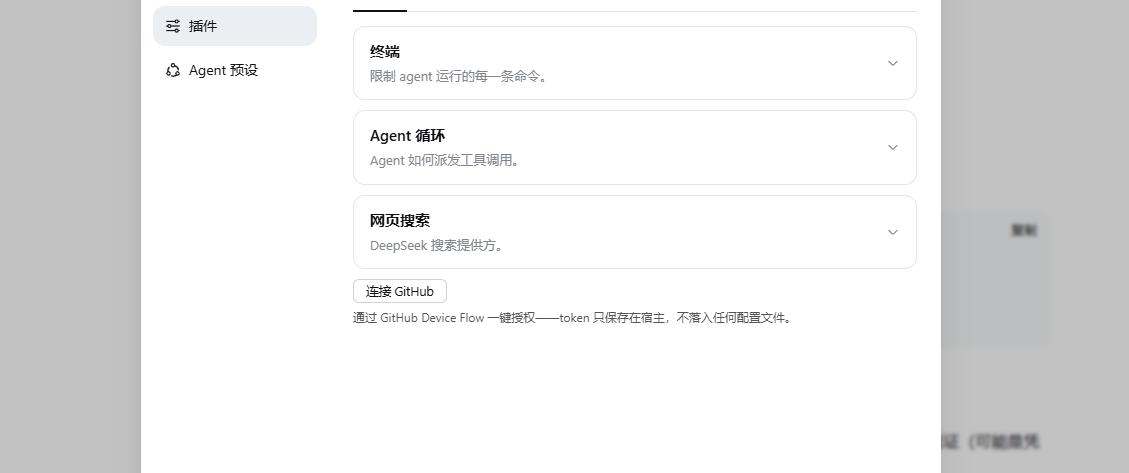
CLI / headless 场景则设置 GITHUB_TOKEN 环境变量(带 repo 权限的 personal access token)。
许可证
Install
Install the catalog once, then DeepSeek Harness can find and install any plugin from this site automatically:
dsh plugin add dshbase-catalogThen say "install dsh-github-connector for me" — your agent finds it in the directory and installs it. Docs: dshbase-catalog · verified packs.
This plugin is GitHub source (not published to npm) — install it straight from the repo:
Web profile:
dsh plugin --profile web add github:kaziii/dsh-github-connectorHeadless (CLI) profile:
dsh plugin --profile headless add github:kaziii/dsh-github-connectorTest report
Verified: L1 install + L2 load + L3 runtime from GitHub source on dsh 0.1.0-rc.6.
When to use it
Extend the agent's coding surface — give it a new tool, workflow, or integration so it handles a dev task it couldn't before.
Who it's for
Developers who want dsh to behave like a teammate on real codebases — editing, running, and verifying changes rather than just answering.
For developers — extending it
The tool/command surface is the seam: expose more of the SDK, add smarter context wiring, or tighten the loop between code changes and verification.
Share this badge
Drop this badge into your README — it links back here and updates automatically when our test status changes:

[](https://dshbase.com/plugins/dsh-github-connector/)<a href="https://dshbase.com/plugins/dsh-github-connector/"><img src="https://dshbase.com/badges/dsh-github-connector.svg" alt="dshbase install-tested"></a>