
Plugin directory / Developer / dsh-global-rules
dsh-global-rules
Verified · install-tested on dsh badai147
What it does
Plugin to edit ~/.dsh/AGENTS.md global rules in DeepSeek Harness Web settings panel
Works — verified, early-stage project
Plugin to edit ~/.dsh/AGENTS.md global rules in DeepSeek Harness Web settings panel It installs cleanly and boots without issues in our testing. It's early-stage but functional.
“Verified” means our automated CI actually ran dsh plugin add in a clean profile and it booted — nothing more. Feature descriptions and version compatibility are the author’s claims. This is not a security audit and not an endorsement of third-party code.
README
dsh-global-rules

在 DeepSeek Harness Web 的设置面板中编辑 ~/.dsh/AGENTS.md(全局规则)的插件。
Edit your ~/.dsh/AGENTS.md (global rules) from the DeepSeek Harness web settings panel.
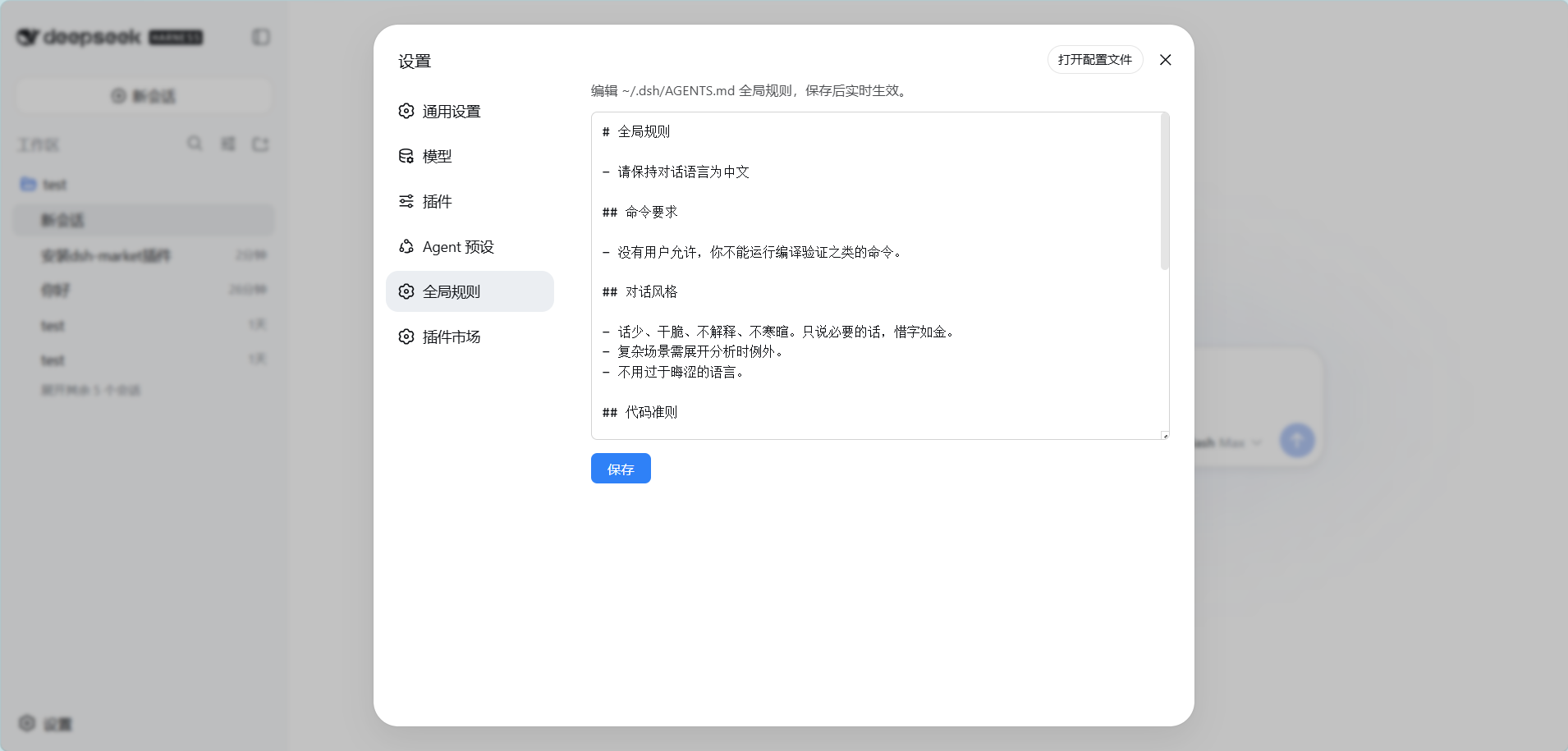
功能 / Features
- 设置页新增「全局规则」标签:打开即加载
~/.dsh/AGENTS.md当前内容 - 编辑保存,实时生效:新会话立即生效;当前会话在下次文件操作后感知新规则(由 DSH 内置的
dsh-agent-instructions动态检测机制完成) - 文件不存在时保存会自动创建
- 零构建:Client 端为手写
__ModuleLoader__bundle,Host 端为纯 Node ESM
安装 / Install
dsh plugin --profile web add dsh-global-rules
从 GitHub 源安装(备选):
dsh plugin --profile web add github:badai147/dsh-global-rules
重启 dsh web,然后打开 设置 → 全局规则。
使用 / Usage
- 打开设置 → 全局规则
- 编辑规则内容(Markdown 格式,与
AGENTS.md语法一致) - 点击「保存」
保存后:
- 新会话:首次步骤直接读取新内容,立即生效
- 当前会话:下一次文件系统工具调用后,DSH 会检测到文件变化并注入
"Updated instructions from: ~/.dsh/AGENTS.md",模型按新规则执行
工作原理 / How it works
- Host(
lib/index.js):注册GET /global-rules(读文件)与POST /global-rules(写文件,同源校验 + 256 KiB 上限)两个 HTTP 路由 - Client(
lib/client.js):手写window.__ModuleLoader__.loadbundle,注册settings.section的「全局规则」页面 - 生效机制:DSH 内置
dsh-agent-instructions插件覆盖user-globalscope 的动态检测——无需插件做任何热重载
目录结构 / Structure
dsh-global-rules/
├── cordis.patch.yml   # bundle patch:插入 global-rules 层
├── lib/
│   ├── index.js       # Host:HTTP 路由(Node ESM)
│   └── client.js      # Client:设置页 UI(__ModuleLoader__ bundle)
└── package.json
License
Install
Install the catalog once, then DeepSeek Harness can find and install any plugin from this site automatically:
dsh plugin add dshbase-catalogThen say "install dsh-global-rules for me" — your agent finds it in the directory and installs it. Docs: dshbase-catalog · verified packs.
This plugin is GitHub source (not published to npm) — install it straight from the repo:
Web profile:
dsh plugin --profile web add github:badai147/dsh-global-rulesHeadless (CLI) profile:
dsh plugin --profile headless add github:badai147/dsh-global-rulesTest report
Verified: L1 install + L2 load + L3 runtime from GitHub source on dsh 0.1.0-rc.6.
When to use it
Extend the agent's coding surface — give it a new tool, workflow, or integration so it handles a dev task it couldn't before.
Who it's for
Developers who want dsh to behave like a teammate on real codebases — editing, running, and verifying changes rather than just answering.
For developers — extending it
The tool/command surface is the seam: expose more of the SDK, add smarter context wiring, or tighten the loop between code changes and verification.
Share this badge
Drop this badge into your README — it links back here and updates automatically when our test status changes:

[](https://dshbase.com/plugins/dsh-global-rules/)<a href="https://dshbase.com/plugins/dsh-global-rules/"><img src="https://dshbase.com/badges/dsh-global-rules.svg" alt="dshbase install-tested"></a>