
Plugin directory / Developer / dsh-image-theme
dsh-image-theme
Verified · install-tested on dsh Carpon39038
What it does
Warp-inspired image-to-theme plugin for DeepSeek Harness: upload a background, extract a palette, and apply a glass UI.
Works — verified, early-stage project
Warp-inspired image-to-theme plugin for DeepSeek Harness: upload a background, extract a palette, and apply a glass UI. It installs cleanly and boots without issues in our testing. It's early-stage but functional.
“Verified” means our automated CI actually ran dsh plugin add in a clean profile and it booted — nothing more. Feature descriptions and version compatibility are the author’s claims. This is not a security audit and not an endorsement of third-party code.
README
DSH Image Theme
A Warp-inspired image theme plugin for the DeepSeek Harness web client.
Upload or drag in a picture and the plugin will:
- extract five dominant colors in CIE Lab space;
- turn the darkest image color into translucent glass surfaces;
- let you choose one extracted color as the DSH accent;
- correct text and accent contrast before applying theme tokens;
- use the original image as the full-window background.
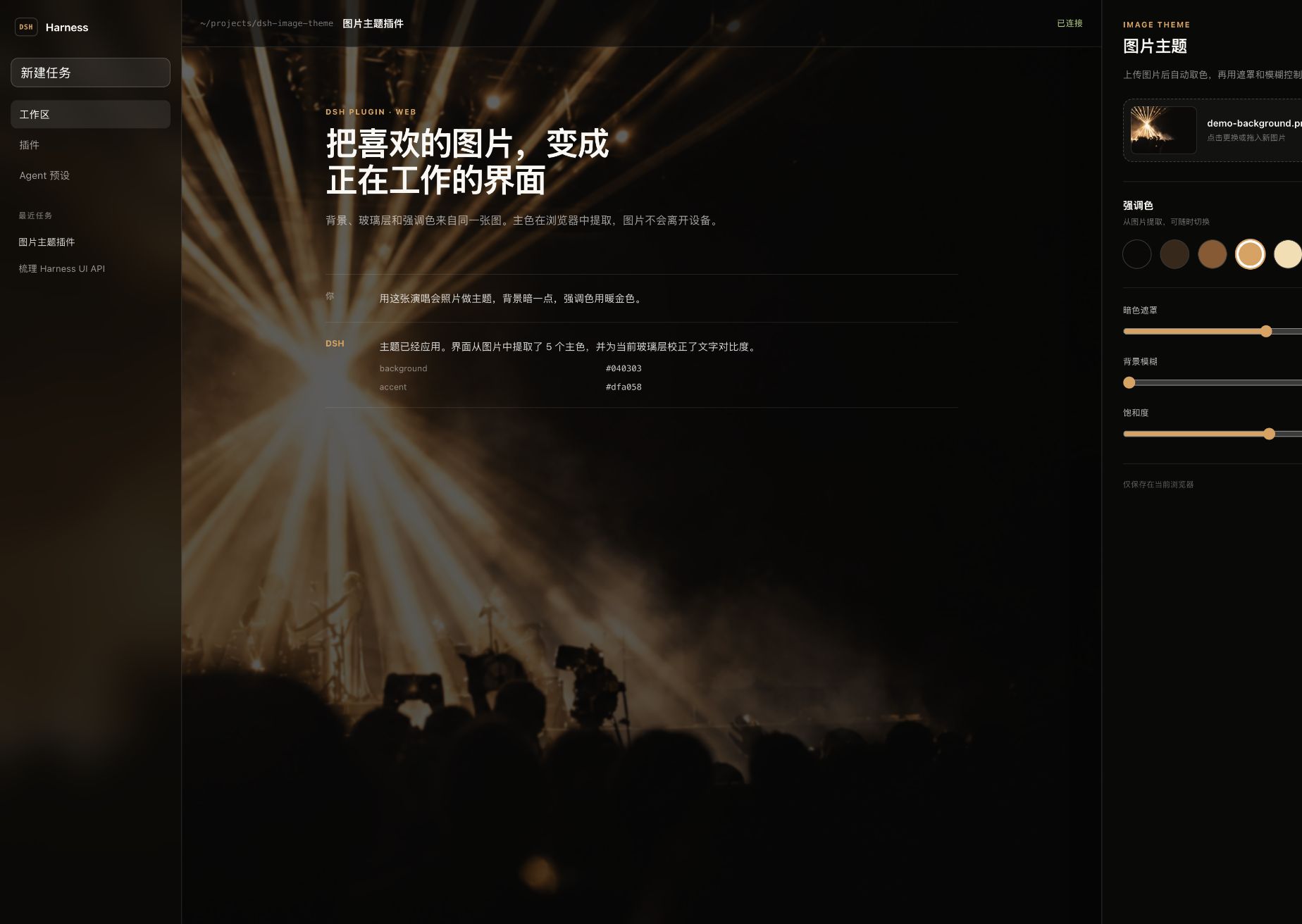
Features
- Full-bleed background image with adjustable dark overlay, blur, saturation, and position.
- Deterministic five-color Lab k-means palette extraction in the browser.
- Live DSH token overrides through
ctx.theme.overrideTokens()锟斤拷no hard-coded edits to the host UI. - A dedicated Settings 锟斤拷 Image theme section with drag-and-drop upload and palette controls.
- Browser-local privacy: the image is stored as a Blob in IndexedDB and settings are stored in
localStorage; nothing is uploaded. - The plugin can be disabled without losing the selected image or settings.
- Responsive settings UI and reduced-motion support.
Install
The repository includes prebuilt lib/ artifacts, so a DSH profile can install it directly from GitHub:
dsh plugin --profile <profile-name> add github:Carpon39038/dsh-image-theme
Restart or refresh the DSH web client, then open Settings 锟斤拷 Image theme.
To install a local checkout while developing:
pnpm install
pnpm build
dsh plugin --profile <profile-name> add link:$PWD
The included .npmrc disables automatic peer installation. This is intentional: DSH supplies the client runtime and UI services, while the current public RC packages still reference workspace-only transitive packages that are not published to npm.
How it works
Palette extraction
The browser downsamples the image to at most 96 锟斤拷 96, samples at most 6,000 opaque pixels, converts RGB to CIE Lab, and runs deterministic k-means with farthest-point seeding. Five clusters are sorted by population.
This follows the same broad model as Warp's open-source theme creator, which uses Lab-space Hamerly k-means with k = 5. This implementation is written independently for the browser and uses deterministic seeding so the same pixels always produce the same palette.
Theme mapping
The plugin keeps the image, the dark surface color, the foreground, and the accent as separate roles:
image 锟斤拷 five-color palette 锟斤拷 darkest color 锟斤拷 near-black glass surfaces
                           锟終 selected color 锟斤拷 contrast-safe accent
It overrides DSH's public alias tokens, including:
--dsw-alias-bg-base--dsw-alias-bg-layer-1--dsw-alias-bg-layer-2--dsw-alias-bg-overlay--dsw-alias-border-l1/--dsw-alias-border-l2--dsw-alias-brand-primary--dsw-alias-label-primary/--dsw-alias-label-secondary--dsw-specific-sidebar-fill
Every override contains both light and dark values, as required by the DSH theme runtime.
Background rendering
A plugin-owned fixed backdrop sits behind the DSH root. The application tokens stay translucent, allowing the image to show through while the overlay and surface opacity protect readability. Unloading or disabling the plugin disposes the token layer and removes the backdrop cleanly.
Development
Requirements: Node.js 22+ and pnpm 10+.
pnpm install
pnpm typecheck
pnpm test
pnpm build
The interactive design preview is in playground/:
cd playground
npm install
npm run dev
The preview imports the same palette and role-mapping modules used by the real plugin. Its generated concert background is a clean demonstration asset, not a copy of Warp UI.
Project layout
src/client/palette.ts          Lab conversion and deterministic k-means
src/client/theme.ts            DSH token and contrast mapping
src/client/controller.ts       lifecycle, persistence, backdrop, token disposal
src/client/storage.ts          IndexedDB image + localStorage settings
src/client/ImageThemeSection.tsx
                               DSH settings page
playground/                    runnable interactive visual preview
Compatibility
The initial version targets the DSH web plugin APIs inspected at deepseek-harness 0.1.0-rc.5. DSH is still moving quickly; check the theme and settings-slot contracts when upgrading to a newer release.
The plugin is web-only. Images and preferences are local to each browser profile and are not synchronized between devices.
Credits
- DeepSeek Harness for the plugin, settings-slot, and theme-token APIs.
- Warp for the open-source theme-creator reference and the separation of image, background, foreground, accent, and opacity roles.
License
Install
Install the catalog once, then DeepSeek Harness can find and install any plugin from this site automatically:
dsh plugin add dshbase-catalogThen say "install dsh-image-theme for me" — your agent finds it in the directory and installs it. Docs: dshbase-catalog · verified packs.
This plugin is GitHub source (not published to npm) — install it straight from the repo:
Web profile:
dsh plugin --profile web add github:Carpon39038/dsh-image-themeHeadless (CLI) profile:
dsh plugin --profile headless add github:Carpon39038/dsh-image-themeTest report
Verified: L1 install + L2 load + L3 runtime from GitHub source on dsh 0.1.0-rc.6.
When to use it
Extend the agent's coding surface — give it a new tool, workflow, or integration so it handles a dev task it couldn't before.
Who it's for
Developers who want dsh to behave like a teammate on real codebases — editing, running, and verifying changes rather than just answering.
For developers — extending it
The tool/command surface is the seam: expose more of the SDK, add smarter context wiring, or tighten the loop between code changes and verification.
Share this badge
Drop this badge into your README — it links back here and updates automatically when our test status changes:

[](https://dshbase.com/plugins/dsh-image-theme/)<a href="https://dshbase.com/plugins/dsh-image-theme/"><img src="https://dshbase.com/badges/dsh-image-theme.svg" alt="dshbase install-tested"></a>