
Plugin directory / UI & Skins / dsh-inkscreen-theme
dsh-inkscreen-theme
Verified · install-tested on dsh Jimmyzwang-cloud
What it does
Ink-and-paper Apple-glass theme for DeepSeek Harness (dsh) web client, with a handwritten jimmy sidebar brand
Works — verified, early-stage project
Ink-and-paper Apple-glass theme for DeepSeek Harness (dsh) web client, with a handwritten jimmy sidebar brand It installs cleanly and boots without issues in our testing. It's early-stage but functional.
“Verified” means our automated CI actually ran dsh plugin add in a clean profile and it booted — nothing more. Feature descriptions and version compatibility are the author’s claims. This is not a security audit and not an endorsement of third-party code.
README
dsh-inkscreen-theme
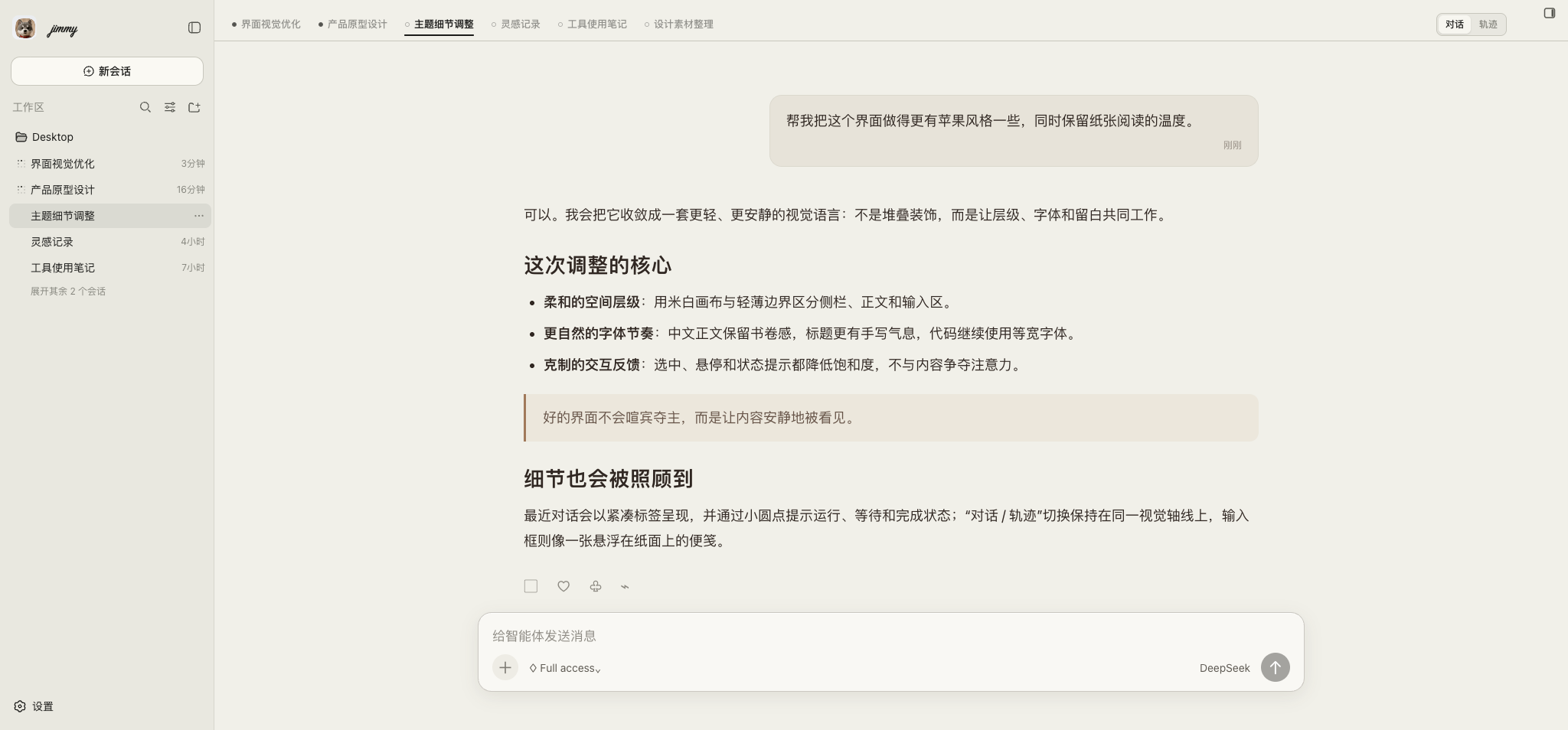
An ink-and-paper, Apple-glass theme for the DeepSeek Harness web client (dsh web).
It restyles the chat shell with soft frosted-glass panels, warm cream/ink colors,
an editorial Kai/handwritten voice for conversation text, and crisp monospace
code. It also replaces the sidebar brand mark with a handwritten "jimmy"
wordmark next to a small dog avatar. The visual system intentionally focuses on
one polished light ink-and-paper appearance.
Install
dsh plugin add dsh-inkscreen-theme
or add it to your profile's package.json as a file:/npm dependency and list
it in dsh.profile.bundles, then restart dsh web (this plugin changes package
identity/CSS injected at boot, so a hot-reload is not enough).
What it does
- Injects a
<style>block with e-ink/Apple-glass CSS variables and rules for
the sidebar, dialogs, composer, code blocks, and scrollbars. - Keeps a consistent light ink-and-paper appearance with warm accents and
restrained Apple-style translucency. - Gives Chinese conversation text a readable Kai-style editorial voice,
expressive handwritten headings, and preserves monospace for code. - Adds a compact recent-conversation tab rail above the chat, with live status
dots for running, waiting-for-input, completed, and idle sessions; clicking a
tab switches directly to that conversation. - Places the built-in Conversation / Trace view switch on the same header
row, styled as a compact segmented control for quick context switching. - Watches the sidebar brand element and replaces its content with a
handwritten wordmark (Caveatwebfont, falling back to a system cursive
font) plus a small rounded-square dog avatar image.
Personalization note
The wordmark text ("jimmy") and the avatar image are hard-coded — this is a
personal theme, not a generic template. If you want your own name/avatar,
fork the repo and edit the name/DOG_LOGO constants near the top oflib/client.js.
License
MIT — see LICENSE.
Install
Install the catalog once, then DeepSeek Harness can find and install any plugin from this site automatically:
dsh plugin add dshbase-catalogThen say "install dsh-inkscreen-theme for me" — your agent finds it in the directory and installs it. Docs: dshbase-catalog · verified packs.
This plugin is GitHub source (not published to npm) — install it straight from the repo:
Web profile:
dsh plugin --profile web add github:Jimmyzwang-cloud/dsh-inkscreen-themeHeadless (CLI) profile:
dsh plugin --profile headless add github:Jimmyzwang-cloud/dsh-inkscreen-themeTest report
Verified: L1 install + L2 load + L3 runtime from GitHub source on dsh 0.1.0-rc.6.
Share this badge
Drop this badge into your README — it links back here and updates automatically when our test status changes:

[](https://dshbase.com/plugins/dsh-inkscreen-theme/)<a href="https://dshbase.com/plugins/dsh-inkscreen-theme/"><img src="https://dshbase.com/badges/dsh-inkscreen-theme.svg" alt="dshbase install-tested"></a>