
Plugin directory / Developer / dsh-jenkins
dsh-jenkins
Verified · install-tested on dsh jsoncode
What it does
可以在DeepSeek Harness中,快捷配置和管理多台 Jenkins 服务器与 Token, 支持设置页配置、模型工具触发构建、工作区级「执行 Jenkins Job」入口。无硬编码路径、 全量 TypeScript、可发布到 npm / GitHub。界面文案中英双语(跟随主界面语言)。
Works — verified, early-stage project
可以在DeepSeek Harness中,快捷配置和管理多台 Jenkins 服务器与 Token, 支持设置页配置、模型工具触发构建、工作区级「执行 Jenkins Job」入口。无硬编码路径、 全量 TypeScript、可发布到 npm / GitHub。界面文案中英双语(跟随主界面语言)。 It installs cleanly and boots without issues in our testing. It's early-stage but functional.
“Verified” means our automated CI actually ran dsh plugin add in a clean profile and it booted — nothing more. Feature descriptions and version compatibility are the author’s claims. This is not a security audit and not an endorsement of third-party code.
README
dsh-jenkins
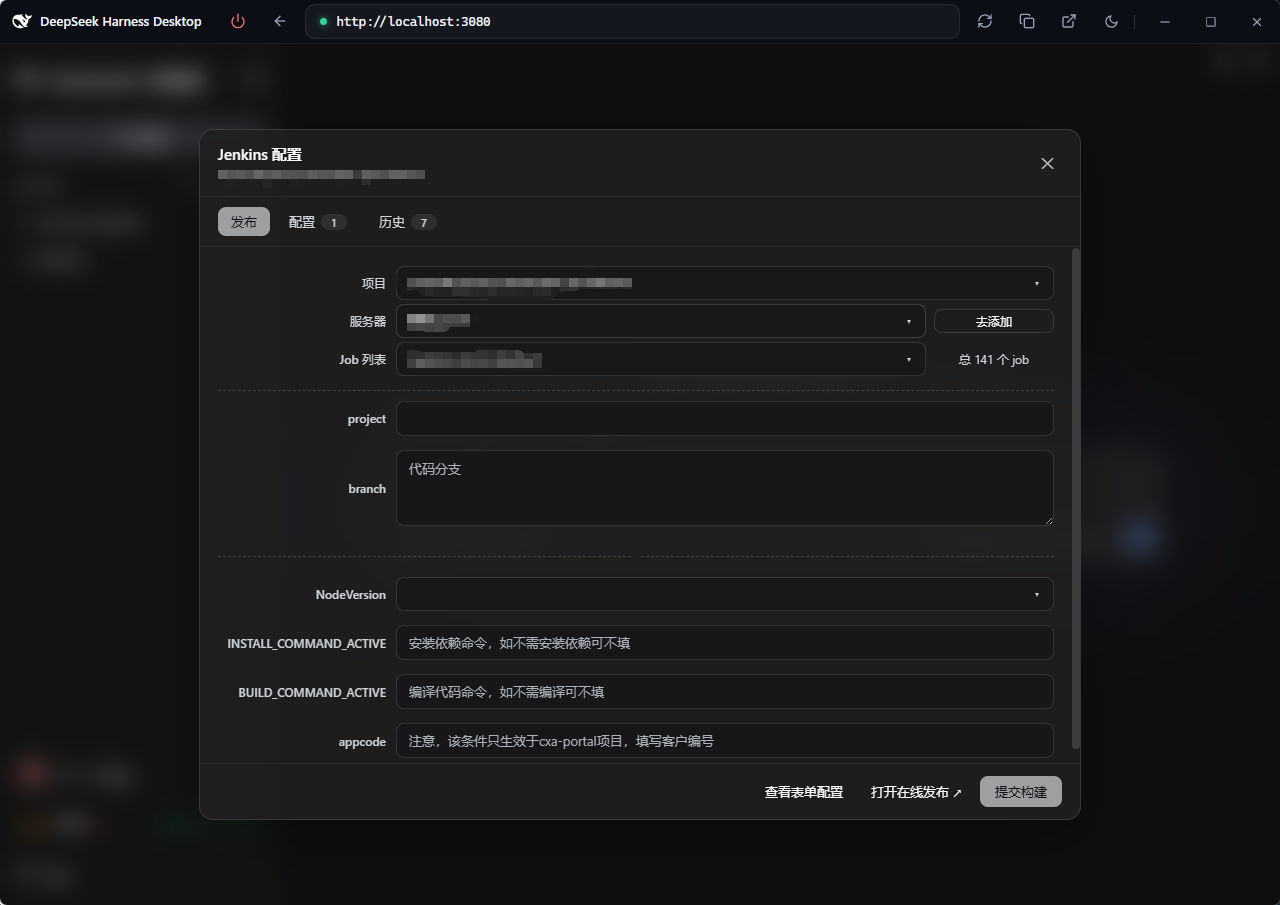
dsh-jenkins is a Jenkins management plugin built on the DeepSeek Harness (DSH)
host, centralizing multiple servers and jobs for fast build publishing.
- Multi-server / multi-job management — configure and manage multiple Jenkins
servers and jobs in one place - One-click publishing — trigger parameterized builds, track
queue → building → result in real time - Logs & operations — view build logs, stop or cancel builds at any time
- Bilingual UI — follows the host interface language (中文 / English)
Available from the Settings page, a per-workspace entry, and model tools.
Preview
Screenshots of the Settings page, workspace entry and run/history modals: see preview.md.
Features
- Settings → Jenkins Config page (
settings.section): add / edit / delete
multiple servers (URL, username, Token), test connections, skip TLS verification.
Only Server URL and Token are required (username defaults toadmin). - Workspace entry (
sidebar.footer.action): a footer group with the Jenkins
logo button (opens the Run Jenkins Job modal) and a History button (clock
icon, publish history of the last 50 runs across all workspaces, filterable by
workspace — defaults to All) appears when the current workspace root contains adsh-jenkins.{json,js,ts}config file.
The modal has searchable dropdowns for server / job, a parameter form
pre-filled from the config, build triggering, and status polling (queued →
building → result, with a 10-minute timeout). The server dropdown shows the
intersection of the servers referenced by the config and the servers configured
in the plugin; selecting a server auto-selects the configured job and echoes its
parameters. The last submitted server / job / parameters are remembered per
workspace and auto-echoed the next time the modal opens (browserlocalStorage).
A missing or invalid config file is treated as "not configured" — no entry is shown. - Model tools (docs/develop/basic/tool):
dsh_jenkins_build,dsh_jenkins_status. - Config (docs/develop/basic/config): Schemastery
Config+ a settings namespace
that persists UI edits to$DSH_HOME/settings.yaml(server list stored as JSON text
to avoid frozen-array pitfalls). - Packaging (docs/develop/basic/publish):
dsh.bundle+dsh.client(web) manifests.
Structure
├── src/host/*.ts       # Host half source: index.ts (entry), jenkins.ts (curl core), ops.ts (op dispatch), workspace-config.ts, types.ts
├── src/client/*.tsx    # Browser half source (React TSX components): Settings page, footer entry, run-job modal, history modal
├── lib/index.js        # Host half build artifact (tsdown, ESM), committed for git installs
├── lib/client.js       # Browser half build artifact (tsdown → __ModuleLoader__ factory), committed
├── lib/types/          # Type declarations (generated by tsc -b)
├── scripts/            # verify-client.mjs (host-seed simulation check)
├── tsdown.config.ts    # tsdown build config (node half + client bundle banner wrapper)
├── tsconfig.json       # solution: references tsconfig.host.json / tsconfig.client.json
├── cordis.patch.yml    # Bundle patch: plugin row referenced by package name (no paths)
├── package.json        # dsh.bundle + dsh.client(web) manifests + peerDependencies
├── README.md           # This file (English)
├── README.zh.md        # 中文文档
└── preview.md          # Screenshot preview (references assets/preview/*.png)
Workspace config file (dsh-jenkins.json / .js / .ts)
Place it in the workspace root. It is an array; each element is one deploy
target (job + server + environments params). .json is parsed directly; .js / .ts
are evaluated with node (CJS module.exports or ESM export default):
[
  {
    "job": "build-app",
    "server": "http://uat.example.com",
    "environments": { "BRANCH": "main", "DEPLOY": false }
  },
  {
    "job": "build-app",
    "server": "http://prod.example.com",
    "environments": { "BRANCH": "release-1.0", "DEPLOY": true }
  }
]
- Every element requires
job(Jenkins job path, e.g.build-apporfolder/build-app) andserver(the server name / id / URL as configured in
Settings → Jenkins). environments(optional): the parameter map for this target (booleans render as
checkboxes, everything else as text fields).- The modal's server dropdown shows the intersection of the servers referenced
by the config and the servers configured in the plugin; selecting a server
auto-selects the matchingjob(left empty when absent from the Jenkins job list,
letting the user choose) and echoes its parameters. If the intersection is empty,
the dropdown degrades to all servers with a hint. A missing or invalid config is
treated as "not configured" — the entry is hidden.
Installation
# Local development
dsh plugin --profile web add ./dsh-jenkins

# Published: npm / tarball / GitHub
dsh plugin --profile web add dsh-jenkins
dsh plugin --profile web add ./dsh-jenkins-0.1.4.tgz
dsh plugin --profile web add github:you/dsh-jenkins#<sha>

dsh --profile web --dump-config   # verify the layer
dsh --profile web                 # start (restart required for the host half to reload)
Local development dependencies: the host loads
index.jsthrough native Node ESM, so@deepseek-ai/schemastery,@deepseek-ai/dsh-toolsand@deepseek-ai/dsh-settingsmust be
resolvable from the plugin directory (node_modulesis gitignored). Either:
- run
pnpm installinside the plugin directory (these three are declared as
devDependencies); or- junction the host's flat fallback copies, e.g.:
New-Item -ItemType Directory "$PWD\node_modules\@deepseek-ai" -Force
foreach ($p in 'schemastery','dsh-tools','dsh-settings') {
  New-Item -ItemType Junction "$PWD\node_modules\@deepseek-ai\$p" -Target "$env:DSH_HOME\profiles\node_modules\@deepseek-ai\$p"
}
Static server defaults can also be set in the profile's cordis.patch.yml:
- insert:
    - id: dsh-jenkins
      name: dsh-jenkins
      config:
        servers:
          - id: prod
            name: 生产环境
            baseUrl: https://jenkins.example.com
            username: admin
            token: <API Token or password>
            insecure: false
Publish
The build toolchain is tsc + tsdown (same as @lemcae/dsh-balance and other
similar plugins — no vite): tsc -b type-checks and emits declarations, whiletsdown (Rolldown core) bundles the host half (lib/index.js, ESM) and the
browser half (lib/client.js, single-file CJS __ModuleLoader__ factory with
auto banner wrapping). Dependency management uses pnpm 10 (Node 26; thepnpm-lock.yaml is committed and CI installs with --frozen-lockfile):
pnpm install     # install per pnpm-lock.yaml
pnpm run build   # clean lib → tsc -b (types + declarations) → tsdown (both halves)
pnpm run verify  # simulate the host module table to check lib/client.js (optional)
pnpm publish     # or pnpm pack / git push origin main (lib/ is committed; git installs need no build)
Automated publishing (GitHub Actions)
Pushing a v* tag (pnpm run release bumps the patch version, rebuilds the
artifact, and tags it automatically) triggers.github/workflows/publish.yml:
- release job: Setup Node 26 →
pnpm install --frozen-lockfile→pnpm run check(tsc -b) →pnpm run build(tsc -b && tsdown) →pnpm pack→ creates a GitHub Release (auto-generated changelog, tarball
attached); - publish-npm job: publishes to npm — requires the
NPM_TOKENrepository
secret (Settings → Secrets and variables → Actions); fails fast with a hint
when it is missing.
Development
Requirements: Node ≥ 26 + pnpm 10 (the packageManager field inpackage.json pins the pnpm version).
pnpm install           # devDependencies: typescript, tsdown, @types/react, @deepseek-ai/* type packages, etc.
pnpm run check         # whole-tree TypeScript type check (tsc -b)
pnpm run build         # rebuild both halves after editing source (tsc -b && tsdown)
pnpm run watch         # tsdown watch mode (rebuild on src/client changes)
pnpm run verify        # simulate the host seed table to check lib/client.js loads
- Host half lives in
src/host/; browser half insrc/client/(build entrysrc/client/index.ts, exporting{ name, inject, apply }directly); - The
window.__ModuleLoader__.loadfactory wrapper oflib/client.jsis
generated by tsdown's banner/intro/footer options (no hand-written wrap
script); - External dependencies in the artifact (
react,@deepseek-ai/dsh-client-ui-primitives, ...) stay external and resolve from
the host module table (seed) at runtime.
Implementation notes
- Jenkins REST via
curl.exethrough the hostshellservice: Basic auth + CSRF crumb--data-binary @-(form body over stdin, UTF-8 without BOM);-D -parses status
and theLocationheader.
- Browser ↔ host transport:
ctx.remote.commands.execute(sessionId, '/dsh-jenkins <json>'),
host errors carry acodethat the client localizes (fallback to the raw message). - Peer dependencies (
@deepseek-ai/cordis,dsh-tools,schemastery,dsh-settings,dsh-commands,dsh-session,dsh-api-remotes, client runtime/ui-slots/ui-settings/
cordis-client-runner,react) are resolved by the host at install time. - The official
deepseek-harnessproject is not modified; all features use existing
slots (sidebar.footer.action,settings.section,shell.overlay) and the command
transport.
Install
Install the catalog once, then DeepSeek Harness can find and install any plugin from this site automatically:
dsh plugin add dshbase-catalogThen say "install dsh-jenkins for me" — your agent finds it in the directory and installs it. Docs: dshbase-catalog · verified packs.
This plugin is GitHub source (not published to npm) — install it straight from the repo:
Web profile:
dsh plugin --profile web add github:jsoncode/dsh-jenkinsHeadless (CLI) profile:
dsh plugin --profile headless add github:jsoncode/dsh-jenkinsTest report
Verified: L1 install + L2 load + L3 runtime from GitHub source on dsh 0.1.0-rc.6.
Share this badge
Drop this badge into your README — it links back here and updates automatically when our test status changes:

[](https://dshbase.com/plugins/dsh-jenkins/)<a href="https://dshbase.com/plugins/dsh-jenkins/"><img src="https://dshbase.com/badges/dsh-jenkins.svg" alt="dshbase install-tested"></a>