
Plugin directory / Developer / dsh-mermaid-image-preview
dsh-mermaid-image-preview
Verified · install-tested on dsh baconbao
What it does
A DeepSeek Harness Plugin for Previewing Mermaid Diagram by Images in Chat Sessions
Works — verified, early-stage project
A DeepSeek Harness Plugin for Previewing Mermaid Diagram by Images in Chat Sessions It installs cleanly and boots without issues in our testing. It's early-stage but functional.
“Verified” means our automated CI actually ran dsh plugin add in a clean profile and it booted — nothing more. Feature descriptions and version compatibility are the author’s claims. This is not a security audit and not an endorsement of third-party code.
README
dsh-mermaid-image-preview




A DeepSeek Harness Plugin for Previewing Mermaid Diagram Images
Preview mermaid syntax as images via local rendering in DSH Web when the chat message contains a mermaid fenced code block (```mermaid or ```mmd ).
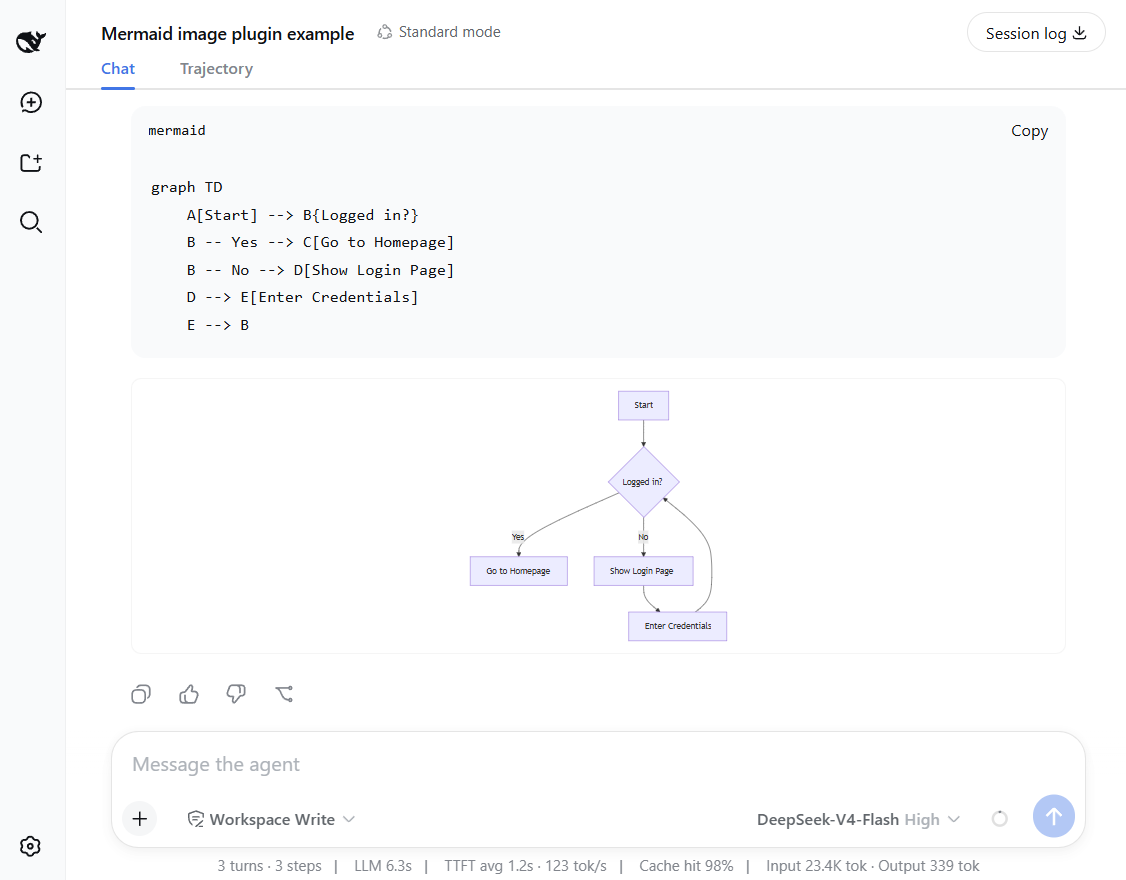
Features and how it works
- Preview mermaid diagrams by rendering images directly!
- Local renderer first! If it fails, it can fall back to an external or self-hosted rendering engine by configuring a fallback server.
- Setting card: you can adjust runtime settings in the UI - no restart needed.
- Mount point:
conversation.chat.turnTail(chain slot, additive - never
shadows shipped UI). - Thumbnail display: the diagram renders as a thumbnail; click to enlarge in place, click again to shrink back (same element toggles, no popup).
- Light/dark themes follow the UI automatically.
Support diagram types
The plugin renders diagrams locally with a built-in renderer. It supports
14 diagram types out of the box.
Rendered locally: flowchart, sequenceDiagram, classDiagram, stateDiagram, erDiagram, pie, journey, gitGraph, requirementDiagram, timeline, quadrantChart, packet-beta, xychart-beta
Expand: gantt, mindmap, block-beta, sankey-beta, architecture-beta, zenuml, C4Context
[!NOTE]
You can enable the fallback to render expanded types — see Configuration below.
Installation
Installation from github
### latest release version
$ npx @deepseek-ai/dsh plugin --profile web add github:baconbao/dsh-mermaid-image-preview#latest

### specific version
$ npx @deepseek-ai/dsh plugin --profile web add github:baconbao/dsh-mermaid-image-preview#<VERSION_TAG|GIT_TAG>

### dev version
$ npx @deepseek-ai/dsh plugin --profile web add github:baconbao/dsh-mermaid-image-preview#dev
Installation from source code
$ git clone https://github.com/baconbao/dsh-mermaid-image-preview
$ cd dsh-mermaid-image-preview
$ pnpm install
$ dsh plugin --profile web add .
[!IMPORTANT]
Restart dsh web after installing.
Configuration
Change runtime settings on setting card
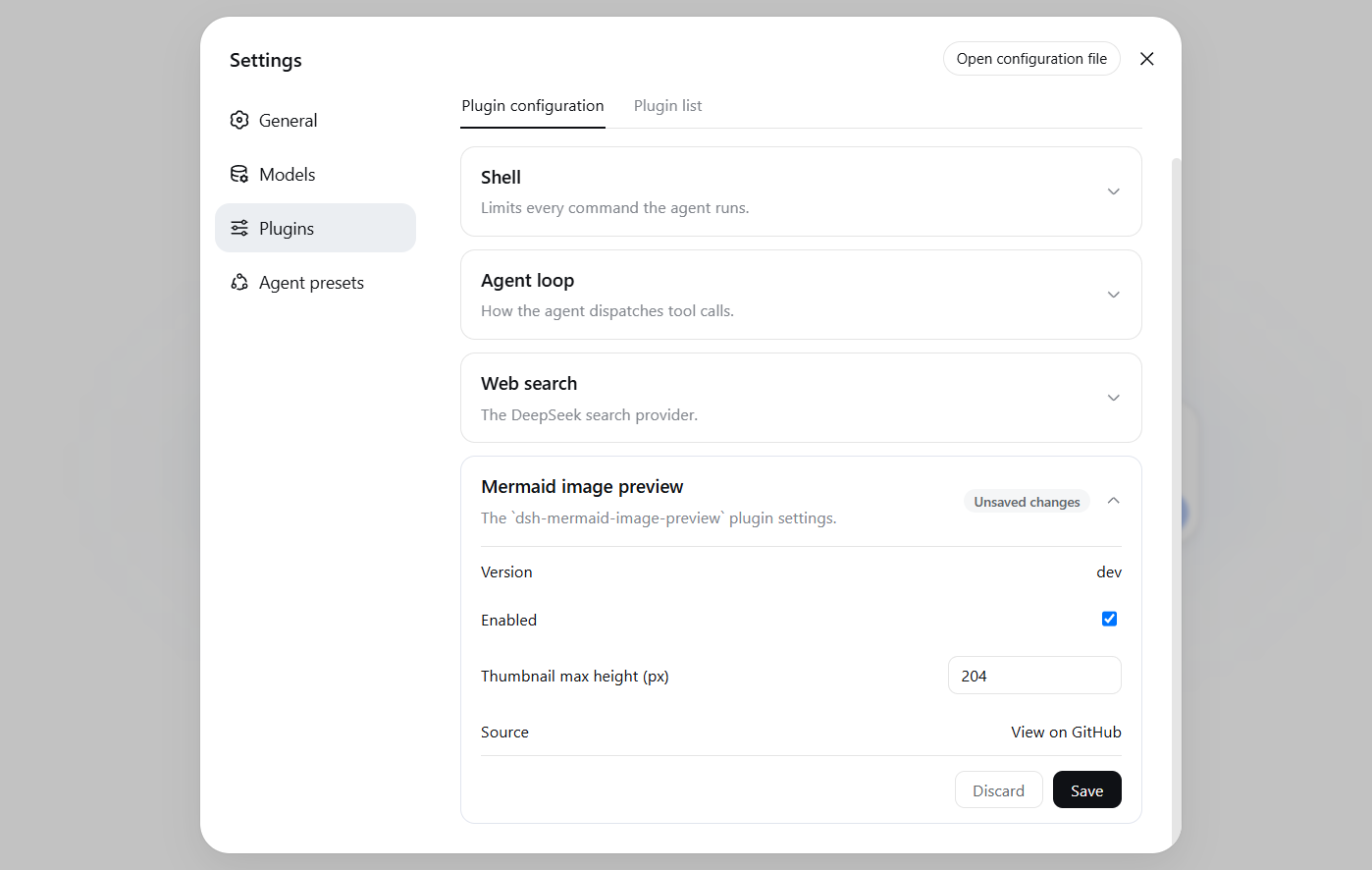
The Plugins settings page (Settings > Plugins) shows a Mermaid image preview card where
you can adjust plugin's runtime settings directly - no restart needed.
Values are stored in localStorage and applied immediately across all sessions.
Change render server by profile patch
Diagrams are rendered locally by default. To use your own render server or
enable the external fallback, edit the profile's cordis.patch.yml (e.g.~/.dsh/profiles/web/cordis.patch.yml):
- id: ui-dsh-mermaid-image-preview
  config:
    enableLocalRender: true
    fallbackRenderUrl: https://mermaid.ink
    enableFallback: false
enableLocalRender: render locally (defaulttrue). Setfalseto always use the fallback server (enableFallbackis ignored).fallbackRenderUrl: fallback render server (defaulthttps://mermaid.ink).enableFallback: use the fallback server when local rendering fails (defaultfalse).- Restart dsh web after changing these settings.
- To host your own fallback render server, see https://github.com/jihchi/mermaid.ink for the details.
Uninstallation
$ dsh plugin --profile web remove @baconbao/dsh-mermaid-image-preview
[!NOTE]
Since v0.2.0 the plugin/package id is changed fromdsh-mermaid-image-previewto@baconbao/dsh-mermaid-image-preview.
Test
Ask the agent to produce:
```mermaid
graph TD
  A[Start] --> B{Success?}
  B -->|Yes| C[Done]
  B -->|No| D[Retry]
```
Author
baconbao, vibe coding with deepseek ai
License
Install
Install the catalog once, then DeepSeek Harness can find and install any plugin from this site automatically:
dsh plugin add dshbase-catalogThen say "install dsh-mermaid-image-preview for me" — your agent finds it in the directory and installs it. Docs: dshbase-catalog · verified packs.
This plugin is GitHub source (not published to npm) — install it straight from the repo:
Web profile:
dsh plugin --profile web add github:baconbao/dsh-mermaid-image-previewHeadless (CLI) profile:
dsh plugin --profile headless add github:baconbao/dsh-mermaid-image-previewTest report
Verified: L1 install + L2 load + L3 runtime from GitHub source on dsh 0.1.0-rc.6.
Share this badge
Drop this badge into your README — it links back here and updates automatically when our test status changes:

[](https://dshbase.com/plugins/dsh-mermaid-image-preview/)<a href="https://dshbase.com/plugins/dsh-mermaid-image-preview/"><img src="https://dshbase.com/badges/dsh-mermaid-image-preview.svg" alt="dshbase install-tested"></a>