
Plugin directory / Developer / dsh-model-aliases
dsh-model-aliases
Verified · install-tested on dsh ZhangZiFei
What it does
为 DeepSeek Harness Web 提供持久化模型别名:将提供商、模型与推理等级绑定为易记名称,并通过输入框旁的单一选择器快速切换。
Works — verified, early-stage project
为 DeepSeek Harness Web 提供持久化模型别名:将提供商、模型与推理等级绑定为易记名称,并通过输入框旁的单一选择器快速切换。 It installs cleanly and boots without issues in our testing. It's early-stage but functional.
“Verified” means our automated CI actually ran dsh plugin add in a clean profile and it booted — nothing more. Feature descriptions and version compatibility are the author’s claims. This is not a security audit and not an endorsement of third-party code.
README
dsh-model-aliases
给模型配置起个好记的名字,然后在 DeepSeek Harness 会话里一键切换。
在输入框旁直接选择别名,不再分别寻找提供商、模型和推理等级:
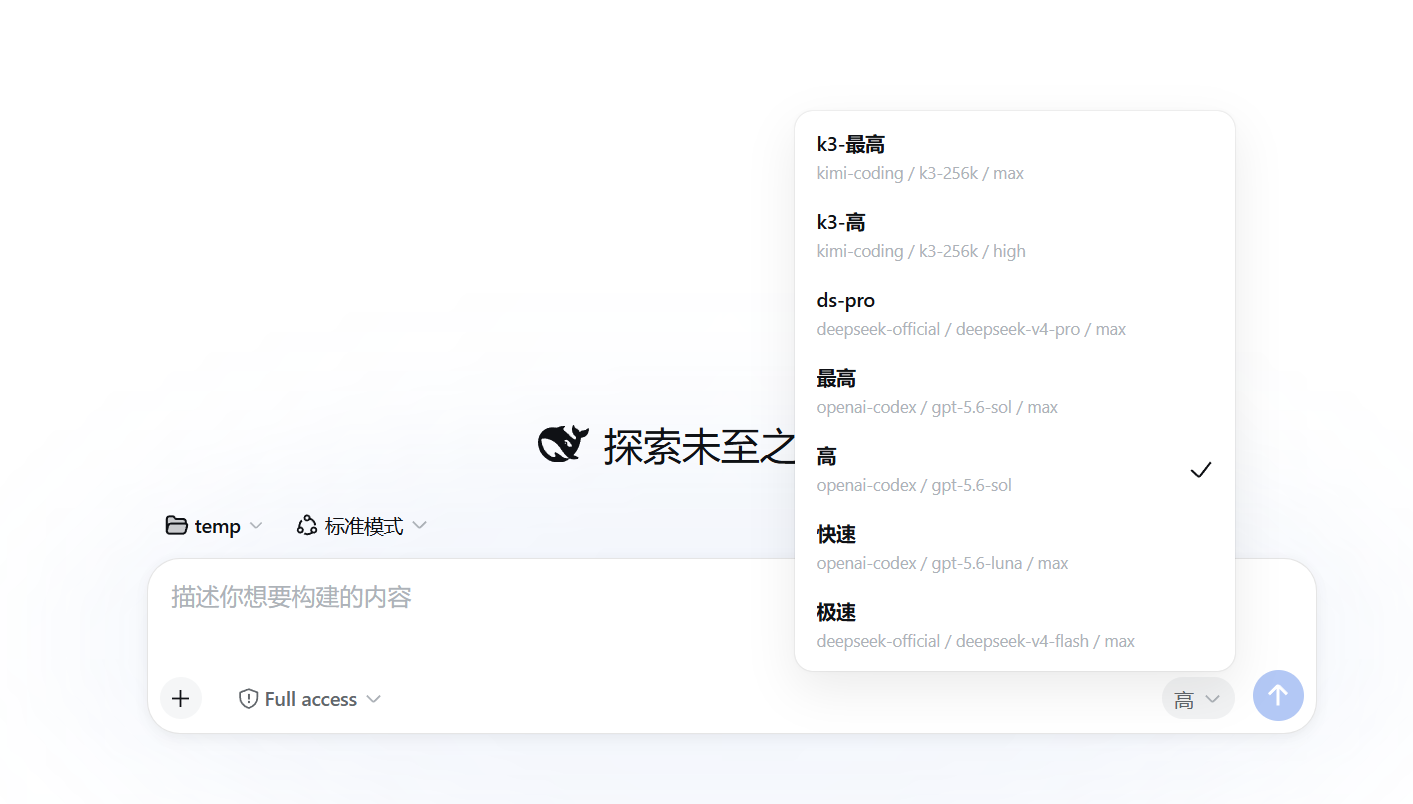
在 设置 → 模型别名 中集中编辑:
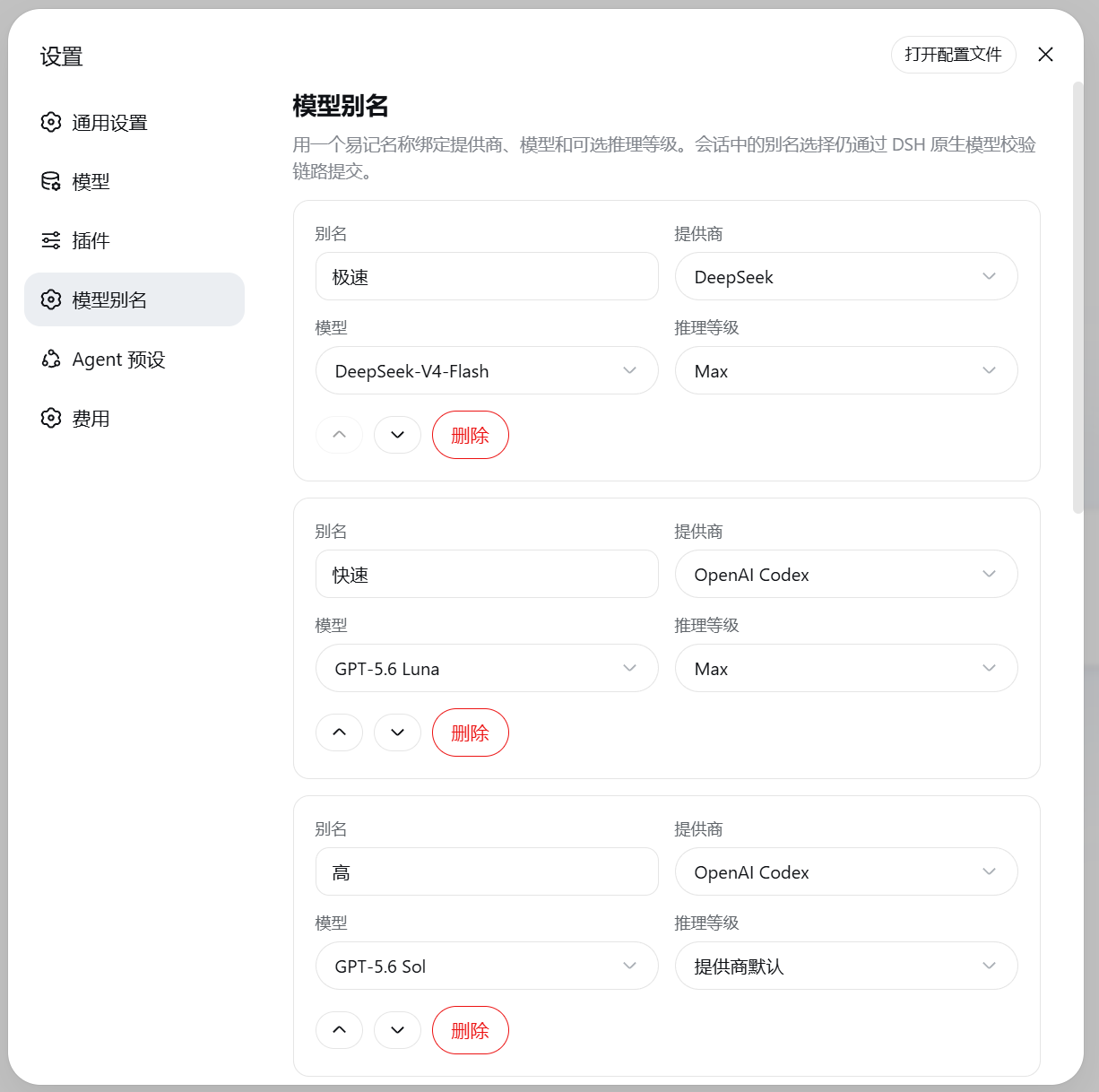
安装
dsh plugin --profile web add github:ZhangZiFei/dsh-model-aliases
重启当前 dsh web 进程并刷新页面,然后打开 设置 → 模型别名。
当前兼容目标为 DeepSeek Harness Web 0.1.0-rc.6。 插件已经声明 DSH Bundle,安装命令会自动把对应 Patch 加入 Web Profile,无需手工编辑 cordis.patch.yml。
你会得到
- 一个别名代表完整模型配置——名称同时绑定提供商、模型和可选推理等级
- 单一会话选择器——用别名选择器遮蔽默认“模型 / 推理等级”控件
- 原生模型选择链路——所有选择仍交给 DSH
ModelDirectory.select()校验和应用 - 持久化设置——配置写入 DSH 的
model-aliases设置命名空间,重启后继续生效 - 目录感知——直接选择当前会话可用的提供商、模型和模型声明的推理等级
- 安全保留失效配置——目录中暂时不存在的别名不会丢失,但会禁用并说明原因
- 准确显示当前状态——完整选择匹配别名时显示别名,否则显示“自定义”
- 遵守会话限制——锁定状态下禁止切换,被寻址的子代理会话不显示选择器
使用
- 打开 设置 → 模型别名。
- 添加别名,选择提供商、模型以及可选推理等级。
- 调整顺序并保存。
- 回到会话,在输入框右侧选择需要的别名。
推理等级选择“提供商默认”时,插件不会写入虚构的默认值,而是保留适配器或提供商的原始行为。
首次使用会写入预置别名;如果保存空列表,插件也会自动恢复预置值。预置路由不在当前模型目录时会保留,但不能被选择。
设置格式
配置保存在 DSH 设置文档的 model-aliases 分节:
model-aliases:
  aliases:
    - name: 日常
      provider: deepseek
      model: deepseek-chat
    - name: 深度推理
      provider: openai
      model: o3
      reasoningEffort: high
规则:
- 名称、提供商、模型以及存在的推理等级必须是首尾无空白的非空字符串
- 别名名称必须唯一
- 提供商、模型和推理等级组成的完整选择必须唯一
- 省略
reasoningEffort表示使用适配器或提供商默认行为
卸载
dsh plugin --profile web remove dsh-model-aliases
完成后重启当前 dsh web 进程并刷新页面。
开发
pnpm install
pnpm run build
pnpm test
pnpm pack --dry-run
构建产物位于 lib/:
lib/index.js:Host 插件入口lib/client.js:Web Client Bundlelib/types/:TypeScript 声明
反馈
发现问题或有功能建议,请提交到 GitHub Issues。
许可
MIT
Install
Install the catalog once, then DeepSeek Harness can find and install any plugin from this site automatically:
dsh plugin add dshbase-catalogThen say "install dsh-model-aliases for me" — your agent finds it in the directory and installs it. Docs: dshbase-catalog · verified packs.
This plugin is GitHub source (not published to npm) — install it straight from the repo:
Web profile:
dsh plugin --profile web add github:ZhangZiFei/dsh-model-aliasesHeadless (CLI) profile:
dsh plugin --profile headless add github:ZhangZiFei/dsh-model-aliasesTest report
Verified: L1 install + L2 load + L3 runtime from GitHub source on dsh 0.1.0-rc.6.
Share this badge
Drop this badge into your README — it links back here and updates automatically when our test status changes:

[](https://dshbase.com/plugins/dsh-model-aliases/)<a href="https://dshbase.com/plugins/dsh-model-aliases/"><img src="https://dshbase.com/badges/dsh-model-aliases.svg" alt="dshbase install-tested"></a>