
Plugin directory / UI & Skins / dsh-neu-theme
dsh-neu-theme
Verified · install-tested on dsh Lhy723
What it does
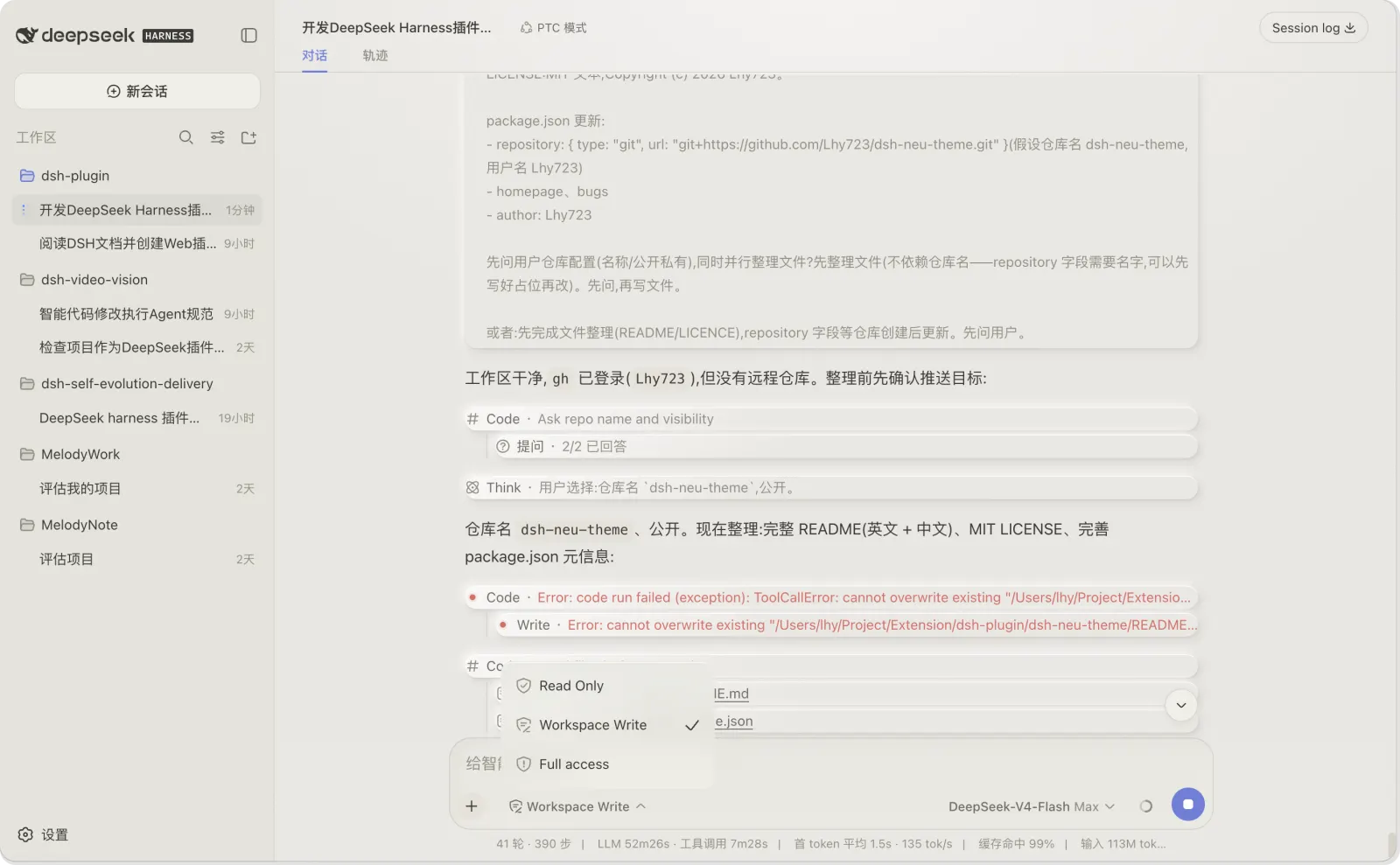
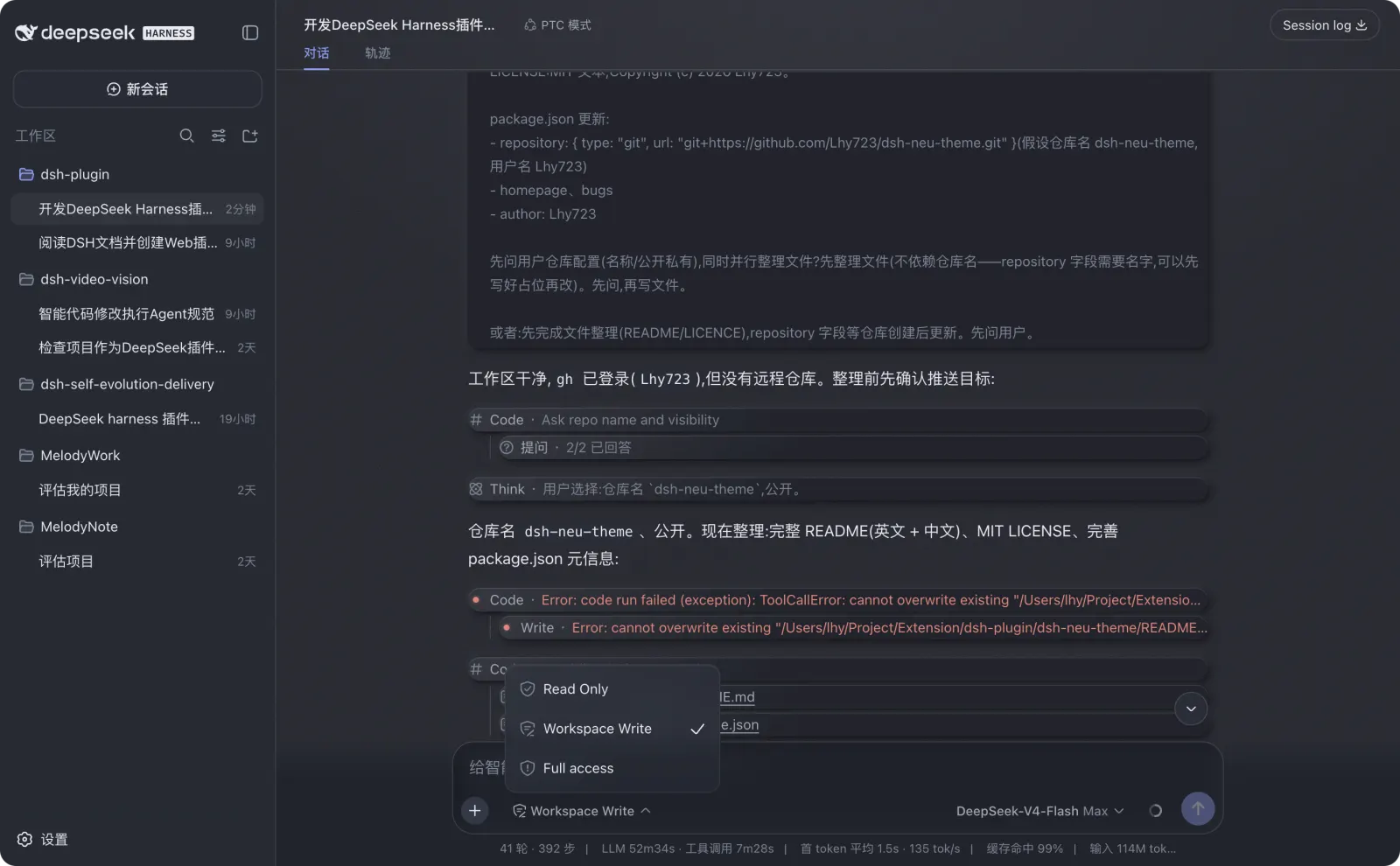
DeepSeek Harness Web 的轻拟物与磨砂玻璃主题插件,提供浅色/深色主题、环境光、材质纹理和细腻微交互。Neumorphism + glassmorphism theme plugin for DeepSeek Harness Web with warm light/dark palettes, ambient lighting, grain texture, and subtle micro-interactions.
Works — verified, early-stage project
DeepSeek Harness Web 的轻拟物与磨砂玻璃主题插件,提供浅色/深色主题、环境光、材质纹理和细腻微交互。Neumorphism + glassmorphism theme plugin for DeepSeek Harness Web with warm light/dark palettes, ambient lighting, grain texture, and subtle micro-interactions. It installs cleanly and boots without issues in our testing. It's early-stage but functional.
“Verified” means our automated CI actually ran dsh plugin add in a clean profile and it booted — nothing more. Feature descriptions and version compatibility are the author’s claims. This is not a security audit and not an endorsement of third-party code.
README

dsh-neu-theme


A Neumorphism (soft-UI) theme plugin for DeepSeek Harness web — gentle
raised-and-recessed surfaces in a cream light palette and an ink-dark
palette, complete with ambient lighting, material gloss, grain texture,
glassmorphism and micro-interactions.
中文说明见 README.zh.md。
Features
- Two themes registered into the built-in ThemeRuntime:
neu-light— cream warm-white canvas, soft slate-blue accentneu-dark— ink-blue night canvas, luminous indigo accent
- Lighting — ambient top glow + corner fill painted on the visible
surfaces (conversation canvas, sidebar, details column), not just body. - Material — three-layer shadows (contact + cast + top-edge highlight),
145° gloss gradients aligned to the light direction, code blocks with a
backlit inner wall. - Texture — fine grayscale grain (inline SVG feTurbulence) over the
canvas, sidebar, details column and code blocks. - Glassmorphism — the composer capsule and its popovers (permission
menu, model menu, context panel) share one frosted-glass language: the
card's blur lives on a::beforepseudo-layer so the nested popovers
keep their own realbackdrop-filterblur (the card is not their
backdrop root). - Micro-interactions — conversation nodes fade in on mount, bubbles
lift on hover, the composer recess deepens on hover/focus, tool rows and
reasoning rows strengthen on hover; all gated under@media (prefers-reduced-motion: no-preference). - Settings row — Settings → General gains a Neumorphism picker
(Default / Neu Light / Neu Dark), persisted through the Host settings
document. - Default is pristine — selecting Default (or having no saved skin)
leaves the document exactly as dsh ships it: no injected stylesheet, no
body attribute, native colors and shadows.
Preview
Neu Light
Neu Dark
Install
Install the published package into a dsh profile (works with the web
profile):
dsh plugin --profile web add dsh-neu-theme
# or install manually in the web profile:
cd ~/.dsh/profiles/web
pnpm add dsh-neu-theme
The package is also available on npm.
Then add "dsh-neu-theme" to dsh.profile.bundles in the profile'spackage.json, and restart dsh web.
Once running: Settings → General → Neumorphism theme → pick
Default / Neu Light / Neu Dark. The choice is stored in the Host settings
namespace dsh-neu-theme (normally ~/.dsh/settings.yaml); choose Default
to return to the built-in appearance.
The Host-backed settings path requires DSH Web Host 0.1.1-rc.2 or newer.
Remote browsers cannot access the loopback settings API, so their selection
remains process-local by design.
Develop
npm run build   # regenerates lib/client.js from src/client.tpl.js + themes/*.json
npm run check   # syntax-checks the built bundles
While dsh web runs with the HMR chain mounted, rebuildinglib/client.js is picked up by the polling watcher and hot-reloads only
this plugin's fiber.
Repository layout
dsh-neu-theme/
├── package.json          # dsh.bundle.patch + dsh.client manifest
├── cordis.patch.yml      # loader entry insert (id: neu-theme)
├── themes/               # neu-light.json / neu-dark.json — the palettes
├── src/
│   ├── index.js          # host half (no-op loader entry)
│   └── client.tpl.js     # browser half template (build injects themes)
├── scripts/build.mjs     # zero-dependency build
└── lib/                  # generated artifacts (gitignored)
License
MIT
Install
Install the catalog once, then DeepSeek Harness can find and install any plugin from this site automatically:
dsh plugin add dshbase-catalogThen say "install dsh-neu-theme for me" — your agent finds it in the directory and installs it. Docs: dshbase-catalog · verified packs.
This plugin is GitHub source (not published to npm) — install it straight from the repo:
Web profile:
dsh plugin --profile web add github:Lhy723/dsh-neu-themeHeadless (CLI) profile:
dsh plugin --profile headless add github:Lhy723/dsh-neu-themeTest report
Verified: L1 install + L2 load + L3 runtime from GitHub source on dsh 0.1.0-rc.6.
Share this badge
Drop this badge into your README — it links back here and updates automatically when our test status changes:

[](https://dshbase.com/plugins/dsh-neu-theme/)<a href="https://dshbase.com/plugins/dsh-neu-theme/"><img src="https://dshbase.com/badges/dsh-neu-theme.svg" alt="dshbase install-tested"></a>