
Plugin directory / Developer / dsh-plugin-install
dsh-plugin-install
Verified · install-tested on dsh qinyre
What it does
给 dsh 设置页加「安装」标签页,按包名安装任意第三方插件。
Works — verified, early-stage project
给 dsh 设置页加「安装」标签页,按包名安装任意第三方插件。 It installs cleanly and boots without issues in our testing. It's early-stage but functional.
“Verified” means our automated CI actually ran dsh plugin add in a clean profile and it booted — nothing more. Feature descriptions and version compatibility are the author’s claims. This is not a security audit and not an endorsement of third-party code.
README
dsh-plugin-install


在 dsh 设置页里安装任意第三方插件的「安装」标签页。输入包名——npm spec、github:user/repo 或本地路径——即可安装,不必开终端,也不必经过插件市场;市场没收录的插件同样能装。
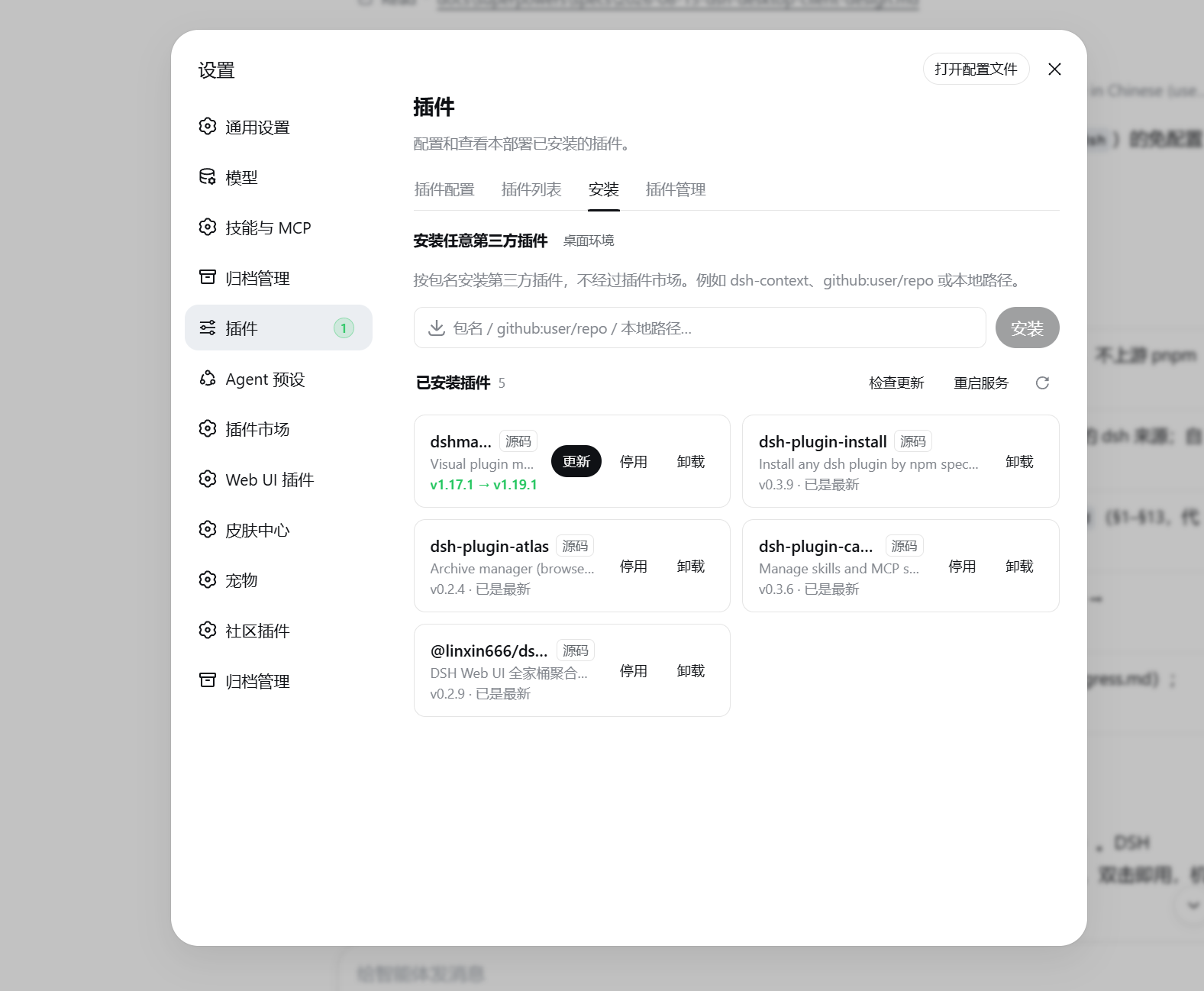
安装、卸载与更新走的都是 dsh plugin add / remove 这条 CLI 路径,与命令行完全一致,dsh.profile.bundles 的同步由 CLI 负责,不存在第二套状态。已安装列表可以一键检查更新:npm 安装的对照 registry 的 latest 版本号,github 安装的对照仓库 HEAD 提交,本地链接则如实标注、不做检查;发现新版后单插件就地更新,更新前还会核对方向——registry 的 latest 不高于已装版本时拒绝执行,绝不把更新变成降级。每次 add 与 remove 都附带 --config.minimum-release-age=0:pnpm 11 默认开启 24 小时发布冷静期,@latest 会被静默解析到窗口外的旧版本,发布当天点更新等于原地不动;它还会在每次操作前对整个 lockfile 做策略校验,只要里面有窗口内发布的条目(例如显式钉版安装带进来的传递依赖),安装与卸载会一并被 ERR_PNPM_MINIMUM_RELEASE_AGE_VIOLATION 拦死——界面上点名操作的包不受这层默认限制(旧版 pnpm 不认识该参数时自动去掉重试)。失败横幅现在也会带出 pnpm 打印在标准输出里的真实诊断,而不是只剩转发器的一句总结。更新完成后还会核对实际落地的版本号,与 registry latest 不一致时如实提示,而不是谎报成功。装好之后,纯客户端插件刷新页面即可生效;组合较复杂的插件会明确提示需要重启,页面上的「重启服务」按钮两种宿主都能用——在 DSH Desktop 里交由壳层重启受监督的 sidecar,独立运行 dsh web 时则由插件自行接力:分离的中转进程等旧进程让出端口后按原启动命令拉起新实例,终端场景下再交接回原终端。
安装
dsh plugin --profile web add dsh-plugin-install
打开 Web UI 的 设置 → 插件,即可看到「安装」标签页。卸载在同一页面完成,或执行:
dsh plugin --profile web remove dsh-plugin-install
开发时也可以直接安装本地源码检出:dsh plugin --profile web add file:/path/to/dsh-plugin-install,包内的 prepare 脚本会自动构建出 lib/。
安全
写操作设有三重防护:spec 采用字符白名单校验,拒绝参数注入与 shell 元字符(如首字符 -、分号、重定向符),更新目标则只能取自已安装清单;POST 请求要求同源;同一时刻仅允许一个安装、卸载或更新操作运行。服务本身只绑定回环地址,上述措施构成纵深防御。
在 DSH Desktop 中
桌面客户端 DSH Desktop 开箱预装了这个插件,无需手动安装。需要重启的操作在桌面内由壳层统一执行,插件不会绕开监督自行重启进程。
开发
npm install
npm run typecheck
npm test
npm run build
端到端 smoke 默认关闭,要求同级目录下存在 deepseek-harness 源码检出,且 Node ≥ 22.19:
DSH_DESKTOP_PLUGIN_SMOKE=1 npm test
它会创建临时 DSH_HOME,将本插件安装进 web profile,启动 dsh web,并对安装、卸载、取消、更新检查等路由逐一探测。
许可
Install
Install the catalog once, then DeepSeek Harness can find and install any plugin from this site automatically:
dsh plugin add dshbase-catalogThen say "install dsh-plugin-install for me" — your agent finds it in the directory and installs it. Docs: dshbase-catalog · verified packs.
This plugin is GitHub source (not published to npm) — install it straight from the repo:
Web profile:
dsh plugin --profile web add github:qinyre/dsh-plugin-installHeadless (CLI) profile:
dsh plugin --profile headless add github:qinyre/dsh-plugin-installTest report
Verified: L1 install + L2 load + L3 runtime from GitHub source on dsh 0.1.0-rc.6.
Share this badge
Drop this badge into your README — it links back here and updates automatically when our test status changes:

[](https://dshbase.com/plugins/dsh-plugin-install/)<a href="https://dshbase.com/plugins/dsh-plugin-install/"><img src="https://dshbase.com/badges/dsh-plugin-install.svg" alt="dshbase install-tested"></a>