
Plugin directory / Developer / dsh-plugin-msg-nav
dsh-plugin-msg-nav
Verified · install-tested on dsh SherUnlocked-4869
What it does
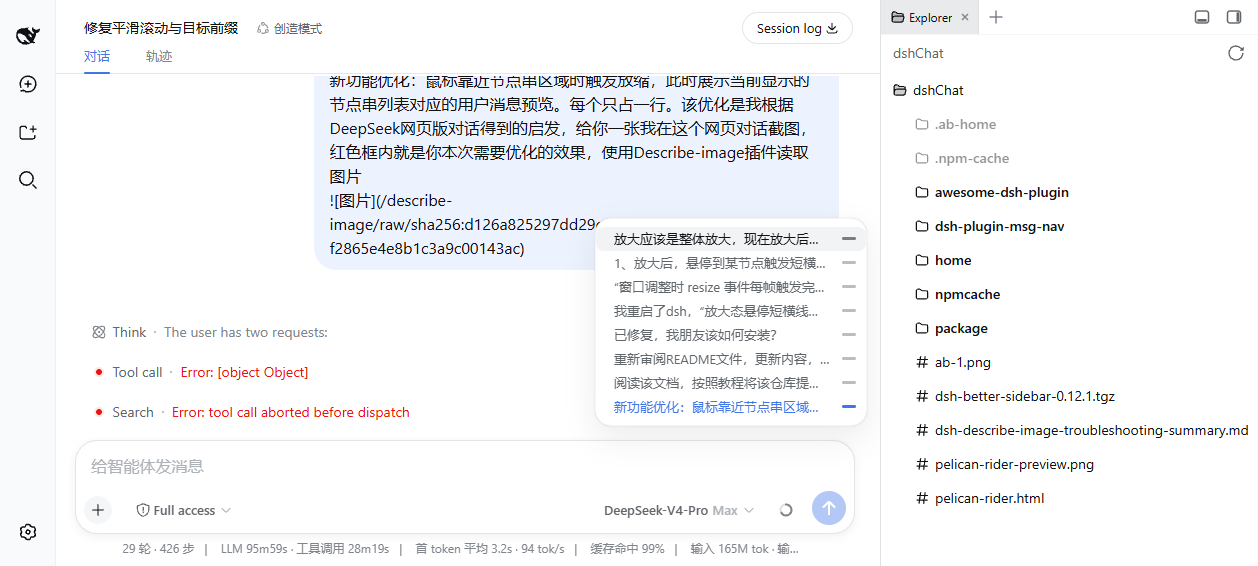
DeepSeek Harness conversation node navigation bar plugin: render a column of dash nodes on the right edge of the conversation area (one node per real user message), follow reading position; when mouse approaches, the node bar 'deforms and pops out' into a single-line message preview panel (overlay original position, restore on leave), click any preview to smoothly jump + highlight the dash, scroll wheel to browse when too many nodes
Works — verified, early-stage project
DeepSeek Harness conversation node navigation bar plugin: render a column of dash nodes on the right edge of the conversation area (one node per real user message), follow reading position; when mouse approaches, the node bar 'deforms and pops out' into a single-line message preview panel (overlay original position, restore on leave), click any preview to smoothly jump + highlight the dash, scroll wheel to browse when too many nodes It installs cleanly and boots without issues in our testing. It's early-stage but functional.
“Verified” means our automated CI actually ran dsh plugin add in a clean profile and it booted — nothing more. Feature descriptions and version compatibility are the author’s claims. This is not a security audit and not an endorsement of third-party code.
README
简体中文 | English

dsh-plugin-msg-nav
DeepSeek Harness 对话节点导航条插件:在对话区右缘渲染一列短横线节点串(每条真实用户消息一个节点),跟随阅读位置;鼠标靠近节点串时,节点条「变形弹出」为单行消息预览面板(覆盖原位置,移开复原),点击任意预览平滑跳转 + 高亮横线,节点过多时可在悬停区域内用滚轮滑动浏览。host 侧会话投影让节点串进入会话即覆盖整段历史的全部用户消息——零翻页请求、无初始卡顿。
以 bundle 形式发布:dsh plugin 安装后自动接入 profile 层栈,无需手改任何配置文件。架构参考 dsh-chat-timeline 的 host 会话投影 + 客户端按需加载模式。
安装(DSH 官方命令)
# 直接从 GitHub 安装
dsh plugin --profile web add github:SherUnlocked-4869/dsh-plugin-msg-nav
dsh plugin 会转发给 pnpm 安装到 profile 目录,并自动把声明了 dsh.bundle 的包加入 dsh.profile.bundles 层栈。随后启动(已在运行则重启)部署即可:
dsh web # 或 dsh --profile <你的 profile>
更新到最新版本:
cd ~/.dsh/profiles/web && pnpm update dsh-plugin-msg-nav
卸载:
dsh plugin --profile web remove dsh-plugin-msg-nav
功能
| 功能 | 行为 |
|---|---|
| 节点导航条 | 对话区右缘纵向短横线串,每条真实用户消息一个节点(系统注入的 goal 自动延续等不计入),恒定 20px 间距 |
| 悬停弹出面板 | 鼠标进入节点串区域:节点条短横线淡出、左侧单行预览面板弹出(0.18s 放大动画,覆盖节点条原位置,行内短横线落在原节点条短横线的横坐标上,如节点条变形展开);移出后节点条恢复 |
| 面板排版 | 每条消息一行(左文字 + 右短横线),24px 行距、上下 8px 对称留白;悬停行时文字与短横线同步高亮并出现 8px 圆角底色;当前阅读位置整行(文字+短横线)以品牌蓝/白色高亮 |
| 列表滑动 | 最多显示 10 条;超过时鼠标悬停在节点串区域内滚轮上下滑动列表(页面不滚动),面板按比例同步滚动 |
| 移出回中 | 鼠标移出悬停区域后,列表平滑居中回当前阅读位置,恢复跟随 |
| 跟随阅读位置 | 激活节点(品牌蓝 / 深色下白色)随滚动侦测实时更新 |
| 点击跳转 | 平滑滚动到对应消息 + 全宽品牌蓝高亮横线(1.5s 淡出),流式输出干扰下亦有看门狗兜底落位,列表自动居中到目标节点 |
| 全量历史即时入串 | host 侧会话投影(msgNavMessages)折叠整段日志,全量用户消息列表经历史尾页 + 推送帧即时送达——进入会话零翻页请求,节点串立刻覆盖全部用户消息,无初始卡顿;未挂载投影注册表的部署自动回退到后台逐页加载(每页 50 条、至多 120 页),加载中节点串末尾显示脉冲短横线 |
| 点击按需加载 | 点击尚未渲染进窗口的旧消息节点时,先按需拉取更早历史直至该消息入窗并渲染出行,再平滑跳转 + 高亮(按消息 id 与窗口行精确关联,不受节点 key 格式影响) |
| 自动隐藏 | <2 条用户消息、空白会话、非对话视图(如轨迹页)时不显示 |
| 渲染细节 | 节点位置按 devicePixelRatio 对齐设备像素(粗细一致);窗口调整 rAF 合帧,不拖慢界面 |
工作原理
与 dsh-chat-timeline 相同的「投影快路径 + 按需翻页」模式:
- Host 投影:host 半注册
msgNavMessages会话投影单元,折叠整段日志中每条user/message事件(仅source.kind === "user"的真实用户消息与 steering,注入的上下文行排除——与聊天视图节点组装器的分类完全一致),产出{seq, time, text, id}全量列表;框架持续驱动,经历史尾页与session/projection推送帧送达。 - 客户端即时渲染:节点串用
useProjection("msgNavMessages")直接渲染全量列表;已加载窗口内的消息按持久 id 关联到 DOM 行,用于阅读位置跟随与跳转。 - 点击按需翻页:点击尚未入窗的旧节点时,按消息 id 循环
loadOlder()(每页 50 条、至多 120 页)直到目标入窗并渲染出行,再平滑跳转 + 高亮。 - 兜底:未挂载投影注册表的部署,客户端自动回退到后台
loadOlder全量循环(投影一旦送达立即停止)。会话切换即换代取消旧循环,插件卸载时同步停止。
参考项目
新增的「全量历史即时入串」与「点击按需加载」功能参考了 jjxjjjjiik-bot/dsh-chat-timeline(MIT):
- host 会话投影(
msgNavMessages)沿用其dshChatTimeline投影单元的折叠思路:在 host 侧把整段日志折叠成全量用户消息列表(仅source.kind === "user"的真实用户消息与 steering,注入上下文排除),经历史尾页与推送帧即时送达客户端,避免客户端逐页拉取历史造成的初始卡顿; - 客户端按需
loadOlder(点击旧节点时逐页拉取直到目标入窗)沿用其jumpToMessage的加载-等待-落位模式;本插件改为按持久消息 id 与窗口行关联,不依赖其硬编码的节点 key 格式; - 投影缺席部署的后台逐页兜底加载同样沿用其客户端
loadOlder循环(每页 50 条、至多 120 页)。
包结构
lib/client.js—— 浏览器端 bundle(window.__ModuleLoader__注册格式,随 DSH 模块系统加载/卸载);节点串 UI + 投影即时渲染 + 兜底后台加载 + 点击按需加载lib/index.js—— host 侧会话投影单元msgNavMessages(全量用户消息折叠;注册表缺席时自动不激活)lib/types/—— TypeScript 类型声明cordis.patch.yml—— bundle 补丁层:insert一行ui-msg-nav客户端行package.json——dsh.client(浏览器清单)+dsh.bundle(bundle 清单)双声明assets/screenshot.png—— 效果图
常见问题
dsh plugin add 报 ERR_PNPM_TARBALL_INTEGRITY?
profile 里某个以 refs/heads/... 分支地址安装的第三方插件在上游更新后,新 tarball 校验和与锁文件不符,pnpm 的供应链保护会拒绝整个安装。确认上游更新可信后,把该依赖固定到具体 commit 即可一劳永逸(本插件即以此方式接入):
"dependencies": {
  "<pkg>": "https://codeload.github.com/<owner>/<repo>/tar.gz/<commit-sha>"
}
然后 pnpm install 刷新锁文件,再重新执行 dsh plugin add。
节点串没出现?
- 确认部署已重启、页面已刷新(bundle 变更需重启部署;刷新页面通常即可拿到新 bundle)
- 当前会话需有 ≥2 条真实用户消息,且处于「对话」视图
开发
git clone https://github.com/SherUnlocked-4869/dsh-plugin-msg-nav.git
# 本地联调:安装进一个测试 profile
dsh plugin --profile <profile> add file:<abs-path>
dsh --profile <profile> --port 3090
License
MIT
Install
Install the catalog once, then DeepSeek Harness can find and install any plugin from this site automatically:
dsh plugin add dshbase-catalogThen say "install dsh-plugin-msg-nav for me" — your agent finds it in the directory and installs it. Docs: dshbase-catalog · verified packs.
This plugin is GitHub source (not published to npm) — install it straight from the repo:
Web profile:
dsh plugin --profile web add github:SherUnlocked-4869/dsh-plugin-msg-navHeadless (CLI) profile:
dsh plugin --profile headless add github:SherUnlocked-4869/dsh-plugin-msg-navTest report
Verified: L1 install + L2 load + L3 runtime from GitHub source on dsh 0.1.0-rc.6.
When to use it
Extend the agent's coding surface — give it a new tool, workflow, or integration so it handles a dev task it couldn't before.
Who it's for
Developers who want dsh to behave like a teammate on real codebases — editing, running, and verifying changes rather than just answering.
For developers — extending it
The tool/command surface is the seam: expose more of the SDK, add smarter context wiring, or tighten the loop between code changes and verification.
Share this badge
Drop this badge into your README — it links back here and updates automatically when our test status changes:

[](https://dshbase.com/plugins/dsh-plugin-msg-nav/)<a href="https://dshbase.com/plugins/dsh-plugin-msg-nav/"><img src="https://dshbase.com/badges/dsh-plugin-msg-nav.svg" alt="dshbase install-tested"></a>