
Plugin directory / AI Models / dsh-plugin-subagent-model-route
dsh-plugin-subagent-model-route
Verified · install-tested on dsh huhu23333
What it does
DSH client plugin: annotate every subagent with the model route it actually ran on (parent-catalog rows + child session header).
Works — verified, early-stage project
DSH client plugin: annotate every subagent with the model route it actually ran on (parent-catalog rows + child session header). It installs cleanly and boots without issues in our testing. It's early-stage but functional.
“Verified” means our automated CI actually ran dsh plugin add in a clean profile and it booted — nothing more. Feature descriptions and version compatibility are the author’s claims. This is not a security audit and not an endorsement of third-party code.
README
dsh-plugin-subagent-model-route
English | 中文
Annotate every subagent with the model route it actually ran on, in both places you look
at a subagent: the parent's catalog list and the child session's own header.
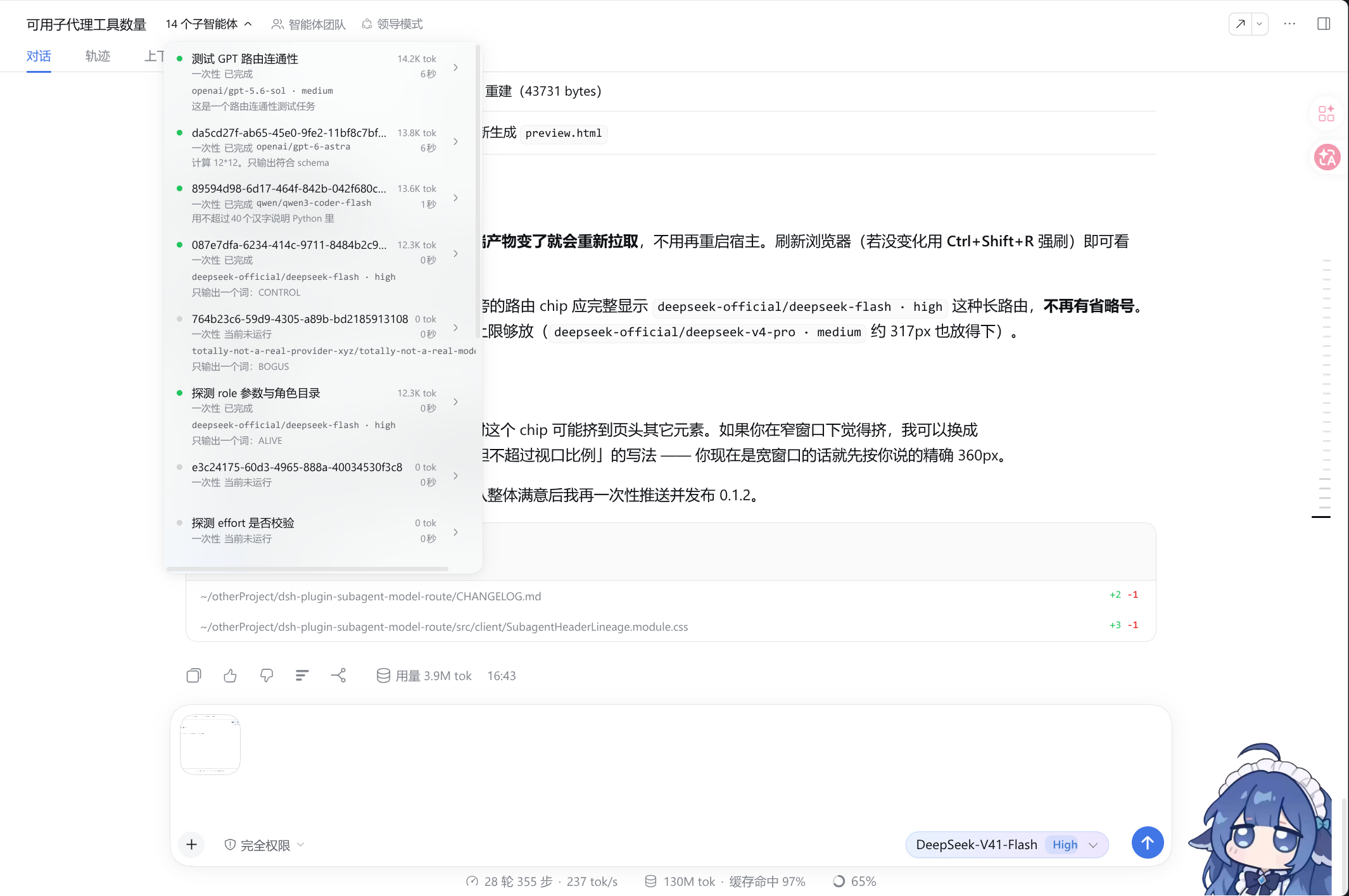
The parent's catalog: thirteen subagents, each row stacking the name, a mode · activity · route badge line, and the durable title below it. The routes shown (gpt-5.6-sol,gpt-6-astra, qwen3-coder-flash, deepseek-flash) are the ones those delegations actually
ran on.
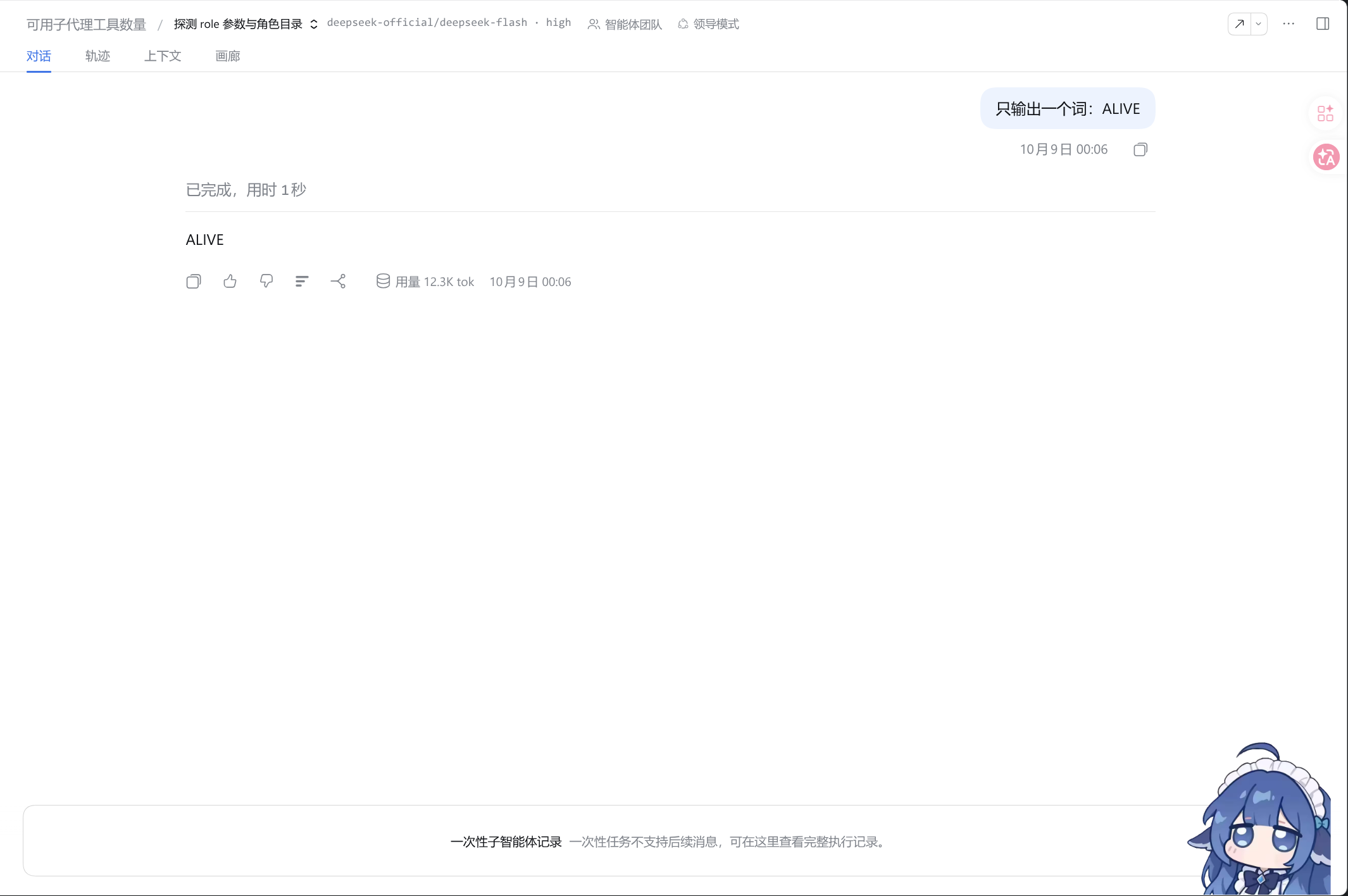
Opening a child session: the route (deepseek-flash) sits beside the lineage breadcrumb, in
the header, above the read-only one-shot composer notice.
Effect
Two surfaces change, and nothing else:
| surface | before | after |
|---|---|---|
| Parent catalog row | name, then title · one-shot · running on one line |
three lines: name / one-shot running gpt-5.6-sol / title |
| Child session header | breadcrumb switcher only | breadcrumb switcher + the route |
A row whose child never issued a request shows no badge. Hovering a badge gives the fullprovider/model · reasoningEffort, and the row's accessible name carries the route too.
Effect, expressed as consequences
Worth reading before installing. This plugin deliberately shadows shipped UI, and that has
a price:
- Rows get taller. 44px → 59px, so the dropdown, capped at
min(560px, 100vh - 140px), now shows roughly 9 rows instead of 12 before it scrolls. - You fork that region of the shipped UI. The catalog contract marks this seat
replaceRisk: 'shadows-shipped-ui'. Upstream improvements to those two occupants —
including DeepSeek adding a model column themselves — will not reach you; you have to
re-vendor and re-apply the two modifications (see PATCH-RECORD.md). - A shipped-UI bug in that region becomes yours. The renderer is a verbatim copy of the
shipped one (the copy even reproduces upstream's React duplicate-key warning about the child
session id). - The stylesheet is injected twice. The vendored CSS module is a second copy of the
shipped sheet, so the page carries both. It is small, and the hashed class names differ
(different file content), so nothing collides. - The shipped occupants are shadowed, not unregistered. They stay registered and render
nothing — a small, inert cost. - It duplicates the
subagent-directordock if you run both. That plugin draws the route
under the composer for an opened child; this one draws it in the header. Expect the route
twice in the same view until you drop one of them. - The route is the last request's route. A child that switched models mid-life shows only
the most recent one, and "no badge" means "never issued a request", not "unknown". - Only those two surfaces change. The read-only composer, the Sidebar chat tab, and the
@
reference source stay shipped. - Uninstalling reverts everything. Nothing is persisted and no host-side surface changes;
remove the package from the profile'sbundlesand restart. - Activation needs a host restart.
dsh.clientis composition-level config and does not
hot-reload.
Why this is a plugin that shadows the shipped UI
The shipped @deepseek-ai/dsh-client-ui-subagent decides what those two surfaces render, and
it cannot be extended additively: conversation.session.header.lineage is a single cell with
no registerOptions and no declared children, and there is no per-row slot at all. Taking the
seats over is the only way to add the route from outside.
The slot registry throws when a second registration lands on an occupied cell at the same
priority and shadows on any different one, so this plugin registers both seats atpriority: -1 (the shipped occupants own the default 0):
| seat | shipped occupant | how this plugin takes it |
|---|---|---|
conversation.session.header.lineage (single) |
SubagentHeaderLineage |
shadow at priority -1 |
conversation.session.header.actions (list) |
SubagentCatalogAction (id subagent-catalog) |
re-register the same id at priority -1 |
The route itself comes from the durable modelSelection projection (recorded on everyrequest/header), read through the same summary.projectionValues the row already uses for
token usage and timing — so this adds no RPC, no host change, no projection, no new slot.
Mounting
Mount it as a profile bundle, exactly like any other local plugin:
// ~/.dsh/profiles/web/package.json
"dependencies": {
  "dsh-plugin-subagent-model-route": "link:/path/to/dsh-plugin-subagent-model-route"
},
"dsh": { "profile": { "bundles": [
  // ...after @deepseek-ai/dsh-base and @deepseek-ai/dsh-web-app
  "dsh-plugin-subagent-model-route"
] } }
Or install it the supported way, which edits both lists for you:
dsh plugin --profile web add dsh-plugin-subagent-model-route     # from npm
dsh plugin --profile web add ./dsh-plugin-subagent-model-route   # from a checkout
Then restart the host.
Development
node_modules/ in this checkout is a dev-only shim of symlinks into a harness checkout (the
host's own react/react-dom/@deepseek-ai/*, plus the monorepo's tooling), because the@deepseek-ai/* packages are only published to npm as a 0.0.1-rc.1 placeholder. A normalnpm install against the versions listed in devDependencies replaces it.
npm run check      # typecheck -> build -> headless smoke (15 checks)
npm run build      # tsdown: lib/index.js (host half) + lib/client/index.js (closure factory)
npm run watch
npm run smoke      # renders both seized seats under jsdom
The out-of-tree build in tsdown.config.ts restates the two contracts the
monorepo's own clientBundle() preset enforces — thewindow.__ModuleLoader__.load({ id, factory }) handoff, and the lightningcss pass that turns*.module.css into a hashed class map plus a tagged <style> injection — because that preset
locates packages by globbing the monorepo and cannot build a package outside it. The build needs
only tsdown + lightningcss: the host-provided packages stay external and are never
resolved, which is what keeps a git install from failing on unpublished @deepseek-ai/*
versions.
scripts/smoke.mjs runs the real artifact through the real handoff and asserts, among other
things, that the bundle's require set is exactly the four platform seed rows (react,react/jsx-runtime, react-dom, @deepseek-ai/dsh-client-ui-primitives) — a request the host's
module table cannot answer would be a guaranteed runtime throw.
Publishing
See PUBLISHING.md for the full checklist, the DSH-specific traps, and the
catalog-submission steps. The short version: fill in the CHANGE-ME repository fields, publish to
npm with lib/ built at publish time, verify in a clean profile, tag the repo with thedsh-plugin topic, then submit to the community catalogs.
Maintenance
The vendored renderer is pinned to the shipped one at deepseek-ai/deepseek-harnessmaster @ 5badb15009. When upstream changes SubagentHeaderLineage.tsx or its stylesheet,
re-vendor and re-apply the two modifications from PATCH-RECORD.md — or, on a
machine that owns the harness checkout, prefer the equivalent upstream patch
(UPSTREAM-PATCH.patch), which needs no shadowing at all.
License
MIT — see LICENSE. The vendored renderer originates from the MIT-licensed@deepseek-ai/dsh-client-ui-subagent.
Install
Install the catalog once, then DeepSeek Harness can find and install any plugin from this site automatically:
dsh plugin add dshbase-catalogThen say "install dsh-plugin-subagent-model-route for me" — your agent finds it in the directory and installs it. Docs: dshbase-catalog · verified packs.
Web profile:
dsh plugin --profile web add dsh-plugin-subagent-model-routeHeadless (CLI) profile:
dsh plugin --profile headless add dsh-plugin-subagent-model-routePackage
npm: dsh-plugin-subagent-model-route · version 0.1.0 · tested on dsh 0.1.0-rc.6
Test report
Verified end-to-end: L1 install + L2 load + L3 runtime Q&A on dsh 0.1.0-rc.6.
Share this badge
Drop this badge into your README — it links back here and updates automatically when our test status changes:

[](https://dshbase.com/plugins/dsh-plugin-subagent-model-route/)<a href="https://dshbase.com/plugins/dsh-plugin-subagent-model-route/"><img src="https://dshbase.com/badges/dsh-plugin-subagent-model-route.svg" alt="dshbase install-tested"></a>