
Plugin directory / Developer / dsh-plugin-working-status
dsh-plugin-working-status
Verified · install-tested on dsh Abyss-Seeker
What it does
Change the 'Deep diving...' text in the thinking status to any phrase you like. Ultra-lightweight.
Works — verified, early-stage project
Change the 'Deep diving...' text in the thinking status to any phrase you like. Ultra-lightweight. It installs cleanly and boots without issues in our testing. It's early-stage but functional.
“Verified” means our automated CI actually ran dsh plugin add in a clean profile and it booted — nothing more. Feature descriptions and version compatibility are the author’s claims. This is not a security audit and not an endorsement of third-party code.
README

dsh-plugin-working-status
一句话概括:把思考状态里那句 "Deep diving..." 改成你喜欢的任何话——点击即改,全局生效,重启都不忘。
快速安装
dsh plugin --profile web add github:Abyss-Seeker/dsh-plugin-working-status
再到 $DSH_HOME/profiles/web/cordis.patch.yml 里启用一行(见下文「安装」),刷新 GUI 页面就能用。
它能干什么
- 点击字段直接改。 点一下状态文字(或者旁边的计时),原地弹出输入框,回车或点别处保存,
Esc反悔。 - 改一次,处处生效。 新文字会覆盖当前和以后所有轮次、所有会话,刷新页面、重启应用都还在。
- 清空提交即还原。 把输入框清空再提交,就回到界面出厂默认文字(默认文字是从实际渲染里抓的,以后官方改文案也能跟得上)。
- 不碰任何样式。 只改那一个文本节点的内容:流光动画、计时器、无障碍标记、加载过程的渲染,全都原样。
操作方式
点击 "Deep diving..." 直接编辑:
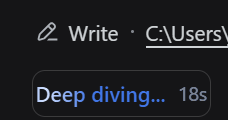
效果预览
| 效果一 | 效果二 |
|---|---|
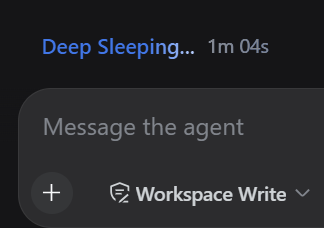 |
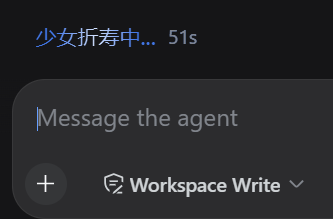 |
安装
一条命令:
dsh plugin --profile web add github:Abyss-Seeker/dsh-plugin-working-status
再在 profile 的补丁层 $DSH_HOME/profiles/web/cordis.patch.yml 里启用这一行:
- insert:
    - id: working-status-editor
      name: dsh-plugin-working-status
刷新一下 GUI 页面即可。包本身无需构建,仓库里的 lib/ 就是最终产物;也可以用 file: 路径或 npm 包名安装,免 pnpm 的兜底方案见 scripts/install.mjs。
插件配置卡片
安装后,设置 → 插件 → 插件配置 里会多出一张「工作状态 / Working status」卡片:同样的字段,带保存、放弃修改、恢复默认,和点击编辑写的是同一个值。
和 dsh-web-ui 一起用
装了 dsh-web-ui(SSH、任务看板那一套)也没问题,各占各的卡片,互不打扰:

持久化的实话
- 现在文字存在浏览器的 localStorage 镜像(
dsh.turn-status.label)里:同源所有标签页共享,刷新、重启都在。 - Host 半边也注册了
turn-status设置命名空间,但目前 DSH 的 API 网关只向浏览器放行固定白名单里的命名空间(dsh-host-apiproxy的WEB_SETTINGS_NAMESPACES),第三方命名空间即使注册成功也只会得到settings-not-exposed。让插件在settings.register()时自行暴露配置,在该包源码里是标注的待办事项;等它落地,本插件会自动改用 Host 存储,localStorage 作为兜底,你的文字到哪儿都不会丢。
排查与兼容性
window.__dshWorkingStatusEditor暴露elements()(当前匹配到的状态字段)和label()(生效文字),方便排查。- 状态字段靠
role="status"+aria-live="polite"+ 稳定的turnStatusCSS-module 本地类名识别;万一将来的 DSH 改了类名,插件只会告警并停止改写,不会弄坏页面。 - 配置卡片注册在
ui-settings-plugins声明的settings.plugin.item插槽里;没有那个设置界面时,点击编辑功能照常工作。
开发
test/smoke.mjs用假 DOM 覆盖了替换、提交/取消/还原、卡片表单和持久化同步,改完跑一遍即可。- 改了源码想同步进 profile:重跑上面的安装命令,或
node scripts/install.mjs "$DSH_HOME/profiles/web"。
Install
Install the catalog once, then DeepSeek Harness can find and install any plugin from this site automatically:
dsh plugin add dshbase-catalogThen say "install dsh-plugin-working-status for me" — your agent finds it in the directory and installs it. Docs: dshbase-catalog · verified packs.
This plugin is GitHub source (not published to npm) — install it straight from the repo:
Web profile:
dsh plugin --profile web add github:Abyss-Seeker/dsh-plugin-working-statusHeadless (CLI) profile:
dsh plugin --profile headless add github:Abyss-Seeker/dsh-plugin-working-statusTest report
Verified: L1 install + L2 load + L3 runtime from GitHub source on dsh 0.1.0-rc.6.
When to use it
Extend the agent's coding surface — give it a new tool, workflow, or integration so it handles a dev task it couldn't before.
Who it's for
Developers who want dsh to behave like a teammate on real codebases — editing, running, and verifying changes rather than just answering.
For developers — extending it
The tool/command surface is the seam: expose more of the SDK, add smarter context wiring, or tighten the loop between code changes and verification.
Share this badge
Drop this badge into your README — it links back here and updates automatically when our test status changes:

[](https://dshbase.com/plugins/dsh-plugin-working-status/)<a href="https://dshbase.com/plugins/dsh-plugin-working-status/"><img src="https://dshbase.com/badges/dsh-plugin-working-status.svg" alt="dshbase install-tested"></a>