
Plugin directory / Developer / dsh-plugin-xiaomi-mimo-tts
dsh-plugin-xiaomi-mimo-tts
Verified · install-tested on dsh ppy-web
What it does
A plugin in the Developer category for DeepSeek Harness.
Works — verified, early-stage project
A plugin in the Developer category for DeepSeek Harness. It installs cleanly and boots without issues in our testing. It's early-stage but functional.
“Verified” means our automated CI actually ran dsh plugin add in a clean profile and it booted — nothing more. Feature descriptions and version compatibility are the author’s claims. This is not a security audit and not an endorsement of third-party code.
README
dsh-xiaomi-tts



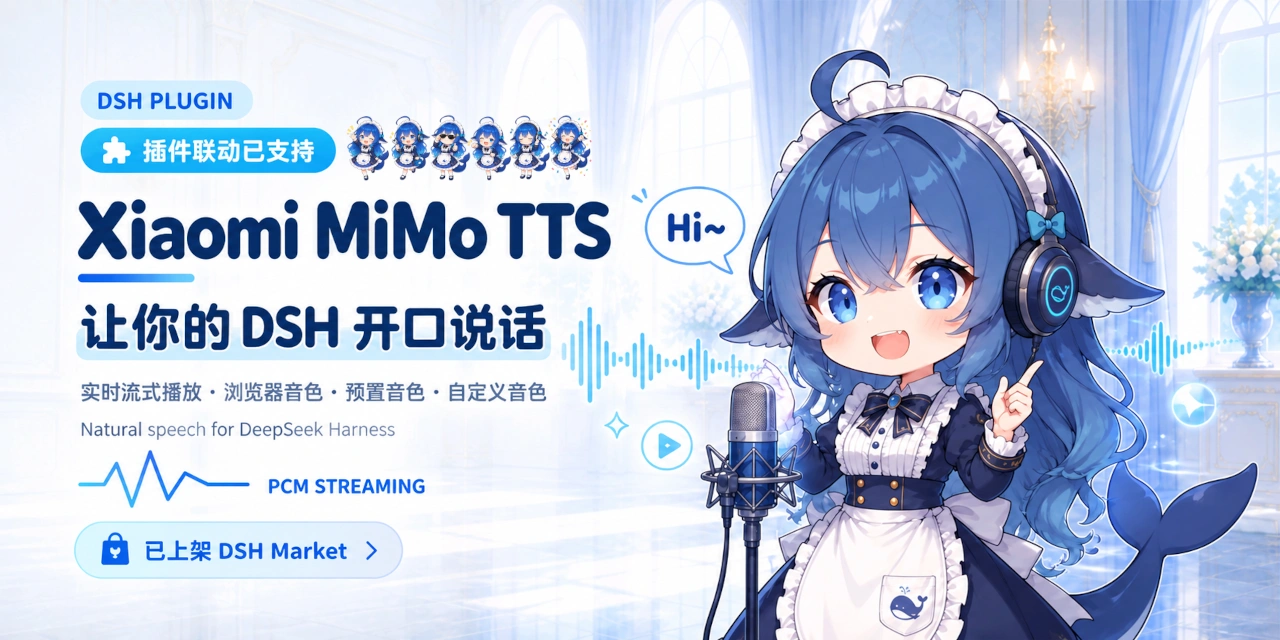
为 DSH 添加 Xiaomi MiMo TTS 语音朗读、浏览器本地语音兜底和可选 UI 音效。
MiMo TTS 当前可能处于限时免费或调整计费阶段,请以 Xiaomi MiMo 官方平台的最新政策为准。
🎨 预览
- 在线预览设置页面
- QQ 交流群:
1104616387欢迎加入
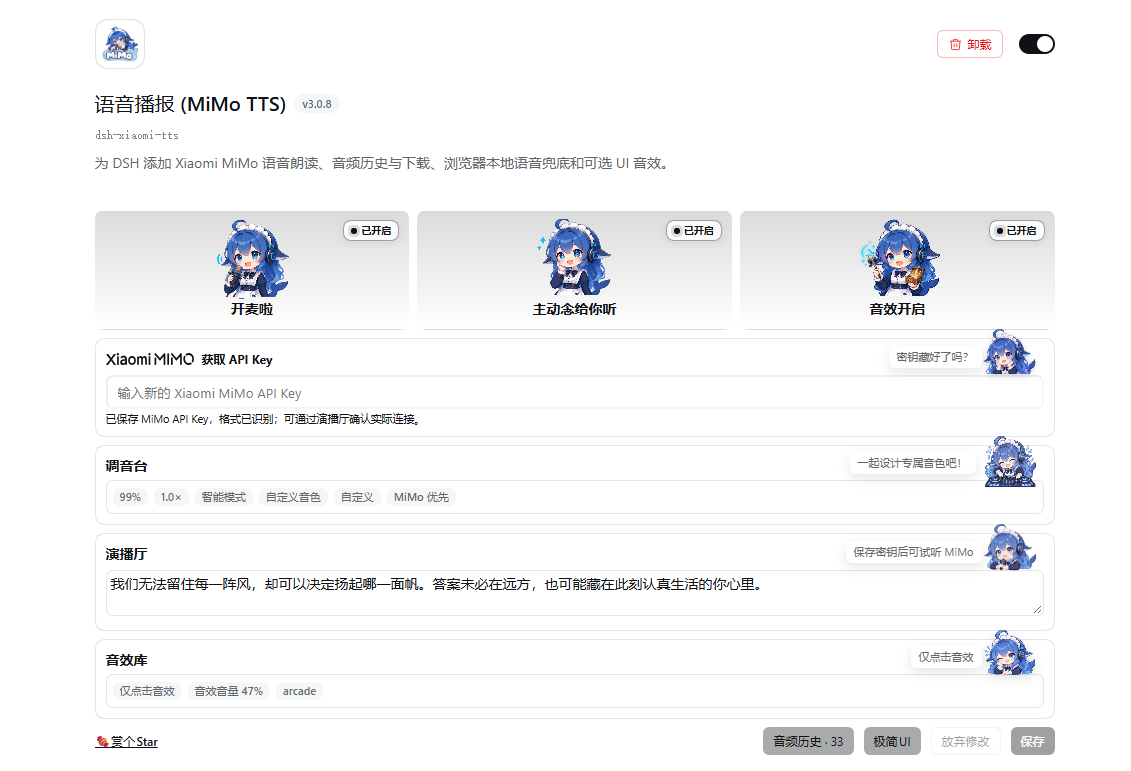
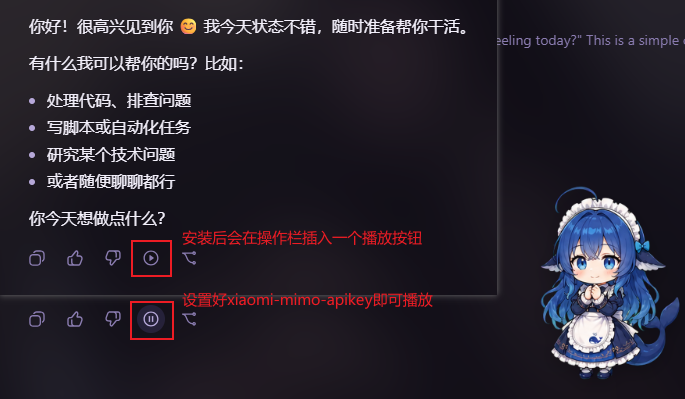
| 设置界面 | 对话朗读入口 |
|---|---|
 |
 |
✨ 功能
- 一键朗读:在助手消息操作栏中提供“朗读”按钮。
- 低延迟播放:
mimo-v2.5-tts支持 PCM 流式播放,并在必要时回退到完整音频或浏览器语音。 - 内置与自定义音色:支持官方内置音色,以及
mimo-v2.5-tts-voicedesign音色描述。 - 浏览器本地语音:可选择 MiMo 优先、本地优先或仅使用 MiMo。
- 朗读范围:支持智能、全文和首段模式。
- 播放控制:支持 0.5×–2.0× 语速、语音音量、暂停、继续和停止。
- 文本清洗:朗读前移除网址、路径、代码块、表情符号和控制字符等不适合播报的内容。
- 可选音效:提供任务状态和语义化点击音效,默认关闭。
- 插件联动:向其他 DSH 插件暴露可选的 PCM 播放服务。
- 鲸鱼娘 Agent 预设:安装后可在 Agent 预设中选择鲸鱼娘女仆助手,提供对话、陪伴、轻量幽默、CDN 表情包反应和本地记忆工具,不依赖外部表情包插件。
📋 环境要求
@deepseek-ai/dsh0.2.0-rc.2(当前目标版本;兼容0.1.7-rc.1至0.2.x版本)- Node.js 22+
- 使用 MiMo 语音时需要 Xiaomi MiMo API Key
- 官方 TTS API 文档
🚀 安装
官方安装(desktop/web)(推荐)
打开桌面/web端,进入插件管理面板,搜索 dsh-xiaomi-tts 即可安装

从 npm 安装(web)
dsh plugin --profile web add dsh-xiaomi-tts@latest
从插件市场安装
 插件市场 已收录本插件,如你已安装社区的插件市场,可在 设置 → 插件市场 中搜索
 xiaomi-mimo-tts安装。
侧边栏 → 插件 → dsh-xiaomi-tts → 语音朗读 (MiMo TTS)
卸载(web)
dsh plugin --profile web remove dsh-xiaomi-tts
🐋 首次使用
新安装的默认行为:
- 朗读按钮可用;
- 自动播报默认关闭;
- UI 音效默认关闭;
- 未保存 API Key 时,“MiMo 优先”策略可能回退到浏览器本地语音。
推荐配置顺序:
- 获取 Xiaomi MiMo API Key。
- 在插件设置中输入 Key,并点击底部 保存。
- 打开“调音台”,选择模型和音色。
- 在“演播厅”试听。
- 按需开启自动播报和 UI 音效,再次保存。
⚙️ 配置说明
官方内置音色
mimo-v2.5-tts 当前提供:
- 中文女声:
冰糖、茉莉 - 中文男声:
苏打、白桦 - 英文女声:
Mia、Chloe - 英文男声:
Milo、Dean
自定义音色
mimo-v2.5-tts-voicedesign 支持从音色描述生成声音。设置面板包含预设模板,也可以手动编辑:
浏览器本地语音
- MiMo 优先:MiMo 在首段音频开始前失败时,尝试浏览器语音。
- 本地优先:先使用浏览器语音,失败后尝试 MiMo。
- 关闭本地语音:只使用 MiMo,不进行本地兜底。
浏览器音色来自 Web Speech API。是否离线、可用语言和实际声音取决于浏览器、操作系统及其语音服务。
朗读范围
- 智能模式:自动播报优先朗读首个语义段;未读内容较多时可能补一句收尾提示。手动朗读播放全文。
- 全文模式:自动播报和手动朗读都播放全文。
- 首段模式:自动播报和手动朗读都只播放首个语义段。
首段和合成分片均在完整句子之间切分,单个长句允许超过建议片长。流式首段等待句尾后再锁定,不会因达到字数阈值而截断句子。
设置面板支持键盘操作:使用 Tab 移动焦点,方向键调整滑块或选项,空格键确认按钮和开关。
🔌 三方插件联动

本插件向其他dsh插件提供可选 PCM 流式播放能力:
ctx.get('xiaomiMimoTts')?.play('欢迎回来')
建议通过 ctx.get() 动态获取,不要声明为必需注入。插件未安装、未就绪或已关闭时,调用会安全跳过;新播放会中断当前朗读,stop() 可主动停止。
需要 TypeScript 类型时:
import type { XiaomiMimoTtsService } from 'dsh-xiaomi-tts/client-api'

const tts = ctx.get('xiaomiMimoTts') as XiaomiMimoTtsService | undefined
tts?.play('欢迎回来')
🐳 鲸鱼娘 Agent 预设
安装本插件后,新建会话时可以在 Agent 预设列表选择“鲸鱼娘”。她是对话助手和女仆型陪伴角色:会先接住情绪,再帮你整理任务、解释信息或使用工具;默认带一点傲娇、米饭、尾巴和摸鱼梗,也会在合适时用 CDN 直链发送表情包,但不会每句话强行卖萌。
文件读写、文件搜索和 Windows PowerShell 只用于用户授权的任务与本地非敏感记忆。女仆设定不代表现实控制或绝对服从,危险、违法、隐私和不安全请求仍遵循宿主安全规则。
鲸鱼娘的人设和表情包关键词参考了社区维护的 DeepSeek-chan Meme Pack;图片通过公开 CDN 直链显示,本插件不复制该仓库的图片素材。
鲸鱼娘支持该素材库的 CDN 热链:使用  格式即可直接在对话中显示公开 WebP 预览图。默认使用压缩预览地址,只有用户明确要求原图时才使用原图地址。
🔒 隐私与网络访问
- API Key 由 DSH Host 保存,浏览器只读取“是否已配置/格式是否识别”的状态,不读取密钥正文。
- 浏览器本地语音由 Web Speech API 提供;标记为在线的音色可能把文本交给浏览器、操作系统或其网络语音服务。
- 音频在浏览器内存中通过 Web Audio 或临时 Blob URL 播放,插件不会主动持久化音频文件。
- 音效核心移植自 uisfx 0.4.0,遵循 MIT License,详见
NOTICE。
🏗️ 架构
- 共享层:配置默认值、文本处理、分段、SSE 和播放契约。
- Host 插件:注册设置与静态资源,并代理 MiMo 完整音频和 PCM 流式请求。
- Web Client:提供设置、消息朗读、浏览器语音兜底、试听和第三方播放服务。
flowchart LR
    DSH["DSH Web"] --> CLIENT["Web Client<br/>设置与播放"]
    THIRD["第三方 Web 插件"] -. "ctx.get('xiaomiMimoTts')" .-> CLIENT
    CLIENT -->|"完整音频 / PCM 流"| HOST["Host 插件<br/>设置与 API 代理"]
    HOST --> MIMO["Xiaomi MiMo API"]
    CLIENT -->|"Web Speech API"| SPEECH["浏览器 / 系统语音服务"]
    SHARED["共享层<br/>配置、文本处理、SSE"] -.-> CLIENT
    SHARED -.-> HOST
🛠️ 开发
pnpm install
pnpm dev
pnpm dev 会启动本地 UI Lab,直接渲染 src/client/settings/card.tsx。设置保存、远程语音和版本检查使用本地 mock,不会调用真实 MiMo 服务。
常用检查:
pnpm typecheck
pnpm test
pnpm dev:build
pnpm pack:check
pnpm build:正常构建。pnpm build:debug:启用 PCM 链路调试日志的构建。pnpm profile:check:验证本机 DSH Web profile 中的安装状态。
Windows 从本地开发链接切换到 npm 包前,请先停止 DSH Web,避免运行中的 Node 进程占用 Junction:
.\start\dsh-plugin-reinstall.bat 3.0.8
如果是 DSH Desktop profile,只需要卸载残留的本地链接,可在退出 Desktop 后运行:
.\start\dsh-plugin-uninstall-local-link.bat desktop
🤝 推荐
鲸鱼娘形象参考社区由GPT生成
uisfx音效参考dsh-plugin-uisfx实现
- dsh-deep-whale · 鲸鱼娘主题皮肤系列。
- dsh-whale-musume · 元气鲸鱼娘桌宠。
- dsh-plugin-uisfx · 语义化 UI 音效。
- dsh-dream-skin · 原生换肤、背景壁纸、强调色和主题包。
- dsh-TUI · 一个为 dsh-TUI 生态打造的插件
Install
Install the catalog once, then DeepSeek Harness can find and install any plugin from this site automatically:
dsh plugin add dshbase-catalogThen say "install dsh-plugin-xiaomi-mimo-tts for me" — your agent finds it in the directory and installs it. Docs: dshbase-catalog · verified packs.
This plugin is GitHub source (not published to npm) — install it straight from the repo:
Web profile:
dsh plugin --profile web add github:ppy-web/dsh-plugin-xiaomi-mimo-ttsHeadless (CLI) profile:
dsh plugin --profile headless add github:ppy-web/dsh-plugin-xiaomi-mimo-ttsTest report
Verified: L1 install + L2 load + L3 runtime from GitHub source on dsh 0.1.0-rc.6.
Share this badge
Drop this badge into your README — it links back here and updates automatically when our test status changes:

[](https://dshbase.com/plugins/dsh-plugin-xiaomi-mimo-tts/)<a href="https://dshbase.com/plugins/dsh-plugin-xiaomi-mimo-tts/"><img src="https://dshbase.com/badges/dsh-plugin-xiaomi-mimo-tts.svg" alt="dshbase install-tested"></a>