
Plugin directory / UI & Skins / dsh-plugin-ya-workspace-sidebar
dsh-plugin-ya-workspace-sidebar
Verified · install-tested on dsh HuanLinOTO
What it does
No description provided.
Works — verified, early-stage project
No description provided. It installs cleanly and boots without issues in our testing. It's early-stage but functional.
“Verified” means our automated CI actually ran dsh plugin add in a clean profile and it booted — nothing more. Feature descriptions and version compatibility are the author’s claims. This is not a security audit and not an endorsement of third-party code.
README
ya-workspace-sidebar

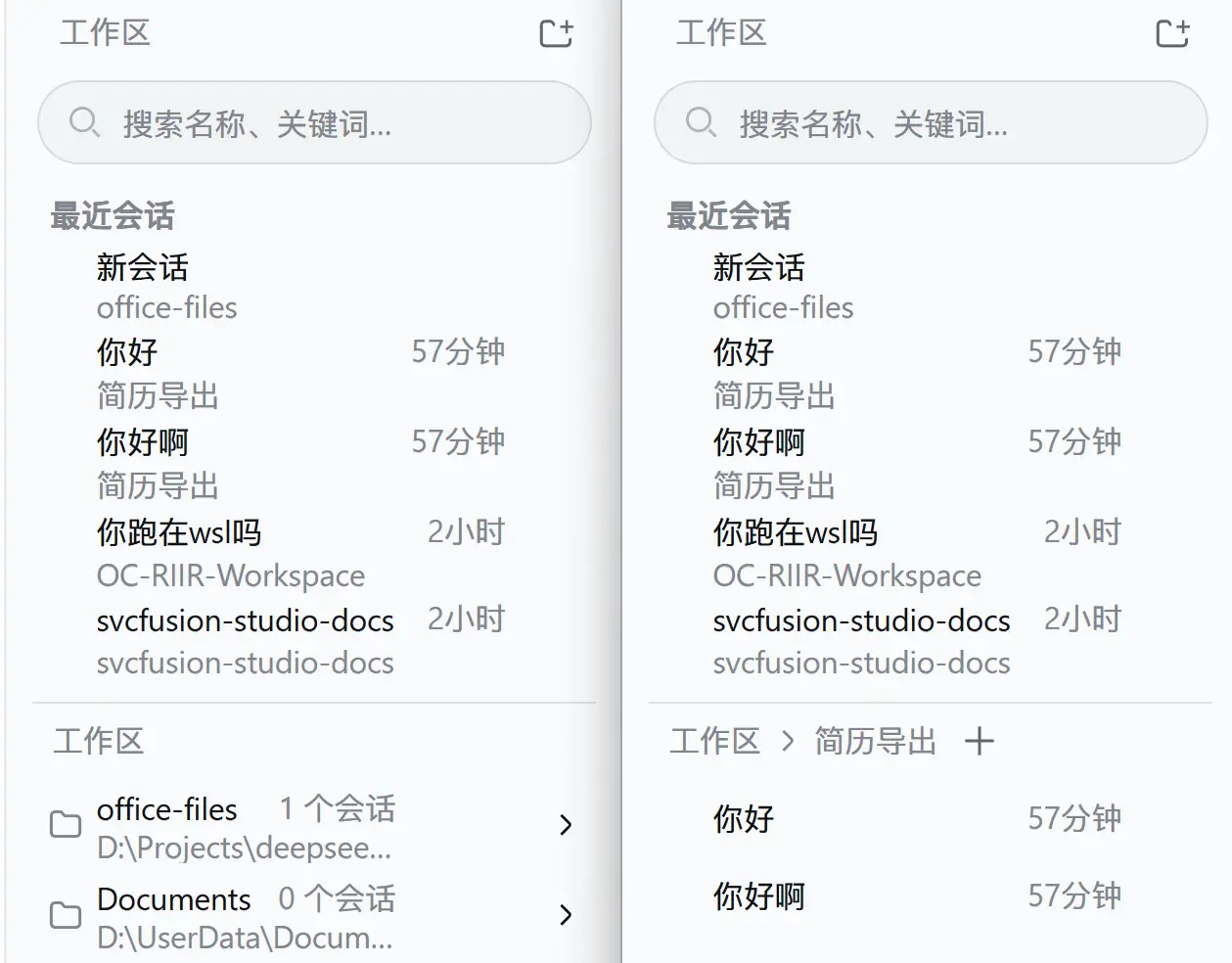
DSH Web 工作区侧栏替代插件。顶部以虚拟滚动展示全局最近会话(完整列表,不限于 5 条),与下方 Workspace → Session 二级菜单之间有一条可拖拽分隔条(也支持方向键微调、双击复位),面包屑导航与选中工作区的会话按本地日历日期分组(今天/昨天/更早);搜索、添加工作区、重命名、删除、Fork 与归档继续使用 DSH 原生 Host 能力。
运行
插件采用 bundle 形式,cordis.patch.yml 会禁用官方 ui-workspace 并插入 @huanlin/dsh-plugin-ya-workspace-sidebar。DSH v0.1.2-alpha.1 起,官方 ui-sidebar / ui-conversation / ui-agent-preset 及目录选择器组合包会注入 ctx.uiWorkspace 服务,本插件 client entry 通过 src/client/navigation.ts 自供该服务的替身(含复用/新建会话导航、current/recent 回退、归档清理与启动自动选择策略),否则这些条目会永久 pending 导致 WebUI 启动死锁。安装:
# 从 npm 安装(推荐):
dsh plugin --profile web add @huanlin/dsh-plugin-ya-workspace-sidebar

# 本地开发(热更新):
dsh plugin --profile web add "link:D:/Projects/deepseek-harness/ya-workspace-sidebar"
修改源码后重新运行 pnpm run build,再重启 dsh web 并硬刷新浏览器。
开发
pnpm install
pnpm run typecheck
pnpm test
pnpm run build
dsh/ 仅作为类型和行为参考,插件不会修改 DSH checkout。浏览器产物预构建到 lib/client.js,因此仓库发布时必须提交 lib/。
检查
pnpm run typecheck
pnpm test
pnpm run build
构建后确认 lib/index.js、lib/client.js 和 lib/types/ 存在,并确认 lib/client.js 使用 window.__ModuleLoader__.load() 包装。
本包自 v0.1.2-rc.1 起不再发布
./invariant导出:本插件贡献的均为 client-only slot 条目,无独立可分歧的观察,按新 invariant 规则省略其源码与接线。
Install
Install the catalog once, then DeepSeek Harness can find and install any plugin from this site automatically:
dsh plugin add dshbase-catalogThen say "install dsh-plugin-ya-workspace-sidebar for me" — your agent finds it in the directory and installs it. Docs: dshbase-catalog · verified packs.
This plugin is GitHub source (not published to npm) — install it straight from the repo:
Web profile:
dsh plugin --profile web add github:HuanLinOTO/dsh-plugin-ya-workspace-sidebarHeadless (CLI) profile:
dsh plugin --profile headless add github:HuanLinOTO/dsh-plugin-ya-workspace-sidebarTest report
Verified: L1 install + L2 load + L3 runtime from GitHub source on dsh 0.1.0-rc.6.
When to use it
Change how dsh looks or how you interact with it — a theme, a skin, or a new panel that reshapes the workspace.
Who it's for
Users who spend hours in the web UI and want it to look and feel the way they work.
For developers — extending it
Skins, panels, and theme tokens are the extension points — author a new skin, add a panel, or sync tokens with an upstream palette.
Share this badge
Drop this badge into your README — it links back here and updates automatically when our test status changes:

[](https://dshbase.com/plugins/dsh-plugin-ya-workspace-sidebar/)<a href="https://dshbase.com/plugins/dsh-plugin-ya-workspace-sidebar/"><img src="https://dshbase.com/badges/dsh-plugin-ya-workspace-sidebar.svg" alt="dshbase install-tested"></a>