
Plugin directory / Automation / dsh-prime-agent
dsh-prime-agent
Verified · install-tested on dsh yoke233
What it does
Prime Agent-inspired persistent RLM control plane for DeepSeek Harness Code Mode
Works — verified, early-stage project
Prime Agent-inspired persistent RLM control plane for DeepSeek Harness Code Mode It installs cleanly and boots without issues in our testing. It's early-stage but functional.
“Verified” means our automated CI actually ran dsh plugin add in a clean profile and it booted — nothing more. Feature descriptions and version compatibility are the author’s claims. This is not a security audit and not an endorsement of third-party code.
README
当前架构 · Prime Agent 学习笔记 · 上游同步手册
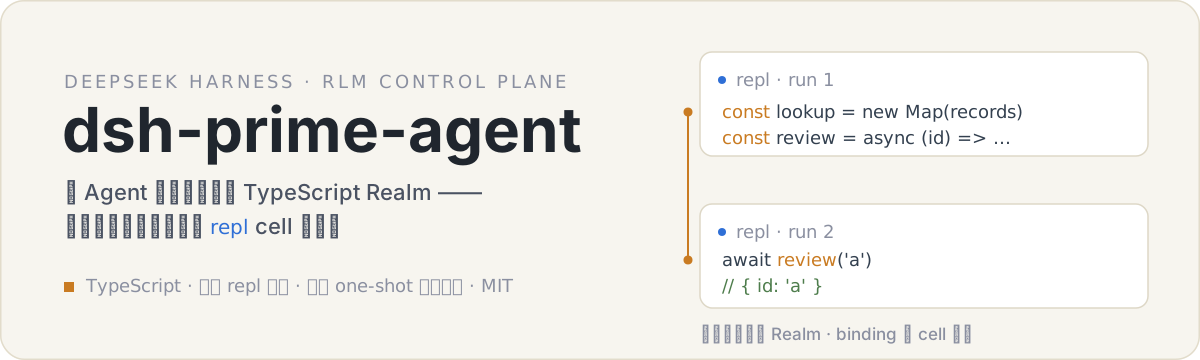
dsh-prime-agent 是面向 DeepSeek Harness 的 RLM-first 控制面。选中 Prime preset 的会话,其 run_code 程序运行在一个经认证的长期 TypeScript Realm 里:上一 cell 声明的普通变量、函数和对象,下一 cell 可以直接使用。
// 第 1 次 run_code
const lookup = new Map(records.map(item => [item.id, item]))
const review = async (id) => tools.review_item({ item: lookup.get(id) })
lookup.size

// 第 2 次 run_code —— 同一会话的新调用
await review('a') // Map 和函数都还活着
普通会话完全不受影响,继续使用官方 one-shot 语义。
工作原理
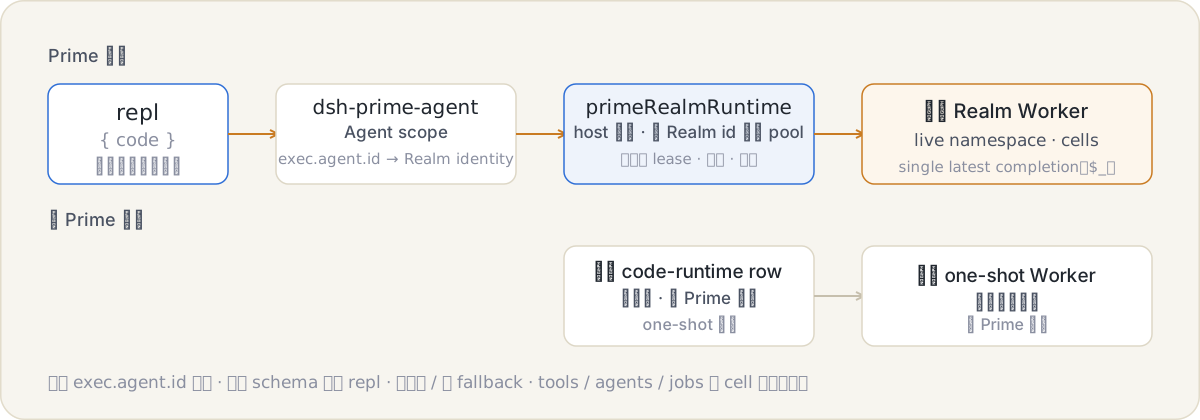
- 插件注册固定名称的
prime_realm_identitybootstrap binding。PrimeCodeRuntime在执行程序前以 32 字节 CSPRNG challenge 调用它,验证带 session binding 的 HMAC proof 后,才把请求路由到该会话的持久 Realm Worker。 - 没有该 binding 的请求原样委托官方 one-shot Worker;binding 存在但握手失败时明确报错,绝不静默降级。
- Realm 内的工具经跨 run 稳定的 Proxy 与 per-run binding lease 调用:schema、审批、沙箱、日志、并发和取消仍由 DSH 执行,run 结束立即撤销授权。
- Realm 是 live-only 的:abort、timeout、OOM 会 hard-kill Worker 并丢失 namespace,下一次真正执行时会明确提示之前的 bindings 已丢失。跨重启的检查点由程序显式写入持久任务文件。
完整身份协议、namespace 生命周期、Agent 编排与学习层边界见 当前架构。
三层数据
| 状态层 | 责任 | 保证 |
|---|---|---|
| Realm live namespace | 普通顶层变量、函数、对象、Map 和索引 | 同一 Worker 内的 cell 间保留;hard kill 后丢失 |
| 持久任务文件 | 大型输入、重要结果与跨重启检查点 | 由文件系统承载,进程重启后仍可恢复 |
prime_refine |
稳定路由与行为经验 | 证据化、乐观并发、事务历史和安全回滚 |
安装与启用
npm install
npm run check
dsh plugin --profile web add ./dsh-prime-agent
dsh plugin add 即提供全部内容:随包 bundle patch 把宿主 code-runtime provider 替换为 dsh-prime-agent/runtime;随包 Prime preset 在启动时落位到 $DSH_HOME/.agent-presets(仅缺失时)。启用 Prime 模式只是为某个会话选中 Prime preset;默认 preset 与其他 preset 保持官方 one-shot 语义。落位后的 preset 不会被覆盖,删除 $DSH_HOME/.agent-presets/prime 并重启即可重新落位当前快照。
TUI 运行
TUI bundle 本身不挂载 Code Runtime 和 agent preset 服务,因此先安装仓库内的 TUI 支持 bundle,再安装 Prime 插件;两者的 bundle 顺序不能颠倒。
$pluginRoot = (Resolve-Path '.').Path
$tuiSupportRoot = Join-Path $pluginRoot 'scripts\tui-prime-support'

$tuiSupportLink = 'link:' + ($tuiSupportRoot -replace '\\', '/')
$pluginLink = 'link:' + ($pluginRoot -replace '\\', '/')
dsh plugin --profile tui add $tuiSupportLink
dsh plugin --profile tui add $pluginLink
如果 Prime 插件此前已经先于支持 bundle 安装,应先运行 dsh plugin --profile tui remove dsh-prime-agent,再按上述顺序重新添加。使用 dsh --profile tui --dump-config 核验组合结果中存在 agent-presets、prime-code-runtime、prime-subagent-report 和 tui-runner,然后运行 dsh --profile tui。
Headless 运行
当前 DSH headless bundle 不会挂载 agent preset,因此需要同时安装仓库内的 prime-headless-shim,并在 headless profile 中启用 Prime preset。推荐使用隔离的 DSH_HOME,避免影响日常 profile。
$sourceDshRoot = Join-Path $env:USERPROFILE '.dsh'
$isolatedDshRoot = Join-Path $env:TEMP ('dsh-prime-headless-' + (Get-Date -Format 'yyyyMMdd-HHmmss'))
$pluginRoot = (Resolve-Path '.').Path
$shimRoot = Join-Path $pluginRoot 'scripts\eval\prime-headless-shim'

New-Item -ItemType Directory -Path $isolatedDshRoot | Out-Null
foreach ($name in @('settings.yaml', '.credentials.yaml', 'openai-codex-auth.json')) {
  $source = Join-Path $sourceDshRoot $name
  if (Test-Path -LiteralPath $source) {
    Copy-Item -LiteralPath $source -Destination (Join-Path $isolatedDshRoot $name)
  }
}

$env:DSH_HOME = $isolatedDshRoot
dsh --profile headless --dump-default-config | Out-Null

# shim 从全局 DSH 安装解析这两个运行时依赖。
$globalNodeRoot = npm root -g
$shimModules = Join-Path $shimRoot 'node_modules\@deepseek-ai'
New-Item -ItemType Directory -Force -Path $shimModules | Out-Null
foreach ($packageName in @('dsh-agent', 'dsh-llm')) {
  $junction = Join-Path $shimModules $packageName
  if (-not (Test-Path -LiteralPath $junction)) {
    $target = Join-Path $globalNodeRoot "@deepseek-ai\dsh\node_modules\@deepseek-ai\$packageName"
    New-Item -ItemType Junction -Path $junction -Target $target | Out-Null
  }
}

$shimLink = 'link:' + ($shimRoot -replace '\\', '/')
$pluginLink = 'link:' + ($pluginRoot -replace '\\', '/')
dsh plugin --profile headless add $shimLink
dsh plugin --profile headless add $pluginLink
如果 settings.yaml 使用 openai-codex provider,headless profile 还必须安装对应适配器。下面复用现有 web profile 已安装的适配器:
$codexAdapter = Join-Path $sourceDshRoot 'profiles\web\node_modules\dsh-openai-codex-auth'
if (-not (Test-Path -LiteralPath $codexAdapter)) {
  throw '当前 web profile 未安装 dsh-openai-codex-auth'
}
$codexAdapterLink = 'link:' + ($codexAdapter -replace '\\', '/')
dsh plugin --profile headless add $codexAdapterLink
将隔离 profile 的 profiles/headless/cordis.patch.yml 设置为:
- insert:
    - id: agent-presets
      name: '@deepseek-ai/dsh-agent-presets'
      config:
        default: prime
启动前可用 dsh --profile headless --dump-config 核验组合结果中同时存在 prime-headless-runner、prime-code-runtime、dsh-prime-agent 和 agent-presets。然后在目标工作目录运行:
$env:NODE_USE_ENV_PROXY = '1'  # Node 需要读取系统代理时启用
$env:DSH_TELEMETRY_DISABLED = '1'
dsh --profile headless '完成当前工作区中的任务'
为单次 headless 请求指定 Ark 模型
当前 headless CLI 不提供 --provider 或 --model 参数,而是读取 settings.yaml 中的 agent-default-model。如果不希望修改日常 profile 的默认模型,可以让本次运行临时读取一份独立设置。下例明确请求 Ark 的 deepseek-v4-flash-ga-260731;deepseek-v4-flash 只是显示名称,不能代替请求中的模型 ID。
现有 $DSH_HOME/.credentials.yaml 中需要已经配置 ARK_API_KEY。临时设置只改变本次模型选择,凭据仍由原来的 DSH credential provider 读取。
$arkTestRoot = Join-Path $env:TEMP ('dsh-headless-ark-' + (Get-Date -Format 'yyyyMMdd-HHmmss'))
New-Item -ItemType Directory -Path $arkTestRoot | Out-Null

$arkSettingsPath = Join-Path $arkTestRoot 'settings.yaml'
$arkPatchPath = Join-Path $arkTestRoot 'cordis.patch.yml'
$arkSettingsYamlPath = $arkSettingsPath -replace '\\', '/'

@'
agent-default-model:
  provider: ark
  model: deepseek-v4-flash-ga-260731
llm-pi-ai:
  providers:
    ark:
      displayName: 火山
      apiKeyEnv: ARK_API_KEY
      api: openai-completions
      baseURL: https://ark.cn-beijing.volces.com/api/v3
      models:
        - id: deepseek-v4-flash-ga-260731
          name: deepseek-v4-flash
'@ | Set-Content -LiteralPath $arkSettingsPath -Encoding utf8

@"
- id: settings
  config:
    path: '$arkSettingsYamlPath'
    watch: false
"@ | Set-Content -LiteralPath $arkPatchPath -Encoding utf8

try {
  $env:NODE_USE_ENV_PROXY = '1'
  $env:DSH_TELEMETRY_DISABLED = '1'
  dsh --profile headless --patch $arkPatchPath '只输出:ARK_HEADLESS_OK_260731'
  if ($LASTEXITCODE -ne 0) {
    throw "headless 请求失败,退出码: $LASTEXITCODE"
  }
} finally {
  Remove-Item -LiteralPath $arkTestRoot -Recurse -Force
}
预期输出为 ARK_HEADLESS_OK_260731。如果希望所有后续 headless 请求都使用该模型,可直接把 $DSH_HOME/settings.yaml 中的 agent-default-model 改为同一组 provider 和 model;此时不再需要临时 patch。
会话轨迹保存在 $DSH_HOME/sessions,Prime Realm 身份与学习状态保存在 $DSH_HOME/prime-agent。
编排工作流
控制面 policy 引导模型在一个程序里组合读取、工具与子 Agent:中间值留在 live namespace,大结果在程序内归约后只返回摘要;独立前台工作用 Promise.all,best-effort 探测逐项捕获,副作用型 mutation 顺序执行。
Prime preset 的 subagent 与 subagent_fork 默认创建 continuable child:调用在 child inbox 接受任务后返回持久 child id,父 Agent 随即继续。后续使用 list_agents 观察、send_message 投递新 turn、interrupt_agent 中断当前 turn;child 通过 report 主动回传选定结论。continuable child 不产生 Job result,详细过程保存在 child Session。
Jobs 是独立的后台任务生命周期。后台 shell 或 one-shot background provider 返回 Job id,使用 job_output、job_list、job_kill 管理,不能与 continuable child id 混用。大材料和大结果通过共享工作区文件交接,prompt/report 只携带任务、摘要与路径。
prime_refine
持续学习刻意放在次要位置。不要存研究资料、任务状态、工具输出或大上下文;只有出现重复失败、用户纠正或稳定可复用策略后才使用它。
inspect返回当前 revision、条目和近期事务。apply需要 inspect 得到的 revision、trigger、具体 evidence、可验证的 expected outcome,以及最小 create/update/delete edits。rollback需要当前 revision 和目标 transaction id,可附带 trigger 记录回滚动机,且只有相关条目没有发生漂移时才成功。
条目类型包括 prompt、memory、skill 与 subagent。skill/subagent 只能引用真实可见的工具;它们记录路由,不会创建能力或扩大权限。
配置
stateDirectory 必填。未配置选项时使用下列默认值。
| 选项 | 默认值 | 含义 |
|---|---|---|
refineToolName |
prime_refine |
持续学习工具名 |
allowGlobalRefinement |
false |
允许模型访问 global 学习状态 |
requireCodeMode |
true |
要求 run_code 是模型唯一可见工具 |
requireOrchestrationTools |
true |
要求具备 Subagent admission 与 job_output |
continual |
有界默认值 | 学习条目、事务、状态与 prompt 限制 |
dsh-prime-agent/runtime 条目另接受官方预算字段(computeMs、maxWallMs、maxOutputBytes、maxOldGenerationSizeMb,同名逐字透传)与 realm pool 治理项(maxActiveRealms、maxIdleMs、maxHostCallsPerRun、maxParallelHostCallsPerRun)。
存储与安全
- 插件状态位于
<stateDirectory>/continual(学习层)与<stateDirectory>/realm-identity(握手密钥);文件名使用 Session id 的散列。 - 状态提交使用跨进程写锁与原子替换;损坏、超限、丢失或 revision 冲突都会明确失败。
- Continual-learning 条目以 JSON 引用的不可信建议记录进入 prompt,不能覆盖当前 system、user、权限或工具约束。
- 在宿主平台支持时请求 POSIX owner-only 权限。这些措施用于持久化与完整性加固,不代表安全沙箱。
开发
开发测试把公开 DSH 包名解析到同级 ../deepseek-harness 源码;发布包只导入公开包名。DSH peer range 限制在兼容的 0.1.x 系列并标记为 optional,避免在已提供这些包的宿主中安装第二套 package graph。
npm run typecheck
npm test
npm run build
Install
Install the catalog once, then DeepSeek Harness can find and install any plugin from this site automatically:
dsh plugin add dshbase-catalogThen say "install dsh-prime-agent for me" — your agent finds it in the directory and installs it. Docs: dshbase-catalog · verified packs.
This plugin is GitHub source (not published to npm) — install it straight from the repo:
Web profile:
dsh plugin --profile web add github:yoke233/dsh-prime-agentHeadless (CLI) profile:
dsh plugin --profile headless add github:yoke233/dsh-prime-agentTest report
Verified: L1 install + L2 load + L3 runtime from GitHub source on dsh 0.1.0-rc.6.
When to use it
Automate a repetitive job — scheduling, chaining tasks, or reacting to events — so it runs without you starting it.
Who it's for
Users with recurring work who want it cron-style and hands-off rather than manually triggered.
For developers — extending it
Triggers and task templates are the seams — add event-driven or file-watch triggers, and richer workflow composition.
Share this badge
Drop this badge into your README — it links back here and updates automatically when our test status changes:

[](https://dshbase.com/plugins/dsh-prime-agent/)<a href="https://dshbase.com/plugins/dsh-prime-agent/"><img src="https://dshbase.com/badges/dsh-prime-agent.svg" alt="dshbase install-tested"></a>