
Plugin directory / UI & Skins / dsh-prompt-boost
dsh-prompt-boost
Verified · install-tested on dsh 060625dfy
What it does
优化输入内容的 DSH 插件(仿 Trae CN):模型选择器旁的 ✨ 按钮一键把输入想法改写为高质量、忠实原文、可直接执行的提示词,↩ 一键撤销恢复原文。An input-optimizer plugin for DeepSeek Harness web GUI.
Works — verified, early-stage project
优化输入内容的 DSH 插件(仿 Trae CN):模型选择器旁的 ✨ 按钮一键把输入想法改写为高质量、忠实原文、可直接执行的提示词,↩ 一键撤销恢复原文。An input-optimizer plugin for DeepSeek Harness web GUI. It installs cleanly and boots without issues in our testing. It's early-stage but functional.
“Verified” means our automated CI actually ran dsh plugin add in a clean profile and it booted — nothing more. Feature descriptions and version compatibility are the author’s claims. This is not a security audit and not an endorsement of third-party code.
README
dsh-prompt-boost — 优化输入内容
English | 中文
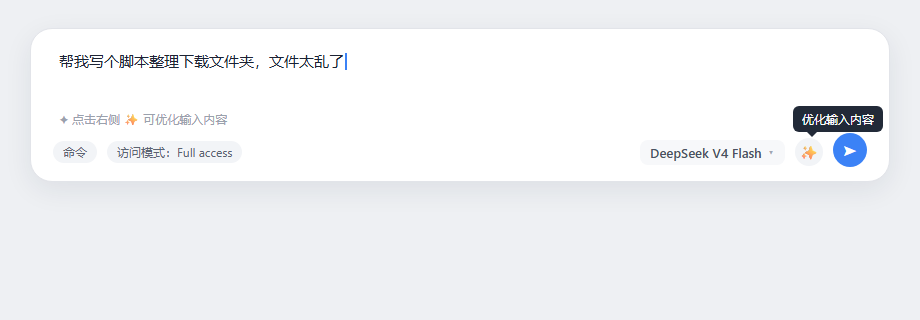
Trae-style input booster for the DeepSeek Harness (DSH) web GUI. A sparkle (✨) button beside the model selector rewrites your typed draft into a high-quality, faithful, directly executable prompt — and after optimization the same button turns into an undo (↩) icon to restore the original input.
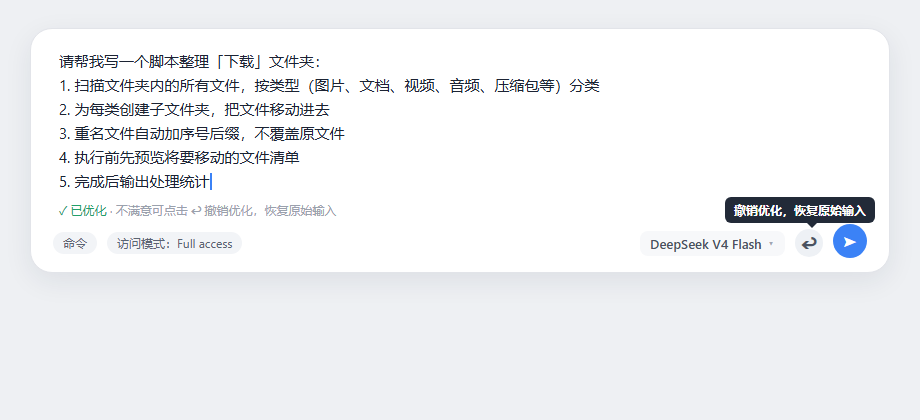
Inspired by Trae CN's "优化输入内容" (optimize input) feature: type a rough idea, click the magic wand, and the composer text is rewritten into a clear, structured instruction that the AI can execute directly. If you don't like the result, click the undo icon to get your original text back — you can loop optimize ⇄ undo as often as you like.
Features
| Feature | Description |
|---|---|
| ✨ Optimize input | One-click rewrite of the current draft into a clear, structured, executable prompt |
| ↩ Undo | After a successful write-back the button becomes an undo icon; click it to restore the original input |
| Task-aware | The optimizer detects the task type (coding, data processing, writing, analysis, research, ops, …) and organizes content accordingly |
| Fidelity-first | Every concrete detail from your input (paths, numbers, names, commands) is kept verbatim; nothing is invented — missing key info becomes a 【请补充:××】 placeholder |
| Natural output | Trae-style natural instruction text with numbered points — no "角色设定:/验收标准:" label headers, no JSON, no template tables |
| Language-locked | Output always follows the input language (Chinese in → Chinese out, English in → English out) |
| Anti-clobber | If you edit the draft while optimizing, the result is not written back and undo is not armed |
Screenshots
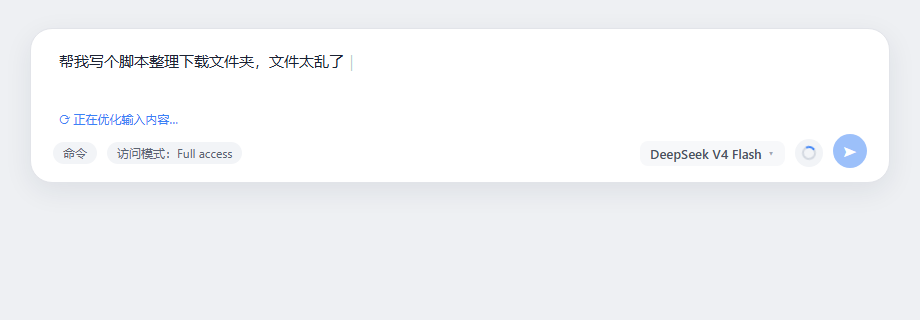
| ✨ Optimize input | ⏳ Optimizing | ↩ Undo available |
|---|---|---|
 |
 |
 |
How it works
- Host half (
lib/index.js): servesPOST /api/prompt-boost/optimize. It streams the optimization call throughllm.streamusing the deployment's default model (agentDefaultModel), applies the v6 optimizer policy, and returns{ text }or{ error }(90 s timeout, 8000-char input cap). - Browser half (
lib/client.js): registers theconversation.input.rightseat (tool row, right beside the model selector, before the send button), POSTs the draft, writes the result back viainputActions.setDraft, and manages the undo state machine.
Zero build: the package is plain JavaScript (ESM host + __ModuleLoader__ web bundle).
Install
Add the bundle patch to your web profile roster, e.g. in ~/.dsh/profiles/web/cordis.patch.yml:
- insert:
    - id: prompt-boost
      name: 'dsh-prompt-boost'
with the package available to the profile's node_modules (npm/link install), then reload the DSH host and refresh the GUI.
Usage
- Type a rough idea in the composer, e.g.
帮我写个脚本整理下载文件夹,文件太乱了 - Click the ✨ button (spinner while optimizing)
- Review the optimized instruction in the composer, then send
- Not happy? Click ↩ to restore the original input and try another phrasing
Requirements
- DSH with
llm+agentDefaultModelservices mounted and a configured default model - Browser web GUI (conversation composer)
License
MIT
Install
Install the catalog once, then DeepSeek Harness can find and install any plugin from this site automatically:
dsh plugin add dshbase-catalogThen say "install dsh-prompt-boost for me" — your agent finds it in the directory and installs it. Docs: dshbase-catalog · verified packs.
This plugin is GitHub source (not published to npm) — install it straight from the repo:
Web profile:
dsh plugin --profile web add github:060625dfy/dsh-prompt-boostHeadless (CLI) profile:
dsh plugin --profile headless add github:060625dfy/dsh-prompt-boostTest report
Verified: L1 install + L2 load + L3 runtime from GitHub source on dsh 0.1.0-rc.6.
Share this badge
Drop this badge into your README — it links back here and updates automatically when our test status changes:

[](https://dshbase.com/plugins/dsh-prompt-boost/)<a href="https://dshbase.com/plugins/dsh-prompt-boost/"><img src="https://dshbase.com/badges/dsh-prompt-boost.svg" alt="dshbase install-tested"></a>