
Plugin directory / Developer / dsh-provider-probe
dsh-provider-probe
Verified · install-tested on dsh Wanbinyu
What it does
Manual provider connectivity and latency checks for DeepSeek Harness
Works — verified, early-stage project
Manual provider connectivity and latency checks for DeepSeek Harness It installs cleanly and boots without issues in our testing. It's early-stage but functional.
“Verified” means our automated CI actually ran dsh plugin add in a clean profile and it booted — nothing more. Feature descriptions and version compatibility are the author’s claims. This is not a security audit and not an endorsement of third-party code.
README
dsh-provider-probe
English | 简体中文
非官方社区插件,与 DeepSeek 官方无隶属或背书关系。
为 DeepSeek Harness Web 提供手动、低成本的模型供应商连通性检测。它通过 DSH 已注册的适配器发送一个极小的真实模型请求,并展示首个 token 延迟、总耗时、结束原因、token 用量或脱敏错误。
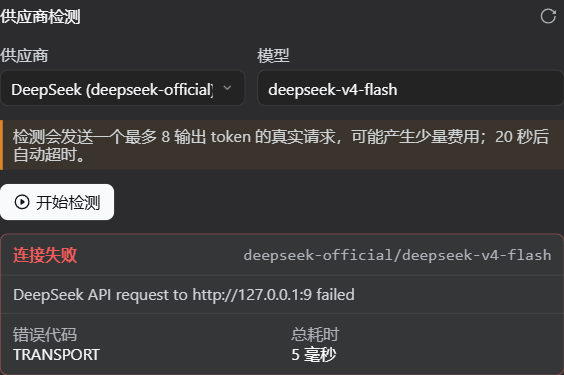
功能
- 自动列出当前活动的供应商路由和适配器模型目录;
- 显示活动模型路由声明的文本、图片或未知输入能力;
- 支持手动输入未出现在目录中的模型 ID;
- 只在用户点击“开始检测”后发送请求,不做后台轮询;
- 默认限制为 8 个输出 token,20 秒强制超时;
- 展示首个 token 延迟、总耗时、结束原因和实际 token 用量;
- 保留错误码、HTTP 状态和 Request ID,并尝试移除密钥、令牌与用户目录;
- 根据明确的状态码和错误特征区分凭据、权限、模型/地址、限流/额度、超时、网络、流兼容与供应商 5xx,并显示下一步建议;
- 一键复制适合粘贴到 Issue/Discussion 的脱敏诊断报告;
- 同一时间只允许一个检测,可随时取消,避免重复计费和限流;
- 不创建会话、不写入 session log、不保存或展示模型回复。
安装
要求 Node.js >=22.19 和 DeepSeek Harness 0.1.0-rc.6 或更高版本。v0.3.2 已使用 DeepSeek Harness 0.1.1-rc.2 完成类型、测试、构建和打包验证,并保留 0.1.0-rc.6 至 rc.8、0.1.1-rc.1 的兼容分支。每个供应商的模型列表读取均有独立超时,单个接口卡住不会阻塞整个目录。
dsh plugin --profile web add https://github.com/Wanbinyu/dsh-provider-probe/releases/download/v0.3.2/dsh-provider-probe-0.3.2.tgz
安装或更新后重启:
dsh web
打开“设置 -> 供应商检测”,选择供应商和模型后手动开始检测。
卸载:
dsh plugin --profile web remove dsh-provider-probe
配置
- insert:
    - id: provider-probe
      name: dsh-provider-probe
      config:
        timeoutMs: 20000
        maxTokens: 8
        maxMessageLength: 1200
| 选项 | 默认值 | 说明 |
|---|---|---|
timeoutMs |
20000 |
单次检测强制超时,范围 1000-120000 毫秒 |
maxTokens |
8 |
单次检测最大输出 token,范围 1-32 |
maxMessageLength |
1200 |
脱敏错误的最大字符数,范围 256-8000 |
失败建议
插件优先使用供应商返回的 HTTP 状态,其次使用明确的错误代码和常见错误文本进行分类。建议仅用于缩小排查范围,不会修改供应商配置或自动重试。
| 结果 | 建议检查 |
|---|---|
| 401 / 凭据 | API Key 是否存在、有效并对应当前接口地址 |
| 403 / 权限 | 模型授权、账号和项目权限 |
| 404 / 模型或地址 | Base URL 与模型 ID |
| 402、429 / 限流或额度 | 限流窗口、额度和计费状态 |
| 超时 / 网络 | 供应商状态、DNS、代理、防火墙与 TLS |
| 流兼容 | 当前接口的流式/SSE 格式是否符合 DSH 适配器预期 |
| 5xx | 稍后重试,并保留 Request ID 供供应商排查 |
费用与隐私
检测请求会经过 DSH 的正常适配器和用户已经保存的供应商配置,因此可能产生少量模型费用。插件不会读取或返回 API Key;凭据仍由适配器按正常路径解析。模型输出会被丢弃,只保留时延、用量和终止状态。
输入能力来自 DSH 当前模型路由的声明,不会额外发送图片进行验证,因此不增加附件、网络请求或费用。复制的诊断报告只使用页面已经显示的路由、能力、时延、用量和脱敏错误;发布前仍应人工检查。
错误脱敏属于纵深防御,无法保证覆盖每个供应商自定义的敏感格式。公开错误信息前仍应人工检查。
开发
npm install
npm run verify
verify 会执行 Host/Web 类型检查、单元测试、客户端构建和安装包内容检查。浏览器端使用轻量边界解析器,避免为两个 Remote 方法重复打入完整 Zod。
反馈
问题与建议请提交到 GitHub Issues。
许可证
Install
Install the catalog once, then DeepSeek Harness can find and install any plugin from this site automatically:
dsh plugin add dshbase-catalogThen say "install dsh-provider-probe for me" — your agent finds it in the directory and installs it. Docs: dshbase-catalog · verified packs.
This plugin is GitHub source (not published to npm) — install it straight from the repo:
Web profile:
dsh plugin --profile web add github:Wanbinyu/dsh-provider-probeHeadless (CLI) profile:
dsh plugin --profile headless add github:Wanbinyu/dsh-provider-probeTest report
Verified: L1 install + L2 load + L3 runtime from GitHub source on dsh 0.1.0-rc.6.
Share this badge
Drop this badge into your README — it links back here and updates automatically when our test status changes:

[](https://dshbase.com/plugins/dsh-provider-probe/)<a href="https://dshbase.com/plugins/dsh-provider-probe/"><img src="https://dshbase.com/badges/dsh-provider-probe.svg" alt="dshbase install-tested"></a>