
Plugin directory / AI Models / dsh-reasoning-settings
dsh-reasoning-settings
Verified · install-tested on dsh JuneLearn
What it does
Add Low, Medium, High, and other reasoning levels to third-party APIs, with model selection for each subagent call.
Works — verified, early-stage project
Add Low, Medium, High, and other reasoning levels to third-party APIs, with model selection for each subagent call. It installs cleanly and boots without issues in our testing. It's early-stage but functional.
“Verified” means our automated CI actually ran dsh plugin add in a clean profile and it booted — nothing more. Feature descriptions and version compatibility are the author’s claims. This is not a security audit and not an endorsement of third-party code.
README
DSH Reasoning Settings
A DeepSeek Harness Web settings plugin that adds an independent reasoning effort (thinking intensity) page for custom llm-pi-ai providers. The official UI only exposes effort selection for first-party DeepSeek models; this plugin makes it work for third-party / relay APIs too.
Third-party service recommendation (referral link)
If you are looking for an OpenAI-compatible API relay, you can take a look at WPIronman API. This is my referral link, and I may receive a referral benefit if you register through it; any promotion or benefit is subject to the provider's current terms. This plugin is independent of that service and does not require any particular relay. Evaluate pricing, reliability, and privacy terms before choosing a provider.
New users can redeem the gift quota with code
99F509ABC6C38F77.
Features
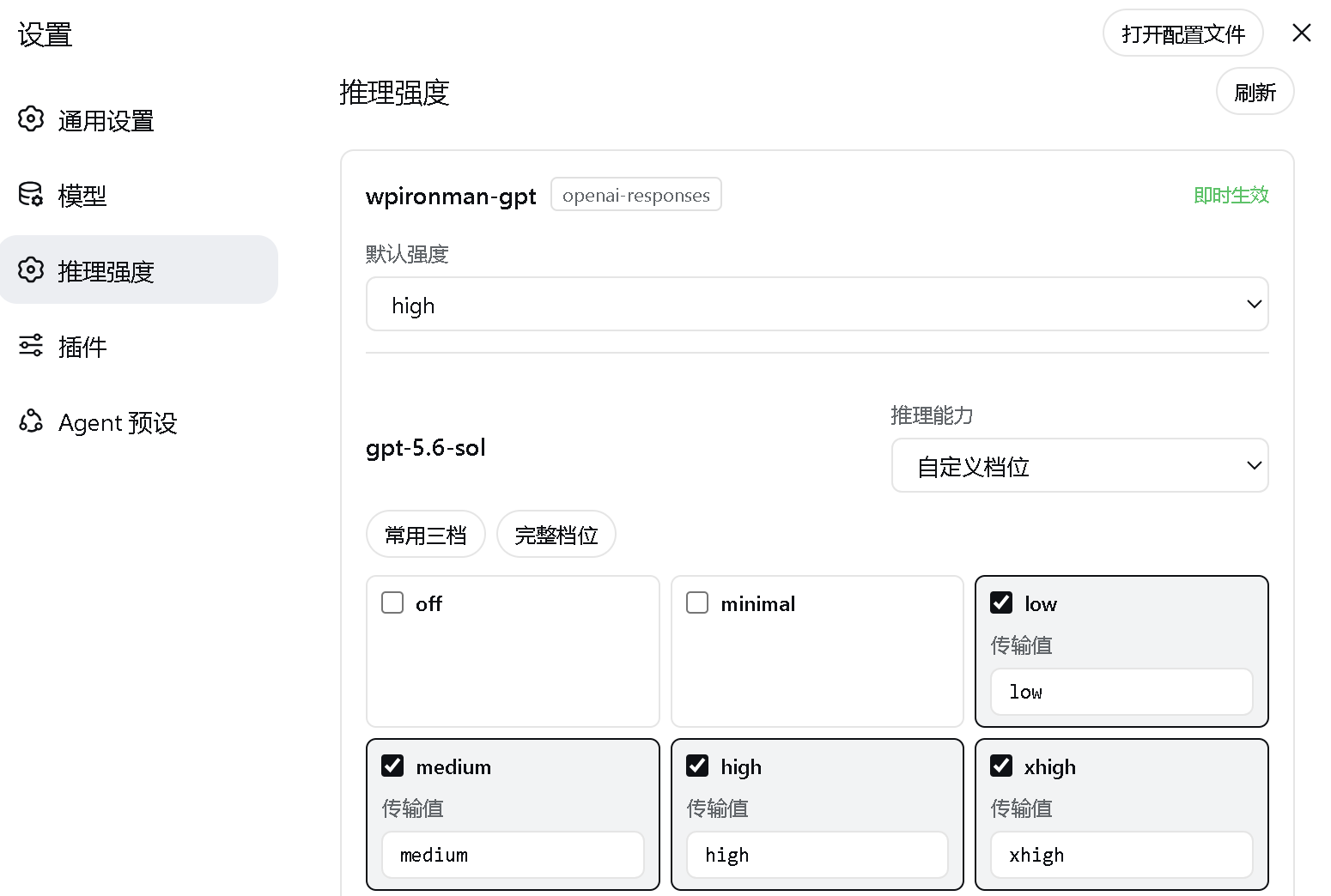
- Auto-reads the custom providers and models you already added on the official Models page.
- Declares a per-model effort level from
off / minimal / low / medium / high / xhigh / max. - Customizes the actual wire value sent to the API for each level.
- Sets a provider-wide default effort, restricted to the levels supported by every model in that provider.
- Configures the reasoning wire format for
openai-completionsproviders. - Writes back to
llm-pi-ai.providers.*through the officialsettings.mutateAPI 锟斤拷 API keys are never touched. - Fixes in-process subagents inheriting the Agent's create-time official model instead of the parent's live third-party provider/model selection.
- Makes subagents inherit an explicit parent reasoning effort, or fall back to the target provider's configured default effort.
- Resolves model-only child overrides such as
grok-4.5against user-configured third-party providers instead of an unrelated official provider. - Extends the ordinary
subagentandsubagent_forktools with per-callprovider,model, andreasoning_effortfields, without replacing their official lifecycle, background, or result behavior.
Live demo
Installation
Prerequisites
- Install Node.js. DSH currently supports Node.js 22.19.x or version 24 and newer; Node.js 24 LTS is recommended. Node.js includes
npmandnpx. - Install Git so the plugin can be fetched from its GitHub repository.
- Install pnpm. Both methods require pnpm because
dsh plugininvokes it in the profile directory to install or remove plugins. - Your network must reach
registry.npmjs.organdgithub.com. Configure a working network proxy if npm or GitHub is unavailable or unstable in your region. - Method 1 does not require a DeepSeek Harness source checkout. Method 2 additionally requires that checkout.
Check the basic environment first:
node --version
npx --version
git --version
corepack enable
pnpm --version
If corepack enable fails with a permission error, run it once from an Administrator PowerShell. Alternatively, use another option from the pnpm installation guide.
If downloads remain on a spinner or fail with ECONNRESET, ETIMEDOUT, or a GitHub connection error, set a proxy for the current PowerShell window. Port 7890 is only an example; replace it with your proxy's actual port:
$proxy = "http://127.0.0.1:7890"
$env:HTTP_PROXY = $proxy
$env:HTTPS_PROXY = $proxy
$env:npm_config_proxy = $proxy
$env:npm_config_https_proxy = $proxy
These variables only affect the current PowerShell window and disappear when it is closed.
Method 1: npx (recommended for regular users)
This method does not require a DeepSeek Harness source checkout or a global dsh installation, but Git and pnpm must already be available. On its first run, npx downloads @deepseek-ai/dsh and its dependencies, which can take several minutes:
npx --yes -p @deepseek-ai/dsh dsh plugin --profile web add github:JuneLearn/dsh-reasoning-settings
Start Web through the same package runner after installation:
npx --yes -p @deepseek-ai/dsh dsh web
Method 2: pnpm with the Harness source tree (recommended for developers)
Use this method if you already cloned deepseek-harness and want to run its source directly. First confirm pnpm is available:
pnpm --version
Enter the DeepSeek Harness source root. Install its dependencies once, then install the plugin:
cd D:\deepseek-harness
pnpm install
pnpm dsh plugin --profile web add github:JuneLearn/dsh-reasoning-settings
Start Web from that source directory afterward:
cd D:\deepseek-harness
pnpm dsh web
The package's dsh.bundle declaration adds the plugin to the Web profile automatically. Neither method requires editing cordis.patch.yml. Web listens on http://127.0.0.1:3080 by default; it uses another port only when the default is occupied or you explicitly select one.
Upgrade
Run the corresponding install command again to upgrade. No uninstall or profile-patch maintenance is required.
npx method:
npx --yes -p @deepseek-ai/dsh dsh plugin --profile web add github:JuneLearn/dsh-reasoning-settings
pnpm source method:
cd D:\deepseek-harness
pnpm dsh plugin --profile web add github:JuneLearn/dsh-reasoning-settings
Uninstall
npx method:
npx --yes -p @deepseek-ai/dsh dsh plugin --profile web remove dsh-reasoning-settings
pnpm source method:
cd D:\deepseek-harness
pnpm dsh plugin --profile web remove dsh-reasoning-settings
DSH removes both the dependency and its bundle layer. Restart dsh web; the Reasoning effort settings page is removed.
Usage
- Add your custom provider and models on the official Models page first.
- Open Settings > Reasoning effort.
- Pick the supported levels for each model and set the provider default effort.
- Click Save under that provider.
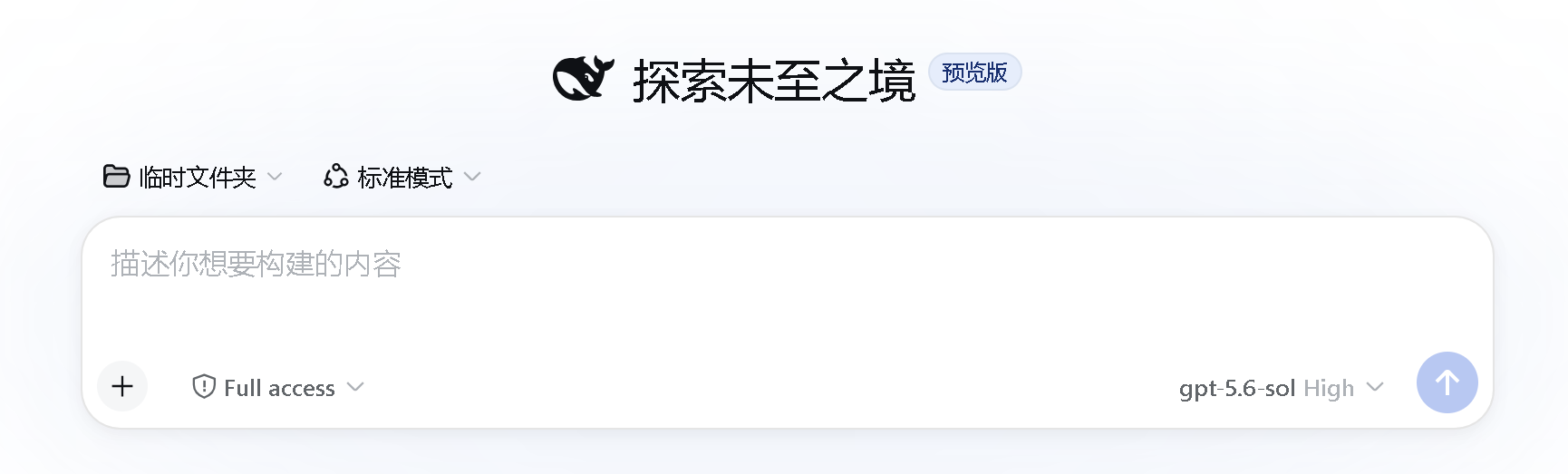
- Start a new session and choose the model and reasoning effort in the model picker.
The plugin only declares which effort levels Harness may select and send. Whether the relay API actually honors a value is up to the relay: if a request comes back with HTTP 400, uncheck the levels that model does not support or adjust their wire values.
Subagent routing and reasoning
The server entry fixes model inheritance for Harness 0.1.0-rc.5 in-process subagent, subagent_fork, and Workflow children:
- An explicit child
provider + modelroute remains authoritative when it differs from the parent's create-time route. - A model-only override is resolved against user-configured third-party providers; duplicate model ids prefer the parent's current provider.
- With no child override, the child inherits the parent's live provider/model instead of its create-time official default.
- An explicit child effort remains authoritative; otherwise the parent's effort is inherited only for the same target route.
- With no explicit effort, the plugin leaves it absent so
llm-pi-aiapplies the target provider'sreasoningdefault.
The plugin also augments the existing model-facing subagent and subagent_fork tools for each live Agent. Their original arguments remain available, with three optional fields added:
provider: exact configured Provider id;model: exact model id owned by that Provider;reasoning_effort: optionaloff / minimal / low / medium / high / xhigh / maxlevel.
provider and model must be supplied together. Omitting both preserves normal inheritance. Omitting reasoning_effort after selecting a different route uses that Provider/model's configured default. The tool descriptions enumerate exact configured pairs and instruct the parent model to delegate instead of answering directly when a user requests another Provider/model.
Do not use shorthand such as 锟斤拷the 5.6 model锟斤拷 when multiple exact ids exist. For example, if a Provider contains both gpt-5.6-sol and gpt-5.6-terra, ask for one exact pair:
Use subagent with provider=wpironman-gpt, model=gpt-5.6-terra,
reasoning_effort=max to write a 100-character random essay.
If the requested pair equals the current route, the child still uses that same route, so the result will naturally look like the parent model. The structured tool-call arguments and the child's durable request/header are the reliable verification points.
Per-call targeting affects local in-process children only. Codex, Claude Code, and ACP subagents run in separate processes and retain their own model configuration. Workflow retains its own structured provider/model phase fields and still benefits from the inheritance correction when no phase target is supplied.
All switches default to true and may be changed in the plugin mount:
- insert:
    - id: ui-settings-reasoning
      name: dsh-reasoning-settings
      config:
        subagentRouting: true
        inheritRoute: true
        resolveModelOnly: true
        inheritReasoning: true
Set subagentRouting: false to disable the entire server-side correction.
Development
pnpm test # or: node tests/plugin.test.mjs
Compatibility
Built against the public dual-end plugin, settings-slot, settings.mutate, agent-scoped tool shadowing, Agent lifecycle, and agent/request waterfall interfaces of DeepSeek Harness 0.1.0-rc.5. Harness is still in Developer Preview; if the plugin stops loading or subagent routing changes after an upgrade, check those interfaces and the subagent session metadata.
License
Install
Install the catalog once, then DeepSeek Harness can find and install any plugin from this site automatically:
dsh plugin add dshbase-catalogThen say "install dsh-reasoning-settings for me" — your agent finds it in the directory and installs it. Docs: dshbase-catalog · verified packs.
This plugin is GitHub source (not published to npm) — install it straight from the repo:
Web profile:
dsh plugin --profile web add github:JuneLearn/dsh-reasoning-settingsHeadless (CLI) profile:
dsh plugin --profile headless add github:JuneLearn/dsh-reasoning-settingsTest report
Verified: L1 install + L2 load + L3 runtime from GitHub source on dsh 0.1.0-rc.6.
When to use it
Bring a new model, provider, or routing policy into the loop so dsh can pick the right brain for the job.
Who it's for
Users juggling multiple models or providers who want cost, quality, and latency balanced automatically.
For developers — extending it
Provider adapters and routing heuristics are the seams — add a backend, tune the fallback chain, or add per-task model selection.
Share this badge
Drop this badge into your README — it links back here and updates automatically when our test status changes:

[](https://dshbase.com/plugins/dsh-reasoning-settings/)<a href="https://dshbase.com/plugins/dsh-reasoning-settings/"><img src="https://dshbase.com/badges/dsh-reasoning-settings.svg" alt="dshbase install-tested"></a>