
Plugin directory / UI & Skins / dsh_Rhine_Lab_theme
dsh_Rhine_Lab_theme
Verified · install-tested on dsh ReLuckyLucy
What it does
Arknights Rhine Lab (莱茵生命) skin for the DeepSeek Harness Web GUI
Works — verified, early-stage project
Arknights Rhine Lab (莱茵生命) skin for the DeepSeek Harness Web GUI It installs cleanly and boots without issues in our testing. It's early-stage but functional.
“Verified” means our automated CI actually ran dsh plugin add in a clean profile and it booted — nothing more. Feature descriptions and version compatibility are the author’s claims. This is not a security audit and not an endorsement of third-party code.
README
dsh-theme-rhine-lab
English | 中文
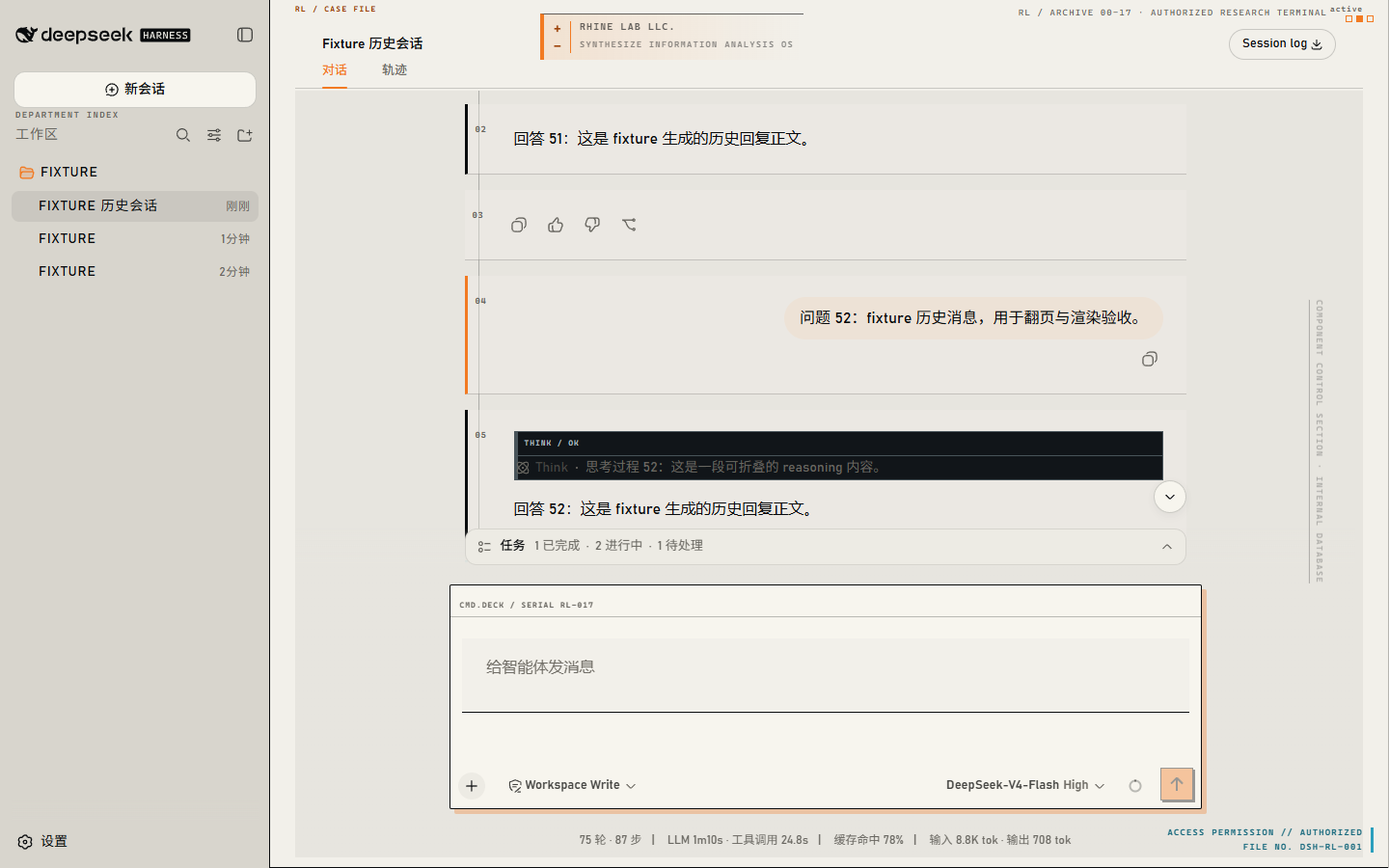
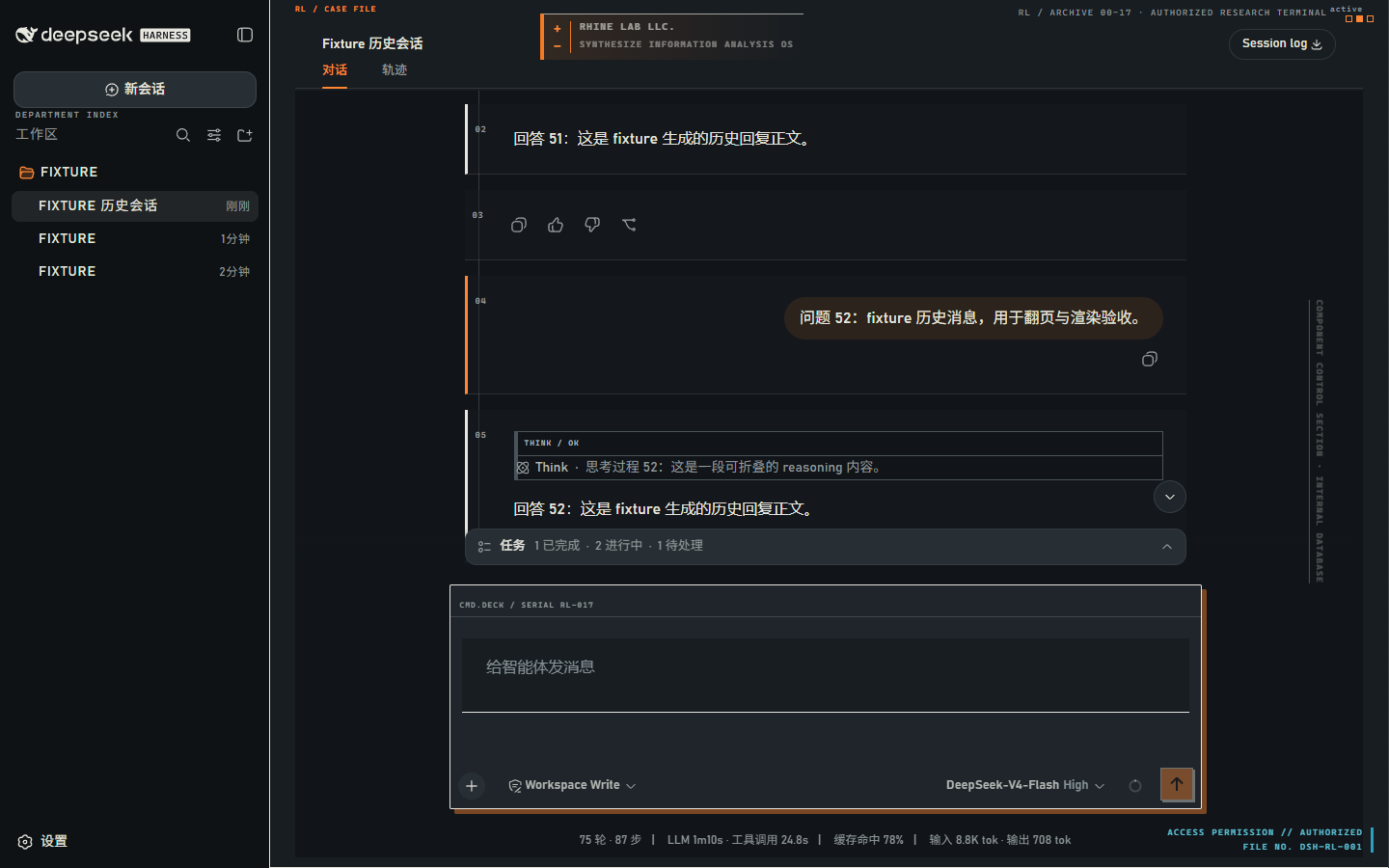
An Arknights Rhine Lab reconstruction for the DeepSeek Harness Web GUI: an archive-terminal visual system with restrained institutional HUD branding.
Visual system
The reconstruction presents Harness as a research archive rather than a decorative overlay:
- Light headquarters archive uses warm paper, dense ink, squared file edges, and research-orange authorization accents.
- Dark night-operations mode keeps the same record structure on charcoal surfaces, with cyan reserved for live data and red for failures.
- Restrained direct branding is limited to non-interactive archival labels and the Rhine Lab shell mark; it never adds controls or changes Harness workflow.
- Accessible behavior preserves normal interaction, respects
prefers-reduced-motion, and reduces only nonessential inscriptions and gutters at narrow widths.
No media from any local reference site is redistributed. The package contains only its own source, compiled output, documentation, and the release screenshots above.
Compatibility and safe degradation
The compatibility target is DeepSeek Harness 0.1.0-rc.5 on the Web surface (dsh --profile web). The stylesheet is deliberately scoped to stable Harness data attributes. If a future or older host omits an anchor, that decoration simply does not apply: the host’s controls, layout tracks, scrolling, code surfaces, and settings remain in charge.
The existing Settings → General toggle remains the control point. It still reads and writes the durable ui-theme-rhine-lab.enabled preference; no migration or replacement settings namespace is introduced. Light, Dark, and System continue to select the base mode underneath the reconstruction.
Install
Install a published package or a packed tarball:
dsh plugin --profile web add dsh-theme-rhine-lab
pnpm pack
dsh plugin --profile web add ./dsh-theme-rhine-lab-0.2.1.tgz
Install from source after building it:
git clone https://github.com/ReLuckyLucy/dsh_Rhine_Lab_theme.git
cd dsh_Rhine_Lab_theme
pnpm install
pnpm build
dsh plugin --profile web add .
Restart dsh web after changing the installed plugin set, then refresh the browser. Git installs use the committed lib/ artifacts and do not require lifecycle-script approval; prepack rebuilds those artifacts before a tarball is produced.
How it works
cordis.patch.ymlcontributes the bundle to dsh.src/index.tsregisters the durableui-theme-rhine-labsetting.src/client/index.tsprojects the enabled setting into token overrides, the scoped archive-terminal stylesheet, the non-interactive HUD, and the General-settings row.lib/is committed so registry and tarball installs have prebuilt artifacts.
Development and publishing
pnpm test
pnpm build
npm pack --dry-run
The published tarball intentionally includes lib, src, cordis.patch.yml, both READMEs, LICENSE, and screenshots when the release captures are present. It excludes tests, local notes, and any reference-site material.
License
MIT. This is a fan-made skin; Arknights and Rhine Lab belong to Hypergryph / Yostar.
Install
Install the catalog once, then DeepSeek Harness can find and install any plugin from this site automatically:
dsh plugin add dshbase-catalogThen say "install dsh_Rhine_Lab_theme for me" — your agent finds it in the directory and installs it. Docs: dshbase-catalog · verified packs.
This plugin is GitHub source (not published to npm) — install it straight from the repo:
Web profile:
dsh plugin --profile web add github:ReLuckyLucy/dsh_Rhine_Lab_themeHeadless (CLI) profile:
dsh plugin --profile headless add github:ReLuckyLucy/dsh_Rhine_Lab_themeTest report
Verified: L1 install + L2 load + L3 runtime from GitHub source on dsh 0.1.0-rc.6.
Share this badge
Drop this badge into your README — it links back here and updates automatically when our test status changes:

[](https://dshbase.com/plugins/dsh-rhine-lab-theme/)<a href="https://dshbase.com/plugins/dsh-rhine-lab-theme/"><img src="https://dshbase.com/badges/dsh-rhine-lab-theme.svg" alt="dshbase install-tested"></a>