
Plugin directory / UI & Skins / dsh-session-nav
dsh-session-nav
Verified · install-tested on dsh kiligzzz
What it does
Piano-key style in-conversation navigation bar for the DeepSeek Harness web GUI: one key per user message, hover preview tooltip, click-to-jump across full history. Official dual-face dsh plugin, no dsh source changes.
Works — verified, early-stage project
Piano-key style in-conversation navigation bar for the DeepSeek Harness web GUI: one key per user message, hover preview tooltip, click-to-jump across full history. Official dual-face dsh plugin, no dsh source changes. It installs cleanly and boots without issues in our testing. It's early-stage but functional.
“Verified” means our automated CI actually ran dsh plugin add in a clean profile and it booted — nothing more. Feature descriptions and version compatibility are the author’s claims. This is not a security audit and not an endorsement of third-party code.
README
dsh-session-nav

English | 简体中文
钢琴键风格的会话内导航条 —— 为 DeepSeek Harness Web GUI 的单个会话提供多轮对话导航:
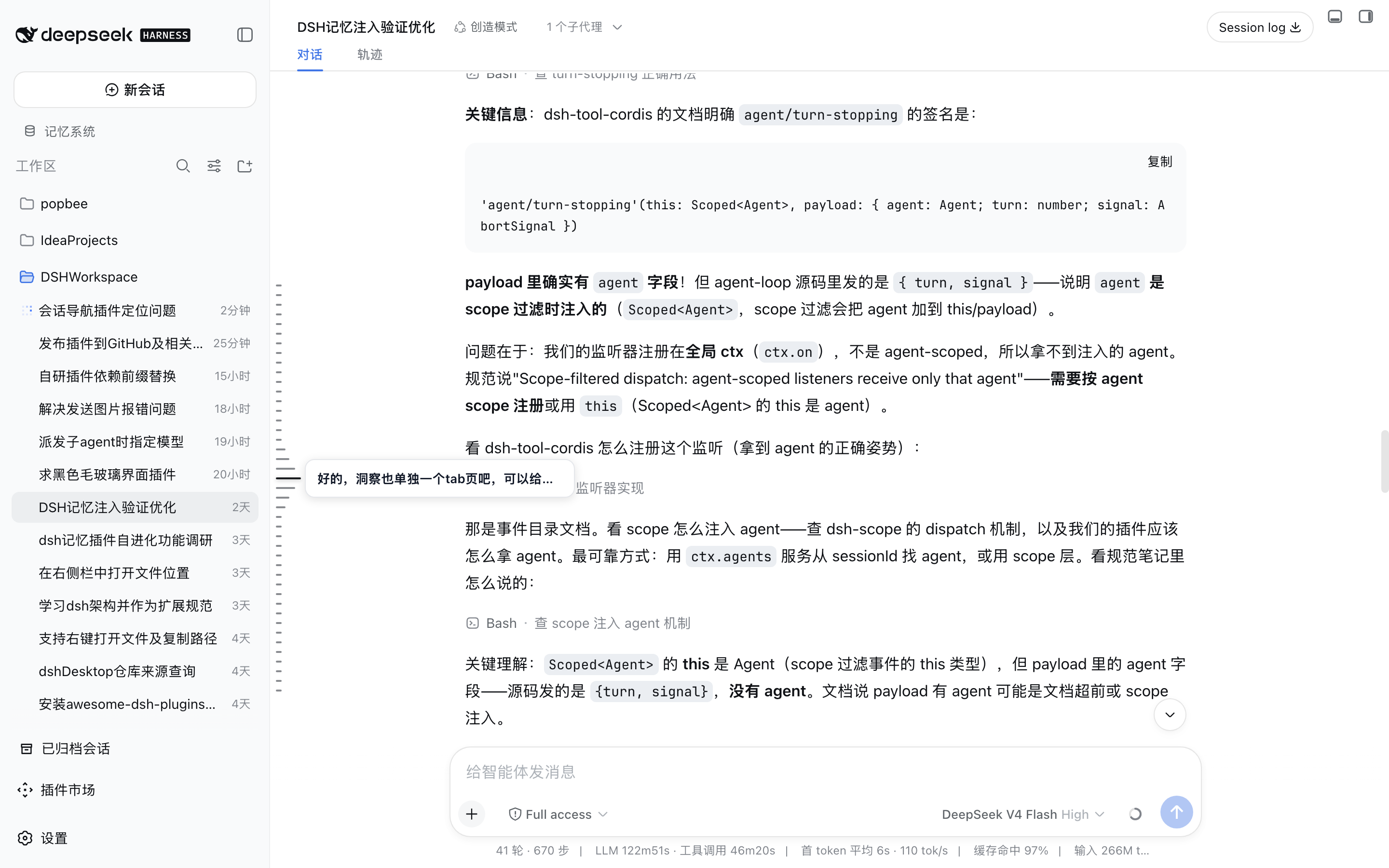
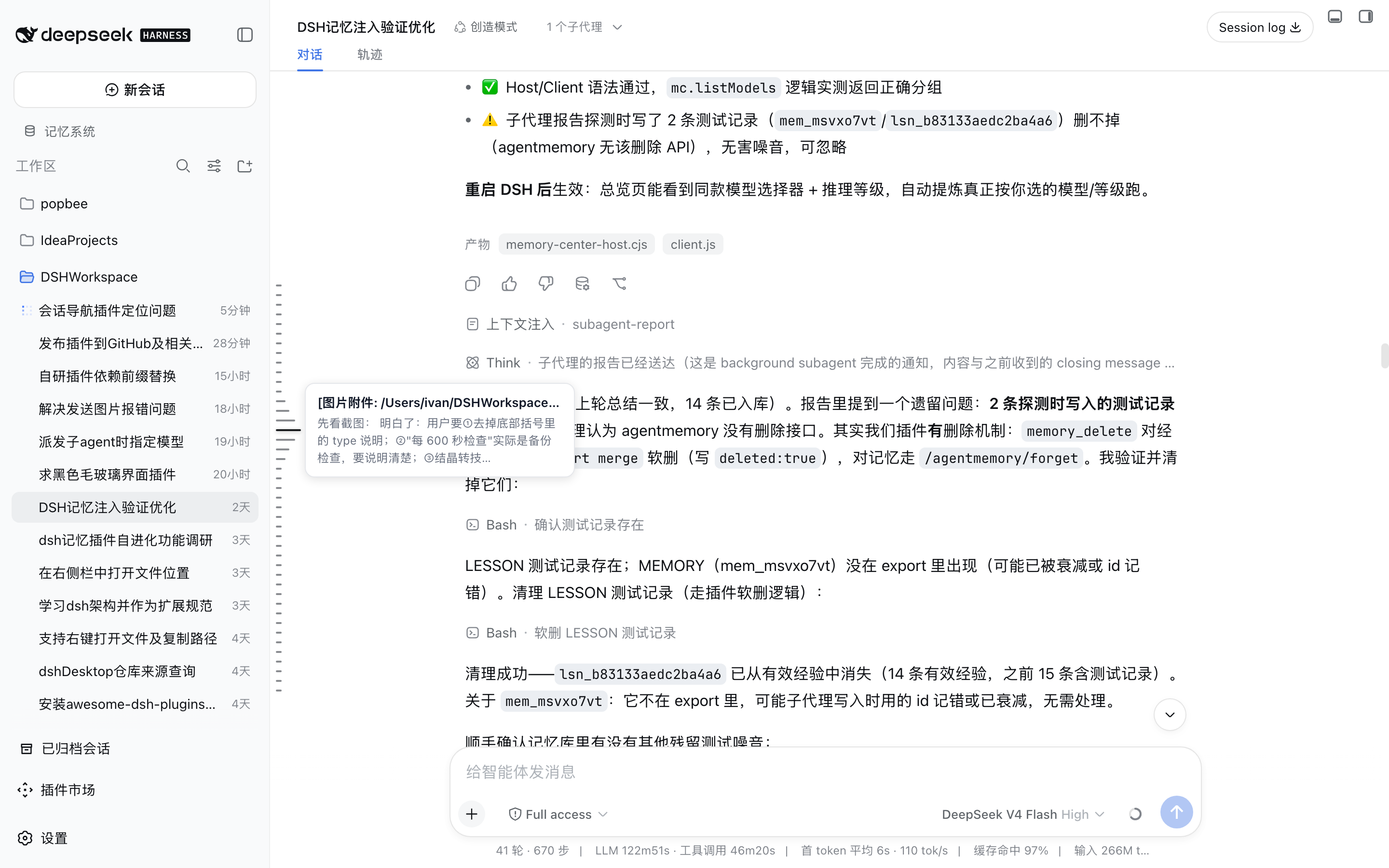
每根键锚定一条用户消息,悬停显示该轮「用户消息 + 模型回复」预览,点击平滑跳转到对应消息。
基于 DSH 官方双面插件机制(host + browser half),不侵入 DSH 源码。
| 整体效果 | 悬停预览 | 点击跳转 |
|---|---|---|
 |
 |
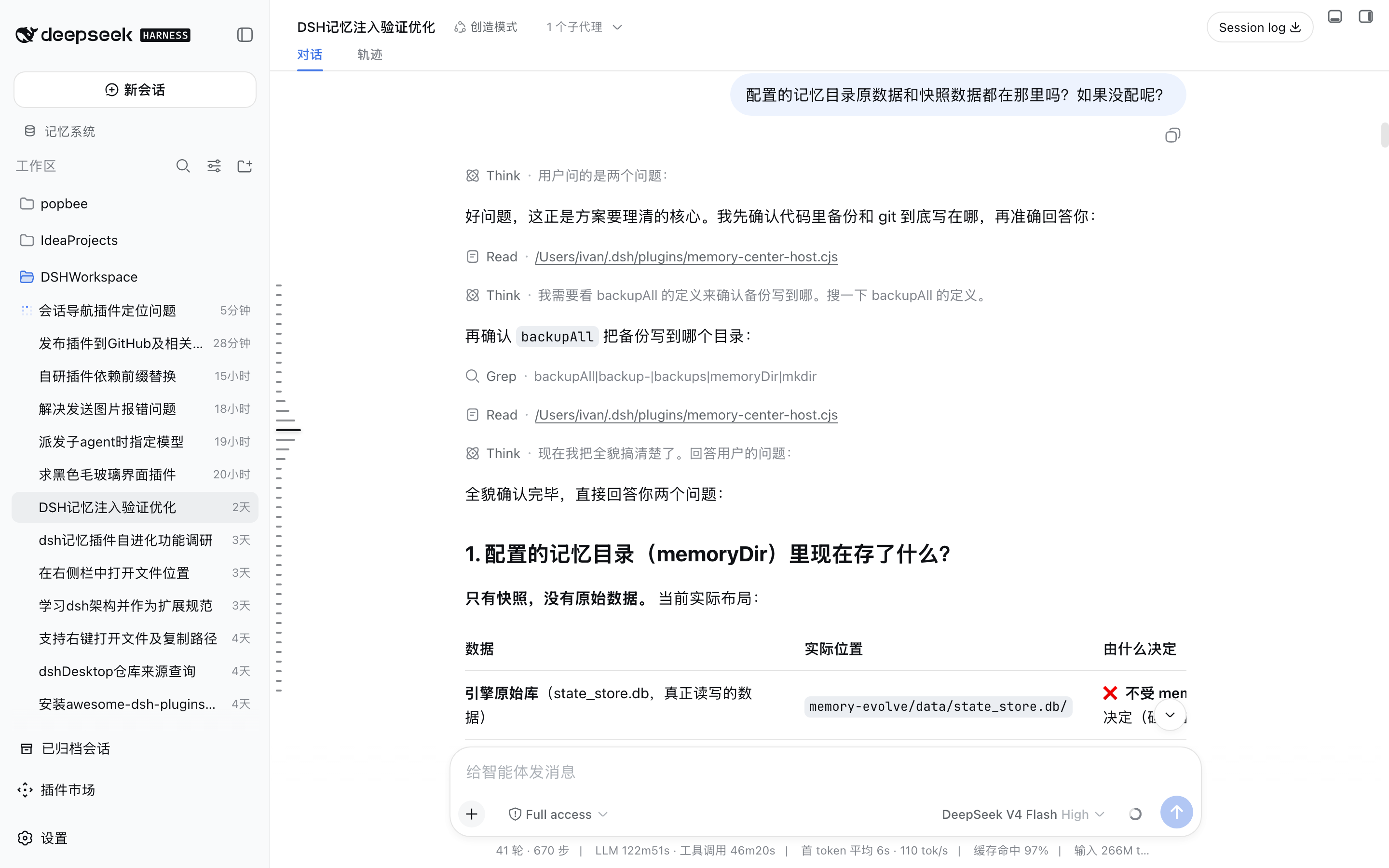 |
| 一个 43 轮的会话 —— 每根键对应一个用户问题,紧凑簇在消息区垂直居中。 | 悬停某键显示用户消息(单行)+ 该轮模型回复(最多 3 行)。 | 点击任意键自动翻页历史(与官方「加载更早」同一通道)并精确定位到视口顶部。 |
截图取自一个真实的 43 轮会话(DSH记忆注入验证优化,浅色主题)。
参考实现:KeLearns/dsh-navigation-bar(视觉规格与交互对齐,代码独立重写)。
功能
- 会话内导航:一根键 = 一条用户消息(含 agent 运行中发送的 steering 消息),按时间正序;
模型回复不单独占键,并入对应轮次的预览。 - 全量历史:导航键数据来自 host 端按需读取的完整会话日志(
sessionPersistence.readFrom),
而非浏览器已加载的窗口 —— 长会话(上百轮)也能一屏看到全部用户问题;
与实时快照合并时按消息 UUID 去重,不会出现重复键。 - 视觉规格:键簇固定 10px 键距、2px 键高、6px 最短长、26px 悬停长(≈4.3×),
在消息区内垂直居中;配色浅色#D2D3D3/#767779/#1A1C1F,
深色#454545/#A3A3A3/#FFFFFF。 - 悬停阶梯:悬停键变长变色,上下相邻 3 级阶梯(20 / 14 / 10px,≈77% / 54% / 38%),
第 4 邻恢复最短,首/尾键悬停时阶梯自然单侧裁剪。 - 悬停气泡:用户消息单行省略 + 对应模型回复最多 3 行(宽度模型 JS 截断 +
-webkit-line-clamp双保险,超出以 … 省略);气泡与键垂直居中对齐;
顶部带「第 N 轮」轮次徽标(v0.1.8+),长会话定位更直观。 - 当前位高亮:非悬停时当前查看内容对应的键仅变色(长度不变),随滚动实时联动。
- 点击跳转:目标消息已在加载窗口内时平滑滚动直达;在窗口外(虚拟列表未加载)时
自动循环调用官方分页接口(与「加载更早」按钮同一通道)拉取历史,直到目标行渲染后
精确定位到视口顶部。 - 深浅色主题自适应(
data-ds-dark-theme+ prefers-color-scheme 兜底)。 - 自动隐藏官方回合导航(v0.1.5+):安装本插件即自动隐藏 DSH 官方「紧凑回合导航」
(右侧竖排「跳转到第 N 轮」按钮),钢琴键导航是它的同位替代,避免双导航并存。 - 仅对话视图显示(v0.1.5+):钢琴键只在「对话」Tab 渲染,切到轨迹 / Agent 调度 /
记忆系统等视图时自动隐藏,不干扰其他面板。
兼容性
- 适配 DSH 0.1.2+(v0.1.11+):0.1.2 重构了会话快照结构(
session.getSnapshot()
不再包含navigation投影),本插件已改用官方uiConversation服务的 chat 完整
快照(viewStore.get('chat'))取回复文本,与官方「紧凑回合导航」同源;
历史轮次回复由 host 端从磁盘日志提取,全量轮次均可预览。 - 0.1.2 之前版本:同样可用(自动回退旧快照路径)。
安装
方式一:从 GitHub 安装(推荐)
dsh plugin --profile web add github:kiligzzz/dsh-session-nav
方式二:本地开发(link 方式)
# 本地开发(link 方式;改 lib/client.js 后刷新页面即生效)
dsh plugin --profile web add link:<本目录>
注意:插件名单在实例启动时加载 —— 新装插件后需重启 dsh web 实例再刷新页面。
结构
| 文件 | 说明 |
|---|---|
index.js |
host 半端:读取会话全量日志并暴露同源路由 /_dsh/session-nav/questions |
lib/client.js |
browser 半端(手写 bundle,无构建步骤;window.__ModuleLoader__.load) |
cordis.patch.yml |
bundle patch:把插件行插入 web profile 名单 |
package.json |
dsh.bundle.patch + dsh.client(platform web)声明 |
数据来源(全部官方 API):
ctx.uiConversation.binding(currentId).viewStore.get('chat')→ chat 完整快照
(含navigation,0.1.2+;useSyncExternalStore实时订阅)ctx.sessions.binding(currentId).session→ConversationSnapshot
(0.1.2 前 / 无 uiConversation 时回退)ctx.sessionPersistence.readFrom(sessionId, 0)→ 全量会话日志(host 端)- DOM 锚点:滚动容器
[data-conversation-scroll],消息行[data-chat-anchor-key] - 分页:
session.loadOlder()(与官方「加载更早」按钮同一通道)
性能
事件驱动几何跟踪:scroll capture / resize / 惰性附加的 scrollport ResizeObserver →
rAF 合并重算;无常驻 MutationObserver、无定时器。锚点行走 isConnected 校验的缓存,
虚拟滚动回收重建不影响正确性。
开发
环境要求:Node.js >= 18。
pnpm install        # 开发依赖(vitest / eslint / prettier)
pnpm test           # 运行单元测试(31 个用例)
pnpm lint           # eslint 检查
pnpm format         # prettier 格式化
结构说明:
- 纯函数(文本提取、截断、键身份、集群几何)放在
lib/shared.js,host 与 browser
两端共用同一实现,测试只需覆盖一次。 - browser 半端是手写 bundle、无构建步骤:改
lib/client.js刷新页面即可;host 端
(index.js)改动需要重载插件。 window.__dssnNavDebug__暴露诊断信息(entryCount、fullCount、stats),
便于 CDP 检查。
License
MIT
Install
Install the catalog once, then DeepSeek Harness can find and install any plugin from this site automatically:
dsh plugin add dshbase-catalogThen say "install dsh-session-nav for me" — your agent finds it in the directory and installs it. Docs: dshbase-catalog · verified packs.
This plugin is GitHub source (not published to npm) — install it straight from the repo:
Web profile:
dsh plugin --profile web add github:kiligzzz/dsh-session-navHeadless (CLI) profile:
dsh plugin --profile headless add github:kiligzzz/dsh-session-navTest report
Verified: L1 install + L2 load + L3 runtime from GitHub source on dsh 0.1.0-rc.6.
Share this badge
Drop this badge into your README — it links back here and updates automatically when our test status changes:

[](https://dshbase.com/plugins/dsh-session-nav/)<a href="https://dshbase.com/plugins/dsh-session-nav/"><img src="https://dshbase.com/badges/dsh-session-nav.svg" alt="dshbase install-tested"></a>