
Plugin directory / Knowledge / dsh-sidebar-mode
dsh-sidebar-mode
Verified · install-tested on dsh Meredith2328
What it does
Put the default four mode switches into the 'New Session' button for easier new session creation (Standard/PTC/Creative/Minimal, two-way sync with settings).
Works — verified, early-stage project
Put the default four mode switches into the 'New Session' button for easier new session creation (Standard/PTC/Creative/Minimal, two-way sync with settings). It installs cleanly and boots without issues in our testing. It's early-stage but functional.
“Verified” means our automated CI actually ran dsh plugin add in a clean profile and it booted — nothing more. Feature descriptions and version compatibility are the author’s claims. This is not a security audit and not an endorsement of third-party code.
README
dsh-sidebar-mode
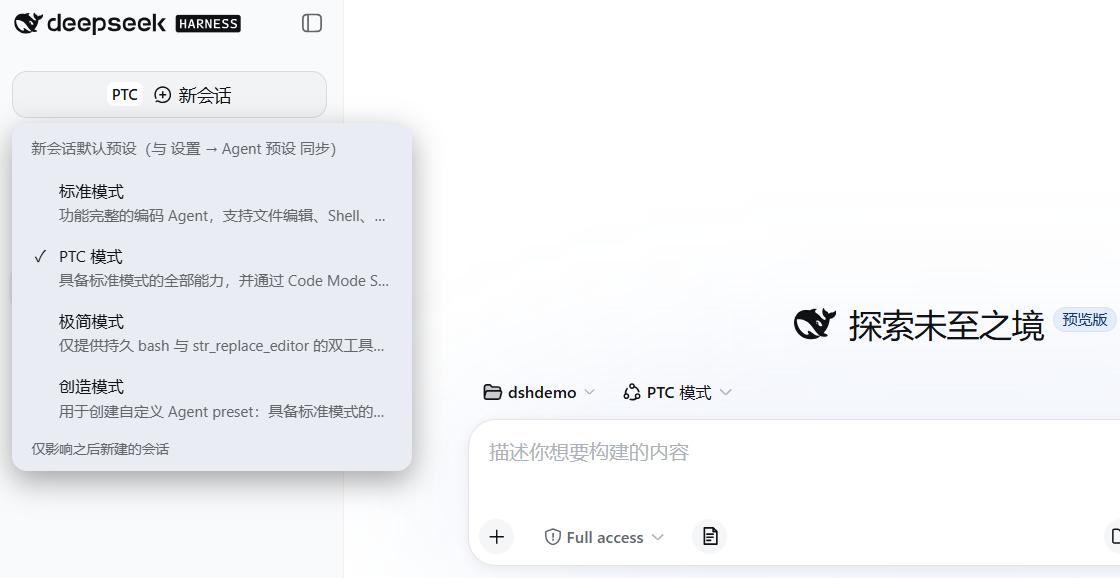
把默认的四种模式(标准 / PTC / 创造 / 极简)切换塞进「新会话」按钮里:
点按钮最左边的小字就弹出预设菜单,即点即用——不用再进设置页切换,新会话创建更方便。
与设置 → Agent 预设双向同步:切换时会把新默认立即应用到当前空白会话,
新会话页的预设徽章实时翻转,无需再手动点徽章。
特性
- 无独立按钮、无三角:小字标签直接嵌在「新会话」按钮内,点击标签弹出菜单;
点击按钮其他区域照常新建会话。 - 预设清单自动发现:菜单里除了出厂的标准 / PTC / 创造 / 极简四种模式,你自己
复制或新建的预设(比如第五个自定义模式)也会自动出现在菜单里,随用随有,
无需改插件;加载失败的预设会按官方规则自动排除。 - 预设名过长时,按钮内的小字标签自动截断成省略号,不会把「新会话」几个字挤掉;
鼠标悬浮仍显示完整名称(和官方设置面板同一套截断策略)。 - 读写与官方设置面板同一数据通道(
agent-presets.default+agentPresets.select),
设置面板 / 侧边栏按钮 / 新会话页徽章三者一致。 - 跟随日间/夜间主题(全部使用 DSH 主题令牌)。
- 侧边栏收起成图标条时自动隐藏。
- 会话创建即固定预设是 DSH 的设计;本插件只改全局默认,并把新默认应用到
当前空白会话,不影响已运行的会话。
安装(profile 插件,随 DSH 常驻)
cd "$(dsh home)/profiles/web"    # Windows: C:\Users\<you>\.dsh\profiles\web
pnpm add "github:Meredith2328/dsh-sidebar-mode"
并把 dsh-sidebar-mode 加入 package.json 的 dsh.profile.bundles 列表,
然后重启 DSH Desktop。
使用
- 点「新会话」按钮里最左侧的小字 → 弹出预设菜单(出厂四种 + 你自定义的所有
预设,自动发现,当前项打 ✓)。 - 点选即切换:写入全局默认 + 应用到当前空白会话(若有)。
- 卸载:从
dsh.profile.bundles移除并pnpm remove dsh-sidebar-mode。
结构
lib/client.js— 浏览器半(__ModuleLoader__格式),全部逻辑在此。lib/index.mjs— Node 半,空 apply(纯 client 插件)。cordis.patch.yml— bundle patch:向组合插入本插件行。
Install
Install the catalog once, then DeepSeek Harness can find and install any plugin from this site automatically:
dsh plugin add dshbase-catalogThen say "install dsh-sidebar-mode for me" — your agent finds it in the directory and installs it. Docs: dshbase-catalog · verified packs.
This plugin is GitHub source (not published to npm) — install it straight from the repo:
Web profile:
dsh plugin --profile web add github:Meredith2328/dsh-sidebar-modeHeadless (CLI) profile:
dsh plugin --profile headless add github:Meredith2328/dsh-sidebar-modeTest report
Verified: L1 install + L2 load + L3 runtime from GitHub source on dsh 0.1.0-rc.6.
When to use it
Give the agent a memory, a knowledge base, or a retrieval layer so it stops forgetting context between sessions.
Who it's for
Users running long projects who want the agent to remember decisions, docs, and preferences without re-explaining.
For developers — extending it
The memory/retrieval backend is the seam — plug a new store, tune what gets distilled, or add citation and audit trails.
Share this badge
Drop this badge into your README — it links back here and updates automatically when our test status changes:

[](https://dshbase.com/plugins/dsh-sidebar-mode/)<a href="https://dshbase.com/plugins/dsh-sidebar-mode/"><img src="https://dshbase.com/badges/dsh-sidebar-mode.svg" alt="dshbase install-tested"></a>