
Plugin directory / Developer / dsh-skill-hub
dsh-skill-hub
Verified · install-tested on dsh cheshireez
What it does
In-GUI skill hub for dsh: browse, search, enable/disable, inspect, diagnose and scaffold local skills from the official ctx.skills registry
Works — verified, growing community
In-GUI skill hub for dsh: browse, search, enable/disable, inspect, diagnose and scaffold local skills from the official ctx.skills registry It installs cleanly and boots without issues in our testing. It has a growing community — a solid choice.
“Verified” means our automated CI actually ran dsh plugin add in a clean profile and it booted — nothing more. Feature descriptions and version compatibility are the author’s claims. This is not a security audit and not an endorsement of third-party code.
README
dsh-skill-hub




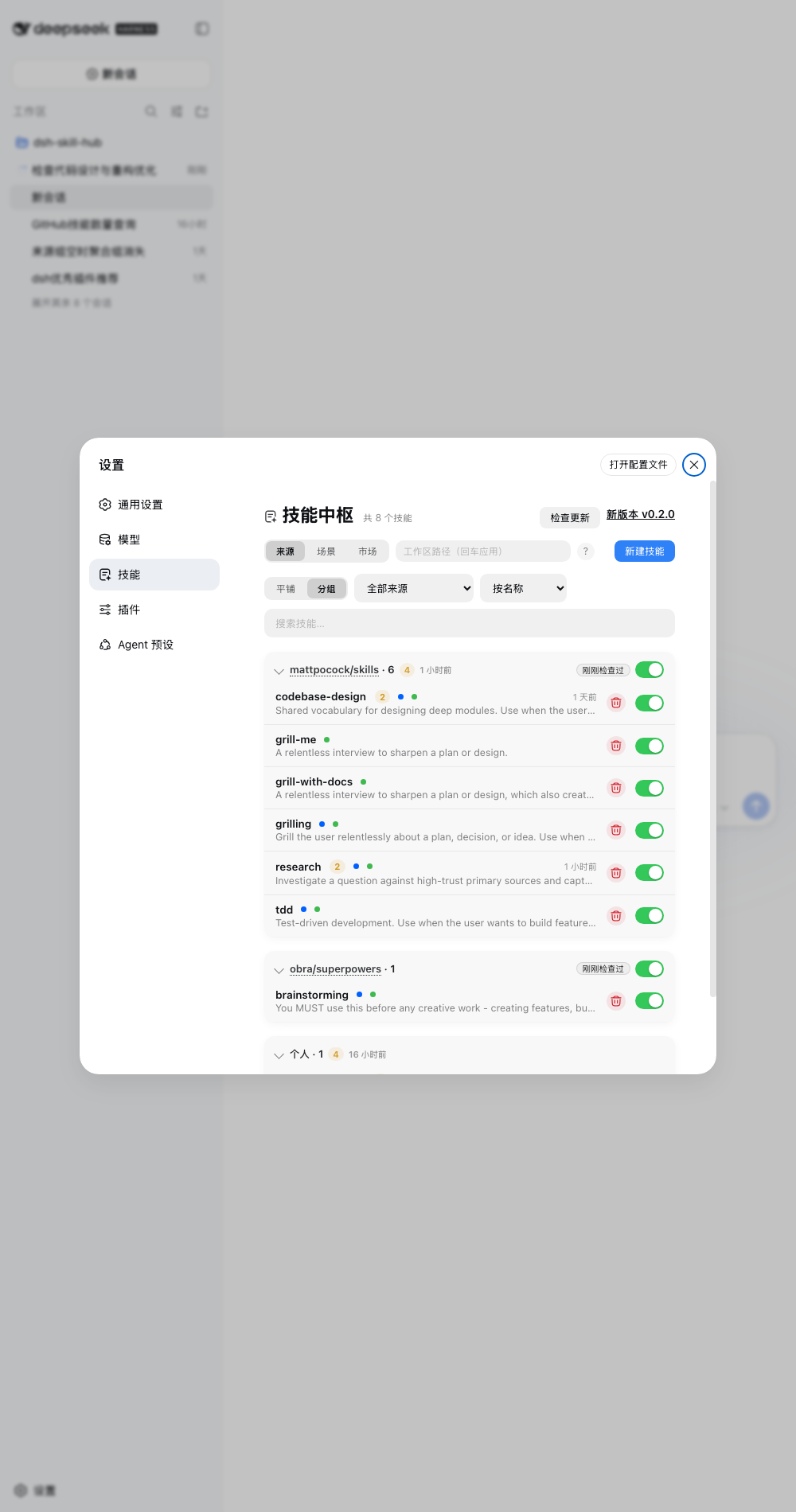
In-GUI skill hub for DeepSeek Harness — browse the full ctx.skills catalog, toggle skills, inspect bodies, fix discovery issues, install from the market, and scaffold new ones.
Host runs in the dsh process via official SDKs only; browser renders through official slots. No dsh source changes.
Quick start
dsh plugin --profile web add dsh-skill-hub
# restart dsh web → Settings → 技能 → Market → scan → import
Requires Node ^22.19 || >=24 + dsh web >=0.1.7-alpha.1 <0.3.
Two surfaces — the hub panel lives at Settings → 技能, and this plugin's own configuration card sits on the plugin's page in the Plugins manager (sidebar → 插件 → dsh-skill-hub). The card is registered by the plugin itself into the plugins.bundle.config slot — dsh has no auto-generated config page — and covers the master switch, announce-to-agent, dot colors, usage display and the stats window/interval.
Features
Settings → 技能 — 3 tabs: Sources (skills, flat/grouped + project tree), Scenes (custom tag groups), Market (install + update).
- Browse — every root of the
ctx.skillsregistry: project / user / bundled + third-party providers. Search across name, description,displayName; filter by source and invocation (model / user); sort by name, added time, or usage. Same-name skills from different sources get a duplicate badge instead of silently hiding. - Toggle — per-skill switches and per-group tri-state switches with a conflict dialog (close all / keep on). Disabling renames the discovery file (never deletes); disabled skills stay inspectable and re-enableable from their detail page. Only
~/.dsh/skills&~/.agents/skillsare writable; everything else is read-only. - Organize — scenes (tags) plus auto-aggregated source collections, all drag-reorderable and persisted in
~/.dsh/dsh-skill-hub.json. Edit mode reveals delete/reorder without cluttering the read view. - Diagnose & fix — files the provider skips (missing frontmatter, bad YAML, name mismatch, short description) show up with reasons; auto-fixable ones (e.g. unquoted
:in descriptions) get a one-click Fix button. - Scaffold — new-skill wizard writing to
~/.dsh/skillsor~/.agents/skills(SKILL.mdtemplate below). - Market — built-in curated repos plus custom
owner/reposources. Any top-level directory containingSKILL.mdscans as a root (no allowlist), and aSKILL.mdat the repo root itself scans as a single skill named after the repo (minus repo tooling such as.github/). Async import with byte-level progress and cancel. Each source pins a version — click the ref badge to switch between releases, branches, or a custom ref. - Track updates — imported skills record a repo + commit snapshot. Check all / update-all, per-source badges (installed / updatable / deleted upstream / new release). Sync overwrites local edits (with confirm); upstream deletions move into a restorable trash that keeps source and scene membership.
- Stats — per-skill call counts + last-used times from session logs (incremental cache), group summaries; window and scan interval live-configurable from the settings card.
- Settings card — registered on the plugin's own page in the Plugins manager (sidebar → 插件 → dsh-skill-hub; collapsed until you expand the title): master switch, announce-to-agent, invocation dot colors, usage display toggles, stats window/interval.
Why not just the read-only browser?
dsh-skill-manager browses, dsh-skill-importer / dsh-find-skill import. This plugin manages.
| Capability | read-only browser | dsh-skill-hub |
|---|---|---|
| Catalog | user roots, self-scanned | ctx.skills registry, all roots + third-party |
| Toggle | ❌ | ✅ per-skill + per-group, never deletes |
| Diagnostics | ❌ | ✅ reasons + one-click fix |
| Market | ❌ | ✅ built-in + custom, version pins, update-all |
| Source tracking | ❌ | ✅ check/sync/trash with restore |
| Stats | ❌ | ✅ counts + last-used |
Scaffold format (SKILL.md):
---
name: my-skill
description: One line when the agent should use this skill.
---
# my-skill
Body...
How it works
GitHub repo ──scan/import──▶ ~/.dsh/skills
     ▲                          │
     └─check/sync/delete── ctx.skills ◀─ provider
                                │ snapshot/get
                                ▼
                    /api/skill-hub/* ──▶ Panel (Settings → 技能)
Host uses only ctx.skills.snapshot/get, ctx.webServer.register, ctx.systemPrompt.section. Loopback-only routes (127.0.0.1/localhost), JSON.
HTTP API
| Endpoint | Method | Purpose |
|---|---|---|
/api/skill-hub/catalog?cwd= |
GET | skills + disabled + diagnostics + duplicates |
/api/skill-hub/skill?name=&cwd= |
GET | skill body (works for disabled too) |
/api/skill-hub/skill/delete |
POST | move to trash (snapshots source+scenes) |
/api/skill-hub/toggle |
POST | {name, enabled} |
/api/skill-hub/toggle-batch |
POST | {names, enabled} |
/api/skill-hub/create |
POST | {name, description?, root?} |
/api/skill-hub/diagnostic/fix |
POST | {path} auto-fix frontmatter |
/api/skill-hub/stats |
GET | invocation counts |
/api/skill-hub/config |
GET/POST | runtime config (null clears) |
/api/skill-hub/groups |
GET | tags + collections + orders |
/api/skill-hub/tag etc. |
POST | create/rename, delete, set members, reorder |
/api/skill-hub/market etc. |
GET/POST | list/add/delete/pin sources; …/source/check + …/source/sync update them |
/api/skill-hub/market/source/versions?repo= |
GET | releases + branches for the version picker |
/api/skill-hub/repo?repo= |
GET | discover (any root) |
/api/skill-hub/repo/import |
POST | async job {jobId, total, totalBytes} |
/api/skill-hub/repo/import/progress?jobId= |
GET | poll job |
/api/skill-hub/repo/import/cancel |
POST | cancel job |
/api/skill-hub/sources etc. |
GET/POST | list/check/sync/delete/restore/clear trash |
/api/skill-hub/update |
GET | plugin latest release |
unknown /api/skill-hub/* |
GET/POST | 404 {error} naming the path — a typo must not read as an auth failure (the SPA fallback answers 401 for /api/* it does not own) |
Development
npm run typecheck  # tsc --noEmit
npm test           # 254 tests, 14 suites
npm run build      # tsc + tsdown → lib/index.js + lib/client.js
Don't run two
dsh webon the same$DSH_HOME+ cwd — no session-log lock (seq gapcorruption). Use separateDSH_HOME.
Troubleshooting
duplicate loader entry id: skill-hub— remove the duplicate install (keep onedsh plugin addmethod).- Skill missing — check the diagnostics section (frontmatter / name mismatch / short description).
- Empty source group — its skills were deleted, or their disabled records were lost (sidecar restored/hand-edited). Startup reconciles
.disabledfiles on disk; source groups with no visible member are no longer rendered. - Dots missing in
/menu — dsh internals changed; catalog still works. - Settings card missing — open the plugin in the Plugins manager (sidebar → 插件 → dsh-skill-hub) and expand the 「技能中枢」 card at the top of the page (collapsed by default). On dsh older than
0.1.7-alpha.1this plugin does not load at all (the settings API it targets does not exist there).
Community
Issues · Discussions · Showcase · Market PR · Discord
License
MIT — LICENSE.
Install
Install the catalog once, then DeepSeek Harness can find and install any plugin from this site automatically:
dsh plugin add dshbase-catalogThen say "install dsh-skill-hub for me" — your agent finds it in the directory and installs it. Docs: dshbase-catalog · verified packs.
This plugin is GitHub source (not published to npm) — install it straight from the repo:
Web profile:
dsh plugin --profile web add github:cheshireez/dsh-skill-hubHeadless (CLI) profile:
dsh plugin --profile headless add github:cheshireez/dsh-skill-hubTest report
Verified: L1 install + L2 load + L3 runtime from GitHub source on dsh 0.1.0-rc.6.
When to use it
Extend the agent's coding surface — give it a new tool, workflow, or integration so it handles a dev task it couldn't before.
Who it's for
Developers who want dsh to behave like a teammate on real codebases — editing, running, and verifying changes rather than just answering.
For developers — extending it
The tool/command surface is the seam: expose more of the SDK, add smarter context wiring, or tighten the loop between code changes and verification.
Share this badge
Drop this badge into your README — it links back here and updates automatically when our test status changes:

[](https://dshbase.com/plugins/dsh-skill-hub/)<a href="https://dshbase.com/plugins/dsh-skill-hub/"><img src="https://dshbase.com/badges/dsh-skill-hub.svg" alt="dshbase install-tested"></a>