
Plugin directory / UI & Skins / dsh-skin-appearance
dsh-skin-appearance
Verified · install-tested on dsh Vim0x3c
What it does
Appearance plugin for dsh web: 8 built-in themes + custom wallpaper (opacity/blur), host settings persisted.
Works — verified, early-stage project
Appearance plugin for dsh web: 8 built-in themes + custom wallpaper (opacity/blur), host settings persisted. It installs cleanly and boots without issues in our testing. It's early-stage but functional.
“Verified” means our automated CI actually ran dsh plugin add in a clean profile and it booted — nothing more. Feature descriptions and version compatibility are the author’s claims. This is not a security audit and not an endorsement of third-party code.
README
dsh-skin-appearance
English | 中文
这是一个面向 DeepSeek Harness 的外观插件。
它保留 Harness 原生控件,只在设置中增加「外观定制」页面,提供:
- DeepSeek 娘、QQ2008 水晶蓝、云海实验室、山海算境、深海星港、深海鲸歌和两套智能星图,共八套内置主题;
- 本地背景图片选择,并在写入设置前自动缩小压缩;
- 从上传图片自动提取主色、辅色、面板色和文字色,并联动浅色/深色外观;
- 独立的背景透明度和模糊控制,默认透明度 100%、模糊 0 px;
- 由 Host 设置文档支持的跨重启持久化;
- 一键还原原生 Harness 外观。
主题预览
| DeepSeek娘·深海回响 | QQ2008·水晶蓝 |
|---|---|
 |
 |
| 云海实验室 | 山海算境 |
 |
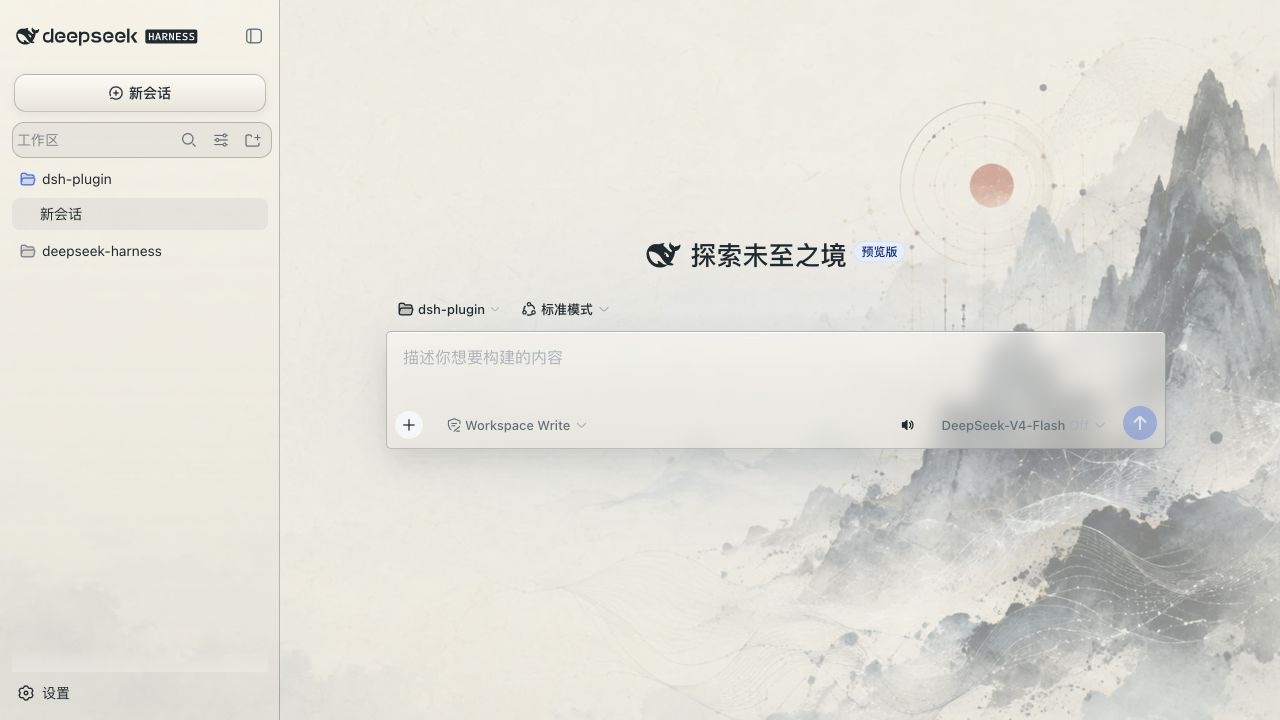 |
| 深海星港 | 深海鲸歌 |
 |
 |
| 智能星图·墨 | 智能星图·曦 |
 |
 |
安装
插件是一个 dsh bundle,可以用 Harness CLI 安装到 web profile:
dsh plugin --profile web add /path/to/dsh-skin-appearance
dsh web
包中的 dsh.bundle.patch 会把插件加入 profile 的配置层。下次启动 Web 时,dsh.client 声明会让 Harness 发现浏览器 bundle,设置页面中就会出现「外观定制」。
如果插件已经发布到包仓库,可以把本地路径换成包名:
dsh plugin --profile web add dsh-skin-appearance
实现说明
Node 半边通过 Harness settings 服务注册 appearance 设置命名空间。浏览器半边通过 ctx.theme 注册调色板,通过 settings.section slot 注册设置页,并维护一个覆盖整个应用根节点的背景图片层。会话区、左侧工作区和右侧详情区使用不同强度的半透明表面,让同一张壁纸贯穿整个界面。背景层不使用 backdrop-filter,而是用渐变和半透明表面维持文字对比度,避免流式输出和滚动时触发整页重复合成。
上传图片会先解码,再按长边 1600 像素上限压缩成 JPEG data URL;独立的 48 像素采样画布会提取主色、色相分离的辅色、可读面板色和文字色,并判断应使用浅色还是深色外观。预设配色由 Harness theme runtime 管理,选择「默认」会交还内置的跟随系统偏好。
开发
这个目录采用 Harness 独立 client 插件的构建结构:
pnpm install
pnpm build
要在 Harness 源码 checkout 中联调,先构建 Harness,再把本目录安装到 web profile:
cd /path/to/deepseek-harness
pnpm install
pnpm build
dsh plugin --profile web add /path/to/dsh-skin-appearance
dsh web
Harness 服务被声明为 peer dependency,确保插件和宿主共用同一个 Cordis、settings、theme、React 实例,避免浏览器 bundle 内联出重复的服务身份。
许可证
MIT。
Install
Install the catalog once, then DeepSeek Harness can find and install any plugin from this site automatically:
dsh plugin add dshbase-catalogThen say "install dsh-skin-appearance for me" — your agent finds it in the directory and installs it. Docs: dshbase-catalog · verified packs.
This plugin is GitHub source (not published to npm) — install it straight from the repo:
Web profile:
dsh plugin --profile web add github:Vim0x3c/dsh-skin-appearanceHeadless (CLI) profile:
dsh plugin --profile headless add github:Vim0x3c/dsh-skin-appearanceTest report
Verified: L1 install + L2 load + L3 runtime from GitHub source on dsh 0.1.0-rc.6.
When to use it
Change how dsh looks or how you interact with it — a theme, a skin, or a new panel that reshapes the workspace.
Who it's for
Users who spend hours in the web UI and want it to look and feel the way they work.
For developers — extending it
Skins, panels, and theme tokens are the extension points — author a new skin, add a panel, or sync tokens with an upstream palette.
Share this badge
Drop this badge into your README — it links back here and updates automatically when our test status changes:

[](https://dshbase.com/plugins/dsh-skin-appearance/)<a href="https://dshbase.com/plugins/dsh-skin-appearance/"><img src="https://dshbase.com/badges/dsh-skin-appearance.svg" alt="dshbase install-tested"></a>