
Plugin directory / Developer / dsh-ssh-ops
dsh-ssh-ops
Verified · install-tested on dsh caoyiwei850
What it does
DeepSeek Harness SSH 运维插件:主对话驱动 SSH,带高危命令保护与右侧终端。
Works — verified, growing community
DeepSeek Harness SSH 运维插件:主对话驱动 SSH,带高危命令保护与右侧终端。 It installs cleanly and boots without issues in our testing. It has a growing community — a solid choice.
“Verified” means our automated CI actually ran dsh plugin add in a clean profile and it booted — nothing more. Feature descriptions and version compatibility are the author’s claims. This is not a security audit and not an endorsement of third-party code.
README
中文 · English
DSH SSH Ops
DeepSeek Harness 的 SSH 运维插件:在主对话中驱动当前服务器,同时在右侧保留真实的交互式终端,并集成文件管理、端口转发与数据库管理。






v0.3.19:新增 SSH Agent 转发(资源「高级选项」开关——跳板机上可用本机密钥继续登录更深层的机器,无需把私钥铺到每一跳;本机未运行 ssh-agent 时连接直接报错,不做静默降级);数据库连接新增查询超时覆盖(
db_connect的query_timeout_ms,慢库上的大查询/大导出不再被 35s 默认死线掐死,0为不限);认证阶段设备主动SSH_MSG_DISCONNECT时给出人话化断开原因(原因码 + 设备原文 + 两层排查提示);设置页「服务器分组 / 共享 SSH 凭据」改为滑动分段切换;插件页换上展示图标与双语标题/描述(DSH 0.2.x 插件管理行,品牌蓝终端标记);修复 #29——github:渠道装出来没有lib/导致插件整体加载失败,现由prepare钩子在安装期自动构建。CI 同步加固:测试矩阵加 Windows 腿、npm 渠道产物冒烟作业、tarball 文件清单进断言。
v0.3.18:新增界面语言钉住开关——DSH 运行插件未内置的语言(如俄语)时,可在设置文件设
autoApplySystemLanguage: false+language钉住插件语言,不再被强制回退中文回写;默认跟随行为不变。见「固定界面语言」说明。贡献:@alexeyfadeev(PR #28)。
v0.3.17:修复 0.3.16 的 #27——i18n 重构漏改变量名导致官方侧栏注册抛
ReferenceError、SSH 终端 UI 完全不可见;eslint 现已覆盖客户端 JSX 并新增回归断言。
v0.3.16:新增中英双语界面——始终自动跟随 DSH「设置 → 语言」(含运行中切换,无需刷新),中文为源、英文覆盖,左侧「SSH 资源」标签与终端图标随语言动态变化;设置页新增自更新条(版本徽标、GitHub 链接、检查更新对话框、一键更新与可复制的手工更新命令);lib 构建产物出库(仓库不再提交打包产物);资源表单布局紧凑化;移除损坏的 ~/.ssh/config 导入;已信任主机列表支持直接删除。
v0.3.15:新增双因素认证——防火墙/交换机把
AuthenticationMethods配成password,publickey(或反序)时,可在资源或共享凭据里为密码/私钥再配一条相反类型的第二因素,这类设备此前必然登录失败;SQL 词法扫描加固,修复反斜杠引号方言与 PG dollar 引用两个破坏性语句漏检(Oracleq''交替引号经实测否决并固化为回归探针);会话日志支持多选 + 全选批量删除;移除旧版 DSH 的浮动面板回退,官方右侧边栏成为 SSH 终端的唯一宿主形态。
v0.3.14:新增默认关闭的「AI 自动连接」开关。开启后,Agent 可按名称连接已保存的 SSH 资源,目标终端自动出现在右侧;关闭时,Agent 无法枚举保存资源。修复会话日志空文件读取问题。
v0.3.13:整轮更新——SFTP 目录批量上传/下载(新工具
sftp_upload_dir/sftp_download_dir:小文件并发、大文件独占、单文件失败不中断整批);SSH 认证失败结构化诊断(试过哪些方法、服务器还接受什么、下一步怎么走),并新增 keyboard-interactive 认证(保存的密码应答交互提示/MFA 门禁,设备掐断时自动降级纯密码重试);数据库连接健壮性三件套(TCP keepalive、空闲复用前活性 ping + 透明重连、断连时手工事务有界收尾);修复 MySQL 未知字符集文本列显示为字节对象的问题;上一版的破坏性操作可逆化(rm 回收站、危险 SQL 自动备份、DROP 隔离改名、绕过向量封堵)一并随本版发布。
v0.3.11:修复 shell integration 的 shell 家族探测(此前探测输出被 cwd 标记污染,导致总是按 zsh 变体注入、bash 上整行脚本失效),并把
shell状态补进终端上下文的结果契约。
v0.3.10:数据库面扩展——新增 SQLite(宿主内置
node:sqlite,零新依赖)、ClickHouse(HTTP 接口)、openGauss(复用 PostgreSQL 协议)三种驱动,查询结果可导出 CSV/JSON(经 SSH 的库直接把文件写到服务器,用 SFTP 面板下载);新增动态 SOCKS5 隧道(ssh -D);新增会话录制与日志(面板可预览/搜索/下载,agent 读取需批准并自动脱敏);新增 OSC 133 shell integration,终端上下文能给出 cwd、退出码与提示符状态;SFTP 面板获得文本编辑器、目录过滤、路径收藏与拖拽上传。
v0.3.9:兼容 DSH
0.1.6-alpha.2——适配新宿主 typert 校验(schema 与 strict codec 必须携带create()工厂,浏览器端 web boot 同样校验)与槽位注册新规则(拒绝同 id 重复注册,此前会导致 SSH 标签从官方侧边栏消失);修复含null默认远程项目目录的资源记录导致配置无法读取的问题(#20);数据库驱动改为首次连接时懒加载。
兼容性
- 目标宿主:DSH Desktop / Web Profile,经四个官方包的
peerDependencies声明为无上界区间>=0.1.5-alpha.1——宿主以includePrerelease语义按 DSH 运行时版本评估,覆盖0.1.5起的全部宿主版本(含一切预发布),宿主升级无需发版跟进。当前开发环境已验证0.2.0-rc.2桌面版。插件使用 DSH 自带的 Node.js 运行时,不要求系统另装ssh、sftp或独立 Node.js。 - 新版右侧边栏(必需):宿主须同时提供
sidebarRightTabs与sidebarRight,SSH 以官方右侧边栏标签运行,支持宿主分栏、缩放和全屏。缺少这两个 API 的旧版宿主不再有浮动面板回退(已移除):插件宿主半(Agent 的 SSH/SFTP/数据库工具)照常工作,但不会显示终端 UI。 - 界面语言:自动跟随宿主语言(中文 / English),并随运行中切换即时重绘;宿主运行插件未内置的第三方语言(如俄语)时回退为默认中文并回写设置文件——此类环境可通过设置文件钉住语言(
autoApplySystemLanguage: false+language,详见「使用」一节)。 - 文件字节流:大文件的浏览器上传/下载路由仅在 Web Profile 同时提供
webServer与请求来源校验服务时注册;不具备该接口的宿主继续使用既有 SFTP 操作。目录归档下载在所有宿主上均返回501 archive-unavailable,避免 SFTP chroot 与 SSH shell 命名空间不一致造成越界。 - 升级方式:安装或升级后必须完整退出并重启对应 DSH Profile。SSH 资源、已知主机和凭据位于 DSH 的独立本地存储,不在插件包内;常规升级不会删除它们。
示例
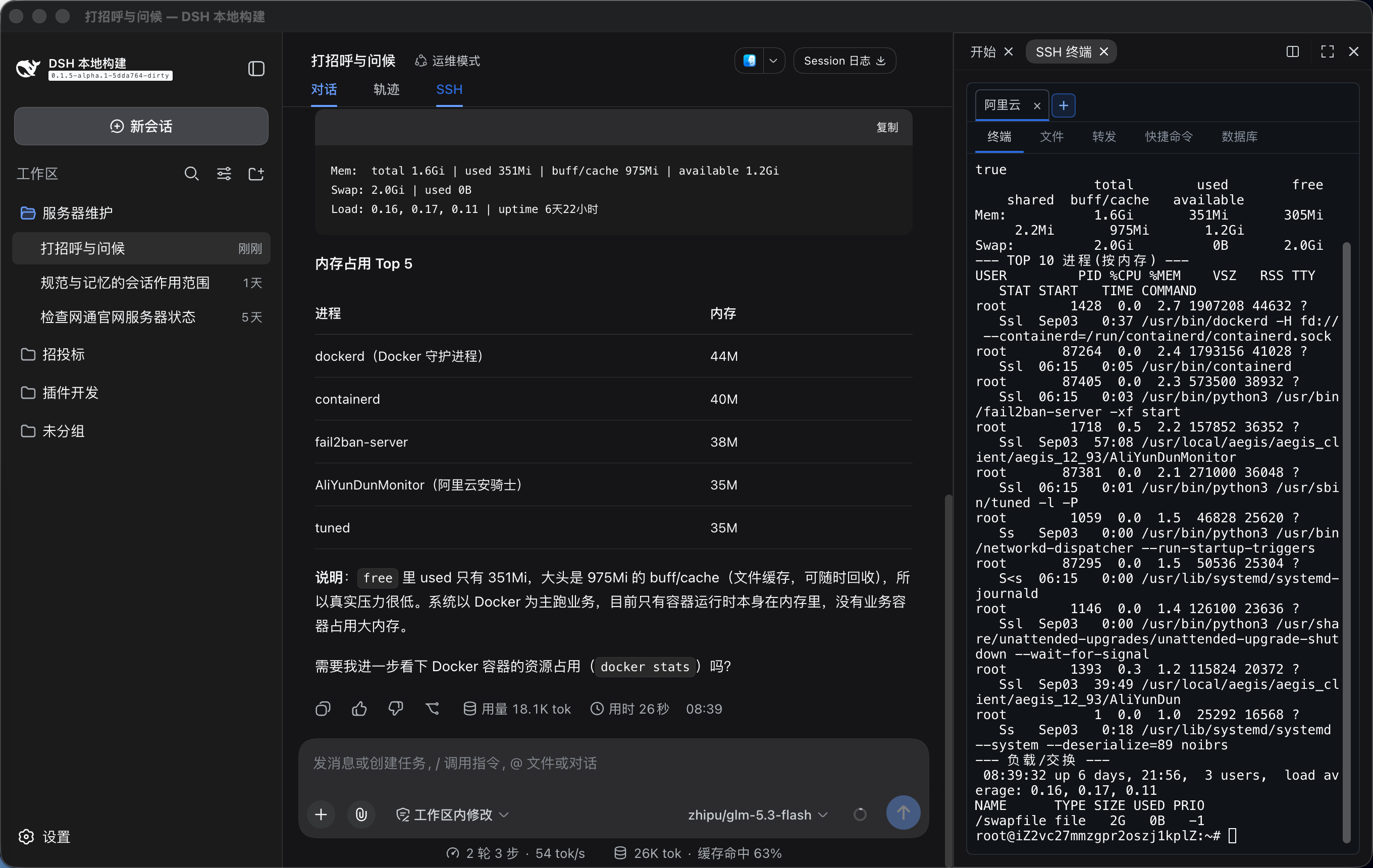
主对话直接指挥已连接的服务器,SSH 终端作为官方右侧边栏标签与对话并排显示:
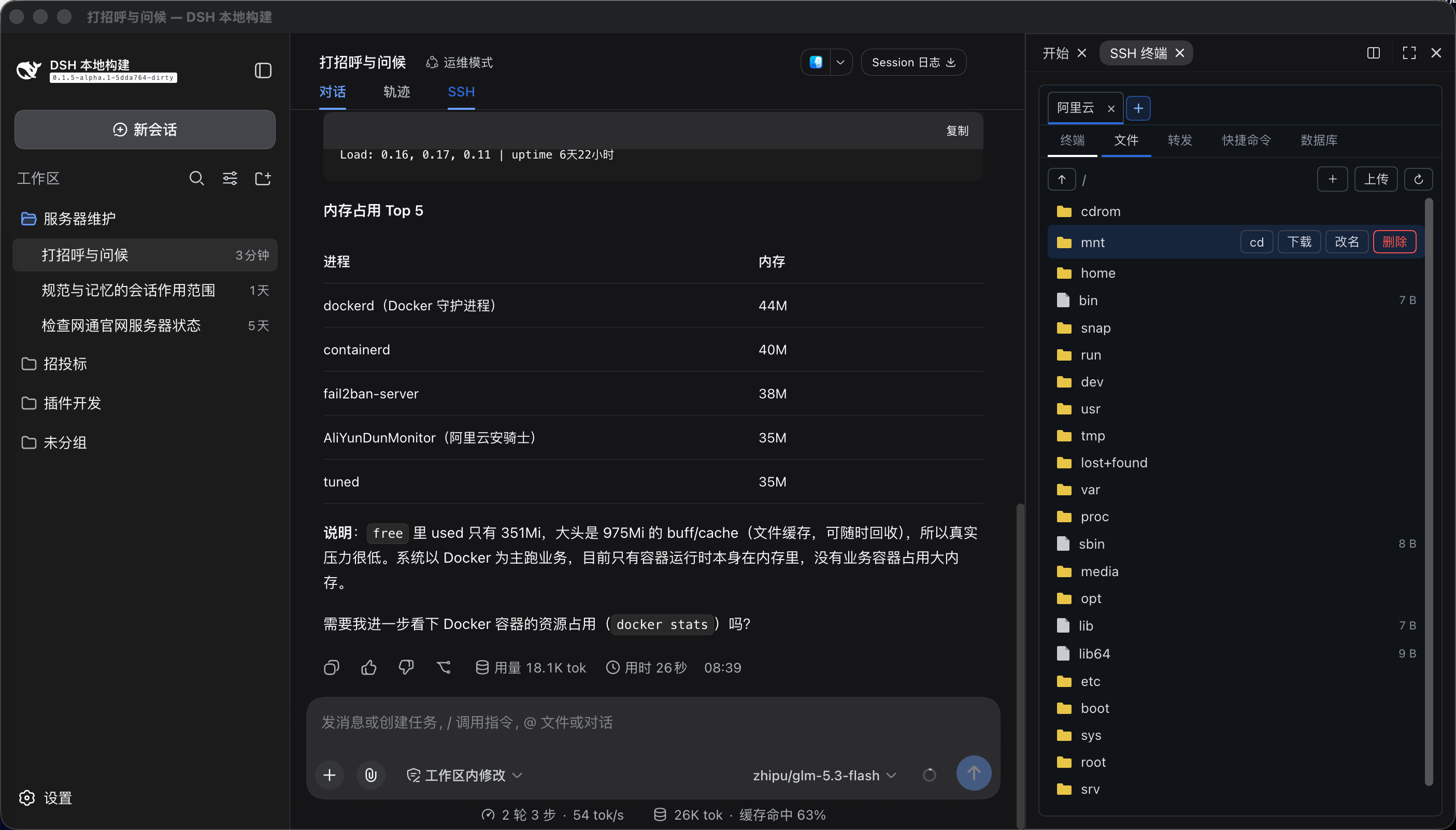
文件页签支持 SFTP 管理,并可用 cd 将交互终端切换到选中的远程目录:
能做什么
- 官方右侧边栏集成(新版 DSH):SSH 终端是官方右侧边栏的一个标签页(与内置「文件」并列),聊天顶部的 SSH 按钮打开或聚焦该标签(重复点击只聚焦、不重复创建);需要同时看文件和终端时使用官方分栏,拖宽、全屏、收起全部由官方管理,终端尺寸随之自动重算。分栏时每个窗格独立:各自维护可见的服务器与选中项,新窗格默认空白、不继承已有服务器;同一台服务器在两栏打开会各建一条独立连接(可在连接对话框勾选复用),关掉其中一栏不影响另一栏,某台服务器不再被任何窗格显示时才真正断开宿主连接。被 Agent 使用的连接带「Agent」徽标,点另一栏即可把 Agent 切过去。连接生命周期与标签显示分离:切换标签、收起侧栏、关闭标签、切换聊天都不会断开 SSH;终端实例常驻内存池,重新打开即恢复完整回看,隐藏期间服务器输出由宿主缓冲、重开时自动补齐。
- 终端跟随 DSH 明暗主题:xterm 渲染在自己的 canvas 上、继承不了 CSS 文字色,因此内置完整的明/暗两套对比色板(含光标与选区),随宿主主题切换立即重绘已经打开的终端。
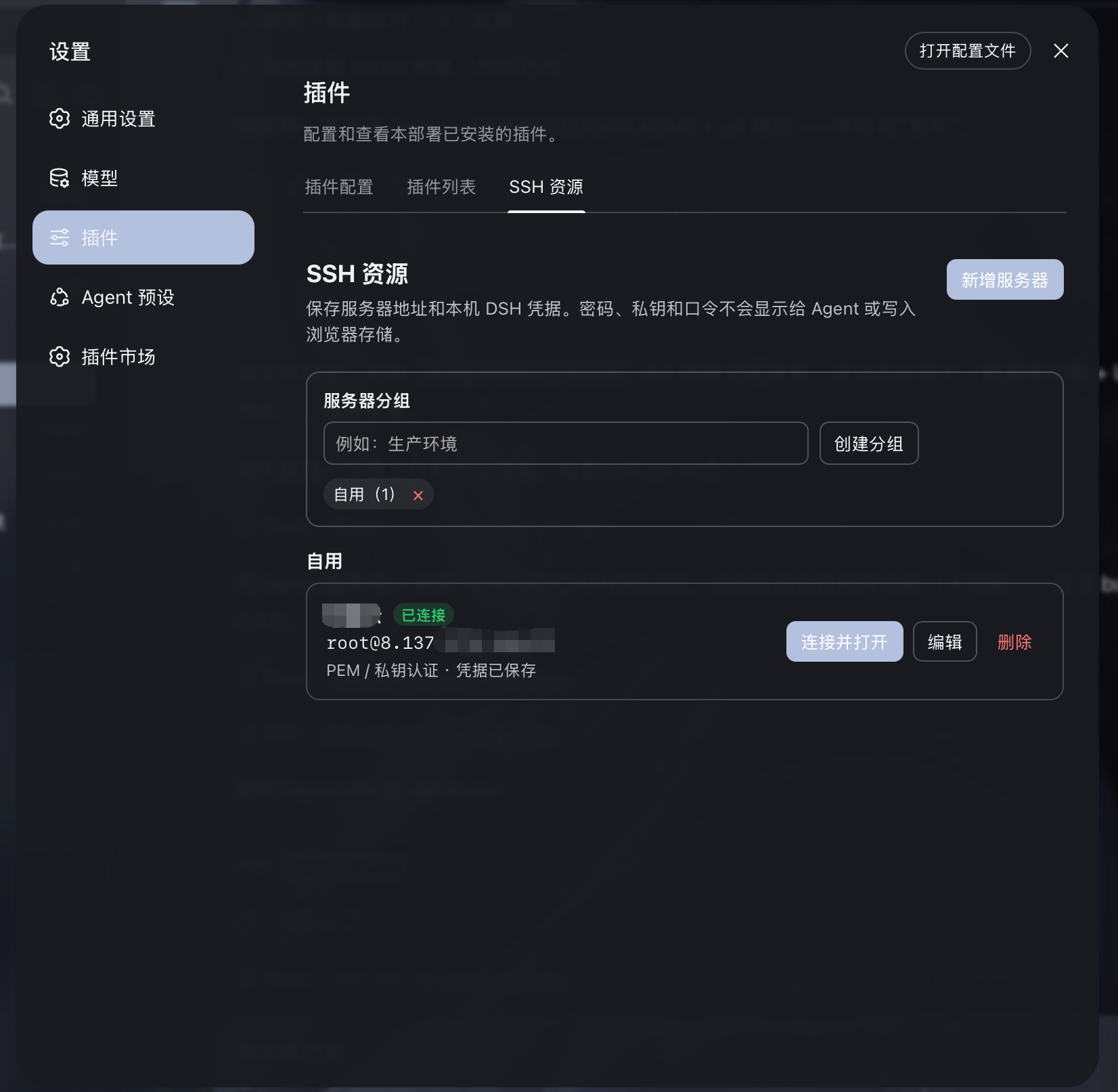
- 在 设置 → SSH 资源 中管理任意数量的服务器和分组;它作为左侧菜单的一等项,与通用设置、模型并列,不再藏在“插件”下。顶部的 SSH 仅打开或聚焦右侧终端标签,不断开连接。
- 固定远程项目目录:每台保存的服务器可选填一个绝对路径作为默认项目目录。资源卡片上的“进入项目”会建立连接、在经过空闲 shell 与单 PTY 校验后切换终端目录,并让 SFTP 从同一路径载入;目录不接受相对路径或控制字符。未设置的资源仍从登录目录和 SFTP 根目录开始。
- 服务器名称、地址、端口、用户名、认证类型和分组保存到 DSH 本地存储;数量不设上限。
- 密码、PEM 私钥和私钥口令仅保存到 DSH 官方本机凭据库
~/.dsh/.credentials.yaml(owner-only 权限);浏览器存储、Agent 上下文、工具结果和资源列表均不会读取或显示秘密内容。 - 共享凭据:一份密码或私钥可保存为共享凭据,供多台服务器与跳板机共同引用(例如全组共用同一把运维私钥,改一处即全部生效)。仍被服务器或跳板链引用时拒绝删除;密文只在宿主端解析后交给 SSH 客户端,不进入浏览器存储、不进入 Agent 上下文。在 设置 → SSH 资源 中新增/编辑/删除,支持选择或直接把 PEM 文件拖入窗口。每台服务器既可绑定共享凭据,也可保留自己的专属凭据。
- 跳板机(ProxyJump):跳板机从已保存的服务器中选择(不再是手填主机与密码),密码/私钥/口令统一取自凭据库,跳板同样可复用共享凭据;保存与连接时拒绝把自己设为跳板、重复选择同一台或不存在的资源。跳板链最多 8 跳。
- 每栏各自一条通道(默认):同一台已保存服务器在两个分栏各打开一次会各建一条独立连接——两条通道、两个终端,互不干扰,各自保留自己的当前目录。要改成共用,在连接对话框勾选「复用已打开的连接」:本栏加入已有那条连接,与另一栏共用同一个终端(适合想在同一终端里看着 Agent 干活)。
- Agent 的作用目标可见、可切换:面板上被 Agent 使用的连接带「Agent」徽标。点另一栏的服务器标签或终端区域即把 Agent 切到那一栏——Agent 省略
connection_id的工具(ssh_exec、sftp_*、tunnel_*、安全确认卡片)默认作用于它。切到已失效的连接会被拒绝,原有绑定保持不变,不会把 Agent 悬空。 - 主对话自动识别当前右侧已连接服务器,无需向用户索取内部连接 ID。
- Agent 发出的
ssh_exec命令会显示在右侧终端,并回传退出码、输出、cwd、耗时、超时和截断状态。Linux 上能唯一确认空闲 POSIX 交互 shell 时继承其实际目录;终端繁忙、候选不唯一或目录不可访问时拒绝执行,未检测到交互 shell 时使用登录初始目录并明确标注。 - 对手动终端输出提供按需
ssh_read读取;不会静默把人工终端内容塞入对话上下文。 - 输出给模型前会脱敏私钥、Bearer Token、常见密码/API Key(含裸
sk-开头的密钥)和数据库连接口令。 - 连接稳定性:SSH 连接启用 keepalive(20 秒间隔、3 次判定),NAT/防火墙不再静默丢弃空闲连接;传输意外断开后指数退避自动重连(上限 30 秒),命令中途掉线透明重试一次,瞬时连接失败自动重试 3 次(认证失败除外);显式断开或插件卸载不触发重连,重连后远程隧道自动重新注册。对端 SSH 横幅不符合 RFC 4253 时(例如
SSH-2.0- OpenSSH只多一个空格、SSH-2.1-)不再直接失败:ssh2 一向只认SSH-2.0-/SSH-1.99-并抛出信息量极低的Invalid identification string,现在仅在它因此拒绝之后重试一次,由插件把该行规范化后再交给它握手(对端软件版本原样保留,连接的加密强度不受影响),成功会给出警告;确实不可用的横幅(只支持 SSH-1 的设备、缺少软件版本)则明确报出对端原文与原因,不反复重试。 - 主机指纹校验(TOFU):SSH 连接校验服务器主机公钥指纹——首次连接记录并信任,之后指纹变化即拒(防中间人 / 误连重装机)。每台服务器可选
accept-new(默认)/verify(拒绝未知)/off;指纹变化时不重试、不自动重连,提示用「忘记指纹」重置。设置 → SSH 资源可按服务器设置校验模式、管理已信任指纹并一键忘记。校验在用户认证前,与登录账号/密码无关,同一台服务器换人登录不会被挡。 - 文件管理:SSH 面板「文件」页签,基于 SFTP 浏览服务器目录树,支持上传、下载、新建目录、删除与重命名;对话中也可用
sftp_*工具直接操作。 - 端口转发:SSH 面板「转发」页签,可建立本地转发(本机 → 服务器可达目标)与远程转发(服务器 → 本机),实时查看与停止隧道;对话中也可用
tunnel_*工具。 - 多机批量:主对话说「批量执行 <命令>」,Agent 创建批量任务,右侧 SSH 面板弹出勾选弹窗,列出 SSH 资源中已保存的全部服务器(含未连接的)供手动勾选,确认后并发执行(每台用保存凭据建连 → 执行 → 断开),结果按服务器分节展示(成功绿 / 失败红)。批量目标与当前打开的连接完全无关,可勾选未连接的服务器;命中安全策略时「命令 + N 台目标」一次性确认,不再逐台弹窗。旧的
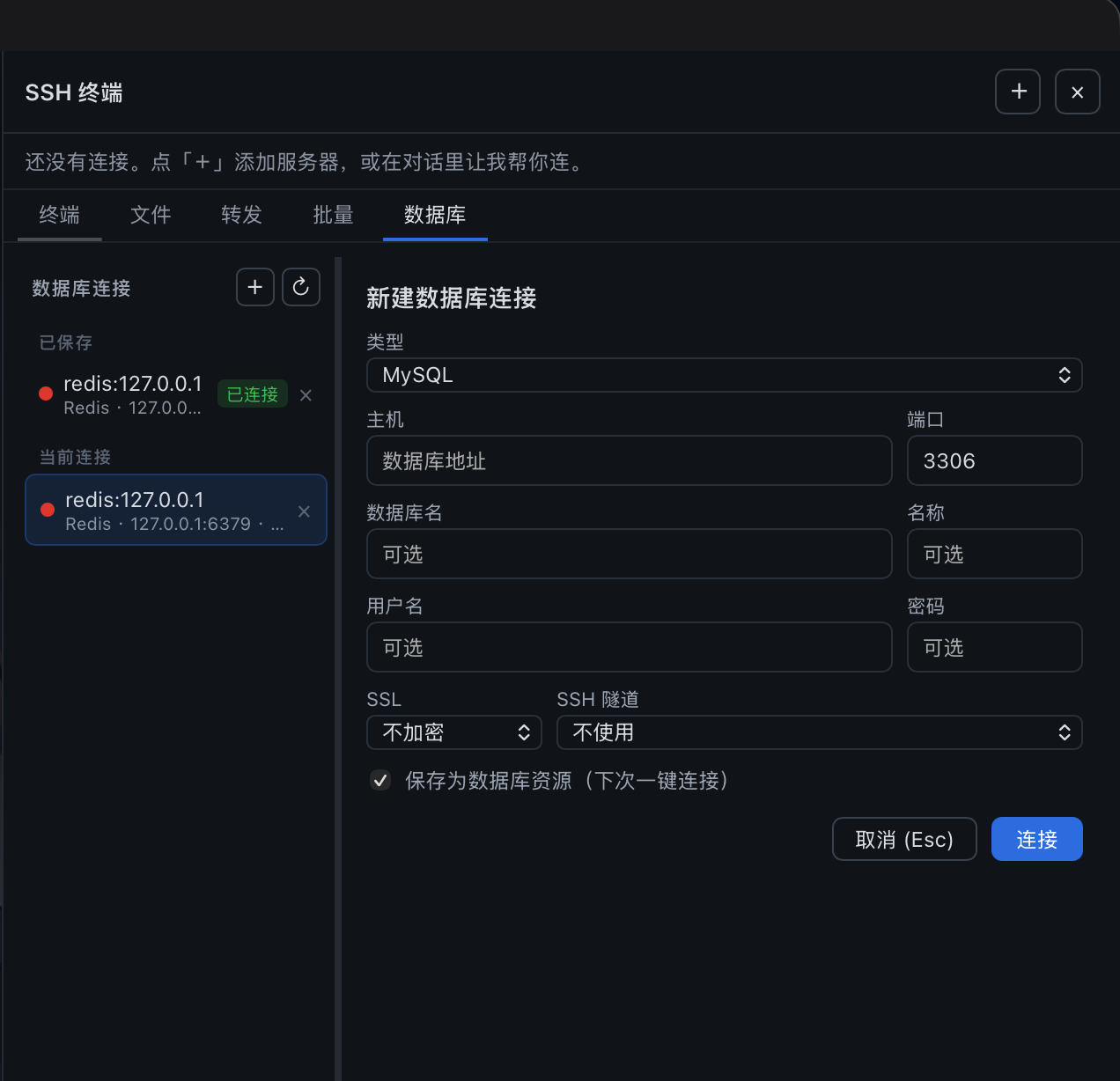
ssh_cluster(基于已打开连接、无需确认即群发)已彻底移除:多机操作只能经ssh_batch由操作者勾选确认,杜绝「点名一台、全量执行」。 - 数据库:SSH 面板「数据库」页签,支持连接 MySQL / PostgreSQL / Redis / MongoDB,可手动执行 SQL 查询或命令并查看结果表格;对话中也可用
db_*工具直接操作。- 支持
db_connect自动 SSH 隧道:连了服务器后,回环地址(127.0.0.1 / localhost / ::1)的数据库自动经当前服务器隧道访问内网库;via_ssh可选auto(默认)/yes/no,显式ssh_connection_id优先级最高。 - 支持 SSL 三档(
disabled不加密 /preferred加密不验证 /verify加密+验证 CA)适配云托管数据库。 - 数据库连接可保存为资源(profile),重启后一键重连;密码加密存储于 DSH 凭据库;已保存资源支持重命名与折叠分组。
- 工程化闭环:
db_query词法级真只读闸(只放行 SELECT/SHOW/DESCRIBE/EXPLAIN/纯查询 WITH,拦截写动词子查询、PG 数据修改 CTE、SELECT INTO、FOR UPDATE锁读);查询流式截断默认 200 行 + 30s 超时(可用环境变量DSH_SSH_OPS_MAX_DB_ROWS调整,最大 5000;生产环境应按最小必要值配置;MySQL destroy 池连接、PG 用 cursor 分批取);交互式事务工作流db_tx_begin/execute/commit/rollback(独占连接、变更后验证、闲置 5 分钟自动回滚);db_describe_table带索引/外键/DDL/行数与容量估计;db_preview分页采样、db_explain执行计划。数据库面板含表树、预览视图、一键导出 CSV(含 BOM,Excel 中文兼容)、查询历史(localStorage 50 条)。DB 传输层意外断开不再崩进程(四类客户端统一处理,绝不 throw)。 - 高危 SQL(
DROP DATABASE/SCHEMA/TABLE、TRUNCATE、SHUTDOWN)自动拦截,按语句动词识别(跳过字符串/注释、支持多语句),不会误杀字符串字面量里的关键字。
- 支持
安全边界
DSH 自身权限机制仍然有效。本插件额外阻止 Agent 工具执行明显不可逆或破坏性操作,例如删除文件、删库、格式化磁盘、terraform destroy、kubectl delete、docker prune、强制 Git 清理以及重启/关机。黑名单同时覆盖高频绕过变体:find -exec rm、xargs rm、rimraf,以及 python/perl/ruby/php/node 一行流里调用 unlink/rmtree/rmSync 等(源自真实事故:rm 被拦后 Agent 换用其它代码完成删除)。黑名单无法穷尽(任何脚本/管道都可能藏删除),因此下面两层「后果兜底」与它配合,而不是只依赖识别。
删除可逆化(rm → 确认后进远端回收站):Agent 发起的删除依然必须过人手——简单 rm/unlink/rmdir(单条命令、显式字面路径、无管道/重定向/glob/变量展开)照常弹出确认卡片,但点「执行」时执行的是可恢复的移动:目标被 mv 进服务器上的 ~/.dsh-trash/,并在该目录的 manifest.tsv 里记录原绝对路径与时间;24 小时后的过期项会在下一次有新文件进回收站时顺带真删(不在服务器上安装任何定时任务)。也就是说 Agent 发起的删除永远不会真正发生——误删(包括人看错卡片、指错机器)都能从回收站 mv 回来;要彻底删除,由操作者自己在终端执行 rm(人工输入不经过此拦截,边界不变)。ssh_exec 与 sftp_delete 均走此路径,卡片与终端镜像都会注明「执行 = 移入回收站」。复合命令、find -delete、shred 等无法安全改写的删除走原有卡片(执行 = 原命令真跑)。
危险 SQL 可恢复化:db_execute 的高危 SQL(DROP/TRUNCATE/SHUTDOWN,按语句动词识别)依旧绝不执行,但拦截瞬间会自动备份受影响的表——行数据经只读导出通道落盘(SSH 连接的库写到远端 /tmp/dsh-backup-*.csv,直连的库写到 DSH 宿主临时目录),MySQL/SQLite 还会附带建表 DDL(PostgreSQL 暂无 DDL 来源);DROP DATABASE 会逐表备份(上限 20 张,超出明示)。其中 DROP TABLE 进一步转为隔离改名:备份完成后自动 RENAME 为 <表名>_to_be_dropped_<日期>(重名自动加序号),数据原样保留、可随时改回。Agent 永远无法完成真正的删除——隔离表的最终 DROP 只接受面板(人工)发起,Agent 再次发起会被明确拦截。备份/隔离清单会完整出现在工具结果里;备份失败时同样如实标注(隔离改名本身可逆,所以不因备份失败而放弃)。
Agent 命中上述黑名单时不会被静默拒绝:插件会创建一条一次性的待确认记录,并立即在整个视口弹出确认模态(含完整命令、风险原因与「执行 / 撤销」按钮;Esc、点遮罩或「稍后在面板中处理」可暂时收起,全部处理完自动关闭;面板重开时仍未处理的会再次弹出)。未处理项同时常驻在右侧 SSH 面板「终端」窗口上方,卡片默认折叠为单行摘要(命令 + 主机名 + 常驻执行/撤销按钮),最新一条自动展开,点击展开风险说明与完整命令。只有操作者点击红色「执行」才会将命令发送到服务器(自动追加回车);「撤销」清除该记录。危险命令不再预填到终端命令行——输入行始终为空,操作者不可能因误按回车而执行。多条危险命令作为独立卡片排队。若当时没有活跃的终端会话、或命令含 Tab 等无法安全发送到 PTY 的控制字符,则降级为在对话中返回一张可复制的命令卡片,供操作者粘贴到终端执行。普通运维操作(配置 SSL、安装软件包、修改配置、重载服务等)可以正常通过 DSH 的权限流程执行。
同样的模型覆盖 sftp_delete(卡片不变,批准时留回滚副本,见上)和 db_execute 的高危 SQL(备份 + 隔离,见上)。SQL 判断按语句动词识别(跳过字符串/注释、支持多语句、按 ; 切分),不会误杀字符串字面量里的关键字,高频增删改查正常放行。
凭据使用建议:ssh_connect / db_connect 以明文参数接收密码或私钥时,这些参数会进入对话与工具调用记录。生产环境请优先把服务器保存为「SSH 资源」(密码存入宿主加密凭据库,面板与 Agent 只见引用),或使用密钥文件的 passphrase 方式,避免在对话中直接传递密钥。
安装
从 GitHub 安装(推荐)
dsh plugin --profile web add github:caoyiwei850/dsh-ssh-ops#v0.3.19
git 渠道装的是源码,安装期由 prepare 钩子自动执行 npm run build 生成入口 lib/,无需手动构建。注意:pnpm ≥ 10 默认拦截依赖包的构建脚本——若重启后 SSH 标签未出现,按 INSTALL.md 第 3 步检查 node_modules/dsh-ssh-ops/lib/:缺失说明构建被拦,进入该包目录执行 npm install && npm run build(或在该 profile 的 pnpm 配置 onlyBuiltDependencies 中放行 dsh-ssh-ops)后重启即可。
安装后重启 DSH Web:
dsh web
然后打开任意会话,点击顶部的 SSH 标签,使用右侧面板连接服务器。
从发布压缩包安装
从 GitHub Releases 下载 dsh-ssh-ops-0.3.19.tgz 后:
dsh plugin --profile web add /path/to/dsh-ssh-ops-0.3.19.tgz
dsh web
dsh-ssh-ops-0.3.19.zip 适用于离线审阅或二次开发;解压后在目录中执行 npm install(构建自动完成)。
使用方式
- 打开 设置 → SSH 资源,新建分组或服务器资源;PEM /
.key文件可直接导入。 - 保存的资源可直接“连接并打开”,并自动创建右侧 PTY 终端。编辑时秘密字段留空会保持原值;清除凭据需要显式确认。
- 顶部 SSH 仅控制右侧终端的显示和隐藏;右上角
+可选择已保存资源,或创建不落盘的临时连接。 - 在主对话中直接说“查询服务器内存使用情况”或“配置 Nginx SSL 证书”。主 Agent 只能操作当前活动连接,不能读取凭据;默认也不能枚举保存资源或自动用保存凭据连接——在 设置 → SSH 资源 → AI 自动连接 打开开关后,Agent 才能按名称连接已保存服务器并切换当前连接(每次连接都会在右侧面板打开终端,操作者始终可见)。
- 需要数据库时,让 Agent 调
db_connect(或自己在「数据库」页签新建连接),随后即可在对话中查询/执行。 - 插件界面语言自动跟随 DSH 自身的语言设置(中文 / English):切换即时重绘整个插件界面,Agent 可见的工具消息经回写即时并持久跟随;左侧设置菜单的「SSH 资源」标签与图标也随语言动态变化。
固定界面语言。 可以通过插件设置文件(~/.dsh/storages/ssh_ops_settings.json)关闭自动跟随行为。该功能适用于系统使用插件未内置的第三方语言(如俄语)的场景——若不固定,此类语言会被强制回退为默认中文,且插件会在每次加载时把该值回写进配置文件。改为固定使用指定语言即可:
{
  "unit": { "name": "ssh_ops_settings", "version": 1 },
  "global": null,
  "tables": {
    "settings": {
      "main": {
        "language": "en",
        "autoApplySystemLanguage": false
      }
    }
  }
}
autoApplySystemLanguage:true(默认值;字段缺失时与true相同)表示跟随 DSH 自身语言并在每次加载时回写,行为与之前完全一致。false表示固定使用存储的language值:既不跟随宿主语言,也不回写,文件保持你手动编辑的状态。升级后首次加载时,插件会把默认值true写入配置文件,以便看到该开关。language:"zh"或"en",当autoApplySystemLanguage为false时作为固定语言使用;自动跟随开启时忽略该字段。- 请在 Harness 停止时编辑该文件(运行中的实例在加载时可能会改写它),编辑完成后重启 Harness 使更改生效。
Agent 工具
共 34 个 Agent 工具,省略 connection_id / db_connection_id 时默认作用于当前活动连接,无需先调 ssh_list / db_list_connections。
SSH(7)
| 工具 | 用途 |
|---|---|
ssh_list |
查看当前活动连接的安全元数据与秘密无关信息;开启「AI 自动连接」后同时列出已保存服务器(不含凭据),仅在需要枚举时用 |
ssh_connect |
建立 SSH 连接(密码或私钥)并设为当前服务器 |
ssh_connect_profile |
按名称连接已保存的 SSH 资源并设为当前服务器(右侧面板同步打开终端);仅在操作者开启「AI 自动连接」后可用,未开启时明确报错提示转人工 |
ssh_exec |
在当前服务器执行 Agent 命令(继承交互 shell 当前目录),回传退出码/输出/cwd/耗时/超时/截断/脱敏状态 |
ssh_read |
按需读取右侧终端缓冲输出(不静默塞入对话) |
ssh_write |
向指定终端写入交互输入;press_enter(默认 true)自动补回车提交(可传 connection_id 指定目标服务器的终端) |
ssh_disconnect |
断开当前连接及其 shell 会话 |
手动终端上下文(2)
| 工具 | 用途 |
|---|---|
ssh_terminal_sessions |
列出已打开终端的低敏元数据与读取游标,不返回终端内容或凭据 |
ssh_terminal_context |
经每次用户确认后,按游标读取指定手动终端的有限、脱敏历史;不会影响右侧终端回看 |
SFTP(8)
| 工具 | 用途 |
|---|---|
sftp_list |
列出远程目录条目(含大小/mtime/权限) |
sftp_read |
读取远程文件内容(默认上限 4 MiB) |
sftp_write |
写入远程文件(创建或覆盖) |
sftp_mkdir |
新建远程目录 |
sftp_delete |
删除远程文件或空目录(不直接执行,改为把 rm -rf <路径> 加入待确认队列或返回可复制卡片) |
sftp_rename |
重命名/移动远程路径 |
sftp_upload_dir |
上传本地目录树到远程(自动建目录结构;小文件并发、大文件独占;单文件失败逐条上报不中断整批) |
sftp_download_dir |
下载远程目录树到本地(同上调度策略) |
端口转发(3)
| 工具 | 用途 |
|---|---|
tunnel_start |
建立本地转发(local,本机 → 服务器可达目标)或远程转发(remote,服务器 → 本机) |
tunnel_list |
列出活动隧道 |
tunnel_stop |
按 tunnel_id 停止隧道 |
批量执行(1)
| 工具 | 用途 |
|---|---|
ssh_batch |
基于 SSH 资源中已保存服务器(含未连接的)创建批量执行任务,由操作者在面板勾选确认后并发下发,结果按服务器分节;仅当用户明确要求多机批量时使用(旧的 ssh_cluster 已彻底移除,多机操作无免确认路径) |
数据库(14)
| 工具 | 用途 |
|---|---|
db_connect |
连接 MySQL / PostgreSQL / Redis / MongoDB;回环地址自动经当前 SSH 服务器隧道,SSL 三档可选 |
db_list_connections |
列出已打开的数据库连接(仅用户询问时用) |
db_query |
在 MySQL/PostgreSQL 上跑词法级强制只读查询(仅放行 SELECT/SHOW/DESCRIBE/EXPLAIN/纯查询 WITH;拒绝写动词、SELECT INTO、FOR UPDATE 锁读、数据修改 CTE);结果默认流式截断 200 行,30s 超时;DSH_SSH_OPS_MAX_DB_ROWS 可调整为最多 5000 行;支持 ? / $1 占位符 |
db_execute |
执行写语句(INSERT/UPDATE/DELETE/CREATE/ALTER);高危 SQL(DROP/TRUNCATE/SHUTDOWN)不执行,返回可复制卡片 |
db_list_tables |
列出 MySQL/PostgreSQL 当前 schema 的表 |
db_describe_table |
完整表结构:列、索引、外键、行数/容量估计、MySQL 附 SHOW CREATE TABLE DDL |
db_preview |
按表名分页采样数据(LIMIT/OFFSET 参数绑定,标识符白名单防注入),附全表行数估计,无需手写 SQL |
db_explain |
查看查询执行计划(EXPLAIN FORMAT=JSON),检查索引使用 |
db_tx_begin / db_tx_execute / db_tx_commit / db_tx_rollback |
交互式事务工作流:开事务 → 执行变更 → SELECT 验证 → 提交/回滚(独占连接,闲置 5 分钟自动回滚) |
db_run |
在 Redis 上跑命令(command+args),或在 MongoDB 上跑 find/findOne/insertOne/updateOne/deleteOne/countDocuments |
db_disconnect |
关闭数据库连接 |
db_query用于 SQL 只读查询,db_execute用于 SQL 写操作,db_run用于 Redis/MongoDB。MySQL 用?占位符、PostgreSQL 用$1占位符。
开发
npm install
npm test        # db-lazy-load 会在缺少 lib/ 时自动先构建宿主包
npm run build   # 生成 lib/(宿主三件 + 客户端 bundle);lib 是构建产物,不入库
npm run pack:release
lib/ 目录由 npm run build 生成并列入 .gitignore(PR diff 因此不再被构建产物淹没)。git 渠道(github:)安装依赖 prepare 钩子在安装期自动构建出 lib/(pnpm ≥ 10 拦截构建脚本时需放行或手动构建,见「安装」一节);npm 与 tgz 渠道的包内自带产物。仓库内 npm install 也会顺带构建一次。
推送与 package.json.version 一致的 vX.Y.Z tag 时,GitHub Actions 会测试、构建并从同一个 .tgz 同时发布 npm 包和 GitHub Release。首次启用前,在仓库 Secrets 配置 NPM_TOKEN。发版改完版本号后先执行 npm run bump:readme,把 README/README.en 中的徽章、安装命令与发布链接一并同步到新版本。
生成物位于 release/:
dsh-ssh-ops-0.3.19.tgz:可直接被 DSH 安装。dsh-ssh-ops-0.3.19.zip:完整离线源码包。
贡献者
 alexeyfadeev 双语引擎 💻 · 英文翻译 🌍 · 方案 💡 |
双语界面的模式引擎与其英文译词典底稿出自 alexeyfadeev 的 PR #26(经词典反转与宿主适配后随 v0.3.16 发布);自更新条适配自 @michengai/dsh-archive-manager(Apache-2.0)。
许可
Install
Install the catalog once, then DeepSeek Harness can find and install any plugin from this site automatically:
dsh plugin add dshbase-catalogThen say "install dsh-ssh-ops for me" — your agent finds it in the directory and installs it. Docs: dshbase-catalog · verified packs.
This plugin is GitHub source (not published to npm) — install it straight from the repo:
Web profile:
dsh plugin --profile web add github:caoyiwei850/dsh-ssh-opsHeadless (CLI) profile:
dsh plugin --profile headless add github:caoyiwei850/dsh-ssh-opsTest report
Verified: L1 install + L2 load + L3 runtime from GitHub source on dsh 0.1.0-rc.6.
Share this badge
Drop this badge into your README — it links back here and updates automatically when our test status changes:

[](https://dshbase.com/plugins/dsh-ssh-ops/)<a href="https://dshbase.com/plugins/dsh-ssh-ops/"><img src="https://dshbase.com/badges/dsh-ssh-ops.svg" alt="dshbase install-tested"></a>