
Plugin directory / Developer / dsh-sticky-note
dsh-sticky-note
Verified · install-tested on dsh Meredith2328
What it does
dsh-sticky-note — DSH plugin (tools)
Works — verified, growing community
dsh-sticky-note — DSH plugin (tools) It installs cleanly and boots without issues in our testing. It has a growing community — a solid choice.
“Verified” means our automated CI actually ran dsh plugin add in a clean profile and it booted — nothing more. Feature descriptions and version compatibility are the author’s claims. This is not a security audit and not an endorsement of third-party code.
README
dsh-sticky-note

左下角便签:随手记点子 / 感想 / TODO,实时保存到归档目录,清单 + 悬浮归档。
适配 DSH
0.1.0-rc.7~0.1.6-alpha.2:最低要求0.1.0-rc.7(设置卡片 keyed slot 强校验),最高已验证0.1.6-alpha.2。
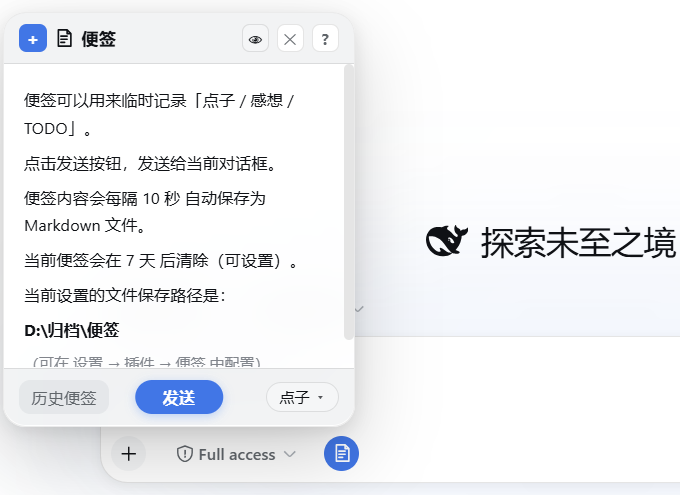
✨ 功能
- 📝 随手记:编辑框工具栏上的便签按钮,点击弹出便签面板
- 📍 可选固定:从标题栏操作中固定后吸附到屏幕边缘,外部点击不再关闭;固定状态与位置会被记住
- 🔁 可选续写:可在插件设置中选择重新打开时继续当前草稿;默认关闭,保持原有行为
- 🔎 整体缩放:标题栏操作提供
− / 倍率 / +,支持Cmd/Ctrl + + / - / 0,倍率会被记住 - 💾 自动保存:按设定间隔(10 秒 / 1 分钟 / 5 分钟)自动落盘,
Ctrl+S立即保存 - 🏷️ 三分类:点子 / 感想 / TODO,快捷键
Ctrl+Shift+1/2/3切换 - 📤 一键发送:便签内容直接发给当前对话(或追加到输入框)
- 📋 历史便签:分组清单 + 展开收起,双击查看、单击预备发送,归档分组可一键恢复
- ✏️ 可编辑:历史便签可二次编辑保存;外部编辑器改动后查看视图自动刷新
- 📌 选择保留:标记保留的便签不会被自动清除(针形图标)
- 🧹 自动清除:按最后修改时间计龄,超期未保留的先移入「已清除」回收站(保留 30 天),Host 定时触发
- 🖥️ Markdown:编辑 ↔ 实时预览(
Ctrl+Shift+V),支持表格 / 任务列表 / 删除线 / 图片 - 🌓 深色模式:全部配色跟随 DSW 主题变量,深浅自动切换
- ⌨️ 快捷键:
Esc层层退出、Tab/Shift+Tab缩进、Ctrl+Shift+X删除线、Ctrl+Shift+T任务项、Ctrl+T表格骨架等 - ⚙️ 可配置:存储路径、保存间隔、清除周期、默认类别、发送方式、是否继续当前草稿
📦 安装
dsh plugin --profile web add github:Meredith2328/dsh-sticky-note
或本地目录:
dsh plugin --profile web add file:/path/to/dsh-sticky-note
安装后重启 DSH(Web 或 Desktop)。
请不要使用裸包名
dsh plugin ... add dsh-sticky-note;npm 上的同名包不是本项目。
版本要求:需要 DSH 0.1.0-rc.7 及以上(设置卡片注册适配 keyed slot 强校验),已验证兼容至 0.1.6-alpha.2;旧版 DSH 请使用 v0.2.1。v0.2.4 移除了 0.1.6 已删除的 settingsNamespace 辅助函数,在顶层声明 Loader 必需服务,把设置卡片迁到新版插件详情页,并让定时清理跟随插件热卸载生命周期。
🗂️ 存储结构
<root>/
├── 点子/    ← 以时间戳命名的 .md 文件
├── 感想/
├── TODO/
├── 归档/    ← 归档的便签(前缀类别名,可一键恢复)
└── 已清除/  ← 自动清除的回收站(保留 30 天)
默认根路径 ~/.dsh/sticky-notes(DSH_HOME 下),可在设置页修改。
🤝 贡献
外部贡献采用先 Issue、后 PR 的流程。请先阅读 CONTRIBUTING.md;未经确认的 PR 暂不进入人工代码审查。
📄 License
MIT
Install
Install the catalog once, then DeepSeek Harness can find and install any plugin from this site automatically:
dsh plugin add dshbase-catalogThen say "install dsh-sticky-note for me" — your agent finds it in the directory and installs it. Docs: dshbase-catalog · verified packs.
This plugin is GitHub source (not published to npm) — install it straight from the repo:
Web profile:
dsh plugin --profile web add github:Meredith2328/dsh-sticky-noteHeadless (CLI) profile:
dsh plugin --profile headless add github:Meredith2328/dsh-sticky-noteTest report
Verified: L1 install + L2 load + L3 runtime from GitHub source on dsh 0.1.0-rc.6.
When to use it
Extend the agent's coding surface — give it a new tool, workflow, or integration so it handles a dev task it couldn't before.
Who it's for
Developers who want dsh to behave like a teammate on real codebases — editing, running, and verifying changes rather than just answering.
For developers — extending it
The tool/command surface is the seam: expose more of the SDK, add smarter context wiring, or tighten the loop between code changes and verification.
Share this badge
Drop this badge into your README — it links back here and updates automatically when our test status changes:

[](https://dshbase.com/plugins/dsh-sticky-note/)<a href="https://dshbase.com/plugins/dsh-sticky-note/"><img src="https://dshbase.com/badges/dsh-sticky-note.svg" alt="dshbase install-tested"></a>