
Plugin directory / Developer / dsh-task-control
dsh-task-control
Verified · install-tested on dsh p2coder
What it does
在输入区暂停/恢复/取消正在运行的对话任务:强制暂停立即中断并记住被中断的工具,安全暂停等工具/推理完成后再落地,恢复时需确认;默认暂停粒度可在设置中配置(出厂 safe wait)。
Works — verified, early-stage project
在输入区暂停/恢复/取消正在运行的对话任务:强制暂停立即中断并记住被中断的工具,安全暂停等工具/推理完成后再落地,恢复时需确认;默认暂停粒度可在设置中配置(出厂 safe wait)。 It installs cleanly and boots without issues in our testing. It's early-stage but functional.
“Verified” means our automated CI actually ran dsh plugin add in a clean profile and it booted — nothing more. Feature descriptions and version compatibility are the author’s claims. This is not a security audit and not an endorsement of third-party code.
README
dsh-task-control

English | 中文

为 DSH Web 增加任务暂停、恢复和取消能力。支持安全暂停与强制暂停,恢复时从暂停点继续,不重复已完成的工作。
安装
dsh plugin --profile web add github:p2coder/dsh-task-control
安装后请完整重启 dsh web,然后刷新浏览器页面。
快速使用
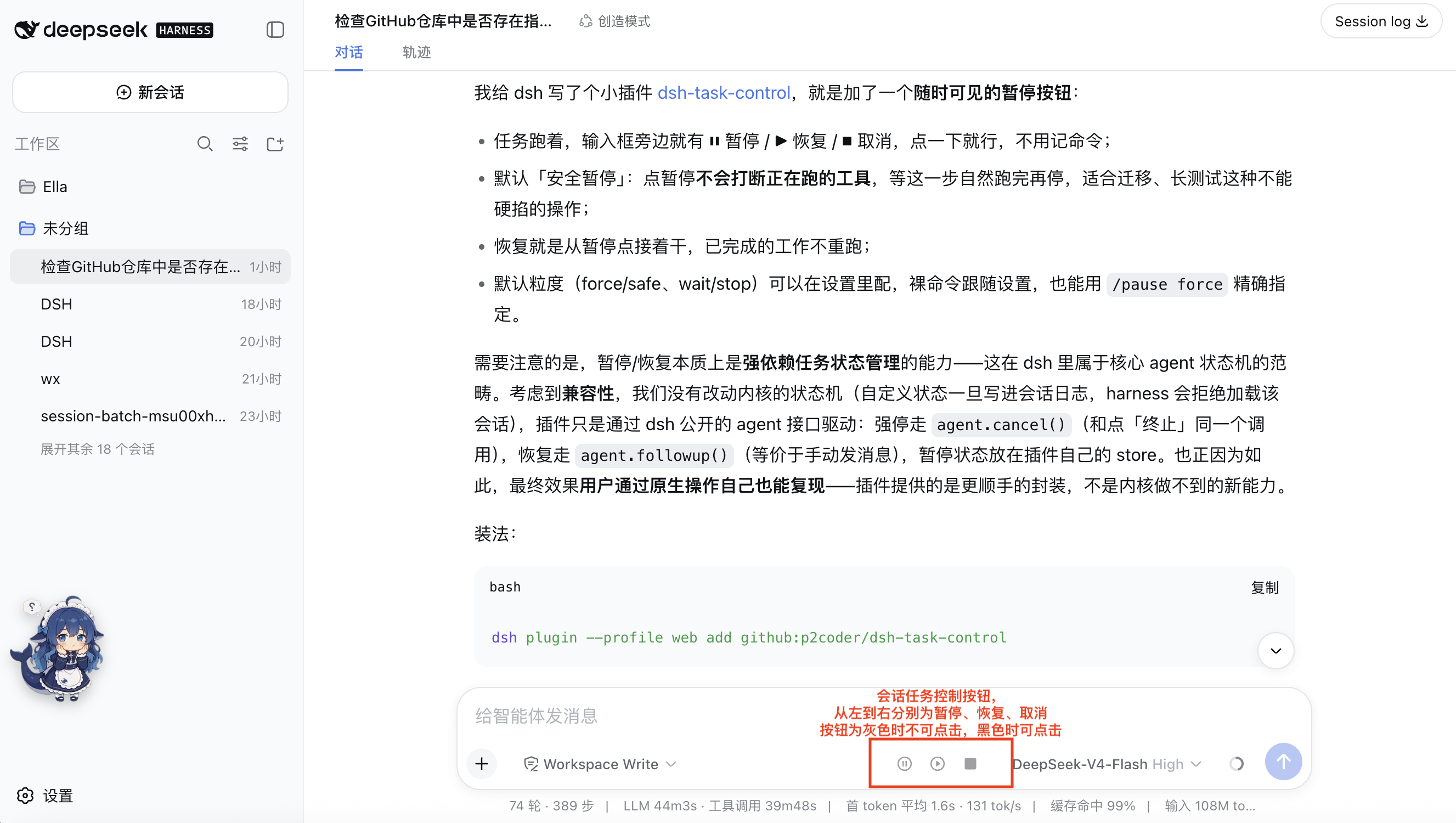
任务运行时,输入框旁会显示三个常驻按钮:
| 按钮 | 作用 | 可用状态 |
|---|---|---|
| ⏸ 暂停 | 按默认粒度暂停任务 | 运行中 |
| ▶ 恢复 | 从暂停点继续 | 已暂停 |
| ⏹ 取消 | 立即终止当前回合 | 运行中或已暂停 |
灰色按钮表示当前不可用,黑色按钮表示可点击。
暂停模式
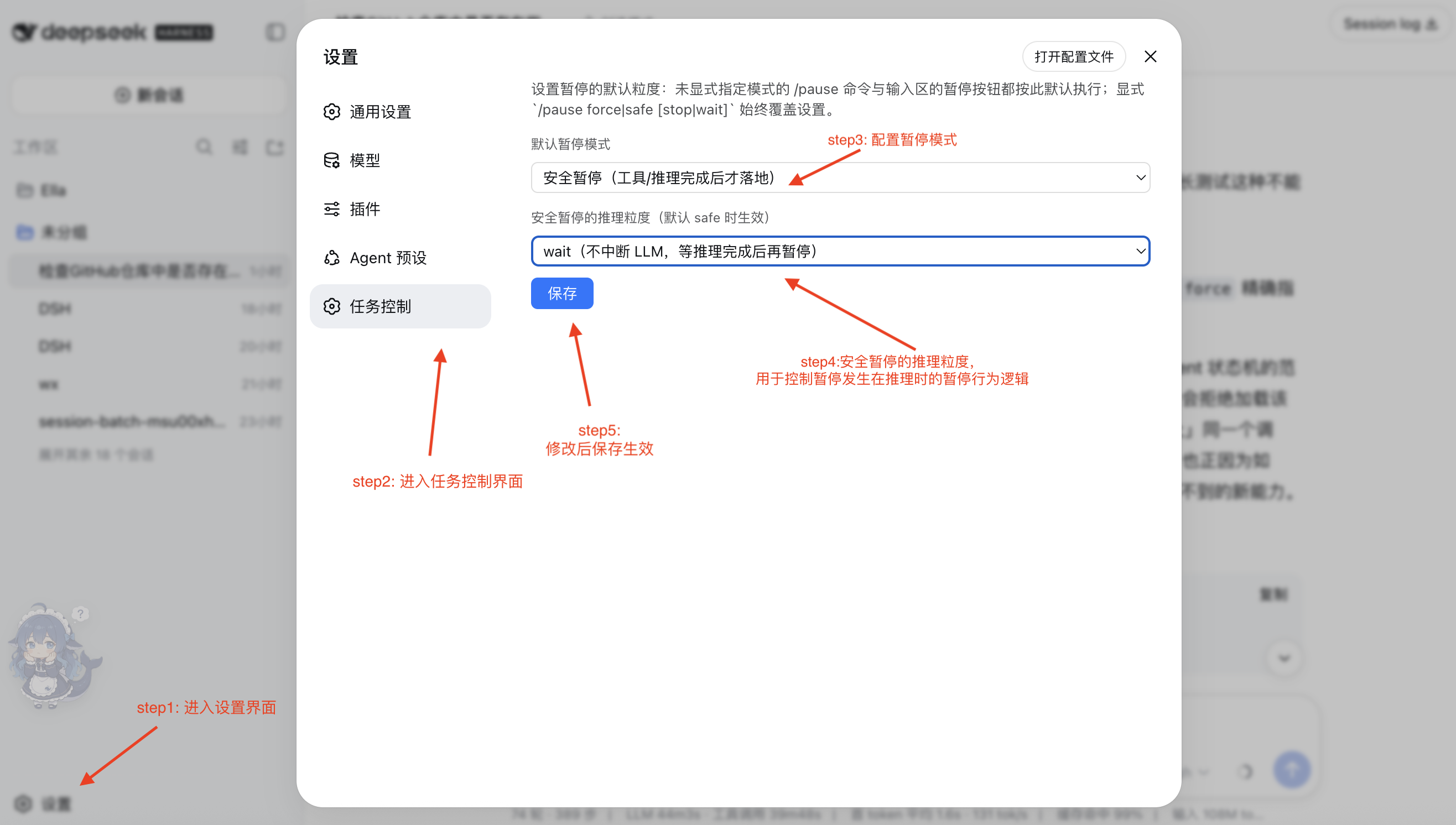
| 模式 | 行为 | 适合场景 |
|---|---|---|
safe wait(默认) |
等待推理和工具自然完成后暂停 | 长任务、迁移、测试 |
safe stop |
工具完成后暂停;可中断当前推理 | 希望更快暂停 |
force |
立即中断推理及在途工具 | 紧急停止 |
在「设置 → 任务控制」中修改默认模式,保存后立即生效:
命令
| 命令 | 说明 |
|---|---|
/pause |
按设置中的默认模式暂停 |
/pause force |
强制暂停 |
/pause safe wait |
安全暂停,不中断推理 |
/pause safe stop |
安全暂停,可中断推理 |
/resume |
恢复任务 |
/resume confirm rerun |
重新执行被中断或未派发的工具后恢复 |
/resume confirm skip |
跳过该工具后恢复 |
/cancel |
取消当前回合 |

供其他插件调用
通过 ctx.get("taskControl") 获取服务:
| API | 作用 |
|---|---|
pause(sessionId, options?) |
暂停任务 |
resume(sessionId, options?) |
恢复任务 |
cancel(sessionId) |
取消任务 |
state(sessionId) |
查询 idle、running 或 offline 状态及暂停信息 |
暂停状态保存在 ~/.dsh/task-control/,重启后不会丢失。测试时可用 DSH_TASK_CONTROL_STATE_DIR 修改存储目录。
注意事项
| 情况 | 说明 |
|---|---|
| 强制暂停 | 工具可能已产生部分副作用;恢复前可选择重新执行、跳过或保持暂停 |
safe wait 的未派发工具 |
恢复时需要选择重新执行或跳过 |
| 暂停期间发送新消息 | 会开启新回合;暂停只控制当前回合 |
| 定时提醒 | dsh-schedule 到期后仍会唤醒 |
| 子代理 | 已派发的子代理不会被父任务暂停 |
| 状态同步 | 浏览器每 2 秒轮询一次,修改插件后需重启 dsh web |
测试
node test/host-smoke.mjs
Install
Install the catalog once, then DeepSeek Harness can find and install any plugin from this site automatically:
dsh plugin add dshbase-catalogThen say "install dsh-task-control for me" — your agent finds it in the directory and installs it. Docs: dshbase-catalog · verified packs.
This plugin is GitHub source (not published to npm) — install it straight from the repo:
Web profile:
dsh plugin --profile web add github:p2coder/dsh-task-controlHeadless (CLI) profile:
dsh plugin --profile headless add github:p2coder/dsh-task-controlTest report
Verified: L1 install + L2 load + L3 runtime from GitHub source on dsh 0.1.0-rc.6.
Share this badge
Drop this badge into your README — it links back here and updates automatically when our test status changes:

[](https://dshbase.com/plugins/dsh-task-control/)<a href="https://dshbase.com/plugins/dsh-task-control/"><img src="https://dshbase.com/badges/dsh-task-control.svg" alt="dshbase install-tested"></a>