
Plugin directory / UI & Skins / dsh-task-kanban
dsh-task-kanban
Verified · install-tested on dsh fonlan
What it does
DSH web plugin: a task kanban that refines requirements into phased plans, auto-executes them in git worktrees (one session per phase), and auto-merges into the main branch on completion.
Works — verified, early-stage project
DSH web plugin: a task kanban that refines requirements into phased plans, auto-executes them in git worktrees (one session per phase), and auto-merges into the main branch on completion. It installs cleanly and boots without issues in our testing. It's early-stage but functional.
“Verified” means our automated CI actually ran dsh plugin add in a clean profile and it booted — nothing more. Feature descriptions and version compatibility are the author’s claims. This is not a security audit and not an endorsement of third-party code.
README
dsh-task-kanban
@fonlan/dsh-task-kanban 是一个 DSH web 插件,为 web 主界面新增"任务看板":把需求细化成多 phase 实现计划,并在 git worktree 中串行实现、全部 phase 完成后自动合入主分支,全流程状态在"需求 / 队列 / 运行中 / 已完成 / 已合并"五条泳道上可视化。
界面预览
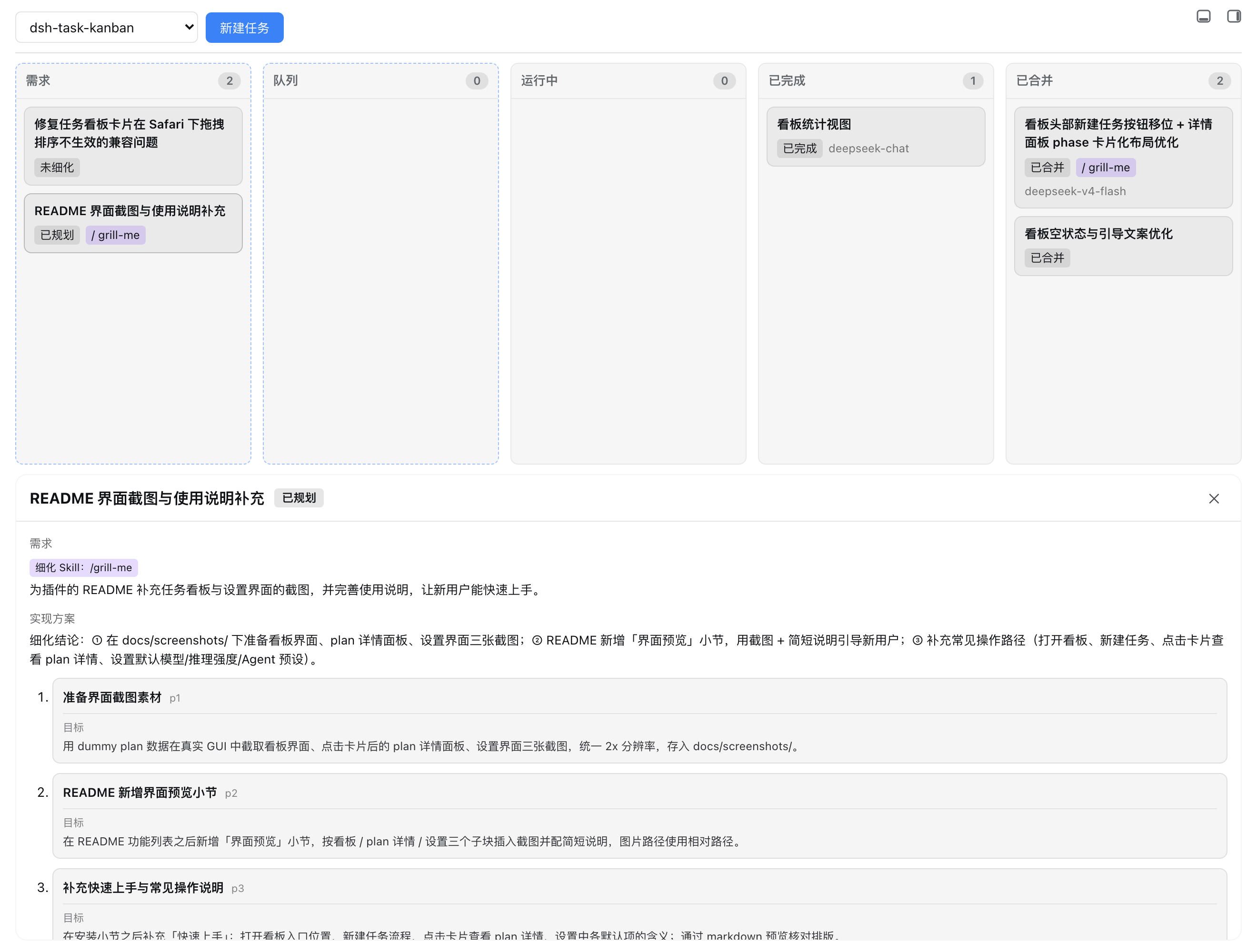
任务看板把卡片按「需求 / 队列 / 运行中 / 已完成 / 已合并」五条泳道可视化,卡片显示标题、需求摘要、模型、细化 Skill、plan 状态徽标与所属阶段;点击任意卡片,页面下方会展开 plan 详情面板:需求、实现方案摘要,以及按 phase 卡片化展示的目标 / 会话 / 结论,并支持停止 / 重试 / 删除等操作。
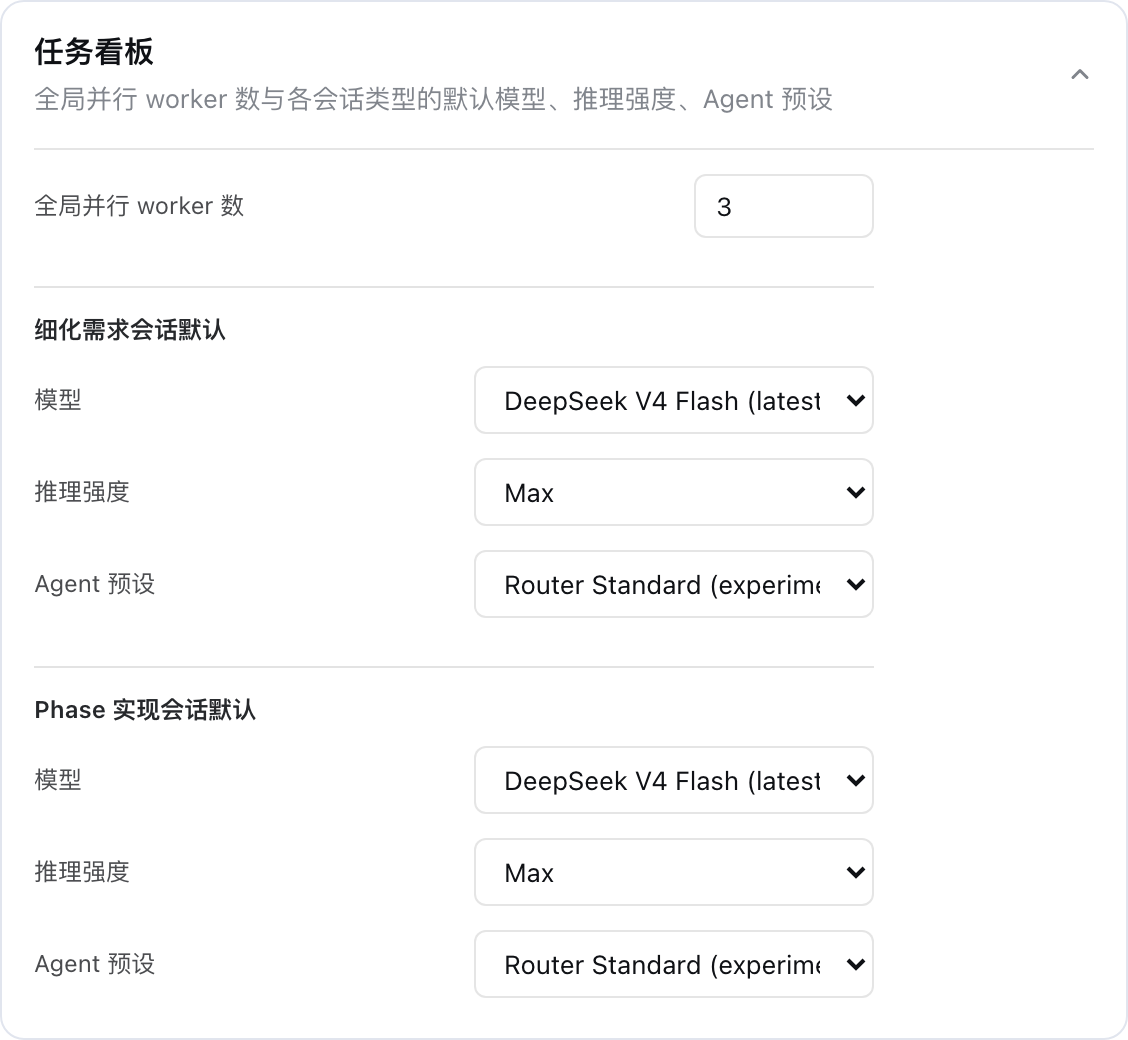
侧边栏设置 → 插件配置 →「任务看板」卡片可配置全局并行 worker 数,以及细化需求会话与 Phase 实现会话各自的默认模型、推理强度与 Agent 预设。
功能
- 需求 → 计划:新建任务后自动进入细化会话,把需求拆解为串行执行的 phase 计划(plan)。
- Skill 驱动的需求细化:在新建任务的需求输入框开头输入
/会弹出可用的 Skill 列表(与聊天输入框一致,来自宿主 skill 目录;支持方向键 / Enter / Tab 选择),选中或手动输入/skill-name(如/grill-me 帮我规划…)即可指定细化时使用的 Skill。插件会把该 Skill 的完整指令注入细化会话,并切换到交互式细化模式——细化会话是显式会话,agent 会按 Skill 的指引(如 grill-me 的深度追问)与你在会话中交流打磨需求,直到需求明确后再写回计划。未知/不可用的 Skill 会给出明确报错并可重试。 - 队列:已规划的卡片拖入队列,按 FIFO 领取执行。
- 串行实现:每个 phase 一个独立会话,在同一 git worktree 中严格串行推进(同一工作区单并发,跨工作区可按设置并行)。
- 自动合并:全部 phase 完成后,插件自动将 plan 分支合入主分支(
main/master),完成后清理 worktree 与分支。 - 状态可视化:卡片完整显示标题、需求摘要、模型、细化 Skill、plan 状态徽标、所属阶段与时间,支持停止 / 重试 / 删除。
设置
侧边栏设置中的「任务看板」分节(settings.section 插槽)支持:
- 全局并行 worker 数:跨工作区同时执行的卡片数上限。
- 细化需求会话默认 / Phase 实现会话默认:分别配置两类会话的默认值:
- 模型:留空表示走默认链路(卡片模型 → 宿主默认模型)。
- 推理强度:仅列出所选模型支持的推理等级;留空表示使用提供方默认。
- Agent 预设:留空表示使用部署默认预设;会话开始后固定,恢复时会话按记录重建同一预设。
新建任务弹窗不再预填卡片模型,卡片模型保持为空即可让细化 / 实现会话各自套用上述默认值。
安装
通过
dsh的 profile 插件管理命令安装,目标 profile 为web。运行命令的目录将作为默认 workspace 根目录。
方式一:从 npm 发布包安装
当前发布版本:0.1.0。
dsh plugin --profile web add @fonlan/dsh-task-kanban
如需固定版本,可显式指定版本号:
dsh plugin --profile web add @fonlan/[email protected]。
方式二:本地源码链接安装
在仓库目录下,先构建出 lib/ 产物(package.json 的 files 只发布 lib / src / cordis.patch.yml / README.md / LICENSE),再以本地目录方式添加:
pnpm build
dsh plugin --profile web add .
安装后插件即通过 cordis.patch.yml 自动挂载到 web profile。web profile 会读取该 patch 并把插件注册进 sidebar.footer.action(看板入口)、conversation(看板视图)与 settings.section(插件设置)等插槽,通常重启 web profile 后即可在侧边栏底部看到"任务看板"入口。
开发
- 修改服务端后需重启 web profile。
- 客户端改动走 web 端 HMR 链路,
pnpm run dev:web同启时生效。
License
MIT — 详见 LICENSE。
Install
Install the catalog once, then DeepSeek Harness can find and install any plugin from this site automatically:
dsh plugin add dshbase-catalogThen say "install dsh-task-kanban for me" — your agent finds it in the directory and installs it. Docs: dshbase-catalog · verified packs.
This plugin is GitHub source (not published to npm) — install it straight from the repo:
Web profile:
dsh plugin --profile web add github:fonlan/dsh-task-kanbanHeadless (CLI) profile:
dsh plugin --profile headless add github:fonlan/dsh-task-kanbanTest report
Verified: L1 install + L2 load + L3 runtime from GitHub source on dsh 0.1.0-rc.6.
Share this badge
Drop this badge into your README — it links back here and updates automatically when our test status changes:

[](https://dshbase.com/plugins/dsh-task-kanban/)<a href="https://dshbase.com/plugins/dsh-task-kanban/"><img src="https://dshbase.com/badges/dsh-task-kanban.svg" alt="dshbase install-tested"></a>