
Plugin directory / Developer / dsh-team
dsh-team
Verified · install-tested on dsh huxint
What it does
Agent teams for DeepSeek Harness: named long-lived teammates over ctx.subagents, a shared task list, a member-to-member mailbox, virtual workspaces, and a live team room in the conversation view
Works — verified, early-stage project
Agent teams for DeepSeek Harness: named long-lived teammates over ctx.subagents, a shared task list, a member-to-member mailbox, virtual workspaces, and a live team room in the conversation view It installs cleanly and boots without issues in our testing. It's early-stage but functional.
“Verified” means our automated CI actually ran dsh plugin add in a clean profile and it booted — nothing more. Feature descriptions and version compatibility are the author’s claims. This is not a security audit and not an endorsement of third-party code.
README
dsh-team
给 DeepSeek Harness 加一支能看见的 agent 团队


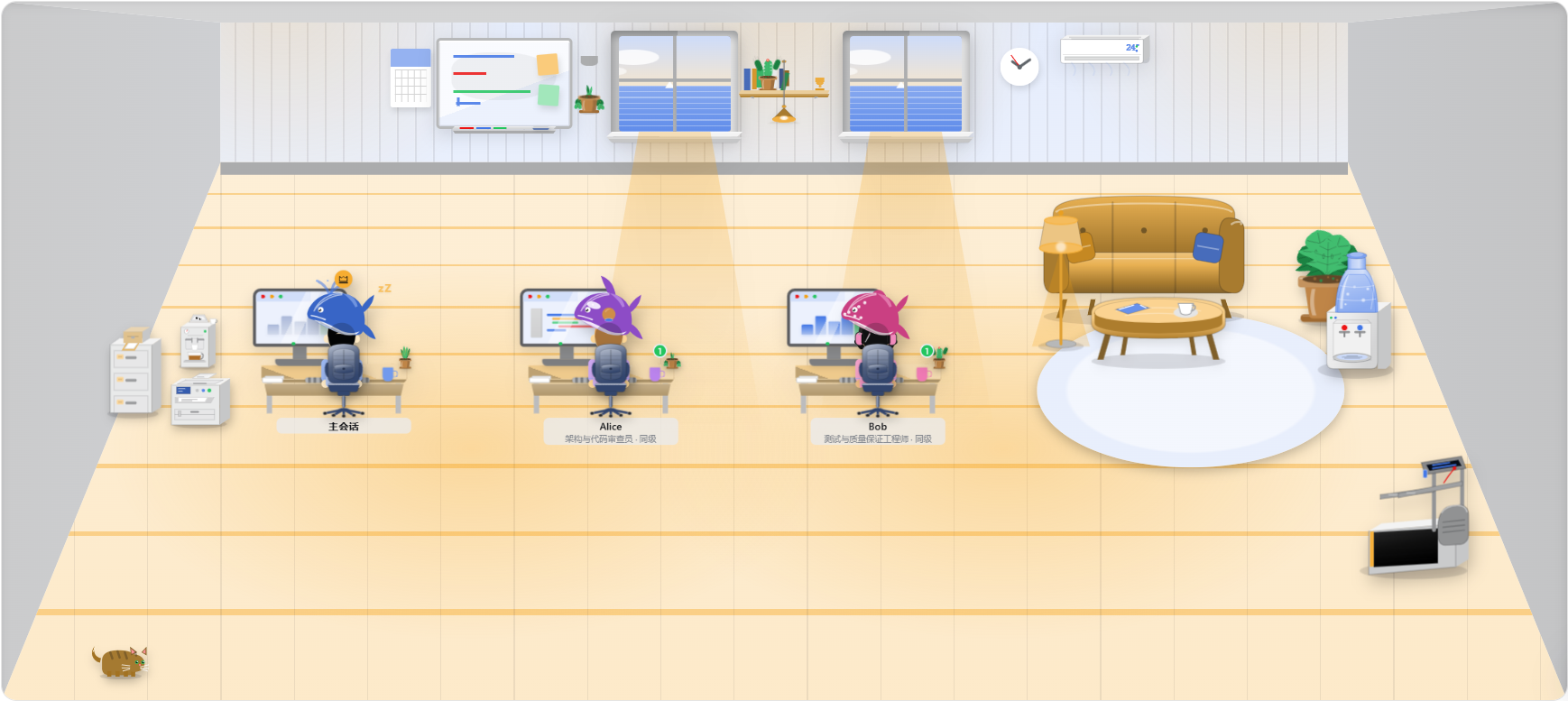
在会话里输入一行 /agent-teams <目标>,主会话就会拉起一支队伍:每位队友有自己的名字、会话和记忆,能互发消息、认领共享任务、往共享黑板写结论;「微型世界」页签把团队带到一座可以旋转、缩放的体素小岛:成员在工位工作,也会在空闲时游泳、运动、吃零食和照料花园。
安装
当前版本 0.2.10 已适配 dsh 0.1.7-rc.2,包括会话导航、团队投影、附件命令和 PTC 工具调用事件。
npm 预构建包,一行装配:
dsh plugin --profile web add dsh-team
或者从源码构建安装:
git clone https://github.com/huxint/dsh-team.git
cd dsh-team && pnpm install && pnpm run build
dsh plugin --profile web add link:$PWD
装完即生效。卸载:
dsh plugin --profile web remove dsh-team
用法
想让一件事由一支队伍来完成时,在输入框输入:
/agent-teams 把鉴权模块迁移到新 SDK
斜杠后面的内容就是给团队的目标,可以带图。也可以不敲命令,直接跟主会话说"组个团队把这件事做了"——它会自己决定需要几个队友、分别做什么。
队伍跑起来之后:
- 队友各自领任务干活,进展自动回到你的会话;
- 主聊天右上角的头像显示团队人数和忙闲,展开可看每位成员的任务、近况,点击头像可直接打开成员会话;
- 想看现场,点开「微型世界」页签进入小岛;
- 想让谁收工、或整个队伍解散,跟主会话说一声即可。
它能做什么
- 常驻队友:每个队友有名字、角色和自己的记忆,随叫随到,不用反复交代背景。
- 成员邮箱:队友之间可以直接互相沟通,不必事事经过你。
- 共享任务列表:全队认领同一份清单,谁在做哪件事清清楚楚。
- 共享工作区:一块全队共用的黑板,外加每人一本别人看不见的私有便笺;写下来的东西重启后还在。
- 微型世界:一座持续模拟的体素小岛,支持多层建筑、设施活动、昼夜轮转和自由视角。
- 聊天内协作:邀请队友、分派任务、发送消息等调用显示为专属卡片,相关成员的头像就在旁边,调用详情可以展开查看。查看预览
- 安全边界:队友之间的对话有轮数上限,不会绕着圈停不下来;发给主会话的消息永远畅通。

潮汐小岛
小岛有办公区、两层会所、泳池、海泳码头、健身露台、零食吧、篮球场、温室、阅读花园和露营区。人物由三维体素组成,服装、发型、肤色和配饰与聊天头像一致。成员名和设施说明在悬停或键盘聚焦时显示,场景保持通透。
| 操作 | 效果 |
|---|---|
| 拖拽 / 单指拖动 | 旋转视角 |
| 滚轮 / 双指捏合 | 放大、缩小 |
| 右键拖拽 / 双指拖动 | 平移视角 |
| 双击 / 相机上的复位按钮 | 返回全景 |
画布聚焦后按左右方向键、+、-、Home |
旋转、缩放、复位 |
| 点击人物或左下角头像 | 查看当前活动、安排休闲活动 |
| 点击悬停出现的成员名或详情里的会话入口 | 打开成员会话 |
| 点击设施图标 | 邀请空闲成员使用设施 |
| 点击楼层图标 | 全景、一楼剖视、二楼近景 |
| 点击太阳或月亮图标 | 调整时间,开启或关闭昼夜轮转 |
运行中的成员留在工位。空闲成员会自主活动,也可以手动安排;新任务开始时会结束休闲,经可通行路线回到工位。泳池和海泳都有扶梯,楼梯按台阶逐级行走,电梯按开门、进入、关门、运行、离开的顺序运作。设施有占用限制,狭窄通道会让行。上下楼可以在成员或设施详情里选择楼梯、电梯。
消息、工作区、任务板保留在左下角工具栏,新消息会点亮提示。共享工作区仍由主会话快照驱动。解散团队后,世界与页签一起关闭。
昼夜默认八分钟一轮,可暂停并切换 1×、2×、4× 模拟速度。查看夜景。动画默认最高 30 FPS,窗口失焦但仍可见时降至 15 FPS;系统开启“减少动态效果”、页面隐藏或世界移出可见区域时停止动画调度,暂停时操作视角仍可按需重绘;无法使用 WebGL 2 时仍可打开成员会话和协作面板。

配置
以下选项都有默认值,不加任何配置也能直接用(写在 cordis.patch.yml 里覆写):
| 键 | 默认 | 含义 |
|---|---|---|
provider |
spawn |
队友的创建方式,保持默认即可 |
maxTeammates |
8 |
一支队伍最多几名队友 |
maxRecentMessages |
50 |
信箱保留多少条最近消息 |
maxChainHops |
4 |
队友之间一次对话最多转手几次 |
maxChainRoundTrips |
2 |
同两个队友之间一轮最多来回几条 |
maxWorkspaceEntries |
32 |
工作区每个区域最多放多少条笔记 |
maxNoteChars |
4000 |
单条笔记最长多少字 |
已知限制
- 队友之间互相聊了什么,只有当事成员自己知道;你能看到的是与你相关的流量。
- 共享任务清单由主会话记账,队友通过汇报交付结果。
- 微型世界里的共享工作区显示的是主会话最后一次读写时的快照。
- 整队解散后,各队友的历史记录仍可在 harness 的子代理面板里翻阅——这是设计使然。
- 主会话不在线时新加入的队友暂时拿不到团队工具,等它回来即恢复。
- 队友不能再开自己的队伍。
开发
pnpm run check # 类型检查 + 测试 + 构建
场景预览和浏览器交互检查需要本机 Chrome / Chromium;可以用 CHROME_PATH 指定可执行文件:
pnpm screenshot /tmp/tideline.png --verify
pnpm screenshot /tmp/tideline.png --benchmark --gpu
预览默认使用确定性的静态场景。--verify 检查悬停、视角、楼层、昼夜、成员活动、面板、窄屏、暂停和图形上下文恢复。--benchmark --gpu 使用浏览器可用的图形设备,输出实际渲染器、帧率、CPU 耗时、绘制次数与分辨率。省略 --gpu 使用 SwiftShader 软件渲染。
渲染使用批量体素与单一 WebGL 画布,优先低功耗设备。默认像素密度最高 1×、总像素不超过 150 万,阴影贴图为 1024²、最多每秒更新 15 次;持续掉帧时进一步降低分辨率,并在必要时关闭动态阴影。只上传实际使用的体素矩阵及改变的颜色,关闭世界或替换场景时释放实例缓冲。性能报告分别记录实际绘制帧率与浏览器刷新帧率;SwiftShader 软件渲染结果不能代表显卡表现。
改完源码重跑构建:宿主侧需要重启 dsh,页面刷新即可看到新的客户端效果。构建产物 dist/ 随仓库提交。
License
Install
Install the catalog once, then DeepSeek Harness can find and install any plugin from this site automatically:
dsh plugin add dshbase-catalogThen say "install dsh-team for me" — your agent finds it in the directory and installs it. Docs: dshbase-catalog · verified packs.
This plugin is GitHub source (not published to npm) — install it straight from the repo:
Web profile:
dsh plugin --profile web add github:huxint/dsh-teamHeadless (CLI) profile:
dsh plugin --profile headless add github:huxint/dsh-teamTest report
Verified: L1 install + L2 load + L3 runtime from GitHub source on dsh 0.1.0-rc.6.
Share this badge
Drop this badge into your README — it links back here and updates automatically when our test status changes:

[](https://dshbase.com/plugins/dsh-team/)<a href="https://dshbase.com/plugins/dsh-team/"><img src="https://dshbase.com/badges/dsh-team.svg" alt="dshbase install-tested"></a>