
Plugin directory / UI & Skins / dsh-theme-escook
dsh-theme-escook
Verified · install-tested on dsh Simon-yyy
What it does
为DeepSeek Harness桌面端打造的一款主题
Works — verified, early-stage project
为DeepSeek Harness桌面端打造的一款主题 It installs cleanly and boots without issues in our testing. It's early-stage but functional.
“Verified” means our automated CI actually ran dsh plugin add in a clean profile and it booted — nothing more. Feature descriptions and version compatibility are the author’s claims. This is not a security audit and not an endorsement of third-party code.
README
dsh-theme-escook

🌸 Escook Theme for DeepSeek Harness
A premium dark violet & amber gold aesthetic theme crafted for DeepSeek Harness Web GUI & Desktop.
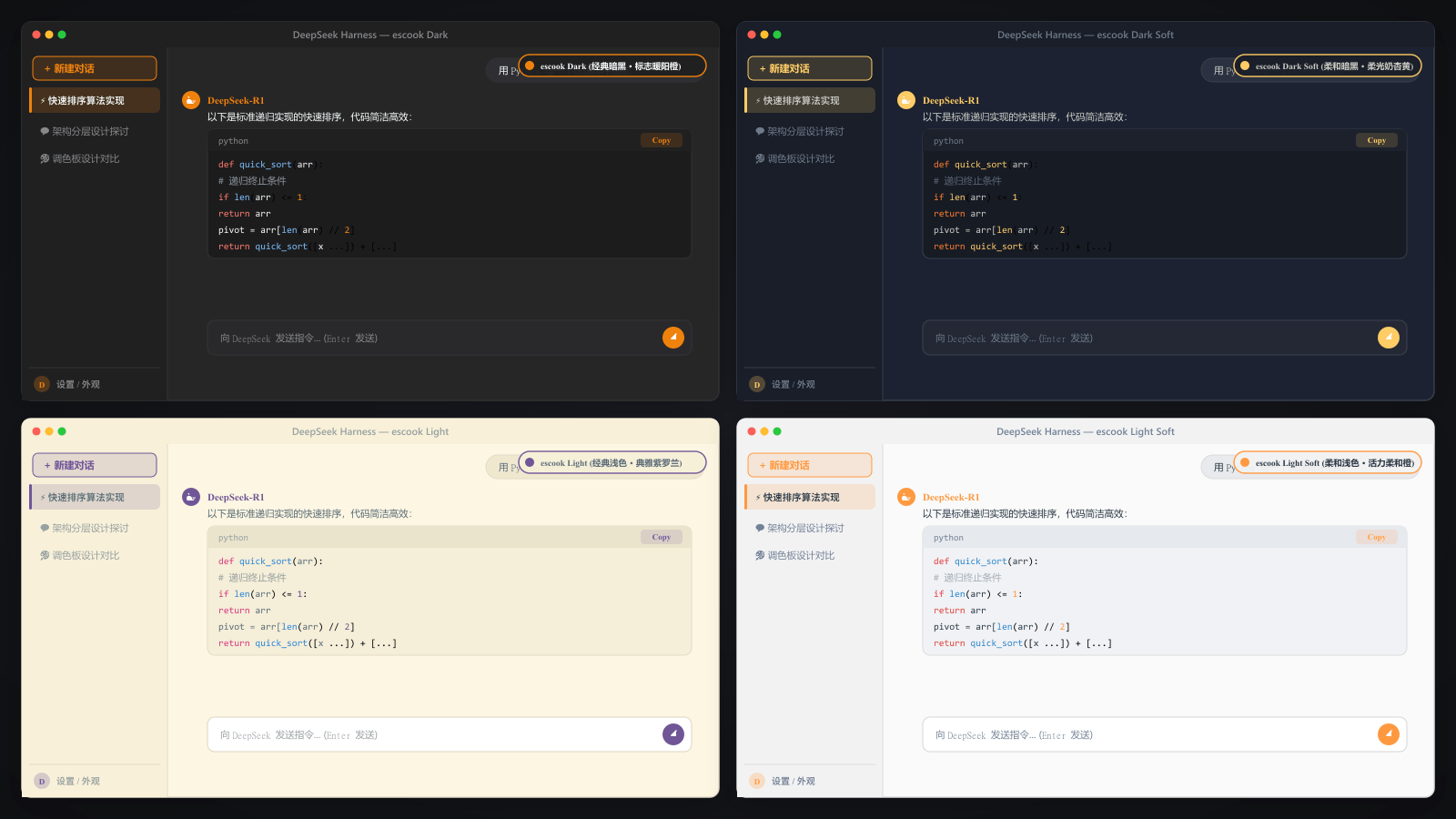
✨ Features
- 🎨 Signature Dark Aesthetics: Faithful port of the beloved VS Code
escook-themecolor palette (#1f2430deep night base with#ffcc66amber gold accent). - 💻 Syntax Highlighting: Enhanced code readability with vibrant pastel tones (Pink keywords, Cyan functions, Mint strings, Amber numbers).
- ⚡ Full UI Coverage: Seamlessly styles sidebar, chat bubbles, settings panels, marketplace cards, and scrollbars.
- 🔄 Live Hot Toggle: Instant switch in DSH Market Theme tab without server restart.
📦 Installation
dsh plugin --profile web add dsh-theme-escook
📄 License
MIT License © 2026 Simon-yyy / escook (liulongbin1314)
Install
Install the catalog once, then DeepSeek Harness can find and install any plugin from this site automatically:
dsh plugin add dshbase-catalogThen say "install dsh-theme-escook for me" — your agent finds it in the directory and installs it. Docs: dshbase-catalog · verified packs.
This plugin is GitHub source (not published to npm) — install it straight from the repo:
Web profile:
dsh plugin --profile web add github:Simon-yyy/dsh-theme-escookHeadless (CLI) profile:
dsh plugin --profile headless add github:Simon-yyy/dsh-theme-escookTest report
Verified: L1 install + L2 load + L3 runtime from GitHub source on dsh 0.1.0-rc.6.
Share this badge
Drop this badge into your README — it links back here and updates automatically when our test status changes:

[](https://dshbase.com/plugins/dsh-theme-escook/)<a href="https://dshbase.com/plugins/dsh-theme-escook/"><img src="https://dshbase.com/badges/dsh-theme-escook.svg" alt="dshbase install-tested"></a>