
Plugin directory / UI & Skins / dsh-token-data
dsh-token-data
Verified · install-tested on dsh dawsondx
What it does
Token usage dashboard, provider balances, and subscription quotas for the DeepSeek Harness (DSH) web GUI
No short evidence report
There is no checkable per-level test record on this page. Stars, the catalog test field, a web-only flag, and whether the plugin needs an external account or service are not shown here as a pass or a failure. The catalog badge stays as published.
“Verified” means our automated CI actually ran dsh plugin add in a clean profile and it booted — nothing more. Feature descriptions and version compatibility are the author’s claims. This is not a security audit and not an endorsement of third-party code.
README
中文 · English
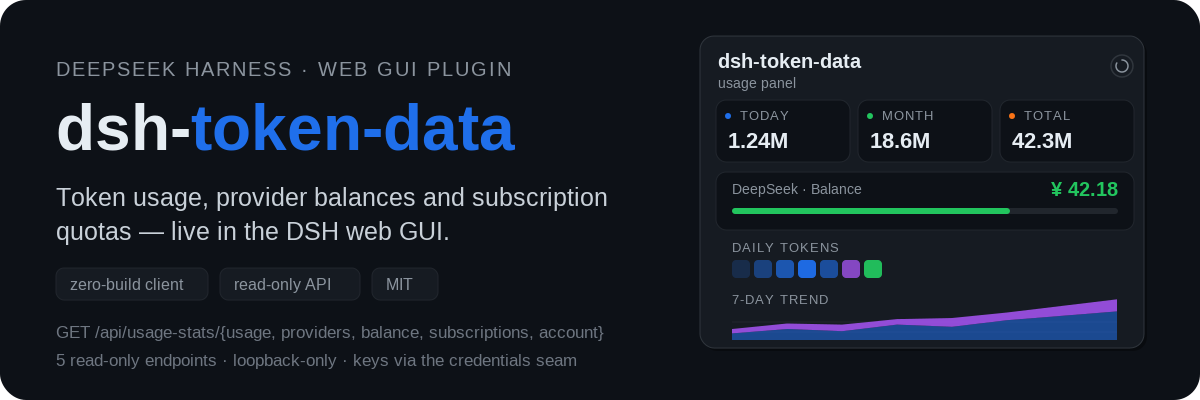





dsh-token-data 是 DeepSeek Harness(DSH)的插件,把实时 Token 用量仪表盘带进 dsh web 图形界面。点击侧边栏底部的徽章即可打开浮动面板,查看每日 Token 消耗、各供应商余额与订阅配额窗口——不必在多个供应商后台之间来回切换,也无需手工记账。
你能看到什么
| 你想知道什么 | 面板会告诉你 |
|---|---|
| 今天 / 这个月烧了多少 Token? | Hero 汇总卡片 + Codex 风格每日热力图 |
| Token 都花到哪去了? | 按日、按模型的明细 + 7 日堆叠趋势图 |
| DeepSeek 余额是不是快用完了? | 供应商余额(DeepSeek、OpenRouter、Moonshot/Kimi、Z.ai 等) |
| 订阅窗口还剩多少? | OpenCode Go、Z.ai、Kimi、MiniMax 的配额窗口 |
| 提示词缓存真的有用吗? | 每日缓存命中率,就在总数旁边 |
它有什么不同
- 零构建步骤——浏览器端是手写的
__ModuleLoader__模块(无打包器、使用者无需 npm install);服务端是纯 ESM。clone、添加、重启即可。 - 只读、仅回环的 API——5 个
GET端点,位于 peer-socket 回环防护之后;绝不会写入你的会话。 - 密钥留在凭据缝隙里——供应商 API Key 在请求时通过 DSH 凭据服务解析。插件自身不存储任何密钥。
- 增量聚合——每个会话的折叠状态被缓存(
<DSH_HOME>/storages/usage-stats-cache.json);无论日志多大,稳态成本始终是 O(新增事件)。 - 面板抗故障——网络 / 超时 / HTTP 错误会归类为友好的本地化消息,瞬时失败带退避重试,并保留最后一次成功数据,网络抖动也不会让面板空白。
- 本地化数字格式——zh/ja 用 亿/万,en 用 K/M/B。
支持的供应商
| 供应商 | 余额 | 订阅 / 配额 |
|---|---|---|
| DeepSeek | GET /user/balance(CNY) |
- |
| OpenRouter | GET /api/v1/credits(需 Management Key) |
- |
| Moonshot / Kimi | GET /v1/users/me/balance |
Kimi coding 用量 |
| Z.ai(GLM) | GET /api/paas/v4/balance |
Coding Plan 配额窗口 |
| OpenCode Go | - | 未公开的用量端点 + 工作区面板兜底 |
| MiniMax | - | Token 套餐余量(global / CN) |
| 其他 | 通用 new-api / sub2api / general 适配器,以及声明式 JSON Pointer 配置 |
没有公开余额 API 的供应商会明确显示无公开余额接口状态,而不是猜测一个数字。
安装
前置条件: 可正常运行的 DSH(dsh web 能启动)、Node.js ≥ 20。
方式一:从 npm 安装(推荐)
dsh plugin --profile web add dsh-token-data
方式二:clone 后安装(审阅源码 / 参与贡献)
git clone https://github.com/dawsondx/dsh-token-data.git
cd dsh-token-data
dsh plugin --profile web add \
  --ignore-scripts --config.auto-install-peers=false \
  .
方式三:直接从 GitHub 添加(无需 npm)
dsh plugin --profile web add \
  --ignore-scripts --config.auto-install-peers=false \
  github:dawsondx/dsh-token-data
方式四:本地开发
dsh plugin --profile web add link:C:/path/to/dsh-token-data
安装完成后重启 dsh web。面板从侧边栏底部徽章打开;用 profile 的 cordis.patch.yml 配置监视器(示例见下)。
配置
本插件是一个 DSH profile bundle(dsh.bundle.patch),内部插件 id 为 usage-stats。在 web profile 的 cordis.patch.yml 中挂载监视器并配置各供应商选项:
- id: usage-stats
  config:
    monitors:
      deepseek-official:
        adapter: deepseek-balance
        allowPrivateNetwork: true   # 放行本地代理(TUN/fake-ip)解析
      minimax-cn:
        adapter: minimax-token-plan
        region: cn                   # MiniMax 中国区账号
工作原理
flowchart LR
  S[会话事件日志] --> F[增量折叠<br/>按日 / 按模型]
  F --> C[(usage-stats 缓存<br/>DSH_HOME/storages)]
  C --> E[5 个只读回环端点]
  E --> P[网页面板<br/>热力图 · 余额 · 配额]
  K[凭据缝隙] -. 请求时解析 Key .-> E
服务端在 /api 下注册了 5 条精确路由,优先于连接插件的 /api 前缀处理器。活动会话只折叠内存中的增量;持久化会话在后端不透明修订号变化时才重新处理新事件(并做连续性检查,日志被截断时会精确重折叠)。
| 端点 | 用途 |
|---|---|
GET /api/usage-stats/usage |
所有会话的按日 Token 用量 |
GET /api/usage-stats/providers |
已配置的供应商 + 余额方案 |
GET /api/usage-stats/balance?provider=<id> |
单个供应商的余额 |
GET /api/usage-stats/subscriptions |
OpenCode Go + Z.ai 配额窗口 |
GET /api/usage-stats/account |
单个供应商的统一账户快照 |
安全性
- 只读——每个端点都是
GET;不会写入你的会话或日志。 - 仅回环——必须是回环接口的 peer-socket 地址(而非客户端可控的
Host头);Host头只是二次校验。 - 不存密钥——凭据在请求时经 DSH 凭据缝隙解析;账户快照会脱敏敏感头(
authorization、cookie、api-key等)。 - 上游调用有界——供应商请求带 15 秒超时与 1 MB 响应上限。
开发
npm run check # 对每个 lib 文件执行 node --check
lib/usage.js 与 lib/balance.js 是纯模块(无 cordis 依赖)——折叠与余额解析可以在 DSH 之外对真实日志做单元测试与验证。
致谢
- dsh-usage-stats(MIT,© 2026 dsh-usage-stats contributors)——本项目的改造基础:内部插件 id
usage-stats与 API 路由保持不变以兼容既有配置,包名与前端 bundle 为全新实现。 - cc-switch(MIT)——统计面板 UI(Hero 汇总卡片、SVG 堆叠趋势图、表格数字)的设计灵感,以及
formatTokensShort本地化数字格式逻辑(zh/ja 用 亿/万,en 用 K/M/B)。
许可证
MIT © dawsondx
Install
Install the catalog once, then DeepSeek Harness can find and install any plugin from this site automatically:
dsh plugin add dshbase-catalogThen say "install dsh-token-data for me" — your agent finds it in the directory and installs it. Docs: dshbase-catalog · verified packs.
This plugin is GitHub source (not published to npm) — install it straight from the repo:
Web profile:
dsh plugin --profile web add github:dawsondx/dsh-token-dataHeadless (CLI) profile:
dsh plugin --profile headless add github:dawsondx/dsh-token-dataTest report
No short evidence report
There is no checkable per-level test record on this page. Stars, the catalog test field, a web-only flag, and whether the plugin needs an external account or service are not shown here as a pass or a failure. The catalog badge stays as published.
Share this badge
Drop this badge into your README — it links back here and updates automatically when our test status changes:

[](https://dshbase.com/plugins/dsh-token-data/)<a href="https://dshbase.com/plugins/dsh-token-data/"><img src="https://dshbase.com/badges/dsh-token-data.svg" alt="dshbase install-tested"></a>