
Plugin directory / Developer / dsh-tokensforce
dsh-tokensforce
Verified · install-tested on dsh spirits001
What it does
DeepSeek Harness (dsh) plugin — tokensforce gateway integration: one-login onboarding, provider groups, and a usage dashboard tab
Works — verified, early-stage project
DeepSeek Harness (dsh) plugin — tokensforce gateway integration: one-login onboarding, provider groups, and a usage dashboard tab It installs cleanly and boots without issues in our testing. It's early-stage but functional.
“Verified” means our automated CI actually ran dsh plugin add in a clean profile and it booted — nothing more. Feature descriptions and version compatibility are the author’s claims. This is not a security audit and not an endorsement of third-party code.
README
dsh-tokensforce


为 DeepSeek Harness(dsh)接入 TokensForce 词元网关:登录一次,模型即用。不需要手动填 API Key,不需要改配置文件。
安装
dsh plugin --profile web add dsh-tokensforce
dsh web
打开 http://127.0.0.1:3080,登录向导会自动弹出。
如果
dsh plugin add报ERR_PNPM_ADDING_TO_ROOT(旧版 pnpm),在~/.dsh/profiles/web目录下手动pnpm add -w dsh-tokensforce,
再把包名加入该目录package.json的dsh.profile.bundles列表即可。
使用
首跑:dsh 启动且尚未配置任何模型时,自动弹出近全屏的 TokensForce 登录窗口
(就是 tokensforce.com 的登录页,邮箱验证码登录,与网页版完全一致):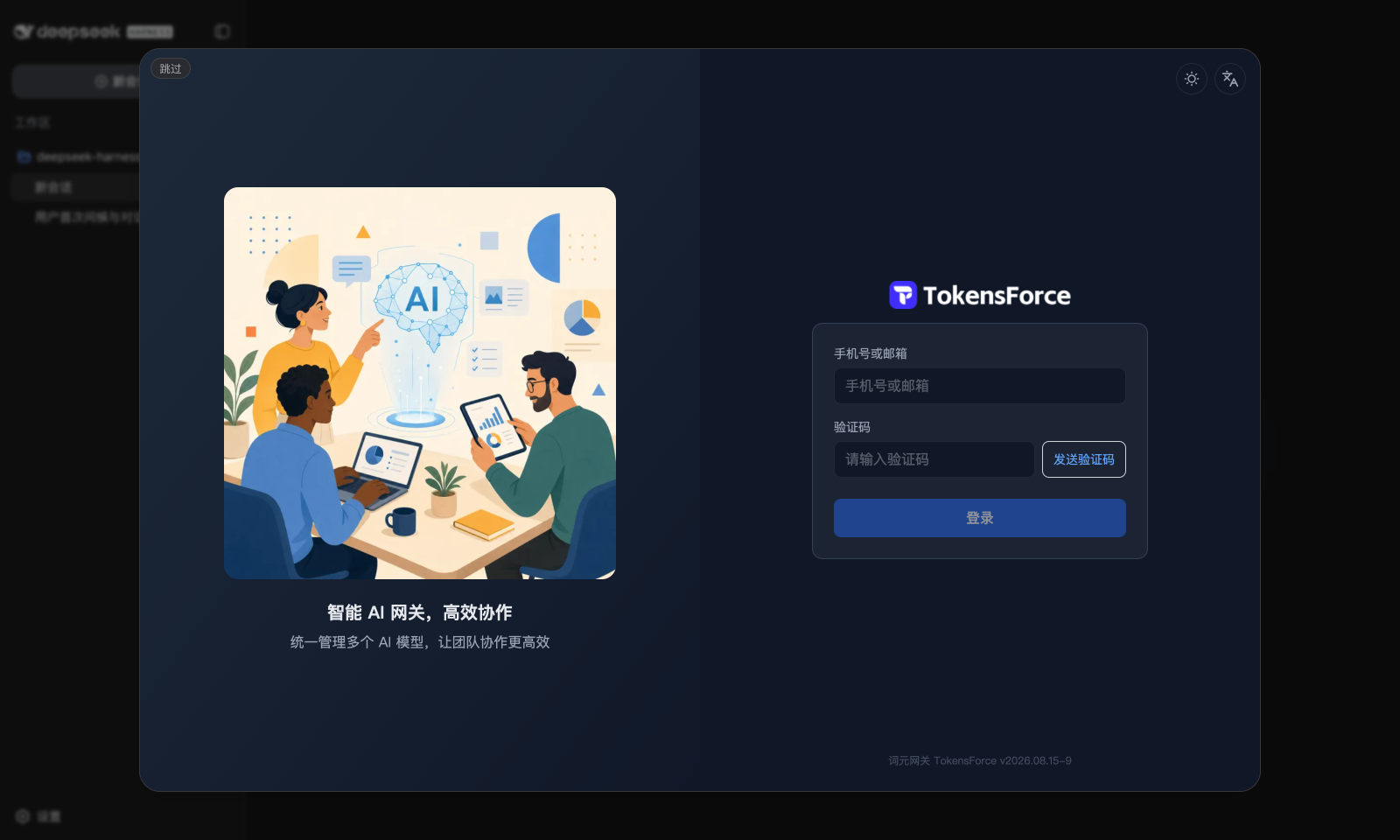
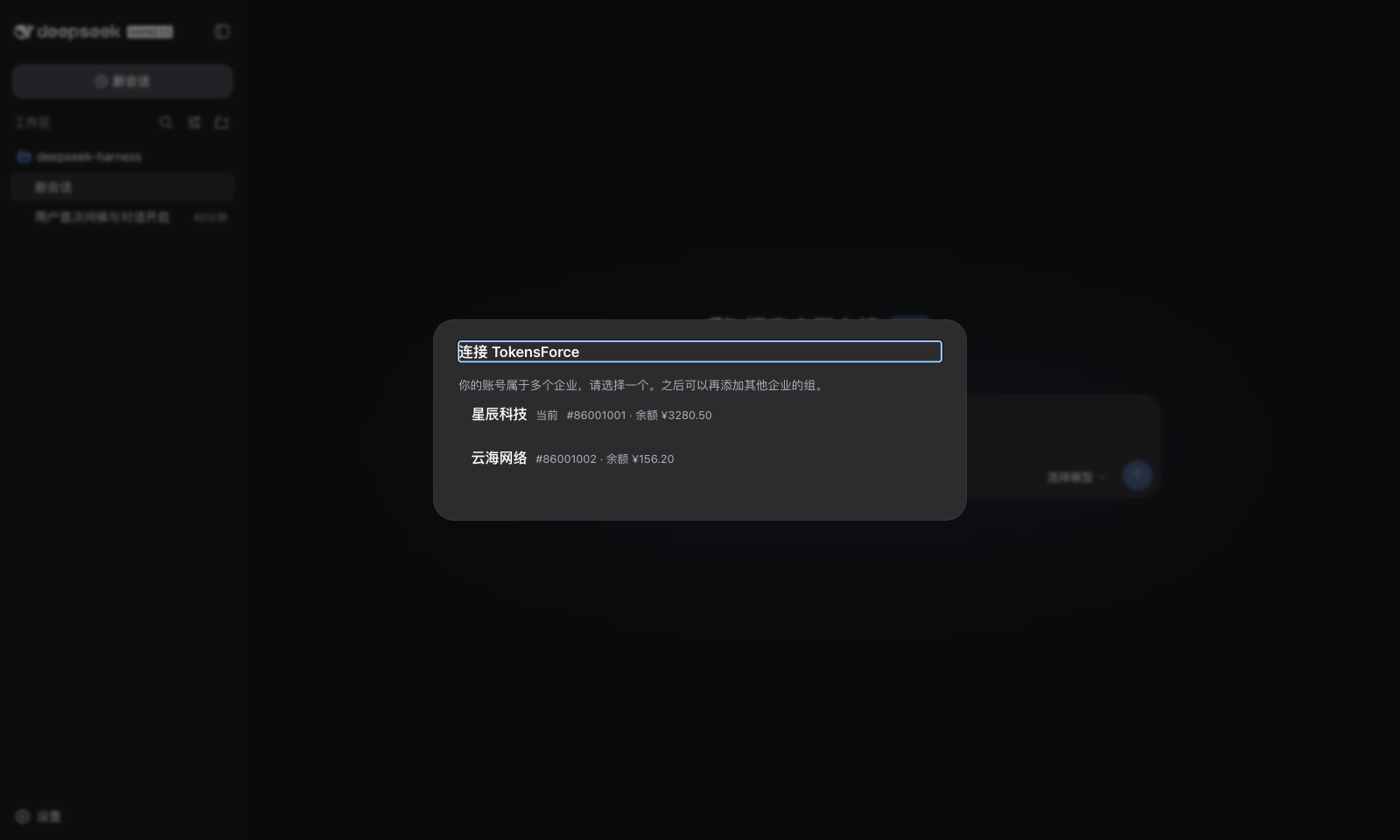
选企业 / 选组:账号属于多个企业或企业下有多个组时让你选,只有一个则自动跳过;
完成:所选组的 API Key 与网关地址自动写入,选个模型就能开始对话。
每个组在「设置 → 模型」里是一行独立的提供方,可编辑、删除、发现模型。
每个模型写入显式 1M 上下文(压缩时机、设置页容量显示都以此为准,不会显示成
dsh 的 256K 占位默认);网关若披露了某个模型的真实上下文,则按披露值精确到该模型。
之后再添加其他组:打开设置,点右上角的「连接 TokensForce」按钮。
登录态保留 7 天,期间添加新组不用重新登录。
用量仪表盘:会话视图里多一个「TokensForce」标签(与「对话」「轨迹」并列),
点开就是 tokensforce 控制台仪表盘(用量、费用、排行),与网页版一致;
未登录或登录过期时,该标签内直接显示登录窗口,登录后自动进入仪表盘。
常见问题
装上后官方 DeepSeek 提供方去哪了?
本插件会禁用 llm-deepseek 的首跑引导,避免开屏出现两处要 Key 的提示;
模型引擎仍走 dsh 自带的 OpenAI 兼容通道。卸载插件即恢复原状。
我们公司自己部署了 tokensforce,能用吗?
能。安装后把 node_modules/dsh-tokensforce/lib/client.js 里的SITE_ORIGIN 改成你的站点地址并重启 dsh;站点侧需放行登录页嵌入
(nginx 对 /login 不发 X-Frame-Options 等,可参考 tokensforce 的实现)。
更正式的做法是 fork 本仓库,改 src/client/logic.ts 中的常量后自行构建。
密钥存在哪?
组密钥经 dsh 自带的凭据机制存在你本机(~/.dsh/.credentials.yaml),
浏览器只保留登录态(JWT,7 天有效)。模型请求由 dsh 宿主进程直连网关,
不经过浏览器。
反馈
- 使用问题:Issues
- 维护与二次开发:见 CONTRIBUTING.md
License
Install
Install the catalog once, then DeepSeek Harness can find and install any plugin from this site automatically:
dsh plugin add dshbase-catalogThen say "install dsh-tokensforce for me" — your agent finds it in the directory and installs it. Docs: dshbase-catalog · verified packs.
This plugin is GitHub source (not published to npm) — install it straight from the repo:
Web profile:
dsh plugin --profile web add github:spirits001/dsh-tokensforceHeadless (CLI) profile:
dsh plugin --profile headless add github:spirits001/dsh-tokensforceTest report
Verified: L1 install + L2 load + L3 runtime from GitHub source on dsh 0.1.0-rc.6.
Share this badge
Drop this badge into your README — it links back here and updates automatically when our test status changes:

[](https://dshbase.com/plugins/dsh-tokensforce/)<a href="https://dshbase.com/plugins/dsh-tokensforce/"><img src="https://dshbase.com/badges/dsh-tokensforce.svg" alt="dshbase install-tested"></a>