
Plugin directory / Terminal / dsh-tui
dsh-tui
Verified · install-tested on dsh tomowang
What it does
An open-source terminal front door for DeepSeek Harness (dsh).
Works — verified, early-stage project
An open-source terminal front door for DeepSeek Harness (dsh). It installs cleanly and boots without issues in our testing. It's early-stage but functional.
“Verified” means our automated CI actually ran dsh plugin add in a clean profile and it booted — nothing more. Feature descriptions and version compatibility are the author’s claims. This is not a security audit and not an endorsement of third-party code.
README
dsh-tui


An open-source terminal front door for DeepSeek Harness (dsh).
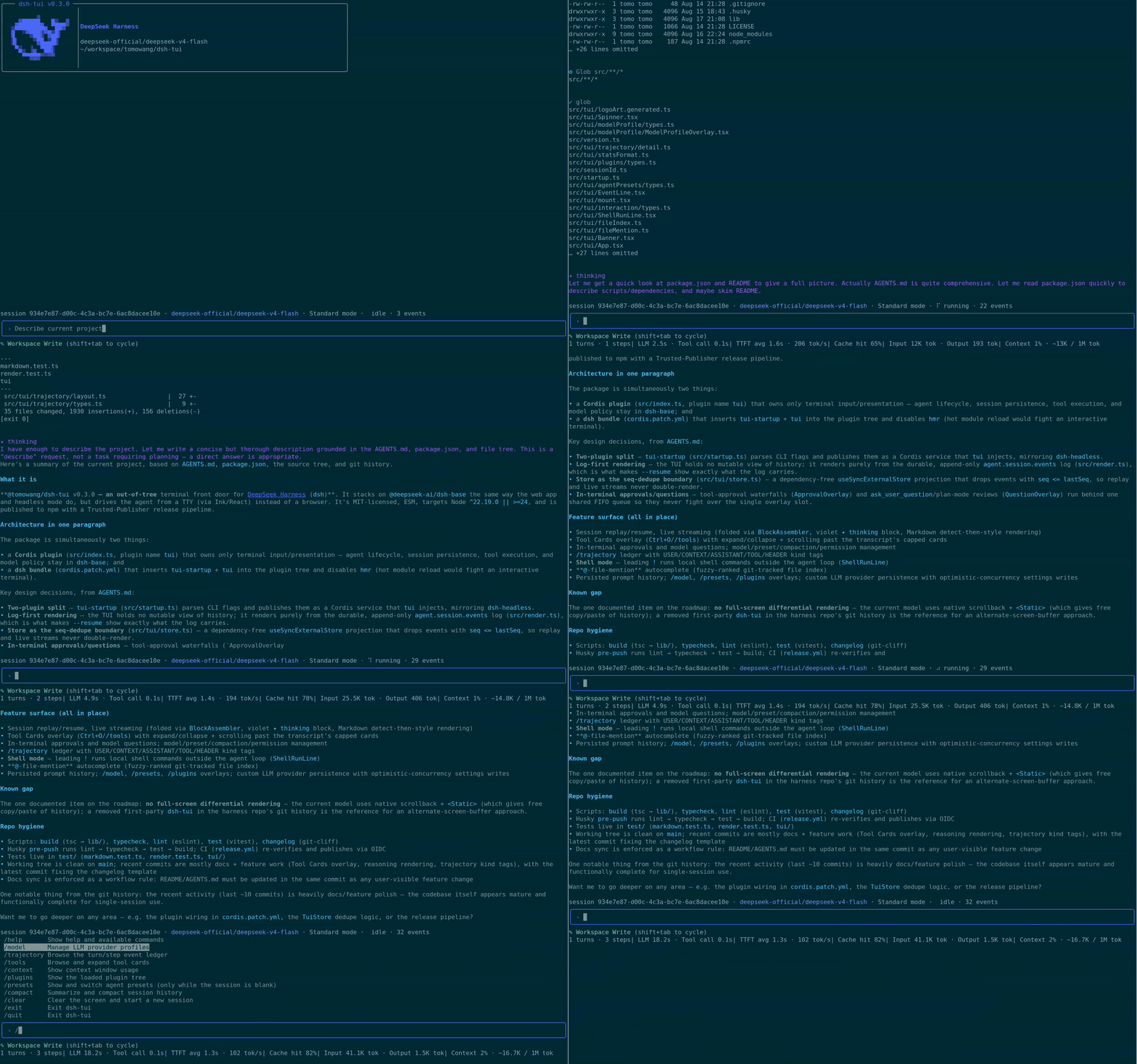
@tomowang/dsh-tui is an out-of-tree mode bundle: it stacks on @deepseek-ai/dsh-base exactly like the shipped dsh-web-app and dsh-headless bundles do, but drives the agent from your terminal instead of a browser. The package is both a Cordis plugin (terminal input and presentation) and a dsh bundle (dsh.bundle.patch in package.json points at cordis.patch.yml); everything else — model adapters, tools, session persistence, sandbox and approval policy — stays in dsh-base and remains patchable underneath.
How it works
- The TUI renders only from the durable session log: it replays
agent.session.snapshotEvents()on startup and followssession/eventlive, so--resumeshows the exact history the log carries — the harness's "model-visible ⟺ logged" invariant does the heavy lifting. - The interface runs full-screen in the terminal's alternate screen buffer, with an application-owned transcript viewport (scroll with the mouse wheel/trackpad,
PageUp/PageDown) that auto-follows new output until you scroll up. - Line input maps to the agent inbox:
agent.followup()while idle,agent.steer()while a turn is running,Ctrl+Ccancels the running turn. tui-startupparses this app's flags (everything after the launcher's own) throughdsh-cmdlineand publishes them as an ordinary Cordis service; the runner row reads them via the bundle patch, mirroringdsh-headless.- Both stdin and stdout must be real TTYs; the plugin fails loud instead of degrading, so pipes keep using
dsh --profile headless.
Features
- Status bar — session id, active LLM provider/model, current agent preset, live run state with spinner, queued-message count, and logged event count.
- Stats line — turn/step counts, LLM/tool wall time, TTFT and decode tok/s, cache-hit %, billed tokens, and a compact context-usage summary; sections hide themselves until there's data.
/modelprovider management — switch the active model by picking from a provider's catalog, and add, edit, or delete custom LLM providers (route, base URL, API key, model discovery) without leaving the terminal.- Agent presets — start a fresh session on a given preset with
--agent-preset, or browse and switch presets from/presets(fixed once the session's first turn has run). - Session inspectors —
/trajectoryfor a turn/step event ledger with a detail view and filtering,/contextfor a context-window usage breakdown,/pluginsfor the loaded Cordis plugin tree and fiber state. - Collapsed tool calls with a live spinner — a running tool call shows as a single spinner line in the prompt area; once its result lands, it settles into one collapsed
✓/✖transcript line rather than an inline multi-line card. - Tool Cards overlay —
/toolsorCtrl+Oopens a scrollable browser over the session's tool calls/results, each shown expanded to its full presentation by default (Enter/Spacecollapses a card back to its title). - Reasoning display — a model's reasoning/thinking content never floods the screen: an animated
✦ thinkingline stands in for it while still streaming, and it collapses to a one-line✦ think · …summary ahead of the visible answer once settled in the transcript; the full text is always available via/trajectory. - Markdown rendering — assistant text with an unambiguous Markdown signal (fenced code, headers, lists, blockquotes, rules, tables, links, bold/strikethrough, inline code) is styled for the terminal; plain prose passes through untouched.
- Permission preset cycling —
Shift+Tabcyclesread-only/workspace-write/danger-full-access/custom, shown live in the prompt area. - In-terminal approvals and questions — a tool call parked on an
askpermission decision is answered right in the terminal (allow once / reject), andask_user_question/plan-mode's plan review present as an option list with multi-select and free-text "Other…",escto skip. A desktop notification (OSC 9 — the same mechanism Claude Code's own CLI uses) fires once whenever such a wait starts, so terminals that support it (Ghostty, Kitty, iTerm2 with escape-sequence alerts enabled) can flag it while you're looking elsewhere; terminals without OSC 9 support just ignore it. - Plan mode —
/plan [message]enters plan mode (optionally steering a first message under it),/plan offleaves it; a model-proposed plan lands in the existing question flow as an Approve/Keep-planning review. - Goal mode —
/goal <objective>sets a long-running goal shown as a live dock strip (phase + objective, hiding on completion like the web portal);/goal clear|edit <objective>|pause|resumemanages it, and automatic continuation rounds keep running in this same session while the goal is active and armed. - Docked subagent switcher — whenever at least one subagent in the current batch is running, a solid/hollow-circle strip docks directly below the composer (Claude Code CLI-style):
←/→, while the prompt is empty, switch which transcript the main scroll region shows — main, or any subagent child, latest-spawned first — without hiding the composer or the strip itself, andEscreturns to main. A running child additionally carries a live spinner beside its circle, independent of which one is currently selected — solid/hollow marks navigation (what you're looking at), the spinner marks activity (what's still working), so the two never get confused with each other. With more than 4 children, a dim‹N/N›count marks whatever the visible window doesn't fit, sliding to keep whichever one is open inside it as you cycle. The strip is a live indicator of the current batch of active work, not a permanent log — it disappears once everything settles and nothing is being viewed. - Manual compaction —
/compactsummarizes and compacts session history on demand. - Session rename —
/rename <title>sets an explicit title; bare/renamegenerates one from the conversation so far via one on-demand model call, as a kebab-case slug (Claude Code CLI's own convention, e.g.fix-auth-bug) rather than the harness's own natural-language default. The accepted title also shows right-aligned in the prompt box's own top border, alongside the terminal window/tab title. - Session resume —
/resume <sessionId>switches to a persisted session in a fresh screen (falling back to a brand-new session with a notice on an unknown id); bare/resumeopens a picker of this working directory's past sessions instead — newest first, each with its folded title where one landed. - Persisted prompt history — submitted lines are saved across processes and
/clear(in$DSH_HOME/dsh-tui/history.jsonl,~/.dsh/…by default), recalled with↑/↓. - Readline-style input — word/line motion, kill/yank-style deletes, multi-line drafts, and shell-like double-press
Ctrl+C/Ctrl+Dto exit. - Shell mode — a leading
!on an empty prompt (Claude Code's convention) switches Enter to run the line as a local shell command instead of sending it to the agent; the prompt border turns yellow for the duration, and output streams into the transcript without touching the session log. @-file-mention autocomplete — typing@opens a fuzzy-filtered dropdown of repo files (git ls-files, or a bounded walk outside a git repo);Tab/Enterinserts the picked path at the cursor.- Update hint — a best-effort startup check against the npm registry shows a persistent dock line with the upgrade command once a newer
@tomowang/dsh-tuiis published; any network failure or timeout is silent. - Terminal window/tab title — once the session gets a title (a short first-message summary, when the profile composes
dsh-session-title), the terminal's title bar shows<session title> — dsh-tui; it staysdsh-tuibefore that or without the service mounted. - Full-screen scrollable transcript — the interface owns the terminal's alternate screen buffer rather than growing native scrollback, with mouse wheel/trackpad and
PageUp/PageDownscrolling and an auto-follow-the-bottom transcript; the last screenful is flattened back into your terminal's normal scrollback on exit./trajectoryremains the tool for browsing further back than the viewport shows. - Every overlay degrades to a plain notice instead of failing the whole TUI when its backing service isn't mounted in a given profile.
Install
Requires Node ^22.19 || >=24 and a DEEPSEEK_API_KEY.
# 1. Install the dsh launcher
npm install -g @deepseek-ai/dsh

# 2. Create the profile and install this bundle into it
#    (dsh reconciles the profile manifest's "dsh.profile.bundles" list
#    automatically, appending any installed dependency that declares
#    dsh.bundle.patch — no manual package.json edit needed)
dsh plugin --profile tui add @tomowang/dsh-tui

# 3. Run
dsh --profile tui
dsh --profile tui --resume <sessionId>           # reopen a persisted session
dsh --profile tui --resume                       # pick a past session from a list, newest first
dsh --profile tui --agent-preset <presetId>      # start a fresh session on a given preset
dsh --profile tui --dump-config                  # inspect the composed plugin tree
Any row --dump-config prints — the model adapter, tool set, sandbox policy, this TUI's own config — can be overridden from the profile's cordis.patch.yml without touching this package. --agent-preset is a dsh-launcher flag (parsed by tui-startup, not --dump-config above) that only applies to a fresh session; it's ignored together with --resume, and is a no-op with a startup notice on profiles that don't mount dsh-agent-preset-registry. The bundle ships the same four presets as the Web portal (Standard, PTC, Minimal, Creator), vendored under presets/. --resume with no id opens the same session picker as bare /resume below.
Terminal commands
| Input | Effect |
|---|---|
| any text | follow-up while idle, steering while a turn runs |
/help |
show available commands and keyboard shortcuts |
/model |
manage LLM provider profiles: pick the active model from a provider's catalog (s opens the picker; ↑/↓ select, Enter activates, Esc backs out), add/edit/delete a custom provider |
/presets |
view and switch agent presets (fixed once the session's first turn has run) |
/trajectory |
browse the turn/step event ledger with a detail inspector and filter |
/tools |
browse and expand tool cards past their collapsed transcript line |
/context |
show context-window usage as a bar-chart breakdown |
/plugins |
show the loaded Cordis plugin tree and fiber state |
/plan [message] |
enter plan mode, optionally steering message as the first step under it |
/plan off |
leave plan mode |
/goal [objective] |
set a long-running goal (or, with no argument, show the current goal) |
/goal clear / /goal edit <objective> / /goal pause / /goal resume |
clear, reword, pause, or resume the current goal |
/compact |
summarize and compact session history |
/rename [title] |
set an explicit session title; with no argument, generates one from the conversation so far |
/resume [sessionId] |
switch to a persisted session by id; with no argument, opens a picker of this directory's past sessions |
/clear |
flush the current session and start a new one |
/exit, /quit |
cancel, wait for idle, flush the session, exit |
Keyboard shortcuts
| Key | Effect |
|---|---|
mouse wheel/trackpad, PageUp/PageDown |
scroll the transcript; auto-follows new output again once you're back at the bottom |
Ctrl+C |
cancel a running turn; on an idle empty line, press twice within 2s to exit |
Ctrl+D |
forward-delete; on an idle empty line, press twice within 2s to exit |
Shift+Tab |
cycle the permission preset (read-only / workspace-write / danger-full-access / custom) |
Ctrl+O |
open the Tool Cards overlay; ↑/↓ select a card, Enter/Space expand or collapse, PgUp/PgDn/Home/End scroll an expanded card, Esc/q/Ctrl+O close |
! (on an empty prompt) |
enter shell mode: Enter runs the line as a local shell command; Esc/backspace-on-empty exits back to normal mode |
@ |
open the file-mention dropdown; ↑/↓ to move, Tab/Enter to insert the path, Esc to dismiss |
←/→ (empty prompt) |
with the docked subagent switcher showing, move to the previous/next session (main, then each subagent child) |
Esc (viewing a subagent, empty prompt) |
return to the main transcript |
/resume (bare) |
open the session picker; ↑/↓ select, Enter resumes the selected session, Esc/q closes without resuming |
Tab |
in /command mode, autocomplete the highlighted command |
↑ / ↓, Ctrl+P / Ctrl+N |
recall prompt history, or move within a multi-line draft |
Shift+Enter, Alt+Enter, trailing \ + Enter |
insert a newline instead of submitting |
Home/Ctrl+A, End/Ctrl+E, Ctrl+B/Ctrl+F/arrows |
readline-style character and line motion |
Alt+Left/Alt+Right, Ctrl+Left/Ctrl+Right |
move by word |
Ctrl+K/Ctrl+U, Ctrl+W/Alt+Backspace, Alt+D |
kill to line end/start, kill word back/forward |
Develop
pnpm install
pnpm run build        # tsc → lib/
pnpm run typecheck
pnpm run lint
pnpm run test
To try a local checkout inside a profile, point the profile's dependency at this directory (dsh plugin --profile tui add /path/to/dsh-tui) and rebuild before each run — profiles load the built lib/ under plain Node.
Releasing
CHANGELOG.md and GitHub Release notes are generated from Conventional Commits via git-cliff. To cut a release: bump version in package.json, run pnpm run changelog, commit as chore(release): vX.Y.Z, then git tag vX.Y.Z && git push && git push --tags. The tag push triggers CI to build, create the GitHub Release, and publish to npm. See AGENTS.md for the full flow.
License
Install
Install the catalog once, then DeepSeek Harness can find and install any plugin from this site automatically:
dsh plugin add dshbase-catalogThen say "install dsh-tui for me" — your agent finds it in the directory and installs it. Docs: dshbase-catalog · verified packs.
This plugin is GitHub source (not published to npm) — install it straight from the repo:
Web profile:
dsh plugin --profile web add github:tomowang/dsh-tuiHeadless (CLI) profile:
dsh plugin --profile headless add github:tomowang/dsh-tuiTest report
Verified: L1 install + L2 load + L3 runtime from GitHub source on dsh 0.1.0-rc.6.
When to use it
Change how dsh looks or how you interact with it — a theme, a skin, or a new panel that reshapes the workspace.
Who it's for
Users who spend hours in the web UI and want it to look and feel the way they work.
For developers — extending it
Skins, panels, and theme tokens are the extension points — author a new skin, add a panel, or sync tokens with an upstream palette.
Share this badge
Drop this badge into your README — it links back here and updates automatically when our test status changes:

[](https://dshbase.com/plugins/dsh-tui-3/)<a href="https://dshbase.com/plugins/dsh-tui-3/"><img src="https://dshbase.com/badges/dsh-tui-3.svg" alt="dshbase install-tested"></a>