
Plugin directory / Developer / dsh-ui-appearance
dsh-ui-appearance
Verified · install-tested on dsh TQSY114514
What it does
Appearance customization plugin for DeepSeek Harness: theme color palette, background image, opacity/blur, glass effect
Works — verified, early-stage project
Appearance customization plugin for DeepSeek Harness: theme color palette, background image, opacity/blur, glass effect It installs cleanly and boots without issues in our testing. It's early-stage but functional.
“Verified” means our automated CI actually ran dsh plugin add in a clean profile and it booted — nothing more. Feature descriptions and version compatibility are the author’s claims. This is not a security audit and not an endorsement of third-party code.
README
dsh-ui-appearance
English · 中文
DeepSeek Harness 生态中首个支持多维度 UI 参数深度自定义的外观插件 —— 不局限于固定预设,支持面板/输入框/代码块透明度微调、毛玻璃强度、壁纸/视频背景及色板智能衍生;WebUI 与 DSH Desktop 均可使用。



零核心代码改动:完全通过官方插件机制(
ctx.theme.overrideTokens()主题扩展点与settings.general.item插槽)实现;卸载后界面完整恢复默认。
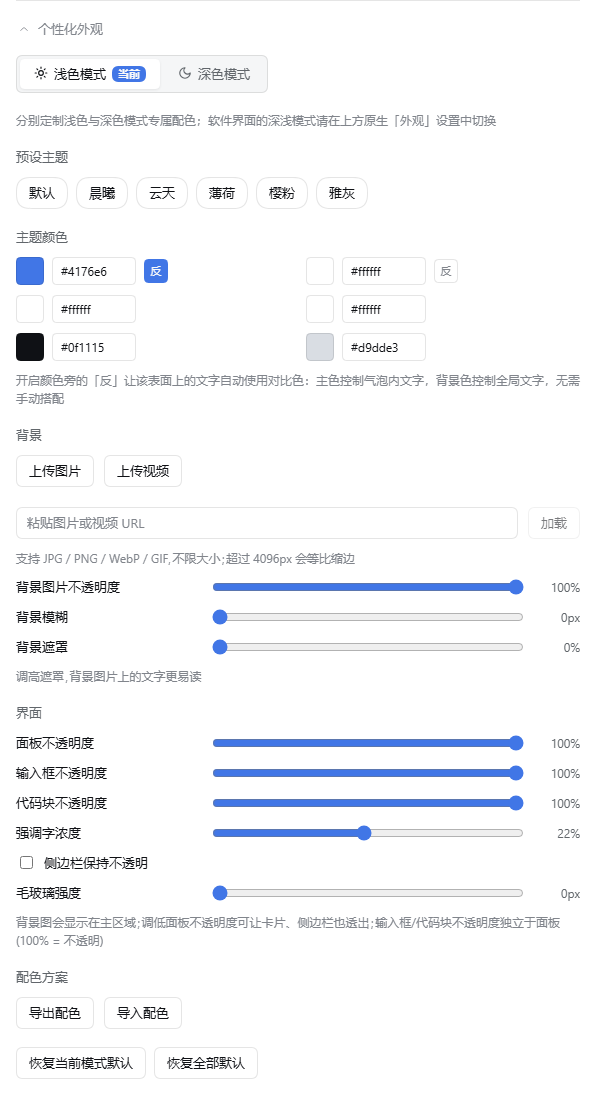
界面
| 设置面板 | 壁纸 + 毛玻璃效果 |
|---|---|
 |
 |
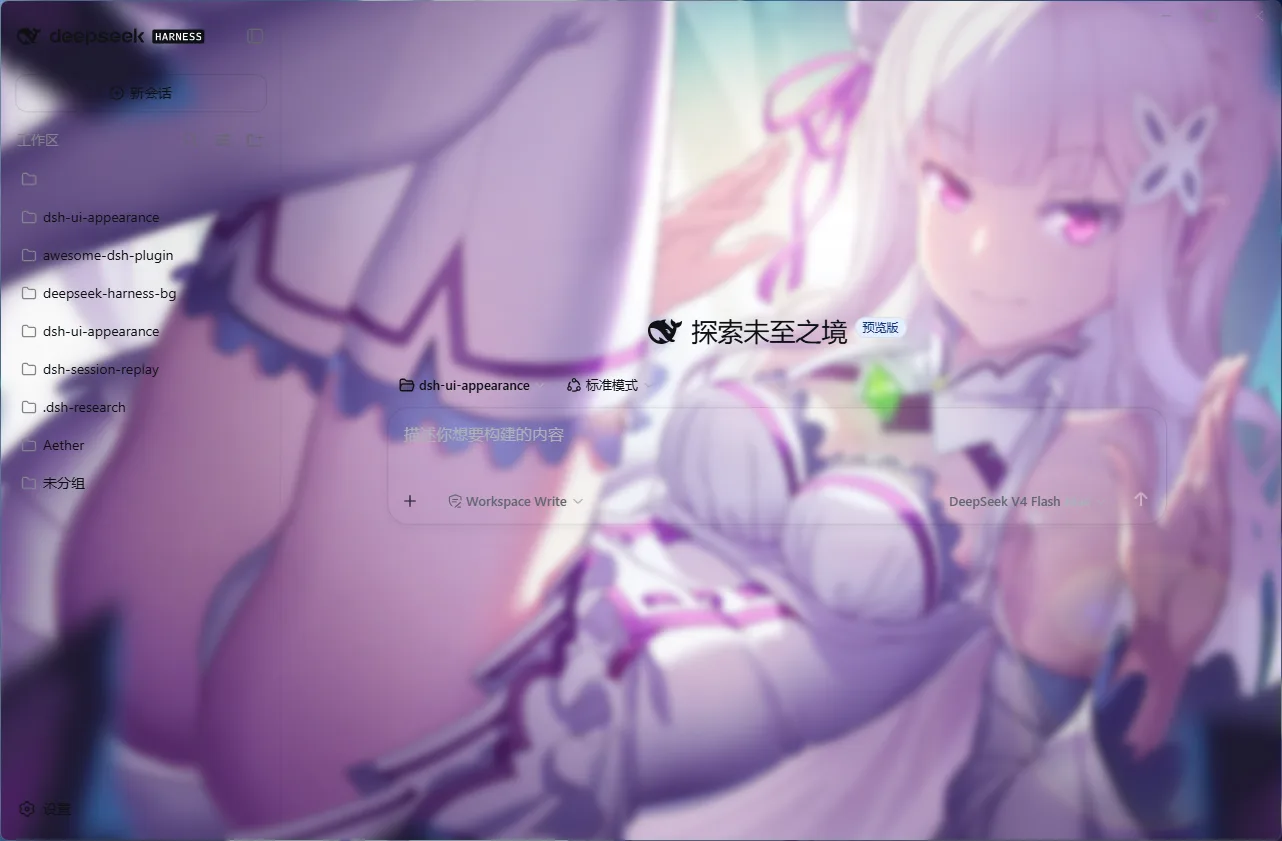
在 DSH Desktop(桌面客户端)中同样开箱即用,以下为实拍:
| 高级模式(桌面原生布局与材质) | 兼容模式(上游默认 Web client) |
|---|---|
 |
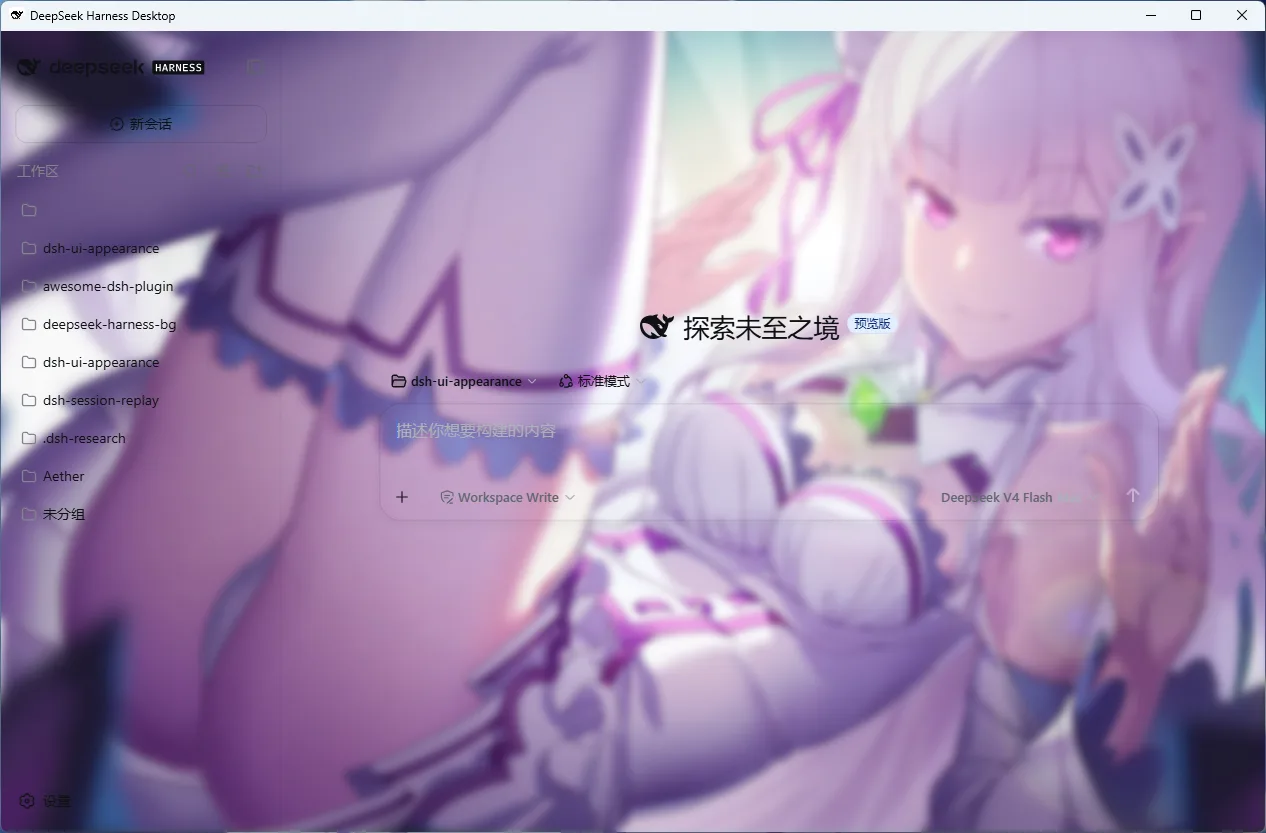 |
效果图中的壁纸素材 © MadYY(原图),仅作演示;用户上传自己的图片即可。

功能
主题颜色 —— 6 个颜色角色:主色、背景色、面板色、输入框色、文字色、边框色。每个角色都支持取色器与 HEX 输入;文字选区与键盘焦点环自动跟随主色;消息气泡跟随主色(半透明时保留主色相);左上角 logo 字标("harness"字样)也跟随主色。
壁纸背景 —— 点击上传或拖拽图片(JPG / PNG / WebP / GIF),或粘贴图片/视频 URL 一键加载(按扩展名自动分流,支持 CORS 友好的图床/视频直链),原画质存入 IndexedDB 作为全界面壁纸(超过 4096px 等比缩边,不降画质);上传时自动采样亮度(深色壁纸协调抬亮表面)并自动提取主色作为强调色(壁纸与界面色调自动和谐)。也支持视频背景(MP4 / WebM,静音循环,与图片互斥);图片与视频都存 IndexedDB,不占用 localStorage 配额。
毛玻璃与半透明 —— 面板不透明度与毛玻璃强度两个滑块,让侧边栏、设置面板、聊天区、任务面板、卡片、按钮一同融进壁纸,而非突兀的实心色块;侧边栏可单独保持不透明。输入框与代码块可独立调节不透明度(100% 时跟随面板不透明度)。路径/文件名等强调字(pnpm-lock.yaml、lib/)的背景会保留主色的低透明度色相——强调靠色相而非实心,同时可用「强调字浓度」滑块独立调节深浅(0% 即完全透明)。
背景氛围 —— 背景不透明度、背景模糊、背景遮罩三个独立滑块:不透明度控制壁纸的浓淡,模糊让壁纸退到远处,遮罩在壁纸上叠加随深浅色模式自动配色的纱帘,保证图片上的文字易读。
预设起步 —— 默认 / 午夜 / 海洋 / 森林 / 玫瑰 / 单色六套预设,一键应用后仍可自由微调,不被预设锁死。
配色分享 —— 一键导出配色 JSON(复制到剪贴板),粘贴导入即应用;与朋友交换配色方案只需一段文本。
所有修改实时生效,无需刷新,无需保存。
安装
方式一:npm 一行命令(推荐)
dsh plugin --profile <name> add dsh-ui-appearance
方式二:一键脚本(Windows,无需 npm 账号与 git)
powershell -ExecutionPolicy Bypass -Command "Invoke-WebRequest 'https://raw.githubusercontent.com/TQSY114514/dsh-ui-appearance/main/install.ps1' -OutFile install.ps1; .\install.ps1"
脚本直接从 npm registry 拉取已构建的发布包(lib/ 预构建产物随包分发),链接进 profile 自己的 node_modules 并在该 profile 的 package.json 中注册(dependencies 条目 + dsh.profile.bundles,与 dsh plugin add 的产物一致)——幂等,可重复执行。可选参数:
.\install.ps1 -Version '0.1.7'      # 固定版本(默认装最新发布版)
.\install.ps1 -DshHome 'D:\.dsh'    # 自定义 DSH 主目录(默认 %DSH_HOME% 或 %USERPROFILE%\.dsh)
.\install.ps1 -ProfileName 'web'    # 目标 profile(默认 web;profile 需已初始化)
方式三:源码安装(已验证端到端)
git clone https://github.com/TQSY114514/dsh-ui-appearance.git
dsh plugin --profile <name> add file:<克隆到的本地路径>
卸载:dsh plugin --profile <name> remove dsh-ui-appearance(脚本安装则删除 profile node_modules 下的 junction 与 package.json 中对应的 dependencies/bundles 条目)。
更新:新版本发布后,重新执行 add 命令或安装脚本即可升级到最新版。
DSH Desktop 用户:Desktop 的 profile 与 Web 版相互独立——三种方式都可用,但要把插件装进 Desktop 实际激活的 profile(默认名为
desktop;Desktop 内置终端里直接跑dsh plugin即可,默认作用于当前激活的 profile)。
安装流程已验证端到端:npm registry 与
file:源码直装两种方式均实测可用(host 半部零@deepseek-ai运行时依赖,浏览器与 Host 均能正确加载)。克隆后pnpm install会自动构建;修改代码后重新执行pnpm install && pnpm prepare并重启 dsh web。
版本演进见 CHANGELOG.md。
使用
- 打开 WebUI,进入侧栏「设置」→「通用」
- 在「外观」行下方找到「个性化外观」,点击展开
- 点预设快速换肤 → 用取色器或 HEX 微调 6 个颜色角色 → 上传或拖入壁纸/视频 → 拖动氛围与界面滑块
- 完成。所有调整实时生效,无需刷新、无需保存
设置面板内容一览:
| 区块 | 控件 |
|---|---|
| 预设主题 | 默认 / 午夜 / 海洋 / 森林 / 玫瑰 / 单色,一键应用后可继续微调 |
| 主题颜色 | 6 个角色 × (取色器 + HEX 输入):主色、背景色、面板色、输入框色、文字色、边框色 |
| 背景 | 图片上传/更换/删除、视频上传/删除、URL 加载(图片/视频)、背景不透明度、背景模糊、背景遮罩 |
| 界面 | 面板不透明度、输入框不透明度、代码块不透明度、强调字浓度、侧边栏保持不透明、毛玻璃强度 |
| 配色方案 | 导出配色、导入配色(JSON 文本) |
持久化与恢复
- 设置保存在浏览器 localStorage(键
dsh-ui-appearance.settings),刷新与重启后保留,多标签页自动同步 - 从 profile 移除插件后界面恢复默认:卸载时自动回收所有覆写 token、样式表与背景图层
- 注意:设置跟随浏览器,换浏览器或清除站点数据会丢失;壁纸原图存 IndexedDB(localStorage 只存记录键),不受 localStorage 配额约束,并已向浏览器申请持久化存储降低被清理概率
工作原理
| 能力 | 机制 |
|---|---|
| 颜色 | ctx.theme.overrideTokens() 覆写 --dsw-alias-* 语义 token,浅/深模式切换自动重套,派生色按模式推导 |
| 背景图层 | 自有的固定定位图层,位于页面背景之上、内容之下,由 CSS 变量驱动 |
| 毛玻璃 | 背景图层整体模糊(filter: blur,背景模糊 + 毛玻璃两滑块之和),不动 #root,不产生 backdrop-filter 的包含块副作用 |
| 半透明 | 表面 token 按模式烘焙为 rgba()(角色色 → 深色翻转色 → 默认面色表),不依赖 color-mix,全浏览器可用;覆盖面含设置面板(bg-layer-2)、对话区任务面板/排队坞/目标栏(specific-tip)、行内代码与代码块(markdown-*)、命令/加号按钮及其 hover(selector / interactive-bg-hover-solid)、主操作按钮的 hover(button-info-hover / button-primary-hover 跟随输入框不透明度,悬浮不再跳回实心) |
| 强调与半透明 | 主操作按钮与强调字(markdown-inline-code)半透明化但保留品牌色相:按钮用主色 α=输入框不透明度(hover 同步),强调字用主色低透明度(0~45%,默认 22%,与 harness 原生引用 chip 一致)——强调靠色相而非实心色块 |
| 气泡角色 | 气泡设置已移除:harness 将唯一的气泡背景渲染在用户消息上(AI 消息无气泡),气泡直接跟随主色(浓度 = 面板不透明度);主色未设置时保持默认浅蓝白 |
| 持久化 | 浏览器 localStorage(harness 的 settings 网关仅对产品命名空间开放浏览器写入),加载时按 schema 校验钳制 |
兼容性与限制
- 支持 DSH Desktop:高级模式(桌面原生布局)与兼容模式(上游默认 Web client)下均可正常使用(截图见上方「界面」一节);Desktop 的 profile 与 Web 版独立,插件需安装到 Desktop 激活的 profile 中(见「安装」)
- 半透明直接烘焙为
rgba(),滑块全程平滑;毛玻璃与背景模糊合并为背景图层的一次模糊(两滑块之和),不依赖backdrop-filter,开启时不会改变页面内固定定位元素的包含块,低端设备可把模糊调回 0 - 深色壁纸或深色背景色自动触发表面家族协调翻转;显式设置的文字色仍然优先
- 每个颜色角色单值双模式共用,派生色按当前模式自动推导
- 图片不压缩、不限大小(200MB 防呆上限):原图直接存 IndexedDB,超过 4096px 等比缩边(重编码为 WebP,保 GIF 动画——未超限的 GIF 原样存储);旧版的 data URL 壁纸在升级后自动迁移进 IndexedDB;持久化数据加载时会按 schema 校验与钳制,手改坏 localStorage 也不会产生无效样式
- 视频背景上限 200MB;建议使用 H.264(MP4)或 VP8/VP9(WebM)编码;不支持的编码(如 HEVC)会自动降级回壁纸;更换视频会同步清理 IndexedDB 中的旧记录
- 代码的语法高亮文字色(shiki
--shiki-token-*)是独立的语法语言配色,不随主色变化(与 IDE 惯例一致);主色为白色时强调字背景为白色半透明,在浅色表面上视觉上接近不可见,属正常物理结果 - 气泡跟随主色,没有独立的气泡颜色设置:harness 把唯一的气泡背景渲染在用户消息上,AI 消息没有气泡(渲染事实,插件无法细分);主色未设置时气泡保持默认浅蓝白
常见问题
- Q: 安装或更新后在 DSH 设置中没有看到「个性化外观」入口?
- 检查 Profile:确认插件装入了当前运行的 profile(DSH Desktop 默认 profile 为
desktop,Web 版通常为web;可运行dsh plugin list检查)。 - 编译与重启:若克隆源码直装,请确保先执行了
pnpm prepare生成lib/产物,并重启 DSH 服务(如dsh web)。 - 强制刷新:按
Ctrl + F5(Mac 为Cmd + Shift + R)强制刷新浏览器,清除旧前端 bundle 缓存。
- 检查 Profile:确认插件装入了当前运行的 profile(DSH Desktop 默认 profile 为
- Q: 我的外观配置保存在哪里?如何备份与迁移?
- 设置保存在浏览器
localStorage(键dsh-ui-appearance.settings),壁纸与视频原画质存入IndexedDB,刷新与重启自动保留。 - 备份迁移:在设置面板底部的「配色方案」区块点击「导出配色」复制 JSON 文本;在其他浏览器/设备上粘贴后点击「导入」即可一键恢复。
- 设置保存在浏览器
- Q: 卸载插件后会残留样式或影响 DSH 界面吗?
- 完全不会。本插件严格基于官方
ctx.theme.overrideTokens()与设置插槽开发,零核心代码改动。执行dsh plugin remove dsh-ui-appearance卸载后会自动注销所有覆盖 token、样式表与背景图层,彻底恢复原生默认 UI。
- 完全不会。本插件严格基于官方
- Q: 与第三方插件(如侧边栏、弹窗等)共存是否会有冲突?
- 层级遮挡已修复:自 v0.1.5 起,壁纸图层已沉底至
z-index: -1,#root不创建额外层叠上下文(Stacking Context),第三方顶层浮层(如dsh-better-sidebar等)与设置弹窗层级互不干扰(#10)。 - 样式覆盖排查:若共存的其他插件使用了强行覆盖全局样式的规则,可能产生视觉竞争;排查时可先单独禁用其他 UI 类插件定位。
- 层级遮挡已修复:自 v0.1.5 起,壁纸图层已沉底至
- Q: 壁纸或视频背景无法显示 / 加载失败?
- 本地文件:图片原画质存入 IndexedDB(超过 4096px 自动等比缩边,限内 GIF 保留动画);视频上限 200MB(推荐 MP4 H.264 或 WebM VP8/VP9,不支持的编码会自动降级为壁纸)。
- 网络 URL:部分外链图床或视频站点开启了防盗链或缺少 CORS 跨域头,浏览器会阻止加载;建议下载后本地上传,或选用支持 CORS 的直链。
包结构
src/
├── index.ts                  # Host 半部(空 apply,零运行时依赖)
├── invariant.ts              # 运行时不变式伴生
├── appearance-settings.ts    # 设置类型与默认值
└── client/
    ├── index.ts              # apply():localStorage 持久化、插槽注册
    ├── applier.ts            # DOM 应用器(token 覆写、背景图层、毛玻璃)
    ├── tokens.ts             # 颜色角色 → token 映射、预设、半透明烘焙
    ├── color.ts / image.ts   # 色值工具 / 图片预处理(超 4096px 缩边,不降质)
    ├── blob-db.ts            # IndexedDB 底座(DB v2:图片+视频两 store)
    ├── image-store.ts        # IndexedDB 图片存储(键化引用)
    ├── video-store.ts        # IndexedDB 视频存储(200MB 上限)
    ├── color-scheme.ts       # 配色导出/导入(纯函数)
    ├── settings-store.ts     # 设置镜像 store
    ├── locales.ts            # 中英文案
    └── AppearanceCustomizerRow.tsx + .module.css   # 设置行 UI
tests/                        # 测试(`pnpm test` 独立运行,@deepseek-ai 运行时以 tests/stubs 桩替代)
types/client.d.ts             # 手写 client 半部类型声明
cordis.patch.yml              # bundle patch
tsdown.standalone.config.ts   # 自包含构建
vitest.config.ts              # 独立测试配置(alias 指向 tests/stubs)
lib/                          # 构建产物
@deepseek-ai/* 依赖全部为 optional peer,运行期由宿主提供;唯一运行时依赖是 clsx。120 个 vitest 测试全绿(独立仓库可独立运行),CI 构建与产物断言全绿。
License
MIT
Install
Install the catalog once, then DeepSeek Harness can find and install any plugin from this site automatically:
dsh plugin add dshbase-catalogThen say "install dsh-ui-appearance for me" — your agent finds it in the directory and installs it. Docs: dshbase-catalog · verified packs.
This plugin is GitHub source (not published to npm) — install it straight from the repo:
Web profile:
dsh plugin --profile web add github:TQSY114514/dsh-ui-appearanceHeadless (CLI) profile:
dsh plugin --profile headless add github:TQSY114514/dsh-ui-appearanceTest report
Verified: L1 install + L2 load + L3 runtime from GitHub source on dsh 0.1.0-rc.6.
When to use it
Extend the agent's coding surface — give it a new tool, workflow, or integration so it handles a dev task it couldn't before.
Who it's for
Developers who want dsh to behave like a teammate on real codebases — editing, running, and verifying changes rather than just answering.
For developers — extending it
The tool/command surface is the seam: expose more of the SDK, add smarter context wiring, or tighten the loop between code changes and verification.
Share this badge
Drop this badge into your README — it links back here and updates automatically when our test status changes:

[](https://dshbase.com/plugins/dsh-ui-appearance/)<a href="https://dshbase.com/plugins/dsh-ui-appearance/"><img src="https://dshbase.com/badges/dsh-ui-appearance.svg" alt="dshbase install-tested"></a>