
Plugin directory / Developer / dsh-web-remote
dsh-web-remote
Verified · install-tested on dsh godchen520
What it does
DSH mobile/external network remote access plugin: Cloudflare Quick Tunnel public tunnel + token auth + gzip compression + LAN HTTPS direct + mobile icon panel + QQ bot link retrieval
Works — verified, early-stage project
DSH mobile/external network remote access plugin: Cloudflare Quick Tunnel public tunnel + token auth + gzip compression + LAN HTTPS direct + mobile icon panel + QQ bot link retrieval It installs cleanly and boots without issues in our testing. It's early-stage but functional.
“Verified” means our automated CI actually ran dsh plugin add in a clean profile and it booted — nothing more. Feature descriptions and version compatibility are the author’s claims. This is not a security audit and not an endorsement of third-party code.
README
dsh-web-remote




中文 | English
手机 / 外网远程访问 DeepSeek Harness(DSH)的插件。随时随地通过微信或浏览器控制你的 DSH。
✨ 功能亮点
| 功能 | 说明 |
|---|---|
| 🌐 公网访问 | Cloudflare Quick Tunnel,无需公网 IP、无需注册,cloudflared 缺失时自动下载 |
| 📡 局域网直连 | HTTP + HTTPS 直连(HTTPS 自动生成自签名证书,零配置) |
| 🔒 安全认证 | 每次启动生成随机令牌;HttpOnly Cookie;局域网可免 token |
| ⚡ 性能加速 | 反向代理自动 gzip 压缩,大历史会话加载更快 |
| 📱 侧边栏图标 | 手机快捷按钮常驻左下角,刷新不消失 |
| 🔗 自定义公网链接 | 支持填写自定义公网 URL(如 ngrok),面板编辑/清除,重启后生效 |
| 🔌 自定义端口 | 局域网模式下可修改 HTTPS 端口号,带端口占用检测 |
| 🤖 微信机器人 | iLink 协议直连微信,支持 AI 对话、会话控制、模型切换 |
| 💬 飞书机器人 | WebSocket 长连接,支持命令控制、会话监听通知 |
| 👁️ 会话监听 | /监听 命令,Agent 思考完毕自动微信/飞书通知 |
⚡ 一句话安装
复制下面这句话给你的 DSH,它自己会装好一切:
请帮我安装 dsh-web-remote 远程访问插件(https://github.com/godchen520/dsh-web-remote),装完告诉我如何重启 DSH Web。
不想麻烦 Agent?命令行一条:
dsh plugin --profile web add github:godchen520/dsh-web-remote && dsh web
📸 截图
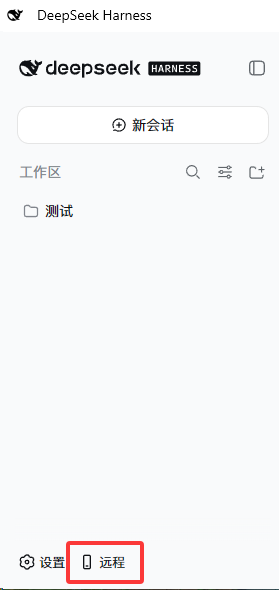
快捷按钮(页面左下角):
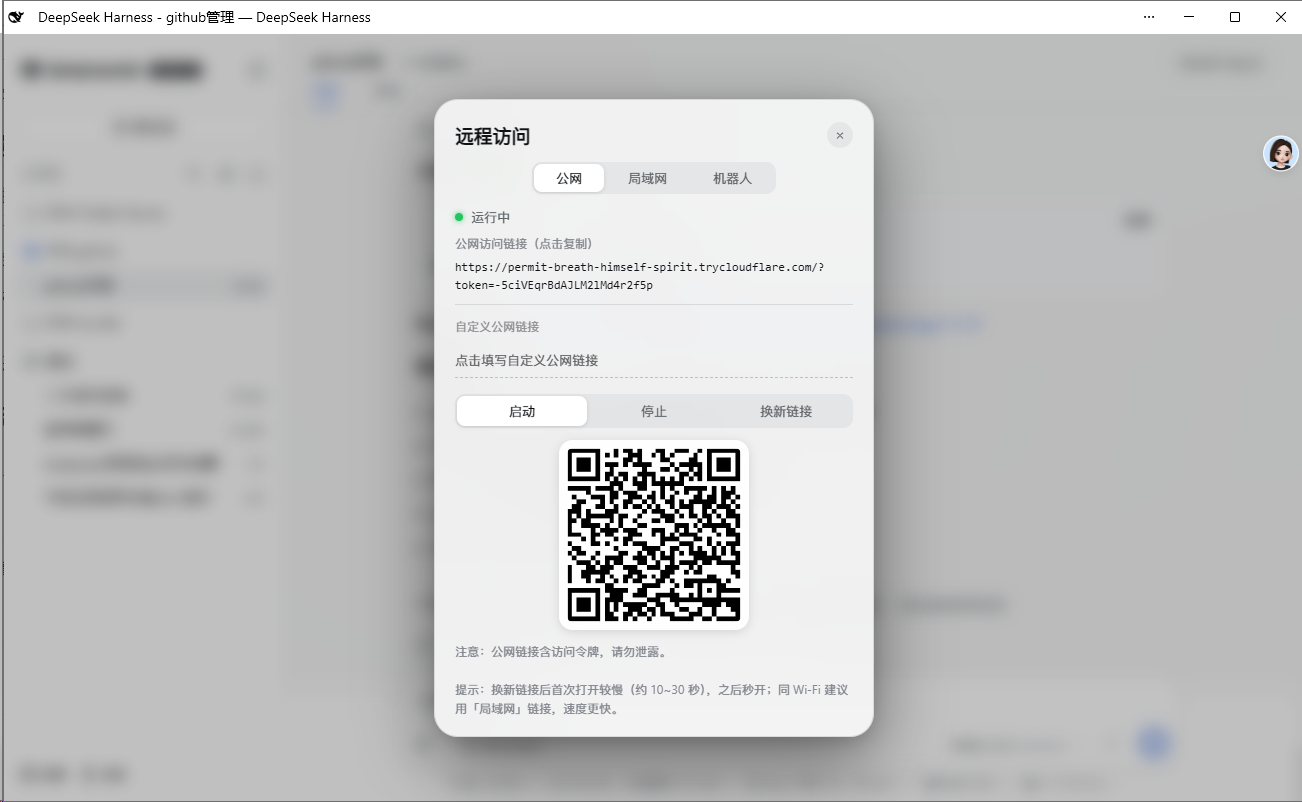
远程面板(公网 / 局域网切换、一键复制链接、二维码、启动 / 停止):
📋 安装方式
方式一:GitHub 直接安装(推荐)
cd $DSH_HOME/profiles/web
pnpm add github:godchen520/dsh-web-remote
在 package.json 的 dsh.profile.bundles 数组中添加 "dsh-web-remote",重启 DSH。
--config.minimumReleaseAge=0可绕过 pnpm 11 新包发布年龄校验(如需要)。
方式二:手动 patch
把本包放入 profile 的 node_modules,然后在 cordis.patch.yml 追加:
- insert:
    - id: web-remote
      name: 'dsh-web-remote'
bundle 方式需重启;cordis.patch.yml 方式会被 HMR 热加载。
⚙️ 配置
全部可选,不配置即开箱即用。在 cordis.patch.yml 里覆盖:
| 参数 | 默认值 | 说明 |
|---|---|---|
targetPort |
3080 |
DSH 自身端口 |
httpPortStart |
3081 |
局域网 HTTP 起始端口(自动跳过占用) |
httpsPortStart |
3082 |
局域网 HTTPS 起始端口 |
qqPortStart |
3001 |
QQ OneBot 桥起始端口 |
cloudflaredPath |
'' |
指定 cloudflared 路径;留空自动探测 / 自动下载 |
pfxPath |
'' |
指定 PFX 证书;留空自动生成自签名 |
pfxPass |
'' |
PFX 密码 |
toolsDir |
'' |
工具与证书缓存目录;留空使用 $DSH_HOME/tools |
autoStart |
true |
插件加载即自动启动 |
lanOpen |
true |
局域网免 token(私网来源放行) |
📱 使用方法
- 启动后页面左下角出现 📱 图标
- 点击图标 → 面板显示运行状态和链接
- 手机浏览器打开链接即可访问 DSH
公网:https://xxx.trycloudflare.com/?token=...
局域网:https://192.168.x.x:3082(同 Wi-Fi;默认免 token)
面板新功能(v1.3.0):
- 公网标签页:可填写自定义公网 URL(如自己的 ngrok 地址)
- 局域网标签页:可点击端口号直接修改 HTTPS 端口
🤖 微信机器人
通过微信直接控制 DSH,支持:
远程控制命令:
/链接— 获取公网链接(未启动自动开启)/停止远程— 关闭远程服务/监听— 开启/关闭会话监听模式(思考完毕自动通知)
会话管理:
/会话列表— 列出所有会话/选择 N— 选中第 N 个会话/当前会话— 查看选中会话名称/历史内容— 查看会话最近输出
模型切换:
/当前模型— 查看当前使用的模型/切换模型— 列出所有模型并切换/选强度 N— 设置思考强度
对话:
- 直接发送内容 → 自动发到选中的会话并回传结果
- 未选择会话时提示先选择
💬 飞书机器人
通过飞书直接控制 DSH,支持:
远程控制命令:
/链接— 获取公网链接/停止远程— 关闭远程服务/监听— 开启/关闭会话监听模式/帮助— 显示命令列表
绑定方式:
在 DSH Web 面板 → 机器人标签页 → 飞书,填写 App ID 和 App Secret,点击绑定。
❓ 常见问题
Q: 公网链接打开提示"不安全"?
A: 这是 HTTPS 自签名证书的预期行为。手机浏览器选择「继续访问」即可。Edge 需关闭"增强安全性"。
Q: 重启 DSH 后链接变了?
A: 公网隧道每次重启会生成新地址,这是正常行为。微信绑定的 token 会自动持久化恢复。
Q: cloudflared 下载失败?
A: 首次启动需要联网下载 cloudflared(约 10MB),之后复用缓存。可手动下载放到 toolsDir 目录。
Q: 微信扫码后断开?
A: 重启 DSH 后微信会自动重连(token 已持久化)。如仍断开,重新发送 /链接 扫码绑定。
📝 更新日志
查看 CHANGELOG.md 了解版本更新历史。
🤝 贡献
欢迎贡献!请查看 CONTRIBUTING.md 了解开发和提交流程。
📄 License
Install
Install the catalog once, then DeepSeek Harness can find and install any plugin from this site automatically:
dsh plugin add dshbase-catalogThen say "install dsh-web-remote for me" — your agent finds it in the directory and installs it. Docs: dshbase-catalog · verified packs.
This plugin is GitHub source (not published to npm) — install it straight from the repo:
Web profile:
dsh plugin --profile web add github:godchen520/dsh-web-remoteHeadless (CLI) profile:
dsh plugin --profile headless add github:godchen520/dsh-web-remoteTest report
Verified: L1 install + L2 load + L3 runtime from GitHub source on dsh 0.1.0-rc.6.
When to use it
Extend the agent's coding surface — give it a new tool, workflow, or integration so it handles a dev task it couldn't before.
Who it's for
Developers who want dsh to behave like a teammate on real codebases — editing, running, and verifying changes rather than just answering.
For developers — extending it
The tool/command surface is the seam: expose more of the SDK, add smarter context wiring, or tighten the loop between code changes and verification.
Share this badge
Drop this badge into your README — it links back here and updates automatically when our test status changes:

[](https://dshbase.com/plugins/dsh-web-remote/)<a href="https://dshbase.com/plugins/dsh-web-remote/"><img src="https://dshbase.com/badges/dsh-web-remote.svg" alt="dshbase install-tested"></a>