
Plugin directory / UI & Skins / dsh-whale-report
dsh-whale-report
Verified · install-tested on dsh SenmuuuuW
What it does
Whale Notepad: Your Agent annual report. Generates daily/weekly/monthly/yearly reports from session event logs, read-only.
Works — verified, growing community
Whale Notepad: Your Agent annual report. Generates daily/weekly/monthly/yearly reports from session event logs, read-only. It installs cleanly and boots without issues in our testing. It has a growing community — a solid choice.
“Verified” means our automated CI actually ran dsh plugin add in a clean profile and it booted — nothing more. Feature descriptions and version compatibility are the author’s claims. This is not a security audit and not an endorsement of third-party code.
README

深迹 · DeepTrace
Your Agent, in numbers.
Agent 可观测 → 诊断 → 改进 → 受控修改 → 回验:
把 DSH 的 session、token、cost、tool call 与异常,转成可追踪的事实、确定性诊断、可执行建议,以及真正能被验证的改进。




| 6 PERIODS · DETERMINISTIC · 4 IMPROVE RULES · APPLY + VERIFY · HISTORICAL PRICING · INCREMENTAL INDEX · FAULT ISOLATION · READ-ONLY BY DEFAULT |

Why DeepTrace
Agent 跑完之后,真正难回答的问题不是"它做了什么",而是:
- 哪些 session 最贵?
- 为什么突然开始 retry?
- 哪些操作值得注意?
- 夜里到底跑了多少?
- 是哪次任务把成本拉高的?
- 这周有什么值得改的?
DeepTrace 不是 log viewer,也不是普通 dashboard——它把会话事件日志聚合成报告,让这些问题有答案。
The loop
|
TRACE Sessions / tokens / cost / tools become queryable evidence. |
→ |
DIAGNOSE Deterministic findings locate failures, waste and cost anomalies. |
→ |
IMPROVE Recommendations include evidence and a verification plan. |
→ |
APPLY Only predefined safe changes can be applied after explicit approval. |
→ |
VERIFY Post-change evidence determines VERIFIED / NOT IMPROVED / INCONCLUSIVE. |
一次报告,走完整个闭环。Apply 只接受用户批准的、allowlisted 的、受控的修改;Apply 不是 autonomous optimization,self-healing 不在范围内。
v0.6.1 — Accounting Correctness
Correct history. Complete sessions.
这一版修的是"数字是否可信"。v0.6.1 release
Historical pricing
DeepSeek pricing 按真实生效日期回溯(Asia/Shanghai):
- before 2026-08-17:legacy flat pricing
- 2026-08-17 onward:peak / off-peak pricing
- 2026-08-23 onward:weekends fully off-peak
Complete session ingestion
- plugin 启动后新建的 sessions 会被 periodic reconcile 自动发现,不需要 restart
- repeated reconciliation 不重复计数
Resume history
- normal resume 保留完整历史;only true fork inherited seed is excluded
- 升级 v0.6.1 后,旧 v17 index 自动失效并重建(见 Semantic migration)
Semantic migration
v0.6.1 bumps the persisted accounting semantics: INDEX_VERSION 18 · REPORT_SEM 7. Old incompatible index / report state is not silently reused.
Accounting model
DeepTrace cost = complete event history × historically correct pricing。
v0.6.1 同时修正了价格口径、session discovery 与 resume history——因此 affected historical reports may change materially after upgrade(历史报告的数字会按正确口径重算)。
Product
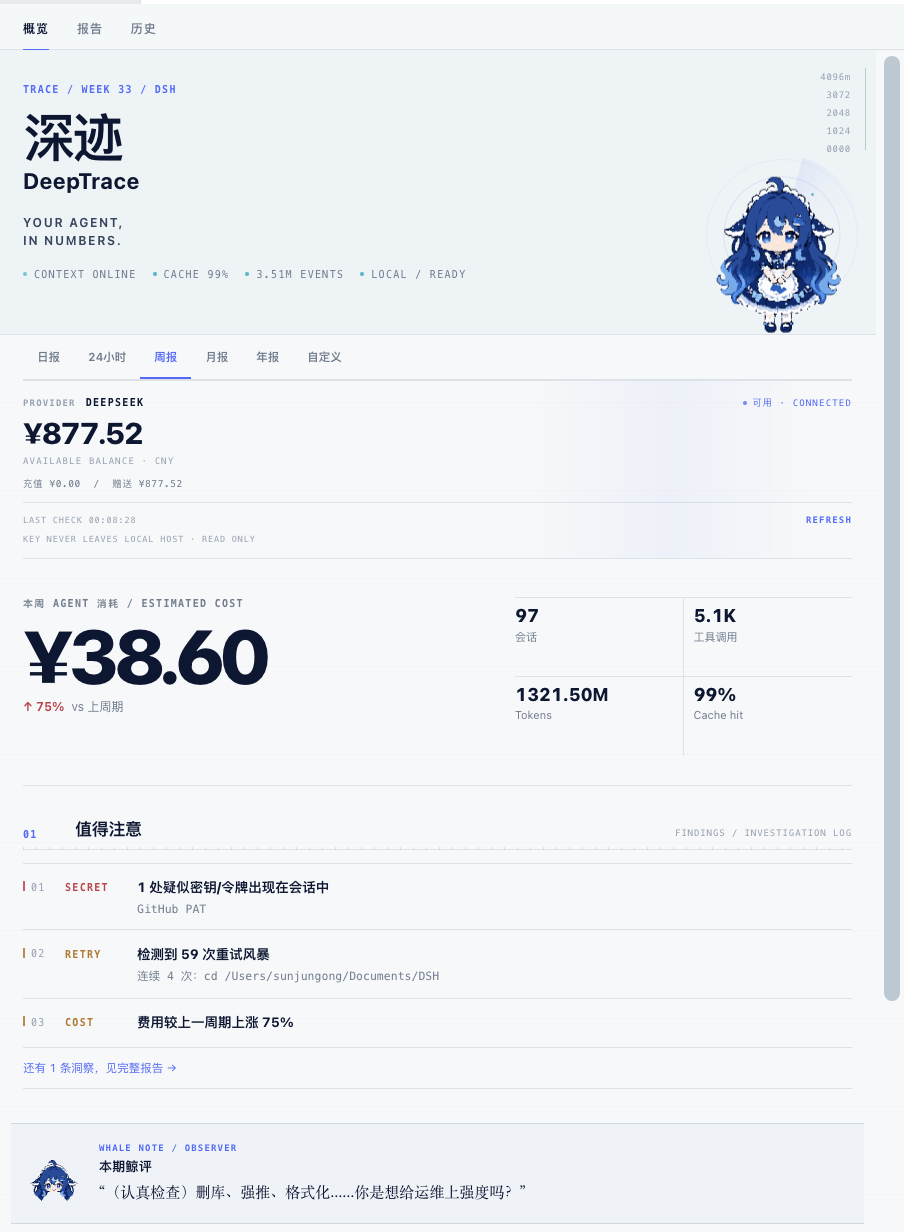
DeepTrace overview — hero, provider balance, cost, findings and the whale note.

The full DeepTrace report — findings, collaboration review, activity, resources, risks and session trace.
Query Engine
DeepTrace 架构是一句话:INGEST ONCE → QUERY MANY。会话事件只在进入时被读取、聚合、落库一次,此后 Overview / Report / History 全部只查询建好的 canonical index——不再重放 Session、不再解压、不再重新聚合。
Ingest(进入一次)
- session/event firehose = primary incremental path(baseline + seq 去重);已索引会话保持增量、去重,绝不重复计数
- periodic reconcile = discovery / recovery path:发现插件启动后新建的 session header 并纳入索引,不需要 restart;损坏会话只读 salvage(worker_threads 解压,不阻塞查询)
- resume 的会话保留恢复前的完整历史(仅真实 fork 继承的 seed 事件除外)
- v0.6.1 uses INDEX_VERSION 18:previously persisted indexes built under the old resume/session interpretation are automatically rebuilt
- 持久化:canonical index 用 coalesced checkpoints 落盘,避免反复整库重写
Query(查询多次)
- 所有页面把 PeriodSpec 解析成窗口后直接查询 canonical index(10 分钟分桶 + 精确边界行),零 readSession / 零解压
- rolling 24h 是精确窗口
[now-24h, now);PeriodSpec 是唯一时间窗口真相源,周期之间绝不串数据
Exact accounting(精确对账)
- 窗口边界逐事件精确过滤(无比例近似);对于完整可读的 event history,integer token accounting 与 raw-event oracle exactly 一致,cost 由同一 canonical 贡献按历史价格边界计算
- 统计与周期口径统一 Asia/Shanghai(不依赖机器时区)
- Source-log gaps 或 truncated session logs 会限制历史完整性——DeepTrace 不虚构缺失事件
当前 version:v0.6.1(npm latest;官方兼容基线 DSH 0.1.1-rc.2)· v0.6.1 release
Performance
Benchmarked on the real production dataset used during v0.5.3 acceptance; results vary with environment.
| 场景 | 之前 | v0.5.3 |
|---|---|---|
| Refresh / Overview | ~31s(重放 + 重新聚合 session) | ~7ms median(纯索引查询) |
| Live session | ~6.5s(每 30s 整读) | <1ms steady state(增量维护) |
| Refresh ×100 压测 | — | p95 8.3ms / max 11.3ms |
Apply & Verify
DeepTrace 不再只告诉你哪里有问题。对于少量、明确、可回滚的安全修改,它可以在用户批准后执行改变,然后用之后的新会话数据验证是否真的改善。
IMPROVE → REVIEW CHANGE → APPLY → OBSERVE → VERIFY → OPTIONAL REVERT
- 默认只读:DeepTrace 永远先只产出建议与证据
- 每次 Apply 都需要用户明确批准(Review change → Apply)
- As of v0.6.1,唯一受控修改仍是:Repeated bash timeout →
shell.timeoutMs调整(shell.timeoutMs only) - 不支持任意配置修改、不支持 arbitrary shell / code mutation、不自动 rollback、不 self-healing
示例
PROBLEM    Repeated Shell Timeouts
EVIDENCE   6 次确定性 timeout / 3 个会话(0 硬失败)
CHANGE     shell.timeoutMs  60s → 120s
EXPECTED   shell_timeout_rate 下降
ROLLBACK   一键还原 60s(并发安全)
批准后进入 OBSERVING;满足最低证据后输出 VERIFIED / NOT IMPROVED / INCONCLUSIVE。NOT IMPROVED 只推荐 Revert,绝不自动回滚。
Safety / Controlled mutations
所有 Apply 只来自 predefined structured mutation schema;当前 allowlist 为 shell.timeoutMs。每次 mutation:
- server-side stored proposal 是 mutation truth(客户端无法提交 namespace / path / before / after / patch)
- resolved current value + revision/value 乐观并发守卫(外部改动 →
CONFIG_CHANGED,绝不覆盖) - 幂等 applyId(双击 / 重放只执行一次)
- rollback 守卫(仅
current == after才允许回滚) - append-only audit trail(只存路径与错误码,无 command / session 正文 / secret)
Browser cross-origin mutation requests are fenced(cross-site / foreign Origin / null Origin / host rebinding 全部拒绝);按 DSH trust semantics,trusted loopback 本地客户端仍可调用 API——真实的 mutation authorization 依赖上述 proposal + allowlist + 并发守卫 + 幂等,而非“只有 UI 按钮可以调用”。
Verify
Verify 使用 exact before/after windows,以 Apply 时刻为切点:
- metric:
shell_timeout_rate(bash timeout / bash invocation) - baseline:Apply 前的精确窗口
- cooldown:Apply 后 10 分钟(排除在途旧预算调用)
- observation:Apply + cooldown 之后
- minimum evidence:≥10 次 shell 调用、≥3 个会话
- outcomes:VERIFIED / NOT IMPROVED / INCONCLUSIVE;NOT IMPROVED 仅 REVERT RECOMMENDED
What it measures
| Cost | 官方峰谷价分段计算(定价页实时抓取、6h 缓存、内置价兜底):工作日 09:00–12:00、14:00–18:00 为高峰(北京时间,谷时 2 倍);2026-08-23 起周末(周六/周日)全天低谷;价格沿革按真实生效日回溯:2026-08-17 峰谷定价生效前按当时 legacy flat price 计费,2026-08-17 起按 peak/off-peak(Asia/Shanghai),2026-08-23 起周末全天 off-peak;按模型与会话分账,报告带峰谷占比(peakShare / peakRatio)与「挪到谷时约省 ¥X」估算;费用为估算,最终以 DeepSeek Platform 实际账单为准 |
| Live session | 进行中会话实时计费:由 session/event firehose 增量维护(steady state <1ms,不再 30s 整读),token 与费用按当前时段价折算,右上角常驻峰/谷徽标 + 双模型价目表 |
| Tokens | input / output / cache read / reasoning,按模型拆分 |
| Sessions | 会话数、回合数、事件数、活跃天数、最忙日 |
| Activity | 小时级活跃热力图(GitHub contribution 风格,基于 Tokens 的固定 log 阈值分级);hover 显示每小时 Tokens / 会话 / 回合 / 工具 / 成本;峰值时段、活跃小时、夜猫指数 |
| Tool calls | 工具调用总量与明细,按工具族归类 |
| Tool health | 高频工具(≥30 次)失败率健康分级,标出最不稳定的工具 |
| Retry bursts | 同一命令连续重复 ≥3 次,附错误摘要样本 |
| Dangerous operations | 红级(不可逆破坏)/ 黄级(需留意)分级,只对命令首行匹配 |
| Secret scan | 6 类常见密钥模式的存在性检测,只报有无,不存原文 |
| Session drilldown | 按费用排序的会话轨迹:成本、重试、危险信号、模型 token 归因 |
| Baseline | 每周期自动落库,报告带"较上周期 ▲/▼"(费用、会话、缓存命中率等) |
| Trends | 多周期趋势曲线(成本 / 会话 / 缓存命中 / 夜间活跃),hover 显示每周期明细与日期范围,进行中周期标记 LIVE(不与完整周期混比) |
| Provider balance | 模型平台实时余额(DeepSeek 已支持,可扩展);key 只在本机服务端使用 |
| Usage accounting(v0.5.0) | canonical 口径:total = input(miss) + cacheRead(hit) + output,reasoning 只作 output breakdown 不重复计;费用 = miss×输入价 + hit×缓存价 + output×输出价(不再二次减缓存);TODAY = Asia/Shanghai 自然日(不依赖机器时区),24H = 精确滚动窗口 [now-24h, now)(rolling 不落自然周期基线,无「上一个自然 24h」的伪造对比);API 输出 providerBreakdown,与 DeepSeek Platform 对账只取 deepseek-official |
| Improve(v0.5) | 值得改的行为建议:Repeated Tool Failure / Retry Workflow Waste / Repeated User Correction(EXPERIMENTAL)/ Peak Cost Opportunity;每条带 metrics、受影响会话、置信度与 VERIFY 基线 → 目标;stable id 跨周期不变,只读、不自动修改任何配置 |
| Data partial / salvage | 单个会话日志损坏/不可读 → 优先只读 salvage(worker_threads 中逐帧解压,22MB 解码不阻塞查询;完整 JSONL 记录进入聚合,仅残缺尾部丢弃,不修改 ~/.dsh 原文件);无法安全恢复时才整段跳过并披露(只存会话 id + 粗分类原因,不含错误原文);缺失数据不按 0 计;markdown / HTML / Web 三处非阻断提示 |
Deterministic insights
DeepTrace 的统计与洞察不是让另一个 AI 随机点评你的数据。它基于:
- session event logs
- deterministic aggregation
- explicit rules
- reproducible report generation
确定性 Finding 规则覆盖:深夜消耗、峰谷时段成本、重试风暴、缓存命中率变化、危险操作(致命 / 需留意)、会话碎片化、疑似密钥、费用趋势、工具健康。每条都带阈值、归因与估算口径。
IMPROVE 引擎(v0.5):Finding 回答"发生了什么",Improve 回答"值不值得改、怎么改"。4 条确定性规则:
| 规则 | 触发证据(跨 session 重复性) | 输出 |
|---|---|---|
| Repeated Tool Failure | 工具失败跨 ≥3 会话、失败率 ≥8%、单一错误码占失败 ≥40% | 建议 + 主错误码 + P95 |
| Retry / Workflow Waste | 同一归一化命令在 ≥2 会话重复重试且伴随失败 | 建议 + 重试次数 |
| Repeated User Correction(EXPERIMENTAL) | 同类纠正跨 ≥2 会话(只在第 2+ 条用户消息统计,首条消息是初始需求不算) | 建议 + 类别 + 计数 |
| Peak Cost Opportunity | 高峰占 ≥50% 且 ≥¥3,且有夜间批量负载证据 | 建议 + 可省金额 |
每条建议都带 evidence(metrics / affectedSessions / 置信度)与 verificationPlan(目标指标、基线 → 目标、窗口),排序 severity → score → occurrences → category;同一目标跨周期 id 稳定。全部本地确定性规则,0 额外 LLM token(v0.5 只落 DETECTED / DISMISSED;v0.6 起支持用户批准的 Apply 与自动 Verify,self-healing 仍不支持)。
协作复盘(COLLABORATION REVIEW):观察人机协作模式——需求漂移 / 迟到约束 / 上下文碎片化,最多 3 条,样本不足不展示;语气是"找摩擦、给可尝试的优化",不评价人格、不把技术 retry 归因为沟通问题。
鲸鱼娘的 Whale Note 也建立在同一套确定性触发规则上(src/whale-notes.ts,表情与文案同源)。
同一份数据 → 同一份结论。
报告本身由本地确定性代码生成——REPORT GENERATION · 0 TOKENS · LOCAL DETERMINISTIC,生成报告不消耗模型调用。
Privacy / read-only by default
- 默认只读:绝不改写任何 session 历史;统计排除 DeepTrace 自身的
whale/*事件 - 唯一受控 Apply seam:只有用户批准后的
shell.timeoutMs调整会写 settings(见 Apply & Verify);除此之外不自动执行任何修改 - 不自动执行:修复建议只输出方案与命令模板,需要你亲自确认
- Secret Scan 不重印:只记录模式标签、时间与来源,报告与导出里都不出现 secret 原文
- 危险命令只存首行:引号段剥离,防止 grep 模式被误报
- 纠正信号只存类别与计数:Repeated User Correction 的匹配基于归一化白名单(去引号、数字、路径),绝不保存用户原句
- 损坏日志不泄错误:fault isolation 只披露会话 id 与粗分类原因(corrupt-log / read-failed),错误消息 / 堆栈从不进报告
- 本机围栏:API 只服务本机 loopback + 同源标记
Reports
| Preset | 区间 | 口径 |
|---|---|---|
| 日报 | 今天 0:00 → 现在 | 自然日 |
| 24h | 精确滚动窗口 [now-24h, now) | 唯一滚动周期 |
| 周报 | 本周一 0:00 → 现在 | 自然周 |
| 月报 | 本月 1 日 0:00 → 现在 | 自然月 |
| 年报 | 本年 1 月 1 日 0:00 → 现在 | 自然年 |
| 自定义 | 任意 from / to | 显式区间 |
自然周期与滚动 24h 的区别:周/月/年按日历对齐(周一、1 号、1 月 1 日),"24h" 则是任意时刻起算的精确滚动窗口 [now-24h, now);24h 没有自然「上一周期」,不产生跨期基线对比。周期 key 前缀隔离(day- / 24h- / wk- / mo- / yr-),对比基线互不串扰。
Export
- Web report:面板内完整报告视图(含 IMPROVE 区与 DATA PARTIAL 提示)
- PNG 图片:canvas 按面板同款视觉绘制主报告(报告头 / 鲸评 / Findings / 活跃 / 模型工具 / 风险),不含会话轨迹、索引与 IMPROVE 区
- 会话轨迹:单独导出的 PNG,仅含会话轨迹 + 会话索引(追查专用)
- HTML:独立可打印 HTML 页,含 02 / IMPROVE 章节(severity 色标 + 证据 + VERIFY 行)与 DATA PARTIAL 横幅
- PDF:直接打印面板报告(A4 排版),浏览器打印对话框另存为 PDF——与面板逐像素一致
鲸鱼娘与页面形象在导出中使用真实素材(与面板显示一致)。
Installation
需要 DSH(DeepSeek Harness,web 端)环境。v0.6.1 的官方兼容基线是 DSH 0.1.1-rc.2(peer 范围 >=0.1.1-rc.2 <0.2.0;升级 dsh 后重启 web 实例即可,会话数据无需迁移)。两种安装方式,注意区分:
① DSH 插件安装(推荐,完整功能) —— 注册进 dsh web:
dsh plugin --profile web add "github:SenmuuuuW/dsh-whale-report"
# 重启 dsh web 使宿主代码生效;客户端 bundle 随插件自动更新
② npm 包安装(仅依赖) —— 把包装进你的项目:
npm install [email protected]
注意:
npm install只是安装包本身,不会自动注册为 DSH 插件。Web UI、whale_report工具与实时计费都需要通过方式 ① 注册;方式 ② 适合直接 import 报告引擎 / 用 CLI 生成报告的场景。兼容性说明:Runtime-tested against DSH 0.1.2-alpha.1 during development, but prerelease 0.1.2-alpha.1 is not included in the current npm peer range —— 官方兼容基线仍是 DSH 0.1.1-rc.2。
两个入口:
- 面板(主入口):装了 better-sidebar 时在 "+" 菜单里打开「深迹」Tab;未装时右下角悬浮按钮兜底
- 对话:直接说"给我一份周报"——
whale_report工具输出 markdown 报告
数据走官方接缝(ctx.sessionQuery + storage domain),卸载即净。
立即体验(不用装插件)
pnpm install && pnpm build
pnpm report                  # 周报(最近 7 天)
pnpm report -- --daily       # 或 --monthly / --yearly / --all
pnpm report -- --from 2026-08-01 --to 2026-08-14   # 自定义区间
CLI 直接读本机会话存档(~/.dsh/sessions/*/session.jsonl.zstd),与插件共用同一个报告引擎。
Architecture
DSH session events(firehose + baseline + salvage)
        ↓  incremental ingest(seq 去重 / fingerprint reconcile;损坏会话 worker_threads 解压)
canonical index(10 分钟分桶 + 精确边界行;coalesced checkpoints 落盘)
        ↓  query engine(PeriodSpec → 精确窗口 → 纯索引查询,零 session IO)
Overview / Report / History(Web / HTML / PDF / PNG)
细节(数据流、存储结构、兼容性策略)见 docs/ARCHITECTURE.md。
Development
pnpm install
pnpm link-dsh   # 软链本地 harness 闭包(typecheck 需要)
pnpm typecheck
pnpm test       # 409 个单测(38 个文件):引擎与统计 / 洞察与 Improve 规则 / fault isolation / salvage / usage 口径 / 主题 / 峰谷计价 / 导出 / 客户端刷新韧性 / Query Engine 与周期不变量 / Oracle 对账 / 增量 ingest / 时区矩阵 / persistence
pnpm build      # tsc + tsdown(客户端单文件 bundle)
Known limitations
当前边界,如实说明:
- 费用为估算:cost is an estimate, not the provider invoice —— 按官方峰谷价与真实生效日期估算,最终以 DeepSeek Platform 账单为准
- Source-log gaps 可限制历史完整性:单个会话日志存在 seq gap 或截断时,DeepTrace 以官方读取器的保守语义处理,不虚构缺失事件;完整可读历史的对账是 integer-exact 的
- Apply 目前只支持
shell.timeoutMs:唯一受控、用户批准、可回滚的修改;不支持 arbitrary config / shell / code mutation,不自动 rollback,不 self-healing - 会话跳转:报告提供 Session ID 复制,尚未实现"一键跳回原会话"(待官方 client API 明确)
- IMPROVE 默认只读:只落 DETECTED / DISMISSED 与 VERIFY 计划;自动 Verify 闭环已实现;Repeated User Correction 标记 EXPERIMENTAL(保守阈值 + 首条消息过滤)
- PNG 主报告导出暂不含 IMPROVE 区(HTML / PDF / markdown / 面板已含)
- DSH 官方兼容基线:
>=0.1.1-rc.2 <0.2.0(package peerDependencies 声明为准;prerelease alpha 不在正式支持范围)
License
MIT
Friends
- dsh-tianshu-tui — 超好看的 DSH 终端界面(TUI)
- DSH-better-sidebar — 很实用的 DSH 侧边栏工作台
DeepTrace is built to make Agent behavior inspectable, measurable, and easier to improve.
…and yes, the whale is watching. She reads every report first.
Install
Install the catalog once, then DeepSeek Harness can find and install any plugin from this site automatically:
dsh plugin add dshbase-catalogThen say "install dsh-whale-report for me" — your agent finds it in the directory and installs it. Docs: dshbase-catalog · verified packs.
This plugin is GitHub source (not published to npm) — install it straight from the repo:
Web profile:
dsh plugin --profile web add github:SenmuuuuW/dsh-whale-reportHeadless (CLI) profile:
dsh plugin --profile headless add github:SenmuuuuW/dsh-whale-reportTest report
Verified: L1 install + L2 load + L3 runtime from GitHub source on dsh 0.1.0-rc.6.
When to use it
Change how dsh looks or how you interact with it — a theme, a skin, or a new panel that reshapes the workspace.
Who it's for
Users who spend hours in the web UI and want it to look and feel the way they work.
For developers — extending it
Skins, panels, and theme tokens are the extension points — author a new skin, add a panel, or sync tokens with an upstream palette.
Share this badge
Drop this badge into your README — it links back here and updates automatically when our test status changes:

[](https://dshbase.com/plugins/dsh-whale-report/)<a href="https://dshbase.com/plugins/dsh-whale-report/"><img src="https://dshbase.com/badges/dsh-whale-report.svg" alt="dshbase install-tested"></a>