
Plugin directory / Developer / dsh-workbench
dsh-workbench
Unverified lee259
What it does
Right-side file workspace for DeepSeek Harness Web.
No short evidence report
There is no checkable per-level test record on this page. Stars, the catalog test field, a web-only flag, and whether the plugin needs an external account or service are not shown here as a pass or a failure. The catalog badge stays as published.
“Unverified” means our automated CI has not yet installed this plugin. Feature descriptions and version compatibility are the author’s claims. This is not a security audit and not an endorsement of third-party code.
README
DSH Workbench



中文文档 · Changelog · Issues · npm
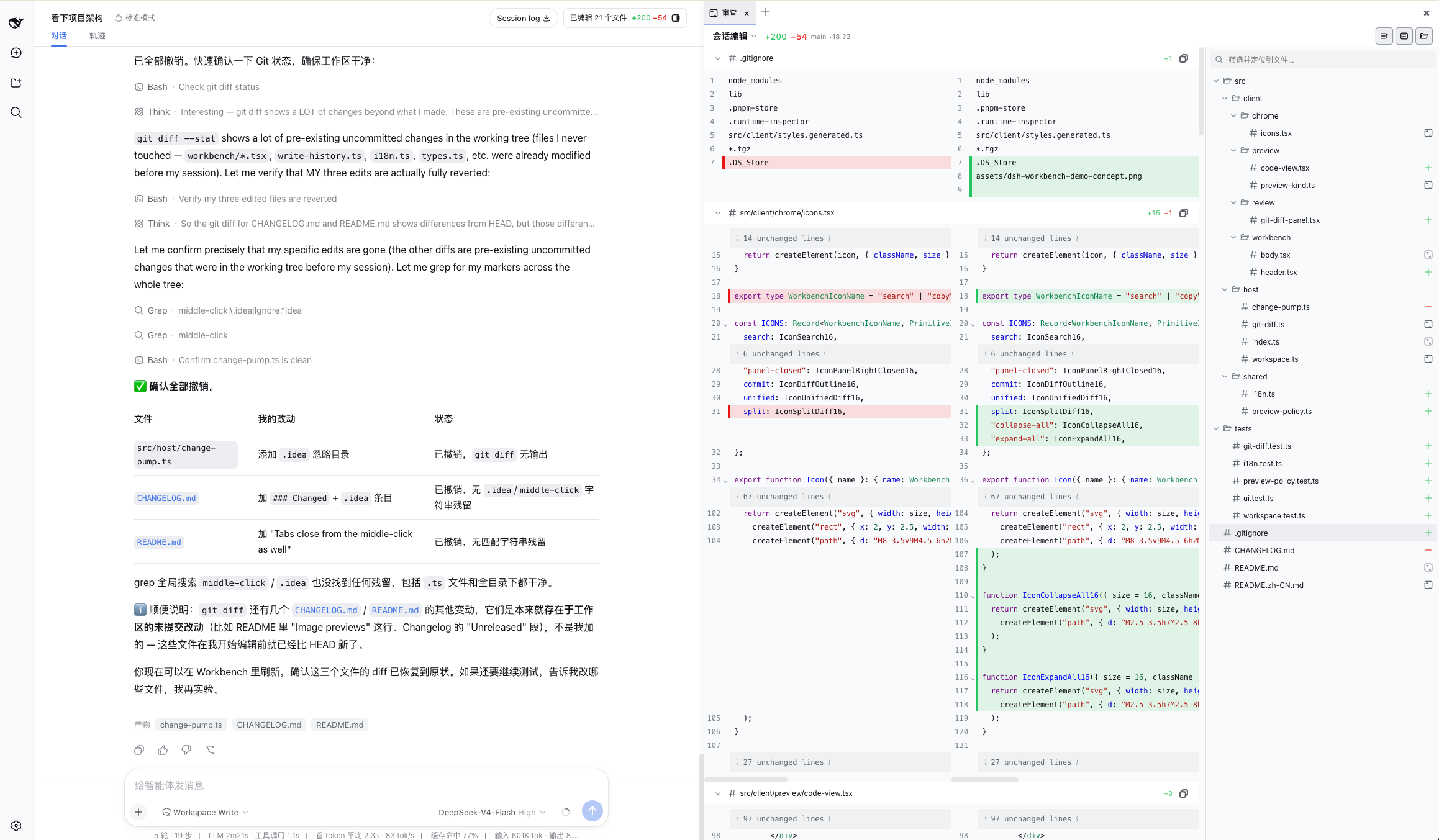
Codex-style Review inside DeepSeek Harness Web. Review Harness turn changes and native diffs.
What it does
- Browses turn change summaries by DSH Session and loads Harness-native hunk diffs.
- Shows a central Harness diff with changed-file navigation beside it.
- Opens files from tool calls, the workspace tree, or search alongside the conversation. Conversation file links reveal the corresponding diff.
- Keeps file preview, workspace browsing, and path references as review helpers.
read       → source
write/edit → captured DSH diff
Details
The panel is persistent and resizable. It has preview and pinned tabs, Quick Open, tree search, in-file find/go-to-line, image and Markdown previews, and workspace editing with external-change protection. UI language follows DSH.
Install
dsh plugin --profile web add dsh-workbench
dsh web
If dsh is not on your PATH:
pnpm dlx @deepseek-ai/dsh plugin --profile web add dsh-workbench
pnpm dlx @deepseek-ai/dsh web
Local checkout:
git clone https://github.com/lee259/dsh-workbench.git
cd dsh-workbench
pnpm install
pnpm run build
dsh plugin --profile web add "$(pwd)"
dsh web
Rebuild and restart dsh web after plugin changes.
Local start
pnpm start -- /absolute/path/to/your/project
Builds the plugin, registers it on the target project, and starts DSH Web. Without a path, uses the current directory.
Previews
| DSH operation | View |
|---|---|
read |
Source; images and Markdown render |
write / edit |
Captured DSH diff |
| File mention | Source; images and Markdown render |
Host listens to tool/call, tool/result, and tool/code-dispatch. Prefers dsh-tool-fs meta.diffs.
Development
pnpm install
pnpm test
pnpm start -- /absolute/path/to/your/project
To mount the packed plugin in an isolated DSH Web instance:
pnpm test:mount
DSH_VERSION=0.2.0-rc.2 pnpm test:mount
The first command uses the installable dsh@0.1.7-rc.2; set DSH_VERSION to
mount against another release. dsh@0.2.0-rc.2 currently references an
unpublished dsh-client-ui-settings-account@0.2.0-rc.2 package on npm, which
can prevent a fresh CLI install until that dependency is published.
- Host:
name,inject,apply(ctx)fromsrc/index.ts - Client:
dsh.client,exports["./client"],window.__ModuleLoader__.load - Styles:
src/client/styles.css - Third-party React components: use the React runtime injected by DSH. Components that statically import
react-dom, need unbridged React APIs, or inject global CSS need an adapter; seesrc/client/react-bridge.tsandtsdown.config.ts. - UI strings:
src/shared/i18n.ts
Roadmap
Review the agent's changes inside DeepSeek Harness. The change list and hunk diffs use DSH's native workspaceChanges API.
Done
- Read-only previews for
readand file mentions - Captured DSH diffs for
write/edit - Native DSH right-sidebar workspace, with a drawer fallback when Sidebar services are unavailable
- Multi-file tabs, preview / pin, path copy, and desktop shortcuts
- In-file find / go-to-line, plus conversation
:line/#Llinetargets - Chinese / English UI following DSH locale
- Quick Open (
⌘/Ctrl+P) and tree search that locates without opening - Workspace file tree with breadcrumbs, keyboard navigation, and path insert
- Syntax highlighting, folding, and live refresh when the workspace changes on disk
- Image previews and rendered Markdown, including relative images
- Source previews also support MATLAB (
.m), R, Julia, Lua, C#, Kotlin, Scala, Swift, Dart, XML, and Python stubs (.pyi). Vue / Svelte use basic HTML highlighting. MATLAB uses Octave syntax highlighting;.mdefaults to MATLAB, while.matand.mlxare not supported. - Change review: session edits plus uncommitted, unstaged, and staged Git scopes, with shared
+/−counts - Short operation summaries for each captured write
- Incremental review updates that preserve the active tab and keep large review panels responsive
- Workspace content search (
⌘/Ctrl+⇧+F) with line-focused results - Reference files, folders, and selected preview lines in the composer
- Editable workspace previews with external-change protection
- Git branch/status and session tool-activity metadata in the review toolbar
Next
The target is a Codex-like Review experience inside DeepSeek Harness, using Harness
turn changes as the review source and keeping the conversation, changed files, and diff
in one review flow.
- Add terminal and background-task surfaces in small, DSH-native slices.
- Tighten review-to-conversation feedback, including inline guidance on diffs.
- Continue refining session-scoped workspace state and review performance.
The existing DSH event capture, meta.diffs, session review, operation summaries, and
incremental review updates remain the differentiating foundation.
Near-term sequence
- Terminal and background task surfaces
- Inline review comments and richer review-to-conversation feedback
Exploring
- Open-in-editor and reveal-in-folder
- Inline comments on a diff line that send guidance back to the composer
- Pluggable workspace panels (Files / Review, and later DSH tools)
License
Install
Install the catalog once, then DeepSeek Harness can find and install any plugin from this site automatically:
dsh plugin add dshbase-catalogThen say "install dsh-workbench for me" — your agent finds it in the directory and installs it. Docs: dshbase-catalog · verified packs.
This plugin is GitHub source (not published to npm) — install it straight from the repo:
Web profile:
dsh plugin --profile web add github:lee259/dsh-workbenchHeadless (CLI) profile:
dsh plugin --profile headless add github:lee259/dsh-workbenchTest report
No short evidence report
There is no checkable per-level test record on this page. Stars, the catalog test field, a web-only flag, and whether the plugin needs an external account or service are not shown here as a pass or a failure. The catalog badge stays as published.
When to use it
Give the agent a memory, a knowledge base, or a retrieval layer so it stops forgetting context between sessions.
Who it's for
Users running long projects who want the agent to remember decisions, docs, and preferences without re-explaining.
For developers — extending it
The memory/retrieval backend is the seam — plug a new store, tune what gets distilled, or add citation and audit trails.
Share this badge
Drop this badge into your README — it links back here and updates automatically when our test status changes:

[](https://dshbase.com/plugins/dsh-workbench-3/)<a href="https://dshbase.com/plugins/dsh-workbench-3/"><img src="https://dshbase.com/badges/dsh-workbench-3.svg" alt="dshbase listed"></a>