
Plugin directory / Developer / dsh-worktime-board
dsh-worktime-board
Verified · install-tested on dsh spacexun2
What it does
🐂🐴 牛马修仙看板:DeepSeek Harness 工时统计 × 修仙养成——把每一分钟劳动,都修成境界(日/周/月 + 学年年历,炼气→宇宙洪荒)
Works — verified, early-stage project
🐂🐴 牛马修仙看板:DeepSeek Harness 工时统计 × 修仙养成——把每一分钟劳动,都修成境界(日/周/月 + 学年年历,炼气→宇宙洪荒) It installs cleanly and boots without issues in our testing. It's early-stage but functional.
“Verified” means our automated CI actually ran dsh plugin add in a clean profile and it booted — nothing more. Feature descriptions and version compatibility are the author’s claims. This is not a security audit and not an endorsement of third-party code.
README
🐂🐴 牛马修仙看板
DeepSeek Harness 工时统计 × 修仙养成 —— 把每一分钟劳动,都修成境界


牛马修仙看板是一个 DeepSeek Harness 工时统计插件,用于记录 agent 在各线程中的活跃时长、模型 token、用户输入和工具调用,并按日、周、月和学年汇总展示。插件通过修仙值和十二重境界呈现累计工作量,所有数据均保存在本地。
✨ 功能
🧘 工时统计与修仙进度
看板将活跃时长、模型 token、用户输入和工具调用汇总为修仙值,并通过十二重境界显示累计进度。夜间工作、连续活跃和突破奖励会计入进度。
token 口径(v0.1.3):「输入」= 计费输入(未命中缓存的 inputTokens + cacheRead + cacheWrite,与官方用量口径一致,含历史缓存命中);token 计分统一按 1 万 token = 1 分换算(修仙值最终整体 ×15 展示尺度,阈值同步 ×15,境界节奏不变)。数据来自会话日志每条回复结算的 usage 字段,纯本地,无第三方统计。
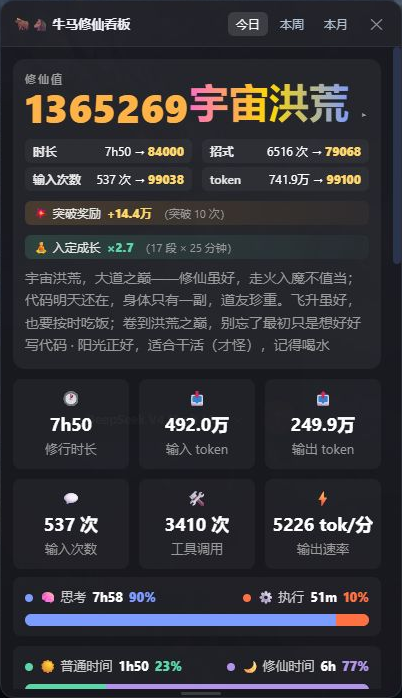
境界十二重:炼气 → 筑基 → 金丹 → 元婴 → 化神 → 炼虚 → 合体 → 大乘 → 渡劫 → 真仙 → 金仙 → 宇宙洪荒
看板以右下角悬浮角标进入,支持时长 / 修仙值切换、忙碌呼吸灯、拖动位置、调整高度和一键收起。
「输入次数」卡片点击可在两种口径间切换:输入次数(含子 Agent 委托与注入消息)或人输入(仅真人发送的 prompt),切换只影响显示,不影响修仙值计分。
📊 日 / 周 / 月 / 学年统计
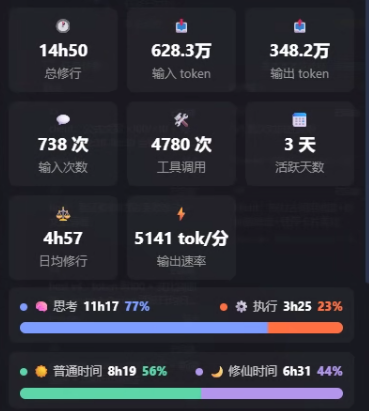
看板提供日、周、月和学年四种统计范围。日视图展示 24 小时分布;周视图汇总总修行、活跃天数、日均修行、token 和时间构成。
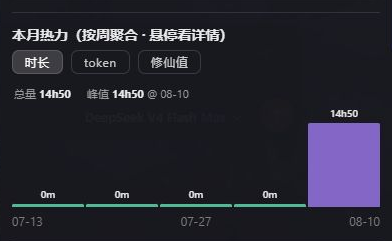
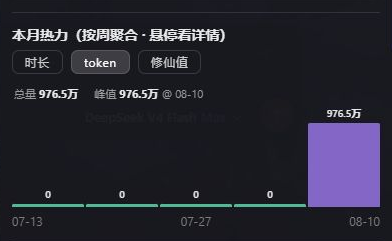
月视图按自然周聚合,并支持查看时长、token 和修仙值。下图分别展示时长与 token:
| 时长 | token |
|---|---|
 |
 |
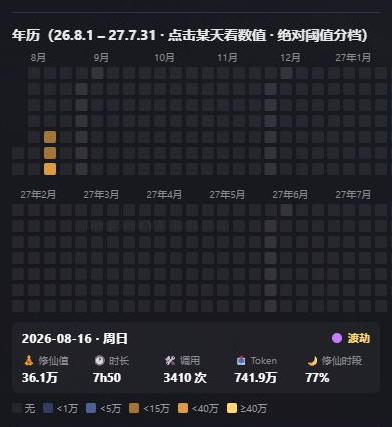
学年年历覆盖每年 8 月 1 日至次年 7 月 31 日。点击任意日期,可以查看当天的境界、修仙值、时长、调用和 token。
🔗 线程出勤与排行
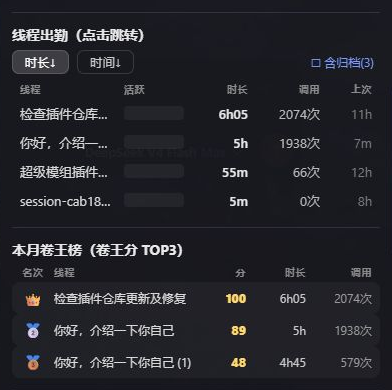
线程出勤按会话展示活跃时段,并支持跳转到对应线程。卷王榜列出所选周期内活跃贡献最高的前三名。
🤖 Agent 查询工具
插件注册了 worktime_summary(range?, ranch?) 工具,线程和子 Agent 可以用它查询日、周、月摘要:
汇总本月工时,并告诉我最活跃的线程。
📦 安装
本插件是标准 dsh bundle(声明了 dsh.bundle.patch + dsh.client),通过 profile 插件机制安装:
# 方式一(推荐):npm 包(正式发布后)
dsh plugin --profile web add dsh-worktime-board

# 方式二:GitHub 源直接安装(构建产物 lib/ 已入库,无需本地构建)
dsh plugin --profile web add github:spacexun2/dsh-worktime-board

# 方式三:本地目录(有源码时,从插件目录的上一级执行)
dsh plugin --profile web add ./dsh-worktime-board
安装后重启 DSH(dsh web),右下角出现 🐂🐴 角标即成功。
也支持 dsh-super-injector(超级模组)运行时注入:
dev_inject_plugin <插件目录>,免重启。
🗂️ 数据
- 存储:
$DSH_HOME/worktime-board/data.json(5 分钟槽活动位图 + 调用/token 计数,60s 批量落盘) - 接口:
GET /plugins/dsh-worktime/state?range=day|week|month(client 轮询) - 隐私:全本地、零外发、不注入消息打扰
⚙️ 配置
计分系数、数据保留天数等配置位于 $DSH_HOME/worktime-board/config.json,保存后热重载生效。
🛠️ 开发
# 构建(无 DSH_CHECKOUT 环境;pnpm exec 会被 verify-deps 拦截,直接调二进制)
node node_modules/typescript/bin/tsc -p tsconfig.json   # host → lib/
node node_modules/tsdown/dist/run.mjs                    # client → lib/client.js
node --test test/core.test.mjs                           # 单测(node 24 原生 TS,零依赖)
- 依赖 junction:
node_modules/@deepseek-ai/{cordis,schemastery}→ 全局 dsh 内部 node_modules(必须用@deepseek-ai/*scope)。 - 注入调试:
dev_inject_plugin→ 刷新浏览器;dev_reload_package dsh-worktime-board热重载。
📄 License
MIT
Install
Install the catalog once, then DeepSeek Harness can find and install any plugin from this site automatically:
dsh plugin add dshbase-catalogThen say "install dsh-worktime-board for me" — your agent finds it in the directory and installs it. Docs: dshbase-catalog · verified packs.
This plugin is GitHub source (not published to npm) — install it straight from the repo:
Web profile:
dsh plugin --profile web add github:spacexun2/dsh-worktime-boardHeadless (CLI) profile:
dsh plugin --profile headless add github:spacexun2/dsh-worktime-boardTest report
Verified: L1 install + L2 load + L3 runtime from GitHub source on dsh 0.1.0-rc.6.
Share this badge
Drop this badge into your README — it links back here and updates automatically when our test status changes:

[](https://dshbase.com/plugins/dsh-worktime-board/)<a href="https://dshbase.com/plugins/dsh-worktime-board/"><img src="https://dshbase.com/badges/dsh-worktime-board.svg" alt="dshbase install-tested"></a>