
Plugin directory / UI & Skins / gal-view
gal-view
Verified · install-tested on dsh Ayase34
What it does
A plugin in the UI & Skins category for DeepSeek Harness.
Recommended — verified working and popular
A plugin in the UI & Skins category for DeepSeek Harness. It installs cleanly and boots without issues in our testing. With 193+ stars it's a community-endorsed, low-risk pick.
“Verified” means our automated CI actually ran dsh plugin add in a clean profile and it booted — nothing more. Feature descriptions and version compatibility are the author’s claims. This is not a security audit and not an endorsement of third-party code.
README
gal-view · GAL 视窗
English | 中文
DSH Web GUI 会话页的 Galgame 风格对话视图 + 场景元素可视化编辑器(官方 bundle 插件格式)。
在会话标签页栏(「对话」/「轨迹」)中间加入 「GAL视窗」 标签,点开之后会话视窗变成
16:9 Galgame 舞台:占位立绘、大对话框、打字机台词、玩家输入;内置「编辑模式」可像场景
编辑器一样拖拽/改属性/换图层,编辑结果实时同步回游戏模式。
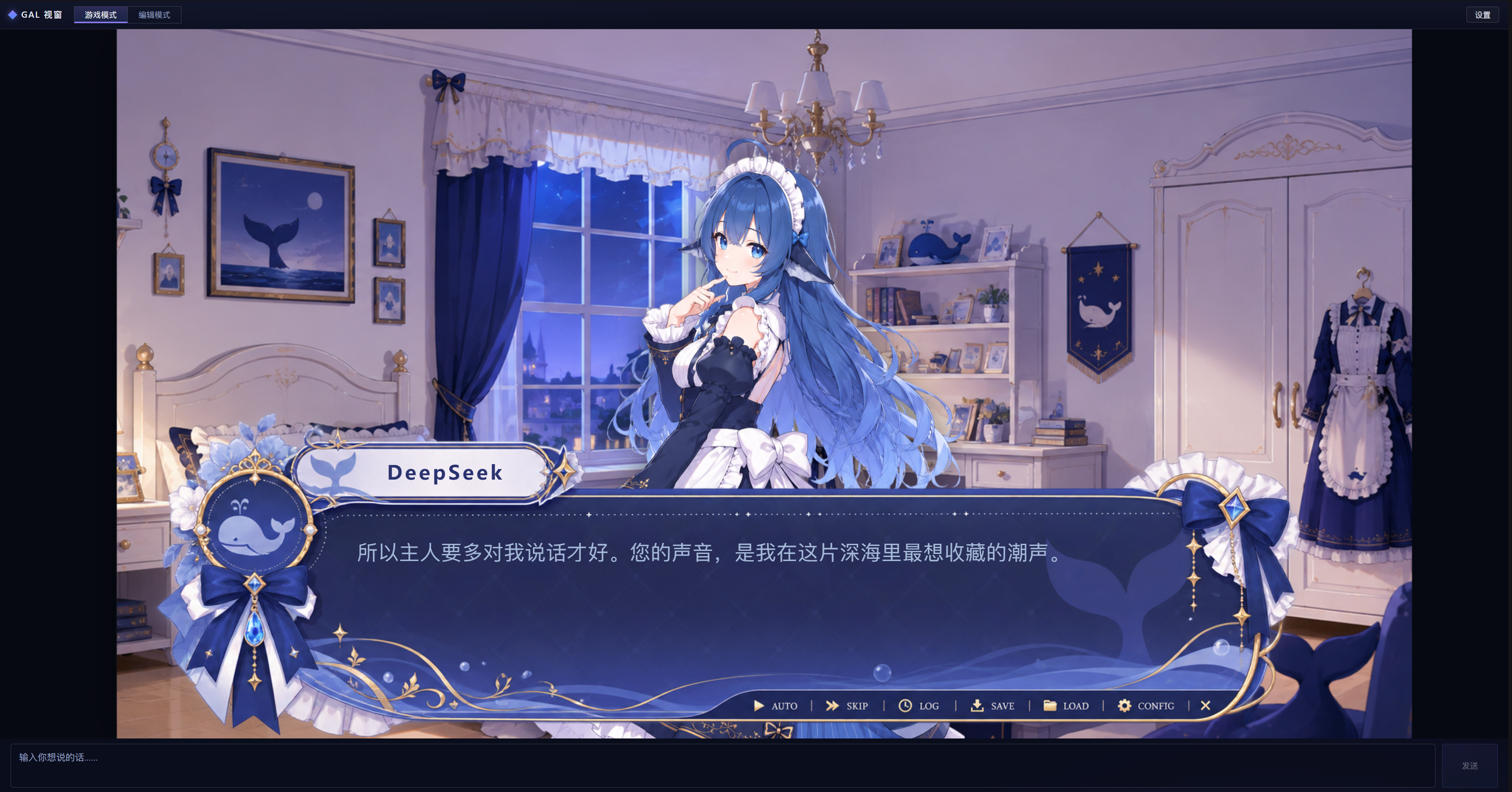
默认预设
仓库根 gal-scene.json 是随包分发的默认预设场景(编辑器导出的格式,内嵌被引用的图片/字体):首次打开「GAL视窗」且本地没有存档场景时自动加载,编辑模式的「重置」也回到该预设。更新预设:编辑场景 → Ctrl+S 导出 → 用导出的 gal-scene.json 替换仓库根同名文件 → npm run build:client 并提交。
安装
本插件以官方 bundle 格式分发,用一条 dsh plugin 命令安装到 web profile,装完重启 web 即可生效。
前置条件
- 已安装 DeepSeek Harness,并且能在终端执行 dsh 命令
- 如果你是从源码 checkout 运行 Harness(日常命令是 pnpm dsh):先 cd 到 Harness 仓库根目录,再把下面的 dsh 全部替换为 pnpm dsh
从 GitHub 安装(一行命令)
dsh plugin --profile web add github:Ayase34/gal-view#main
#main 表示使用仓库的 main 分支;想锁定某个具体版本,可以换成提交哈希,例如 #ae73dca。
完成安装
安装后重启 web(bundle 层在启动时合成,必须重启才会加载插件)。重启后打开 Web GUI 的会话页,标签栏应出现 「GAL视窗」 标签(位于「对话」和「轨迹」之间)。
可选验证:执行 dsh --profile web --dump-config,输出中应能看到 # == gal-view 这一层,说明插件层已进入组合。
更新到新版本
dsh plugin --profile web update gal-view
# 更新后同样要重启 web
卸载
dsh plugin --profile web remove gal-view
# 卸载后同样要重启 web
说明:场景布局、素材图片、字体与阅读进度都保存在你的浏览器里(localStorage / IndexedDB),重装或卸载插件不会丢失;清除浏览器站点数据才会重置它们。
开发
pnpm install            # 安装 esbuild devDependency
npm test                # 纯逻辑单测(node:test,同进程运行)
npm run build:client    # 生成 .dsh-plugin/client.js(生成物勿手改)
npm run check:client    # 校验 client.js 新鲜度
npm run smoke           # Playwright 冒烟(需 DSH_CHECKOUT 指向 dsh checkout)
结构
.dsh-plugin/index.mjs     Node half(极简,无宿主行为)
.dsh-plugin/client/       client 源码:场景模型/打字机/转录映射/组件/样式
.dsh-plugin/client.js     构建产物(scripts/build-client.mjs 生成)
scripts/build-client.mjs  esbuild 构建器(--check 守护新鲜度)
tests/                    纯逻辑单测(node:test)
Install
Install the catalog once, then DeepSeek Harness can find and install any plugin from this site automatically:
dsh plugin add dshbase-catalogThen say "install gal-view for me" — your agent finds it in the directory and installs it. Docs: dshbase-catalog · verified packs.
This plugin is GitHub source (not published to npm) — install it straight from the repo:
Web profile:
dsh plugin --profile web add github:Ayase34/gal-viewHeadless (CLI) profile:
dsh plugin --profile headless add github:Ayase34/gal-viewTest report
Verified: L1 install + L2 load + L3 runtime from GitHub source on dsh 0.1.0-rc.6.
When to use it
Change how dsh looks or how you interact with it — a theme, a skin, or a new panel that reshapes the workspace.
Who it's for
Users who spend hours in the web UI and want it to look and feel the way they work.
For developers — extending it
Skins, panels, and theme tokens are the extension points — author a new skin, add a panel, or sync tokens with an upstream palette.
Share this badge
Drop this badge into your README — it links back here and updates automatically when our test status changes:

[](https://dshbase.com/plugins/gal-view/)<a href="https://dshbase.com/plugins/gal-view/"><img src="https://dshbase.com/badges/gal-view.svg" alt="dshbase install-tested"></a>